Question 1
Which of these options are private IPv4 addresses you can assign to a trusted interface, as described
in RFC 1918, Address Allocation for Private Internets? (Select three.)
- A. 192.168.50.1/24
- B. 10.50.1.1/16
- C. 198.51.100.1/24
- D. 172.16.0.1/16
- E. 192.0.2.1/24
Answer:
A,B,D
Comments
Question 2
The policies in a default Firebox configuration do not allow outgoing traffic from optional interfaces.
- A. True
- B. False
Answer:
B
Comments
Question 3
When you examine the log messages In Traffic Monitor, you see that some network packets are
denied with an unhandled packet log message. What does this log massage mean? (Select one.)
- A. The packet is denied because the site is on the Blocked Sites List.
- B. The packet is denied because it matched a policy.
- C. The packet is denied because it matched an IPS signature.
- D. The packet is denied because it does not match any firewall policies.
Answer:
C
Comments
Question 4
Which of these actions adds a host to the temporary or permanent blocked sites list? (Select three.)
- A. Enable the AUTO-block sites that attempt to connect option in a deny policy.
- B. Add the site to the Blocked Sites Exceptions list.
- C. On the Firebox System Manager >Blocked Sites tab, select Add.
- D. In Policy Manager, select Setup> Default Threat Protection > Blocked Sites and click Add.
Answer:
A,C,D
Comments
Question 5
Which of these threats can the Firebox prevent with the default packet handling settings? (Select
four.)
- A. Access to inappropriate websites
- B. Denial of service attacks
- C. Flood attacks
- D. Malware in downloaded files
- E. Port scans
- F. Viruses in email messages
- G. IP spoofing
Answer:
B,C,E,G
Comments
Question 6
Users on the trusted network cannot browse Internet websites.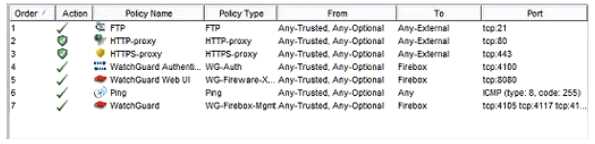
Based on the configuration shown in this image, what could be the problem with this policy
configuration? (Select one.)
- A. The default Outgoing policy has been removed and there is no policy to allow DNS traffic.
- B. The HTTP-proxy policy has higher precedence than the HTTPS-proxy policy.
- C. The HTTP-proxy policy is configured for the wrong port.
- D. The HTTP-proxy allows Any-Trusted and Any-Optional to Any-External.
Answer:
C
Comments
Question 7
If you disable the Outgoing policy, which policies must you add to allow trusted users to connect to
commonly used websites? (Select three.)
- A. HTTP port 80
- B. NAT policy
- C. FTP port 21
- D. HTTPS port 443
- E. DNS port 53
Answer:
A,C,D
Comments
Question 8
How is a proxy policy different from a packet filter policy? (Select two.)
- A. Only a proxy policy examines information in the IP header.
- B. Only a proxy policy uses the IP source, destination, and port to control network traffic.
- C. Only a proxy policy can prevent specific threats without blocking the entire connection.
- D. Only a proxy works ta the application, network, and transport layers to examine all connection data.
Answer:
B,D
Comments
Question 9
Which authentication servers can you use with your Firebox? (Select four.)
- A. Active Directory
- B. RADIUS
- C. LDAP
- D. Linux Authentication
- E. Kerberos
- F. TACACS+
- G. Firebox databases
Answer:
A, B, C, G
Explanation: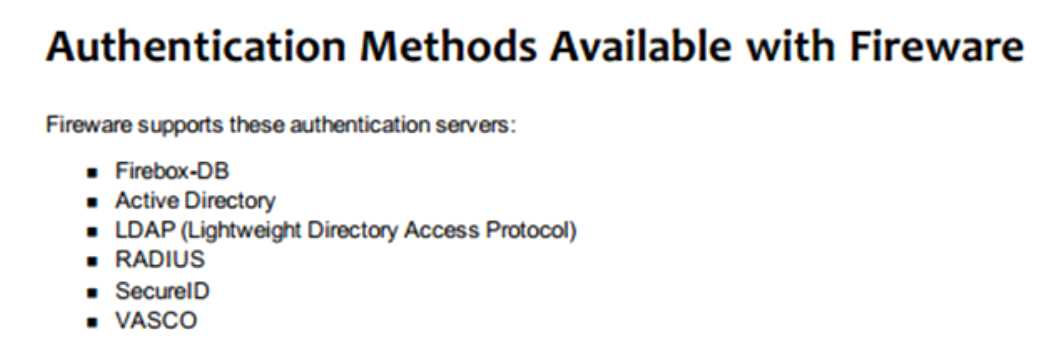
Comments
Question 10
When your users connect to the Authentication Portal page to authenticate, they see a security
warning message in their browses, which they must accept before they can authenticate. How can
you make sure they do not see this security warning message in their browsers? (Select one.)
- A. Import a custom self-signed certificate or a third-party certificate to your Firebox and import the same certificate to all client computers or web browsers.
- B. Replace the Firebox certificate with the trusted certificate from your web server.
- C. Add the user accounts for your users who use the Authentication Portal to a list of trusted users on your Firebox.
- D. Instruct them to disable security warning message in their preferred browsers.
Answer:
C
Comments
Page 1 out of 5
Viewing questions 1-10 out of 60
page 2