Question 1
An engineer needs to back up the data on a NAS file share, located on the company’s main
production site.
Which option would increase the performance of the job?
- A. Deploy the backup proxy and the cache repository on the same network as the NAS.
- B. Assign a high priority to this job.
- C. Assign Veeam WAN accelerators to the job.
- D. Deploy the backup proxy and the cache repository on a dedicated backup network.
Answer:
A
Explanation:
Placing the backup proxy and cache repository on the same network as the NAS file share helps to
increase the performance of the backup job due to reduced latency and higher network speeds. This
configuration allows for faster communication and data transfer between the NAS and the backup
components, leading to more efficient backup operations.
Reference:
Veeam Backup & Replication User Guide: Backup Proxy
Veeam Best Practices: NAS Backup Performance
Comments
Question 2
It is required that some replicated VMs start on a time delay during a failover. How can this be
accomplished?
- A. Create a failover plan.
- B. Adjust boot delay in application group.
- C. Use a pre-freeze/post-thaw script.
- D. Modify the failover template file.
Answer:
A
Explanation:
A failover plan in Veeam Backup & Replication allows you to define the order in which VMs are
started during a failover operation. It can include startup delays for certain VMs, ensuring that some
VMs can be configured to start after a defined time delay. This meets the requirement of having
some replicated VMs start on a time delay.
Reference:
Veeam Backup & Replication User Guide: Failover Plans
Veeam Help Center: Creating Failover Plans
Comments
Question 3
What can Veeam service providers deploy in Service Provider Console 7.0?
- A. Enterprise plugins
- B. Veeam Backup for Microsoft 365
- C. Veeam Backup & Replication
- D. Veeam One
Answer:
B
Explanation:
In the Service Provider Console 7.0, Veeam service providers can deploy Veeam Backup for Microsoft
365. This allows them to offer Microsoft 365 backup and recovery services to their customers,
managing the protection of Microsoft 365 data including Exchange Online, SharePoint Online,
OneDrive for Business, and Microsoft Teams data.
Reference:
Veeam Service Provider Console Documentation: Backup for Microsoft 365
Veeam Cloud & Service Provider Program Guide
Comments
Question 4
A backup administrator must enable guest file system indexing for a backup job of a Microsoft
Windows file server VM. All required credentials are added to the Veeam Backup & Replication
server. VMware Tools (VIX) cannot be used due to security regulations. What should be done to make
it possible in the following environment?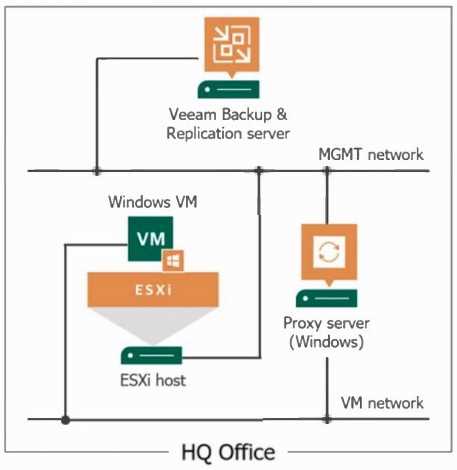
- A. Use the proxy server as a guest interaction proxy
- B. Connect the ESXi host to the VM network
- C. Use the Veeam Backup & Replication server as a quest interaction proxy
- D. Install a file system indexing plugin on the Microsoft Windows file server
Answer:
A
Explanation:
If VMware Tools (VIX) cannot be used due to security regulations, the backup administrator can use
the proxy server as a guest interaction proxy to enable guest file system indexing for a backup job.
The guest interaction proxy is responsible for the deployment and coordination of guest processing
tasks, such as guest file system indexing, which does not require VIX.
Reference:
Veeam Backup & Replication User Guide: Guest Interaction Proxy
Veeam Knowledge Base: Configuring Guest Interaction Proxies
Comments
Question 5
A Veeam administrator has been tasked to create a backup that will automatically make a copy of
data on a different media type, while also being off site, without creating additional backup or
backup copy jobs. The administrator has determined that a Scale-out Backup Repository can be used
as part of the solution. How can this be accomplished?
- A. Add an archive tier to the Scale-out Backup Repository and enable "GFS Tierinq".
- B. Add a capacity tier to the Scale-out Backup Repository and enable the "Copy" option.
- C. Add an archive tier to the Scale-out Backup Repository and enable the "Copy" option.
- D. Add a capacity tier to the Scale-out Backup Repository and enable the "Move" option.
Answer:
B
Explanation:
By adding a capacity tier to the Scale-out Backup Repository and enabling the "Copy" option, the
administrator can create a backup that automatically copies data to a different media type (object
storage) and also ensures that the data is offsite. This is accomplished without creating additional
backup or backup copy jobs. The "Copy" option allows for immediate copying of backups to the
capacity tier, meeting the criteria specified.
Reference:
Veeam Backup & Replication User Guide: Scale-Out Backup Repository
Veeam Help Center: Capacity Tier and Archive Tier Configuration
Comments
Question 6
An administrator is asked to change a backup copy job from periodic mode to immediate mode. How
can this be accomplished?
- A. Modify the job settings on the proxy performing the copy job.
- B. Enable immediate mode on the repository.
- C. Edit the original job and select immediate copy mode from the job settings.
- D. Create a new copy job and delete the original job.
Answer:
C
Explanation:
To change a backup copy job from periodic mode to immediate mode, an administrator can edit the
original backup copy job and select the immediate copy mode from within the job settings. This
change ensures that backup copy jobs are started immediately after the source backup job
completes, rather than waiting for a defined copy interval.
Reference:
Veeam Backup & Replication User Guide: Backup Copy Job
Veeam Help Center: Backup Copy Job Modes
Comments
Question 7
A request to protect some new domain controllers has been submitted in the ticketing system The
engineer creates a backup job with the following steps:
1. Right-clicks on the Jobs navigation item on the left
2. Selects VMware vSphere from the menu
3. Enters a name for the job.
4. Selects workloads to protect.
5 Defines a job schedule.
6. Clicks the Finish button.
When testing restores, the engineer finds that the backups are crash-consistent.
Which set of steps should the engineer use to avoid crash-consistent backups for the domain
controllers?
- A. Launch the New Backup Job Wizard. Enter a name for the iob. Select workloads to protect. Choose a destination. Enable the Application-Aware checkbox and confiqure settinqs. Define a job schedule. Click the Finish button.
- B. Launch the New Backup Job Wizard. Enter a name and a description. Select a resource pool to protect. Specify a backup repository with copy-mode enabled. Define a job schedule. Click the Finish button.
- C. Launch the New Backup Job Wizard Enter a name for the job Specify a backup repository. Specify Guest Processing settings. Define a job schedule Click the Finish button.
- D. Launch the New Backup Job Wizard Enter a name or description for the job. Select the vSphere environment to protect. Choose the Default Backup Repository Check the box labelled 'Run the job when I click Finish". Specify Guest Processing settings. Define a job schedule.
Answer:
A
Explanation:
Application-aware processing is a feature in Veeam Backup & Replication that creates transactionally
consistent backup images of VMs. For domain controllers, this feature ensures that backups are
consistent with the applications running on the VM, like Active Directory services. To avoid crash-
consistent backups and ensure application consistency, the engineer must enable the Application-
Aware Processing option during the job configuration.
Reference:
Veeam Backup & Replication User Guide: Application-Aware Processing
Veeam Best Practices: Protecting Active Directory Domain Controllers
Comments
Question 8
An engineer has 3 Veeam Backup servers in 3 different data centers. The engineer needs a way to
have centralized licensing and role-based access control.
How should the engineer accomplish this with the least effort?
- A. Install the Remote console on a different client
- B. Use the Veeam Web Portal
- C. Create a web portal using REST API
- D. Deploy the Enterprise Manager
Answer:
D
Explanation:
Veeam Enterprise Manager provides centralized management for Veeam Backup & Replication
environments. It enables the administrator to manage licensing and role-based access control across
multiple Veeam Backup servers in different locations, offering a unified control panel with minimal
effort compared to other options that would require more complex setups or custom development
work.
Reference:
Veeam Backup & Replication User Guide: Veeam Enterprise Manager
Veeam Help Center: Centralized Management with Enterprise Manager
Comments
Question 9
Which feature can be used in Veeam Explorer for Microsoft Exchange?
- A. Export to BAK file
- B. Restore databases from backups created with Veeam RMAN plug-in
- C. Recover from litigation and in-place hold items
- D. Restore original password for account objects
Answer:
C
Explanation:
Veeam Explorer for Microsoft Exchange allows recovery of items that are under litigation hold or in-
place hold. This feature is essential for compliance and legal discovery processes where emails and
other items need to be preserved and may be subject to eDiscovery requests. It is not used for
restoring databases from backups created with Veeam RMAN plug-in, exporting to BAK files, or
restoring original passwords for account objects.
Reference:
Veeam Explorer for Microsoft Exchange User Guide: Working with Items under Litigation Hold
Veeam Knowledge Base: Recovery of Exchange Items
Comments
Question 10
For general data protection regulation (GDPR) compliance, Veeam can add a location tag to which
component?
- A. vCenter servers
- B. WAN accelerators
- C. Guest interaction proxies
- D. Cloud gateways
Answer:
A
Explanation:
Veeam Backup & Replication offers the capability to assign location tags to different components
within the backup infrastructure, including vCenter servers. This feature is particularly useful for
GDPR compliance, as it allows administrators to specify the physical location of the data processed
and stored within vCenter servers, helping to ensure that data sovereignty and regulatory
requirements are met.
Reference:
Veeam Backup & Replication User Guide: Location Tagging for GDPR Compliance
Veeam Help Center: GDPR Compliance and Data Location Controls
Comments
Page 1 out of 10
Viewing questions 1-10 out of 109
page 2