Question 1
Which activity is used to validate and correct automatic classification outputs?
- A. Present Validation Station activity
- B. Digitize Document activity
- C. Classify Document activity
- D. Present Classification Station activity
Answer:
D
Explanation:
Comprehensive and Detailed Explanation From Exact Extract:
The Present Classification Station activity is specifically used to review and correct the classification
results performed by the "Classify Document" activity.
It allows a human to validate which document type has been assigned before data extraction begins.
UiPath Documentation Reference:
Classification Station – Document Understanding
Comments
Question 2
What type of variable is used to store information about a duration in UiPath?
- A. String
- B. System.DateTime
- C. Integer
- D. System.TimeSpan
Answer:
D
Explanation:
Comprehensive and Detailed Explanation From Exact Extract:
The System.TimeSpan variable is designed to represent a duration or interval of time, such as "2
hours, 30 minutes".
It is different from DateTime, which represents a specific point in time.
You can perform operations like addition/subtraction with TimeSpan in workflows.
UiPath Documentation Reference:
Variables and Data Types – UiPath Docs
Comments
Question 3
Given the following variable assignments: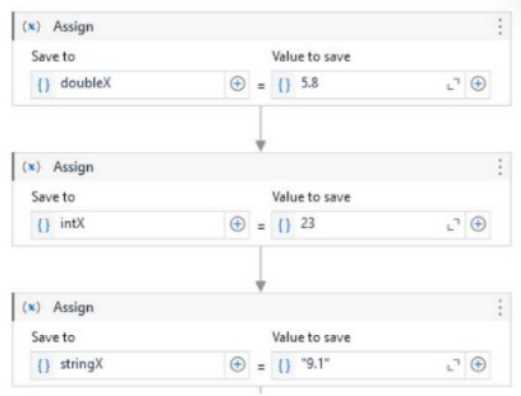
outputX = If(CInt(doubleX + CDbl(intX) + CDbl(stringX)) > 38.30, 1, 0)
What will be the output of the conditional?
- A. 0
- B. 1
- C. Compilation Error
- D. Error During Runtime
Answer:
B
Explanation:
Comprehensive and Detailed Explanation From Exact Extract:
To evaluate this:
Let’s assume:
doubleX = 10.5
intX = 10
stringX = "18"
Then:
CDbl(intX) → 10.0
CDbl(stringX) → 18.0
Sum = 10.5 + 10 + 18 = 38.5
CInt(38.5) > 38.30 → 38 > 38.30 → True
Result of If → 1
CDbl converts string/numeric values to Double
CInt converts Double to Integer (rounding behavior is floor if .5 and below)
UiPath Reference:
Data Type Conversion - Microsoft VB.NET
Comments
Question 4
What is the primary objective of the UiPath Document Understanding (DU) process template?
- A. To provide a platform for file storage and organization.
- B. To facilitate manual data entry tasks.
- C. To streamline the process of file digitization and data extraction from various document types.
- D. To automate the validation of extracted data.
Answer:
C
Explanation:
Comprehensive and Detailed Explanation From Exact Extract:
The main purpose of Document Understanding is to help developers extract structured information
from unstructured documents (invoices, receipts, forms, etc.) using AI and OCR.
It streamlines the entire pipeline of digitizing, classifying, extracting, and validating document data.
UiPath Documentation Reference:
Document Understanding Overview
Comments
Question 5
Why is it important to understand the potential value UiPath Communications Mining can enable
prior to training?
- A. To forecast the number of trainers that are required to achieve an excellent performing model.
- B. To ensure the objectives are focused on delivering targeted value and the model's taxonomy is aligned to value realization.
- C. To calculate the potential reduction in data storage costs due to model training.
- D. To estimate the amount of time required to build an excellent performing model.
Answer:
B
Explanation:
Comprehensive and Detailed Explanation From Exact Extract:
Before training a model in Communications Mining, it is crucial to align the taxonomy and labeling
strategy with business goals to ensure the outputs provide measurable value. This preparation stage
helps define KPIs, label definitions, and ensures the AI output leads to actionable automation or
insight.
Focusing on value from the start prevents wasted effort and allows prioritization of the most
impactful communication types.
UiPath Documentation Reference:
Communications Mining – Best Practices for Training
Comments
Question 6
Which filter option should be used for the For Each File in Folder activity to iterate between all the
Microsoft Word documents in a local folder?
- A. *.doc*
- B. *.doc, *docx
- C. *.doc
- D. Microsoft Word
Answer:
A
Explanation:
Comprehensive and Detailed Explanation From Exact Extract:
The correct syntax for filtering both .doc and .docx Word documents is to use the wildcard *.doc*.
This matches:
.doc
.docx
Any Word file variant starting with .doc
UiPath Studio uses .NET wildcards for file filters in activities like "For Each File in Folder".
UiPath Documentation Reference:
For Each File in Folder – UiPath Docs
Comments
Question 7
A developer intends to incorporate a Flow Switch activity within a Flowchart. What is a characteristic
of this activity?
- A. The Flow Switch activity is designed solely for usage in sequence workflows.
- B. Default cases can be numbered.
- C. Two default cases can be assigned in the Default section.
- D. The default TypeArgument property for the Flow Switch activity is set to Int32.
Answer:
D
Explanation:
Comprehensive and Detailed Explanation From Exact Extract:
The Flow Switch activity is similar to a switch-case control structure and is used within Flowchart
workflows, not Sequences. By default, the TypeArgument is Int32, which determines the data type
used to evaluate and match the expression branches.
Developers can change this TypeArgument to String, Boolean, etc., based on control logic.
UiPath Documentation Reference:
Flow Switch – UiPath Docs
Comments
Question 8
For which version(s) from Out-of-the-Box ML Packages minor versions is the download functionality
available?
- A. Version 0 only
- B. Version 0 and above
- C. Version 1 only
- D. Version 1 and above
Answer:
D
Explanation:
Comprehensive and Detailed Explanation From Exact Extract:
UiPath AI Center allows downloading only Out-of-the-Box ML packages from version 1 and above.
Version 0 is considered experimental or in preview, and the download functionality is not available
for those.
This is important when users want to clone or retrain these models.
UiPath Documentation Reference:
Managing ML Packages – AI Center
Comments
Question 9
In a UiPath Studio project, what is the broadest scope a variable can have?
- A. Global, available in the entire project.
- B. Within the surrounding "Do" or "Body" sequence.
- C. Within the activity in which it is defined.
- D. Outermost workflow component in the current .xaml project file.
Answer:
D
Explanation:
Comprehensive and Detailed Explanation From Exact Extract:
Variables in UiPath are scoped to the container (e.g., Sequence, Flowchart, or State Machine) where
they are defined. The broadest scope possible is the entire outermost workflow (e.g., Main.xaml).
Global variables across multiple workflows require use of arguments or storage in assets or config
files, not regular variables.
UiPath Documentation Reference:
Variables Panel – Scope Concept
Comments
Question 10
What does the Document Classification step do?
- A. Identifies what type of document the robot is currently processing.
- B. Presents a document processing-specific user interface for validating and correcting automatic classification outputs.
- C. Empowers the closing of the feedback loop to any classification algorithm capable of learning.
- D. Retrieves the text from any PDF or image, using, only if necessary, the OCR engine.
Answer:
A
Explanation:
Comprehensive and Detailed Explanation From Exact Extract:
The Document Classification step in Document Understanding identifies the type of document (e.g.,
Invoice, Receipt, Contract) being processed. It uses trained classification models to assign the correct
document type before extraction begins.
This is critical in cases where multiple document types are processed together.
UiPath Documentation Reference:
Classify Document Activity
Comments
Page 1 out of 24
Viewing questions 1-10 out of 250
page 2