Question 1
Given the blowing diagram how on the process be optimized from the steps perspective?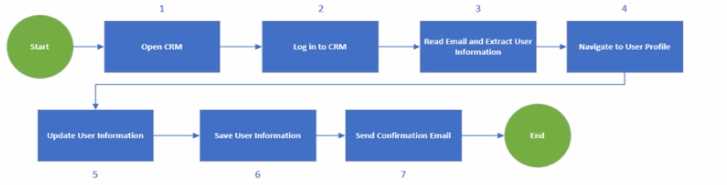
- A. Read the email as a first step and open CRM and tog in only if there's an email.
- B. Do not send a confirmation email as part of this process
- C. Navigate to the User Profile directly after the login
- D. Log out from CRM before login so the environment is ready lot automation
Answer:
A
Explanation:
The process shown in the diagram can be optimized by reading the email as the first step and
opening CRM and logging in only if there’s an email. This way, the process can avoid unnecessary
steps and save time and resources. If there is no email, the process can end without opening CRM. If
there is an email, the process can extract the user information from the email and use it to log in to
CRM and navigate to the user profile. This can also reduce the risk of errors and exceptions due to
invalid or missing user information. Reading the email as the first step can also help the process to
prioritize the emails based on their importance or urgency and handle them accordingly. Reference:
UiPath Process Mining: Use process monitoring and optimization to propel RPA
Optimizing Processes with UiPath Process Mining
Optimization maximum utilisation - UiPath Community Forum
Comments
Question 2
What argument types can be used for a workflow that is invoked with the Isolated" option?
- A. Simple types
- B. Reference types
- C. Serializable types
- D. Class types
Answer:
C
Explanation:
The Isolated option for the Invoke Workflow File activity allows the invoked workflow to run in a
separate Windows process, which can help with isolating a faulty workflow from the main workflow.
However, this option requires that the arguments passed to the invoked workflow are serializable,
meaning that they can be converted into a binary format that can be transferred across processes.
Simple types, such as integers, strings, booleans, etc., are serializable by default. Reference types,
such as arrays, lists, dictionaries, etc., are serializable if they implement the ISerializable interface or
have the [Serializable] attribute. Class types are serializable if they meet the same criteria as
reference types. Data Row is an example of a non-serializable type that cannot be used as an
argument for an isolated workflow. Reference:
Invoke Workflow File
,
Using Arguments
,
What is the
the use of “isolated” property of invoke workflow
,
How to pass arguments to Isolated Workflow
.
Comments
Question 3
What are two key indicators m estimating the development time for process development?
- A. Number of items to be processed and experience of developers
- B. Number of users who will use the process and number of applications 10 be automated
- C. Correctness of documentation and triggers scheduling strategy
- D. Number of actions to be automated and complexity of architecture
Answer:
D
Explanation:
The development time for process development depends on various factors, such as the scope,
requirements, design, testing, deployment, and maintenance of the automation solution. However,
two of the most important factors are the number of actions to be automated and the complexity of
the architecture. The number of actions to be automated refers to the number of steps, activities, or
tasks that the automation solution has to perform to achieve the desired outcome. The complexity of
the architecture refers to the level of difficulty, integration, and customization involved in designing
and implementing the automation solution.
Both of these factors affect the amount of effort,
resources, and skills required for the process development12
.
Reference:
Roles of a Solution Architect in Automation, RPA Setting
,
Become an Automation Solution
Architect
Comments
Question 4
Deal guidance is a machine learning application of which industry?
- A. Financial services
- B. Healthcare
- C. Professional services
- D. Retail
Answer:
A
Explanation:
Deal guidance is a machine learning application that helps financial services firms to optimize their
deal pricing, terms, and risk assessment. It uses historical data, market trends, and customer
preferences to generate insights and recommendations for the best deal outcomes.
Deal guidance
can also automate the deal approval process and generate reports and dashboards for performance
monitoring and compliance. Reference: UiPath Automation Solution Architect Learning Plan, Module
6: Machine Learning and AI1; UiPath Automation Suite - Deal Guidance2; UiPath Academy - Roles of
a Solution Architect in Automation, RPA Setting3
.
Comments
Question 5
What is a requirement to access Automation Cloud?
- A. Need a dedicated infrastructure
- B. Need a compatible browser
- C. Need to install on-premises
- D. Need an offline access
Answer:
B
Explanation:
To access Automation Cloud, you do not need a dedicated infrastructure, an on-premises installation,
or an offline access. You only need an internet connection with TLS and a compatible web browser.
Automation Cloud is a cloud-based platform that delivers the full UiPath Platform, including SaaS
robots and self-hosted robots, in under a minute, from any of six regions around the world. You can
access it from any supported browser, such as Google Chrome, Microsoft Edge Chromium, Mozilla
Firefox, or Apple Safari. Other browsers that are not listed, older versions of the listed ones, or
mobile browsers are not supported and may cause errors or malfunctions. Reference:
Automation
Cloud - Software requirements - UiPath Documentation Portal
,
Complete cloud-based enterprise
automation solution | UiPath
Comments
Question 6
What is the recommended UiPath Studio template to be used for long-running workflows?
- A. Robotic Enterprise Framework (ReFramework).
- B. Attended Automation Framework
- C. No framework is needed
- D. Orchestration Process Template
Answer:
D
Explanation:
Long-running workflows are processes that require logical fragmentation or human intervention
(validations, approvals, exception handling) such as invoice processing and performance reviews.
UiPath provides a dedicated project template in Studio called Orchestration Process, which enables
the use of a set of activities to handle these scenarios. The Orchestration Process template allows the
workflow to be suspended and resumed based on certain conditions, such as the completion of a
job, a queue item, a form task, or an external task. The template also integrates with UiPath Action
Center, which is a feature that enables human intervention in long-running unattended workflows.
The Orchestration Process template is the recommended option for designing and developing long-
running workflows in UiPath Studio. Reference:
Orchestrator - Working With Long-running Workflows
New Component - Long Running Workflow Template with UiPath Tasks
Long Running Workflow Template for Task Creation - UiPath Marketplace
Comments
Question 7
What is a layer that is redundant for a Solution Architect to take into account when designing the
Reusable Components for a project?
- A. Logic layer
- B. Persistence layer (saving data)
- C. Process steps that are not part of the User Interlace interaction layer or the Logic layer or the Persistence layer
- D. User interface interaction layer (interact with applications)
Answer:
C
Explanation:
A reusable component is a workflow that can be compiled and packaged as an activity and reused in
multiple processes. A reusable component should be designed with a clear purpose, input and
output parameters, and error handling. A reusable component should also follow the best practices
of modularity, reusability, maintainability, and scalability. A reusable component can be categorized
into three layers: User Interface interaction layer, Logic layer, and Persistence layer. The User
Interface interaction layer is responsible for interacting with applications, such as clicking, typing, or
scraping data. The Logic layer is responsible for implementing the business logic, such as
calculations, validations, or decision making. The Persistence layer is responsible for saving or
retrieving data, such as using databases, files, or queues. These three layers are essential for
designing reusable components, as they represent the common functionalities that can be shared
across different processes. However, process steps that are not part of these three layers are
redundant for a Solution Architect to take into account when designing the reusable components for
a project. Process steps that are not part of these three layers are specific to a particular process or
scenario, and they may not be applicable or compatible with other processes. For example, a process
step that involves sending an email notification to a specific recipient or group may not be relevant
or suitable for another process that uses the same reusable component. Therefore, such process
steps should be avoided or separated from the reusable components, and instead be implemented in
the main workflow of the process that requires them. Reference:
18.3 - Library (Reusable components) - UiPath Community Forum
How to make useful Libraries (Reusable components) - UiPath Community Forum
Reusable Components - UiPath Documentation Portal
Comments
Question 8
How does scalability impact the design of a UiPath automaton flowchart and what strategies can
ensure it handles increased process volume?
- A. Scalability primarily focuses on reducing the number of steps in the flowchart to make it more efficient for smaller-scale processes
- B. To achieve salacity flowchart design should be rigid and not allow for changes or adaptations to the process response lo evolving business needs.
- C. Scalability is crucial in high-level flowchart design to handle larger volumes efficiently involving design adjustments and resource optimization if needed
- D. Scalability is irrelevant in high-level flowchart design, as it is solely a concern for the deployment phase
Answer:
C
Explanation:
Scalability is the ability of a system or a process to handle growing amounts of work or demand in a
graceful manner. Scalability impacts the design of a UiPath automation flowchart because it
determines how well the automation can cope with increased process volume, complexity, or
variability. A scalable flowchart design should consider the following strategies:
Modularization: Breaking down the process into smaller, reusable, and maintainable components
that can be easily modified or replaced if needed. Modularization also facilitates testing, debugging,
and error handling.
Parameterization: Using variables, arguments, configuration files, assets, or queues to store and pass
data that can change depending on the process execution. Parameterization allows for flexibility and
adaptability of the automation to different scenarios or environments.
Optimization: Reducing unnecessary or redundant steps, activities, or data in the flowchart to
improve the performance, efficiency, and reliability of the automation. Optimization also involves
choosing the best methods or techniques to achieve the desired outcome, such as using selectors,
data scraping, or computer vision.
Orchestration: Managing the resources, schedules, triggers, and dependencies of the automation to
ensure that it runs smoothly and effectively. Orchestration also involves monitoring, logging, and
reporting the status and results of the automation, as well as handling exceptions and alerts.
Reference:
Enhancing UiPath Solutions’ Design Scalability
,
Roles of a Solution Architect in
Automation, RPA Setting
,
Studio - Flowcharts
.
Comments
Question 9
Which feature of UiPath Apps allows a user to create forms and components for user interfaces in
applications?
- A. UiPath Studio
- B. UiPath Orchestrator
- C. Data Service
- D. App Builder
Answer:
D
Explanation:
According to the UiPath documentation1
, App Builder is a feature of UiPath Apps that allows a user
to create forms and components for user interfaces in applications. App Builder is a low-code app
development tool that enables users to design and publish custom apps using drag-and-drop
controls, data bindings, conditional logic, and automation workflows. App Builder also provides a
preview mode to test the app functionality and appearance before publishing. Users can create apps
for various form factors and devices, such as desktop, mobile, web, or sidebar.
App Builder also
integrates with UiPath Studio, UiPath Orchestrator, and Data Service to leverage the power of
automation and data management in the apps. Reference: 1
:
App Builder - UiPath Documentation
Portal
Comments
Question 10
What is the man difference between the deployment models for UiPath products?
- A. How the product is managed from an IT infrastructure point of view.
- B. The level of infrastructure integration between UiPath products.
- C. The types of processes that can be automated using the products.
- D. How each product I s licensed and billed
Answer:
A
Explanation:
The deployment models for UiPath products refer to the different ways of installing, configuring, and
running the UiPath components on various IT environments. The main difference between the
deployment models is how the product is managed from an IT infrastructure point of view, such as
the hardware, software, network, and security requirements, the scalability and availability options,
the backup and recovery strategies, and the maintenance and support procedures. UiPath offers
several deployment models to suit different customer needs and preferences, such as:
Standalone deployment: This is the simplest and most common deployment model, where each
UiPath component is installed on a single machine or server, and communicates directly with other
components without any intermediaries. This model is suitable for small-scale automation scenarios,
where the number of robots, processes, and users is low, and the IT infrastructure is simple and
stable. However, this model has some limitations in terms of performance, reliability, security, and
flexibility, as it depends on the availability and capacity of the single machine or server hosting the
component.
High-availability deployment: This is a more advanced and robust deployment model, where each
UiPath component is installed on multiple machines or servers, and communicates with other
components through a load balancer or a cluster manager. This model is suitable for large-scale
automation scenarios, where the number of robots, processes, and users is high, and the IT
infrastructure is complex and dynamic. This model offers several benefits in terms of performance,
reliability, security, and flexibility, as it allows for load balancing, failover, scaling, and redundancy of
the components.
Cloud deployment: This is a modern and flexible deployment model, where some or all of the UiPath
components are hosted on a cloud platform, such as Microsoft Azure, Amazon Web Services, or
Google Cloud Platform, and communicate with other components through the internet. This model
is suitable for hybrid or distributed automation scenarios, where the number of robots, processes,
and users is variable, and the IT infrastructure is elastic and scalable. This model offers several
advantages in terms of cost, convenience, accessibility, and innovation, as it reduces the need for
hardware, software, network, and security maintenance, and enables faster and easier deployment,
configuration, and updates of the components.
Reference:
About Deployment - Standalone
,
Automation Suite - Deployment architecture
,
UiPath
Cloud Platform
Comments
Page 1 out of 15
Viewing questions 1-10 out of 151
page 2