Question 1
Data from an Excel file is read into a data table named "dtEmployee", as displayed in the following
graphic: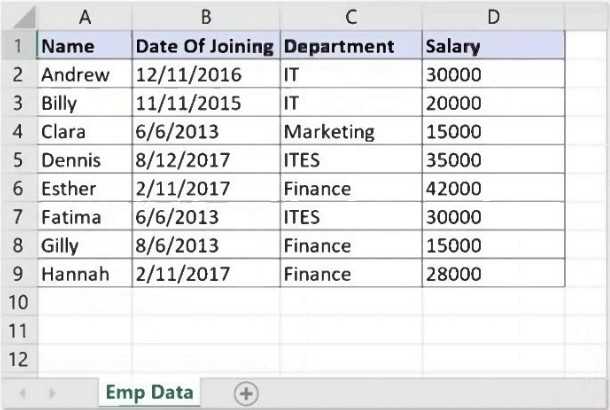
A developer needs to filter the data table to obtain all rows representing employees from the
Finance and IT departments with a Salary under 30,000. Which expression yields the desired
outcomes?
- A. dtEmployee.Select("([Department]='IT' AND [Department]='Finance') AND [Salary] < 30000")
- B. dtEmployee.Select("[Department]='IT OR [Department]='Finance' OR [Salary] < 30000")
- C. dtEmployee.Select("[Department]='IT' OR [Department]= 'Finance' AND [Salary] < 30000")
- D. dtEmployee.Select("([Department]='IT' OR [Department]='Finance') AND [Salary] < 30000")
Answer:
D
Comments
Question 2
A developer is building an automation that must interact with a destination remote computer
reached by jumping through multiple RDP connections, as described by the following scenario:
- The Robot is installed on Machine A, which connects through RDP to Machine B.
- From Machine B another RDP connection is opened to Machine C, where the automation must be
performed.
Which of the following scenarios is appropriate for the developer who wants to use UI Automation
activities?
- A. UI Automation can be used and the following are prerequisites:Machine A - install RDP extension.Machine B - install RemoteRuntime.msi.Machine C - install RemoteRuntime.msi.
- B. UI Automation can be used and the following are prerequisites:Machine A - install RDP extension.Machine B - install RDP extension and RemoteRuntime.msi.Machine C - install RemoteRuntime.msi.
- C. UI Automation can be used and the following are prerequisites:Machine A - no requirement.Machine B - no requirement.Machine C - install RemoteRuntime.msi.
- D. UI Automation can be used and the following are prerequisites:Machine A - install RDP extension.Machine B - no requirement.Machine C - install RemoteRuntime.msi.
Answer:
B
Explanation:
To use UI Automation activities in a scenario where the destination remote computer is reached by
jumping through multiple RDP connections, the following prerequisites are required:
Machine A - install the RDP extension. This extension enables the robot to generate native selectors
over RDP connections and interact with the UI elements on the remote machines.
Machine B - install the RDP extension and the RemoteRuntime.msi. The RDP extension allows the
robot to connect to Machine C from Machine B, while the RemoteRuntime component enables the
communication between the robot and the UI elements on Machine B.
Machine C - install the RemoteRuntime.msi. This component enables the communication between
the robot and the UI elements on Machine C, where the automation must be performed. Reference:
[Remote Runtime Architecture], [Multiple RDP Connections], [UiPath Extension for Microsoft Remote
Desktop and Apps]
Comments
Question 3
How does UiPath handle different dependency versions for multiple running processes that run at
the same time?
- A. Each running process automatically adapts to the available dependency version.
- B. Each running process uses its own required version of the dependency.
- C. All running processes use the latest version of the dependency available.
- D. Running processes use the earliest compatible dependency version.
Answer:
B
Explanation:
UiPath handles different dependency versions for multiple running processes that run at the same
time by using the concept of isolation. This means that each running process uses its own required
version of the dependency, without affecting or being affected by other processes. This ensures that
the processes run smoothly and consistently, regardless of the dependency versions. The isolation is
achieved by using the NuGet protocol, which allows the robot to download and store the
dependencies in a local cache folder. The robot then loads the dependencies from the cache folder
into separate application domains for each process, creating isolated environments for each
process. Reference: [Managing Dependencies], [About the NuGet Protocol]
Comments
Question 4
In order for a developer to utilize the default REFramework without relying on Orchestrator queues,
what is the essential prerequisite to ensure that the project does not interact with Orchestrator?
- A. Remove the Get Transaction Data state from the Main state machine. Remove the OrchestratorQueueName setting from Config.xlsx & change the variable type.
- B. Eliminate the Get Transaction Data state from the Main state machine. Exclude the Get Transaction Item activity from the project & change the variable type.
- C. Exclude the Get Transaction Item activity from the project. Eliminate the three SetTransactionStatus activities from the SetTransactionStatus workflow & change the variable type.
- D. Omit the OrchestratorQueueName setting from the Config.xlsx file. Exclude the three SetTransactionStatus activities from the SetTransactionStatus workflow & change the variable type.
Answer:
C
Explanation:
To utilize the default REFramework without relying on Orchestrator queues, the essential
prerequisite is to exclude the Get Transaction Item activity from the project, eliminate the three
SetTransactionStatus activities from the SetTransactionStatus workflow, and change the variable type
of the TransactionItem and TransactionData variables. The Get Transaction Item activity is used to
retrieve a transaction item from the Orchestrator queue, which is not needed if the queue is not
used. The SetTransactionStatus activities are used to update the status of the transaction item in the
Orchestrator queue, which is also not needed if the queue is not used. The variable type of the
TransactionItem and TransactionData variables should be changed to match the type of data that is
used as input for the process, such as DataRow, String, or Object. These changes will ensure that the
project does not interact with Orchestrator and can use other sources of data for the
transactions. Reference: [The UiPath REFrameWork], [Get Transaction Item], [Set Transaction Status]
Comments
Question 5
Which of the following describes the correct hierarchy of the elements in the Object Repository tree
structure?
- A. Version, Application, Screen, Ul Element.
- B. Application, Version, Screen, Ul Element.
- C. Application, Screen, Ul Element, Version.
- D. Screen, Application, Version, Ul Element.
Answer:
C
Explanation:
The Object Repository in UiPath organizes elements in a hierarchical structure that reflects the logical
arrangement of user interfaces and elements as they are captured and used in automation projects.
The correct hierarchy for elements in the Object Repository tree structure is:
A . Version, Application, Screen, UI Element.
This hierarchy starts with the 'Version', which could refer to the specific version of the application you
are automating. Under each version, there could be multiple 'Applications' that you have elements
for. Within each application, you might have captured various 'Screens' or dialogs, and within each
screen, there are individual 'UI Elements' like buttons, text fields, dropdown menus, etc., that the
automation interacts with.
However, it's important to note that in practice, when you are working with UiPath Studio and its
Object Repository, the hierarchy usually starts with the 'Application', then under it, you have
different 'Screens' of the application, and under each screen, you have the 'UI Elements'. The
'Version' is typically managed separately and is not a level in the hierarchy tree but rather a property
or attribute of the application or element. Therefore, the most practical answer reflecting the usage
in UiPath Studio would be:
C . Application, Screen, UI Element, Version.
The 'Version' here would be understood not as a layer in the hierarchy but rather as an attribute that
can be associated with the 'Application' or 'UI Element'.
Comments
Question 6
A developer wants to add items to a list of strings using the Invoke Method activity. The list is
declared as follows: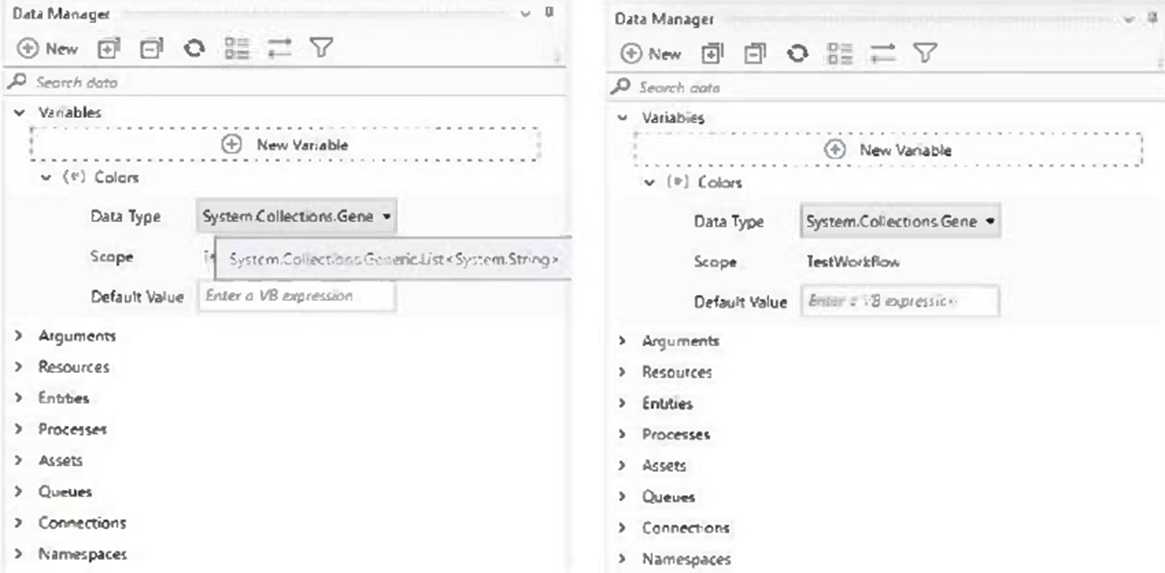
The Invoke Method activity has the following properties: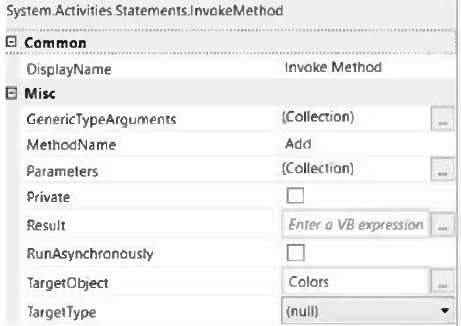
The Parameters property is as follows: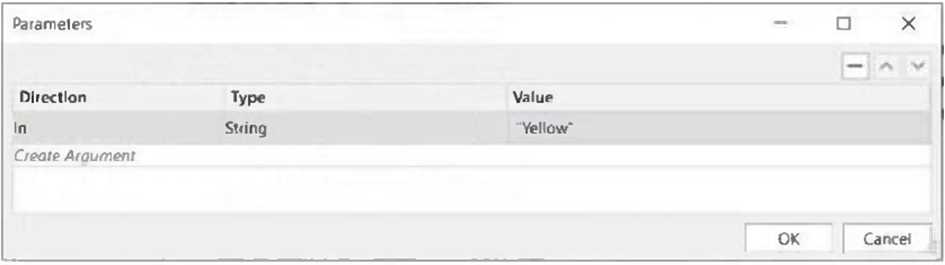
Based on the information shown in the exhibits what is the outcome of the Invoke Method activity?
- A. An exception will be thrown.
- B. Colors will contain an item with the value "Yellow".
- C. Colors will contain an item with an empty value.
- D. Colors will contain an item with the value "Colors: Yellow".
Answer:
B
Explanation:
The Invoke Method activity is used to invoke a method of a class or an object. In this case, the
developer wants to add items to a list of strings using the Invoke Method activity. The list is declared
as follows:
Dim Colors As New List(Of String)
This means that the list is named Colors and it can store strings. The Invoke Method activity has the
following properties:
TargetType: System.Collections.Generic.List`1[System.String]. This means that the target type is a
generic list of strings.
TargetObject: Colors. This means that the target object is the list named Colors.
MethodName: Add. This means that the method name is Add, which is a method of the list class that
adds an item to the end of the list.
Parameters: In, String, Yellow. This means that the parameter direction is In, which means that the
value is passed to the method. The parameter type is String, which means that the value is a string.
The parameter value is Yellow, which means that the value is the string “Yellow”.
Based on the information shown in the exhibits, the outcome of the Invoke Method activity is that
Colors will contain an item with the value “Yellow”. This is because the Invoke Method activity will
add “Yellow” to the list of strings declared as Colors.
Comments
Question 7
What is the default polling interval set for an event trigger?
- A. 1 minute
- B. 5 minutes
- C. 10 minutes
- D. 15 minutes
Answer:
B
Explanation:
When you create a new connection and set up an event trigger on that connection, the default
polling interval is set to 5 minutes. This means that the event trigger checks for new object events
every 5 minutes. You can customize this interval using the Adjustable Polling Interval feature, which
allows you to choose the interval on which event triggers check for new object events. The polling
interval can be changed in two ways: from a specific connector’s page or from the Connections tab.
The polling interval is displayed only for connections with added triggers. Updating the polling
interval affects all the associated triggers on a connection
Comments
Question 8
When should the Show Elements button be used in the Computer Vision wizard?
- A. Highlighting all Ul elements that have been identified by the Computer Vision analysis.
- B. Displaying a list of all available Ul elements and their properties.
- C. Activating a real-time view of the target agp^s Ul during automation.
- D. Filtering out specific Ul elements from being processed by the Computer Vision engine.
Answer:
A
Explanation:
The Show Elements button in the Computer Vision wizard is used to highlight all UI elements that
have been identified by the Computer Vision analysis. This helps you to see the UI elements that are
available for automation and to select the ones that you want to use in your activities. The Show
Elements button is located in the top-right corner of the Computer Vision wizard. When you click it,
the UI elements are highlighted with different colors and shapes, depending on their type and
category. You can hover over each UI element to see its name and properties. You can also use the
Filter Elements button to filter out specific UI elements from being processed by the Computer
Vision engine.
Comments
Question 9
In a UiPath State Machine workflow, which section of State activity is used to specify
conditional/triggers logic and multiple outgoing transitions in a state machine?
- A. Entry
- B. Transitions
- C. Triggers
- D. Exit
Answer:
B
Explanation:
In a UiPath State Machine workflow, the Transitions section of the State activity is used to specify
conditional/triggers logic and multiple outgoing transitions in a state machine. Transitions are
expanded when you double-click them, just like the State activity. They contain three sections:
Trigger, Condition and Action, that enable you to add a trigger for the next state, or add a condition
under which an activity or sequence is to be executed. Transitions are represented by arrows or
branches between states. They define the flow of the state machine and the rules for moving from
one state to another. You can add multiple transitions from a state, but only one transition can be
taken at a time, based on the trigger or condition that is met first
Comments
Question 10
In a UiPath REFramework project, what is the primary purpose of using Custom Log Fields?
- A. To maintain contextual insights within log messages, including secure details like credentials.
- B. To add specific contextual information to log messages that are relevant to the automation process.
- C. To modify the representation of logged contextual data as it is displayed in the Orchestrator.
- D. To generate extra variables alongside log messages, enhancing workflow understanding.
Answer:
B
Comments
Page 1 out of 20
Viewing questions 1-10 out of 205
page 2