Question 1
An Administrator has been given a task to generate a list of users who have not changed their
password in the last 90 days.
Which DBC view should be used to generate this list?
- A. DBC.LOGONOFFV
- B. DBC.USERSV
- C. DBC.SECURITYDEFAULTSV
- D. DBC.ACCESSLOGV
Answer:
B
Explanation:
DBC.USERSV contains information about users, including the passwordlastmodified column, which
records the date and time the user last changed their password. By querying this view, the
Administrator can identify users who have not updated their password within the specified time
frame (in this case, 90 days).
Option A (DBC.LOGONOFFV) logs user logon and logoff events, but it does not track password
changes.
Option C (DBC.SECURITYDEFAULTSV) contains system-wide security defaults, but it does not track
individual user password activity.
Option D (DBC.ACCESSLOGV) logs access control events, like who accessed which database objects,
but it doesn't track password changes either.
Therefore, DBC.USERSV is the appropriate view to use for this task.
Comments
Question 2
A client has a healthy system but often sees delays in some queries because of workload concurrency
limits. These limits have been carefully chosen, so the client needs a solution that will not modify
them.
What should the Administrator use to assist this client?
- A. Use a system throttle.
- B. Use Query Group Viewpoint gortjet to change the throttle limit temporally.
- C. Use Flex Throttle option. Use Query Monitor Viewpoint portlet to change query workloads.
Answer:
C
Explanation:
The Flex Throttle option allows the system to temporarily adjust workload concurrency limits based
on system conditions. This provides more flexibility when handling spikes in query concurrency,
without permanently modifying the established workload limits. Flex Throttle is ideal for handling
temporary peaks in activity, helping to smooth out delays while keeping the core concurrency limits
intact.
Option A (Use a system throttle) would enforce strict concurrency limits but doesn't provide the
flexibility needed in this scenario, where the client is trying to avoid modifying existing limits.
Option B (Use Query Group Viewpoint portlet to change the throttle limit temporarily) suggests
manually adjusting the throttle limit, which is not desirable in this case as the limits have been
carefully chosen.
Option D (Use Query Monitor Viewpoint portlet to change query workloads) would involve changing
the way queries are handled or prioritized but does not address the need to keep concurrency limits
unchanged while still dealing with temporary delays.
Thus, Flex Throttle (Option C) provides the best solution to assist the client without altering the
concurrency limits permanently.
Comments
Question 3
Given a user creation request on a 10-AMP system:
CREATE USER hr_user AS PERM = 100e9 SKEW = 10 PERCENT,
SPOOL = 100e9 SKEW = 20 PERCENT;
How does the SKEW factor affect the user's Perm space, assuming the total space consumed is under
the specified perm space limit?
- A. The per AMP limit of any AMP can reach 20 GB.
- B. The per AMP limit of 100 GB can be breached up to 10 percent.
- C. The per AMP limit of 10 GB can be breached to any percent.
- D. The per AMP limit of any AMP can reach 11 GET
Answer:
D
Explanation:
In the given CREATE USER statement, the SKEW = 10 PERCENT parameter applies to Perm space and
allows some AMPs (Access Module Processors) to use up to 10% more space than the average
allocation across the AMPs.
The user is allocated 100 GB of Perm space across a 10-AMP system, meaning the average space per
AMP is 10 GB.
With a 10% skew allowed, this means that an AMP can use up to 10% more than the average
allocation, which is 10 GB + 1 GB = 11 GB.
Comments
Question 4
An Administrator has been tasked with analyzing previous growth and usage patterns by utilities
such as Multiload and FastLoad. The aim is to project the likely resource requirements of the existing
loads in the next three to six months.
In the last month, the Administrator team have started using AccountString expansion on all user
accounts and have started maintenance jobs to housekeep system data older than seven years. Two
years ago, the following command was issued on the system:
BEGIN QUERY LOGGING WITH ALL ON ALL;
No other logging commands have been issued.
Which view contains the utility usage data for the prior months?
- A. AMPUsageV
- B. LogOnOffV
- C. QryLogUtilityV
- D. QryLogV
Answer:
C
Explanation:
QryLogUtilityV is a specific DBQL (Database Query Logging) view that provides information about
utility usage (such as Multiload and FastLoad) on the system. Since the BEGIN QUERY LOGGING WITH
ALL ON ALL command was issued two years ago, the DBQL (Database Query Logging) has been
tracking various events, including utility usage, which is stored in QryLogUtilityV.
Option A (AMPUsageV) contains AMP (Access Module Processor) level statistics and usage data but
not detailed information about utility jobs.
Option B (LogOnOffV) tracks user logon and logoff activities but does not provide information about
utility usage.
Option D (QryLogV) logs general query execution data but is not specifically focused on utility usage.
Comments
Question 5
A middle-tier application server logs on to the database as TrustedUser and submits requests on
behalf of application end users. The server is shared by Finance and Human Resources groups and
uses ProxyUser query band to identify end users to the database. Each group needs access to its own
sensitive data, so the Administrator has created two separate roles with the appropriate
permissions.
What is the best way to control access to each group's sensitive data?
- A. Define the roles as external and use the ProxyRole query band to specify one role.
- B. Grant both roles to TrustedUser, and add the ProxyRole query band to specify one role.
- C. Specify the appropriate role for each end user in a grant connect through statement.
- D. Include both roles in the grant connect through statement, and use ProxyRole in the query band to select the appropriate role.
Answer:
D
Explanation:
The GRANT CONNECT THROUGH statement allows the TrustedUser to act on behalf of multiple end
users while securely connecting to the database. By granting both roles (Finance and Human
Resources) in this statement, you allow the ProxyUser to switch between roles depending on the
query band's ProxyRole value.
Using the ProxyRole query band, the application can specify which role (Finance or Human
Resources) should be used for each specific request. This approach provides flexibility, as the
application can dynamically assign the appropriate role to the user based on the query context.
Option A (Defining roles as external and using ProxyRole) wouldn't fully address the need to manage
multiple roles dynamically for a shared server.
Option B (Granting both roles to TrustedUser) doesn't allow for flexible role switching on a per-
request basis without the use of GRANT CONNECT THROUGH and could lead to over-granting of
permissions.
Option C (Specifying a role for each end user in GRANT CONNECT THROUGH) isn't as flexible as
allowing both roles to be used and dynamically selected through the query band.
Thus, Option D is the most appropriate solution, as it provides both security and flexibility, enabling
the application to use the correct role based on the ProxyRole query band for each query submitted.
Comments
Question 6
An Administrator needs to provide end users access to data in a Native Object Store using shared
credentials.
How can this be accomplished?
- A. Define a FOREIGN TABLE with DEFINER TRUSTED security.
- B. Define a FUNCTION MAPPING with INVOKER TRUSTED security.
- C. Use an S3 1AM role or Azure SAS token rather than User and Password.
- D. Grant users access to a shared AUTHORIZATION object.
Answer:
D
Explanation:
In Teradata's Native Object Store, the AUTHORIZATION object stores shared credentials (such as an
S3 IAM role, Azure SAS token, or other cloud storage credentials). By granting users access to this
shared authorization object, the administrator can allow multiple users to access the object store
using the same set of credentials. This simplifies credential management and ensures secure access
to the external data source.
Option A (Define a FOREIGN TABLE with DEFINER TRUSTED security) refers to defining a foreign table
with a specific security model but does not handle shared credentials directly.
Option B (Define a FUNCTION MAPPING with INVOKER TRUSTED security) relates to function
mappings and security contexts for user-defined functions, not directly to shared credentials for
accessing an object store.
Option C (Use an S3 IAM role or Azure SAS token rather than User and Password) is a part of how
credentials might be managed, but it does not address the mechanism for sharing these credentials
among users. The AUTHORIZATION object is the correct method for managing and sharing these
credentials securely.
Comments
Question 7
An Administrator has been presented with these performance metrics from the DBQLOGTBL table for
four queries:
The Administrator needs to identify which query is suspected to be causing a full table scan or large
redistribution.
Which query is producing this result?
- A. QRY_D because of CPU SKEW
- B. QRY_C because of UII
- C. QRY_B because of IO SKEW
- D. QRY_A because of PJI
Answer:
C
Explanation:
IO SKEW refers to an uneven distribution of I/O operations across AMPs, which can occur during
large redistributions or full table scans, as data needs to be read from or written to the entire table.
High IO skew indicates that some AMPs are handling significantly more I/O than others, which is
often a sign of inefficient data distribution or full table scanning.
QRY_B has an IO SKEW value of 2.76, which is much higher than the other queries, suggesting that it
is likely performing a full table scan or large redistribution, as this would result in uneven I/O across
AMPs.
CPU SKEW (as seen in QRY_D) could indicate an issue with CPU load balancing, but it doesn't
necessarily suggest a full table scan or redistribution.
UII (Utility Impact Index) and PJI (Product Join Index) are also metrics that might indicate query
inefficiencies, but the high IO SKEW in QRY_B is the most direct indicator of a full table scan or large
redistribution.
QRY_B is the query suspected of causing the full table scan or large redistribution due to its high IO
SKEW value.
Comments
Question 8
BATCH_USER submits stored procedures, utility jobs, and other requests. All BATCH_USER work
classifies into workload WD-Batch based on username criterion.
System performance has slowed due to AWT exhaustion during the batch window. The Administrator
determined the AWT exhaustion is due to high concurrency of stored procedure calls from
BATCH_USER.
How can the Administrator effectively throttle these stored procedures?
- A. Create a utility limit, classify on username = BATCH_USER and utility = Stored Procedure, and set the limit.
- B. Define an AWT resource limit, classify on username = BATCH_USER and utility = Stored Procedure, and set the limit.
- C. Create a new workload, classify on username = BATCH_USER and statement type = CALL, and set a throttle.
- D. Define a system throttle, classify on username = BATCH_USER and stored procedure = *.*, and set the limit.
Answer:
C
Explanation:
In this scenario, the issue arises due to high concurrency of stored procedure calls, which are
exhausting AWTs (AMP Worker Tasks). To address this, the administrator needs to throttle the
specific stored procedure calls made by BATCH_USER. The most effective way to do this is to create a
new workload that specifically targets those calls (statement type = CALL) from BATCH_USER and
then applies a throttle to limit concurrency. This helps manage the system's AWTs by controlling how
many stored procedures can be run concurrently.
Other options are less suitable as they either do not target stored procedures specifically or may not
provide the necessary granularity in controlling AWT usage for stored procedure calls.
Comments
Question 9
An application is consuming very high I/O on Teradata Vantage. The Administrator has been asked to
identify the queries that are consuming more than 100 million IOs and are suspected of completing
Full Table Scans or Large Redistribution.
Which metrics should be examined for high values to identify the queries?
- A. MAXAMPIO and PJI
- B. TOTALIOCOUNT and PJI
- C. I/O SKEW % and UII
- D. REQPHYSIO and UII
Answer:
B
Explanation:
TOTALIOCOUNT represents the total number of I/O operations a query performs, which is crucial
when trying to identify queries consuming excessive I/O (in this case, more than 100 million IOs).
This directly indicates the amount of I/O a query is generating.
PJI (Product Join Index) measures whether a product join is being performed in the query, which is
often associated with inefficient joins that result in large redistributions of data. A high PJI value
indicates that the query might be performing a product join, leading to a significant performance hit
due to large redistributions.
Option A (MAXAMPIO and PJI): MAXAMPIO refers to the maximum I/O performed by a single AMP,
but TOTALIOCOUNT is a more direct indicator of the total I/O performed by a query across all AMPs.
Option C (I/O SKEW % and UII): I/O SKEW % indicates uneven distribution of I/O, which can cause
performance issues, but it does not directly measure the total I/O consumption like TOTALIOCOUNT
does. UII (Utility Impact Index) is relevant but not as important for identifying large I/O queries.
Option D (REQPHYSIO and UII): REQPHYSIO refers to the number of physical I/Os, but it is not as
comprehensive as TOTALIOCOUNT, which includes both logical and physical I/O.
Thus, TOTALIOCOUNT (for total I/O) and PJI (to detect potential large redistributions due to product
joins) are the key metrics to identify queries with high I/O and large redistributions.
Comments
Question 10
DRAG DROP
An Administrator is configuring an alert service on a Vantage system and must define threshold levels
and triggers for the alerts.
Match the Administrator's portlet to the correct use definition.
(Each answer is used once.)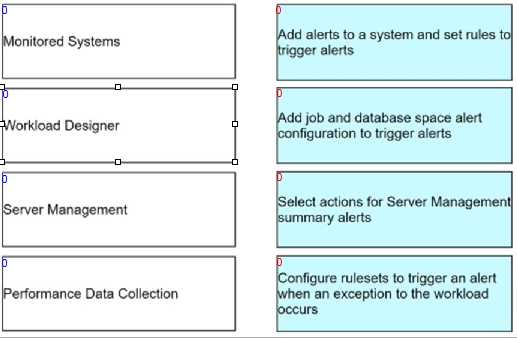
Answer:
None
Explanation: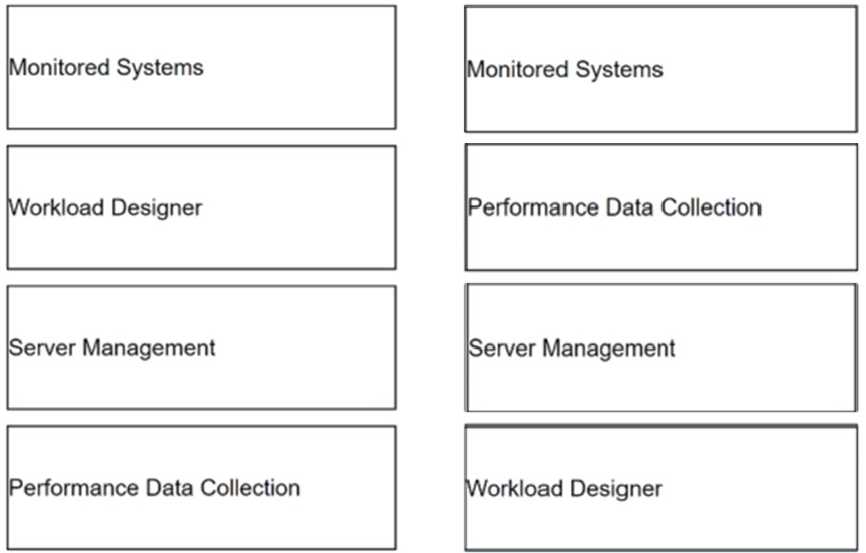
Comments
Page 1 out of 7
Viewing questions 1-10 out of 72
page 2