Question 1
Which of the following is not a path used by Splunk to execute scripts?
- A. SPLUNK_HOME/etc/system/bin
- B. SPLUNK HOME/etc/appa/<app name>/bin
- C. SPLUNKHOMS/ctc/scripts/local
- D. SPLUNK_HOME/bin/scripts
Answer:
C
Explanation:
Splunk executes scripts from specific directories that are structured within its installation paths.
These directories typically include:
SPLUNK_HOME/etc/system/bin: This directory is used to store scripts that are part of the core Splunk
system configuration.
SPLUNK_HOME/etc/apps/<app name>/bin: Each Splunk app can have its own bin directory where
scripts specific to that app are stored.
SPLUNK_HOME/bin/scripts: This is a standard directory for storing scripts that may be globally
accessible within Splunk's environment.
However, C. SPLUNKHOMS/ctc/scripts/local is not a recognized or standard path used by Splunk for
executing scripts. This path does not adhere to the typical directory structure within the
SPLUNK_HOME environment, making it the correct answer as it does not correspond to a valid script
execution path in Splunk.
Splunk Documentation Reference:
Using Custom Scripts in Splunk
Directory Structure of SPLUNK_HOME
Comments
Question 2
Which of the following are features of a managed Splunk Cloud environment?
- A. Availability of premium apps, no IP address whitelisting or blacklisting, deployed in US East AWS region.
- B. 20GB daily maximum data ingestion, no SSO integration, no availability of premium apps.
- C. Availability of premium apps, SSO integration, IP address whitelisting and blacklisting.
- D. Availability of premium apps, SSO integration, maximum concurrent search limit of 20.
Answer:
C
Explanation:
In a managed Splunk Cloud environment, several features are available to ensure that the platform is
secure, scalable, and meets enterprise requirements. The key features include:
Availability of premium apps: Splunk Cloud supports the installation and use of premium apps such
as Splunk Enterprise Security, IT Service Intelligence, etc.
SSO Integration: Single Sign-On (SSO) integration is supported, allowing organizations to leverage
their existing identity providers for authentication.
IP address whitelisting and blacklisting: To enhance security, managed Splunk Cloud environments
allow for IP address whitelisting and blacklisting to control access.
Given the options:
Option C correctly lists these features, making it the accurate choice.
Option A incorrectly states "no IP address whitelisting or blacklisting," which is indeed available.
Option B mentions "no SSO integration" and "no availability of premium apps," both of which are
inaccurate.
Option D talks about a "maximum concurrent search limit of 20," which does not represent the
standard limit settings and may vary based on the subscription level.
Splunk Documentation Reference:
Splunk Cloud Features and Capabilities
Single Sign-On (SSO) in Splunk Cloud
Security and Access Control in Splunk Cloud
Comments
Question 3
Which of the following statements is true about data transformations using SEDCMD?
- A. Can only be used to mask or truncate raw data.
- B. Configured in props.conf and transform.conf.
- C. Can be used to manipulate the sourcetype per event.
- D. Operates on a REGEX pattern match of the source, sourcetype, or host of an event.
Answer:
A
Explanation:
SEDCMD is a directive used within the props.conf file in Splunk to perform inline data
transformations. Specifically, it uses sed-like syntax to modify data as it is being processed.
A . Can only be used to mask or truncate raw data: This is the correct answer because SEDCMD is
typically used to mask sensitive data, such as obscuring personally identifiable information (PII) or
truncating parts of data to ensure privacy and compliance with security policies. It is not used for
more complex transformations such as changing the sourcetype per event.
B . Configured in props.conf and transform.conf: Incorrect, SEDCMD is only configured in props.conf.
C . Can be used to manipulate the sourcetype per event: Incorrect, SEDCMD does not manipulate the
s ourcetype.
D . Operates on a REGEX pattern match of the source, sourcetype, or host of an event: Incorrect,
while SEDCMD uses regex for matching patterns in the data, it does not operate on the source,
sourcetype, or host specifically.
Splunk Documentation Reference:
SEDCMD Usage
Mask Data with SEDCMD
Comments
Question 4
Which of the following is correct in regard to configuring a Universal Forwarder as an Intermediate
Forwarder?
- A. This can only be turned on using the Settings > Forwarding and Receiving menu in Splunk Web/UI.
- B. The configuration changes can be made using Splunk Web. CU, directly in configuration files, or via a deployment app.
- C. The configuration changes can be made using CU, directly in configuration files, or via a deployment app.
- D. It is only possible to make this change directly in configuration files or via a deployment app.
Answer:
D
Explanation:
Configuring a Universal Forwarder (UF) as an Intermediate Forwarder involves making changes to its
configuration to allow it to receive data from other forwarders before sending it to indexers.
D . It is only possible to make this change directly in configuration files or via a deployment app: This
is the correct answer. Configuring a Universal Forwarder as an Intermediate Forwarder is done by
editing the configuration files directly (like outputs.conf), or by deploying a pre-configured app via a
deployment server. The Splunk Web UI (Management Console) does not provide an interface for
configuring a Universal Forwarder as an Intermediate Forwarder.
A . This can only be turned on using the Settings > Forwarding and Receiving menu in Splunk Web/UI:
Incorrect, as this applies to Heavy Forwarders, not Universal Forwarders.
B . The configuration changes can be made using Splunk Web, CLI, directly in configuration files, or
via a deployment app: Incorrect, the Splunk Web UI is not used for configuring Universal Forwarders.
C . The configuration changes can be made using CLI, directly in configuration files, or via a
deployment app: While CLI could be used for certain configurations, the specific Intermediate
Forwarder setup is typically done via configuration files or deployment apps.
Splunk Documentation Reference:
Universal Forwarder Configuration
Intermediate Forwarder Configuration
Comments
Question 5
What does the followTail attribute do in inputs.conf?
- A. Pauses a file monitor if the queue is full.
- B. Only creates a tail checkpoint of the monitored file.
- C. Ingests a file starting with new content and then reading older events.
- D. Prevents pre-existing content in a file from being ingested.
Answer:
D
Explanation:
The followTail attribute in inputs.conf controls how Splunk processes existing content in a monitored
file.
D . Prevents pre-existing content in a file from being ingested: This is the correct answer. When
followTail = true is set, Splunk will ignore any pre-existing content in a file and only start monitoring
from the end of the file, capturing new data as it is added. This is useful when you want to start
monitoring a log file but do not want to index the historical data that might be present in the file.
A . Pauses a file monitor if the queue is full: Incorrect, this is not related to the followTail attribute.
B . Only creates a tail checkpoint of the monitored file: Incorrect, while a tailing checkpoint is created
for state tracking, followTail specifically refers to skipping the existing content.
C . Ingests a file starting with new content and then reading older events: Incorrect, followTail does
not read older events; it skips them.
Splunk Documentation Reference:
followTail Attribute Documentation
Monitoring Files
These answers align with Splunk's best practices and available documentation on managing and
configuring Splunk environments.
Comments
Question 6
In case of a Change Request, which of the following should submit a support case for Splunk
Support?
- A. The party requesting the change.
- B. Certified Splunk Cloud administrator.
- C. Splunk infrastructure owner.
- D. Any person with the appropriate entitlement
Answer:
D
Explanation:
In Splunk Cloud, when there is a need for a change request that might involve modifying settings,
upgrading, or other actions requiring Splunk Support, the process typically requires submitting a
support case.
D . Any person with the appropriate entitlement: This is the correct answer. Any individual who has
the necessary permissions or entitlements within the Splunk environment can submit a support case.
This includes administrators or users who have been granted the ability to engage with Splunk
Support. The request does not necessarily have to come from a Certified Splunk Cloud Administrator
or the infrastructure owner; rather, it can be submitted by anyone with the correct level of access.
Splunk Documentation Reference:
Submitting a Splunk Support Case
Managing User Roles and Entitlements
Comments
Question 7
Consider the following configurations: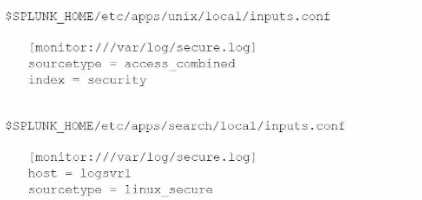
What is the value of the sourcetype property for this stanza based on Splunk's configuration file
precedence?
- A. NULL, or unset, due to configuration conflict
- B. access_corabined
- C. linux aacurs
- D. linux_secure, access_combined
Answer:
C
Explanation:
When there are conflicting configurations in Splunk, the platform resolves them based on the
configuration file precedence rules. These rules dictate which settings are applied based on the
hierarchy of the configuration files.
In the provided configurations:
The first configuration in $SPLUNK_HOME/etc/apps/unix/local/inputs.conf sets the sourcetype to
access_combined.
The second configuration in $SPLUNK_HOME/etc/apps/search/local/inputs.conf sets the sourcetype
to linux_secure.
Configuration File Precedence:
In Splunk, configurations in local directories take precedence over those in default.
If two configurations are in local directories of different apps, the alphabetical order of the app
names determines the precedence.
Since "search" comes after "unix" alphabetically, the configuration in
$SPLUNK_HOME/etc/apps/search/local/inputs.conf will take precedence.
Therefore, the value of the sourcetype property for this stanza is linux_secure.
Splunk Documentation Reference:
Configuration File Precedence
Resolving Conflicts in Splunk Configurations
This confirms that the correct answer is C. linux_secure.
Comments
Question 8
A monitor has been created in inputs. con: for a directory that contains a mix of file types.
How would a Cloud Admin fine-tune assigned sourcetypes for different files in the directory during
the input phase?
- A. On the Indexer parsing the data, leave sourcetype as automatic for the directory monitor. Then create a props.conf that assigns a specific sourcetype by source stanza.
- B. On the forwarder collecting the data, leave sourcetype as automatic for the directory monitor. Then create a props. conf that assigns a specific sourcetype by source stanza.
- C. On the Indexer parsing the data, set multiple sourcetype_source attributes for the directory monitor collecting the files. Then create a props, com that filters out unwanted files.
- D. On the forwarder collecting the data, set multiple 3ourcotype_sourc« attributes for the directory monitor collecting the files. Then create a props. conf that filters out unwanted files.
Answer:
B
Explanation:
When dealing with a directory containing a mix of file types, it's essential to fine-tune the
sourcetypes for different files to ensure accurate data parsing and indexing.
B . On the forwarder collecting the data, leave sourcetype as automatic for the directory monitor.
Then create a props.conf that assigns a specific sourcetype by source stanza: This is the correct
answer. In this approach, the Universal Forwarder is set up with a directory monitor where the
sourcetype is initially left as automatic. Then, a props.conf file is configured to specify different
sourcetypes based on the source (filename or path). This ensures that as the data is collected, it is
appropriately categorized by sourcetype according to the file type.
Splunk Documentation Reference:
Configuring Inputs and Sourcetypes
Fine-tuning sourcetypes
Comments
Question 9
Windows Input types are collected in Splunk via a script which is configurable using the GUI. What is
this type of input called?
- A. Batch
- B. Scripted
- C. Modular
- D. Front-end
Answer:
C
Explanation:
Windows inputs in Splunk, particularly those that involve more advanced data collection capabilities
beyond simple file monitoring, can utilize scripts or custom inputs. These are typically referred to as
Modular Inputs.
C . Modular: This is the correct answer. Modular Inputs are designed to be configurable via the
Splunk Web UI and can collect data using custom or predefined scripts, handling more complex data
collection tasks. This is the type of input that is used for collecting Windows-specific data such as
Event Logs, Performance Monitoring, and other similar inputs.
Splunk Documentation Reference:
Modular Inputs
Windows Data Collection
Comments
Question 10
Which file or folder below is not a required part of a deployment app?
- A. app.conf (in default or local)
- B. local.meta
- C. metadata folder
- D. props.conf
Answer:
D
Explanation:
When creating a deployment app in Splunk, certain files and folders are considered essential to
ensure proper configuration and operation:
app.conf (in default or local): This is required as it defines the app's metadata and behaviors.
local.meta: This file is important for defining access permissions for the app and is often included.
metadata folder: The metadata folder contains files like local.meta and default.meta and is typically
required for defining permissions and other metadata-related settings.
props.conf: While props.conf is essential for many Splunk apps, it is not mandatory unless you need
to define specific data parsing or transformation rules.
D . props.conf is the correct answer because, although it is commonly used, it is not a mandatory
part of every deployment app. An app may not need data parsing configurations, and thus,
props.conf might not be present in some apps.
Splunk Documentation Reference:
Building Splunk Apps
Deployment Apps
This confirms that props.conf is not a required part of a deployment app, making it the correct
answer.
Comments
Page 1 out of 7
Viewing questions 1-10 out of 80
page 2