Question 1
This file has been manually created on a universal forwarder
A new Splunk admin comes in and connects the universal forwarders to a deployment server and
deploys the same app with a new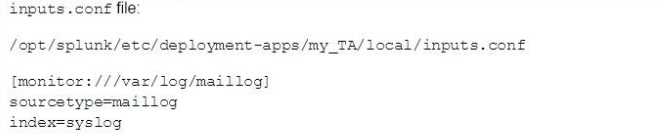
Which file is now monitored?
- A. /var/log/messages
- B. /var/log/maillog
- C. /var/log/maillog and /var/log/messages
- D. none of the above
Answer:
B
Comments
Question 2
In which phase of the index time process does the license metering occur?
- A. input phase
- B. Parsing phase
- C. Indexing phase
- D. Licensing phase
Answer:
C
Explanation:
"When ingesting event data, the measured data volume is based on the new raw data that is placed
into the indexing pipeline. Because the data is measured at the indexing pipeline, data that is
filetered and dropped prior to indexing does not count against the license volume qota."
https://docs.splunk.com/Documentation/Splunk/8.0.6/Admin/HowSplunklicensingworks
Comments
Question 3
You update a props. conf file while Splunk is running. You do not restart Splunk and you run this
command: splunk btoo1 props list —debug. What will the output be?
- A. list of all the configurations on-disk that Splunk contains.
- B. A verbose list of all configurations as they were when splunkd started.
- C. A list of props. conf configurations as they are on-disk along with a file path from which the configuration is located
- D. A list of the current running props, conf configurations along with a file path from which the configuration was made
Answer:
C
Explanation:
https://docs.splunk.com/Documentation/Splunk/8.0.1/Troubleshooting/Usebtooltotroubleshootcon
figurations
"The btool command simulates the merging process using the on-disk conf files and creates a report
showing the merged settings."
"The report does not necessarily represent what's loaded in memory. If a conf file change is made
that requires a service restart, the btool report shows the change even though that change isn't
active."
Comments
Question 4
When running the command shown below, what is the default path in which deployment server.
conf is created?
splunk set deploy-poll deployServer:port
- A. SFLUNK_HOME/etc/deployment
- B. SPLUNK_HOME/etc/system/local
- C. SPLUNK_HOME/etc/system/default
- D. SPLUNK_KOME/etc/apps/deployment
Answer:
C
Explanation:
https://docs.splunk.com/Documentation/Splunk/8.1.1/Updating/Definedeploymentclasses#Ways_t
o_define_server_classes "When you use forwarder management to create a new server class, it
saves the server class definition in a copy of serverclass.conf under
$SPLUNK_HOME/etc/system/local. If, instead of using forwarder management, you decide to directly
edit serverclass.conf, it is recommended that you create the serverclass.conf file in that same
directory, $SPLUNK_HOME/etc/system/local."
Comments
Question 5
The priority of layered Splunk configuration files depends on the file's:
- A. Owner
- B. Weight
- C. Context
- D. Creation time
Answer:
C
Explanation:
https://docs.splunk.com/Documentation/Splunk/7.3.0/Admin/Wheretofindtheconfigurationfiles
"To determine the order of directories for evaluating configuration file precendence, Splunk software
considers each file's context. Configuration files operate in either a global context or in the context of
the current app and user"
Comments
Question 6
When configuring monitor inputs with whitelists or blacklists, what is the supported method of
filtering the lists?
- A. Slash notation
- B. Regular expression
- C. Irregular expression
- D. Wildcard-only expression
Answer:
B
Explanation:
https://docs.splunk.com/Documentation/Splunk/latest/Data/Whitelistorblacklistspecificincomingdat
a#Include_or_exclude_specific_incoming_data
Comments
Question 7
What is required when adding a native user to Splunk? (select all that apply)
- A. Password
- B. Username
- C. Full Name
- D. Default app
Answer:
AB
Explanation:
According to the Splunk system admin course PDF, When adding native users, Username and
Password ARE REQUIRED
Comments
Question 8
What are the minimum required settings when creating a network input in Splunk?
- A. Protocol, port number
- B. Protocol, port, location
- C. Protocol, username, port
- D. Protocol, IP. port number
Answer:
A
Explanation:
https://docs.splunk.com/Documentation/Splunk/8.0.5/Admin/Inputsconf
[tcp://<remote server>:<port>]
*Configures the input to listen on a specific TCP network port.
*If a <remote server> makes a connection to this instance, the input uses this stanza to configure
itself.
*If you do not specify <remote server>, this stanza matches all connections on the specified port.
*Generates events with source set to "tcp:<port>", for example: tcp:514
*If you do not specify a sourcetype, generates events with sourcetype set to "tcp-raw"
Comments
Question 9
Which Splunk component requires a Forwarder license?
- A. Search head
- B. Heavy forwarder
- C. Heaviest forwarder
- D. Universal forwarder
Answer:
B
Comments
Question 10
Which optional configuration setting in inputs .conf allows you to selectively forward the data to
specific indexer(s)?
- A. _TCP_ROUTING
- B. _INDEXER_LIST
- C. _INDEXER_GROUP
- D. _INDEXER ROUTING
Answer:
A
Explanation:
https://docs.splunk.com/Documentation/Splunk/7.0.3/Forwarding/Routeandfilterdatad#Perform_se
lective_indexing_and_forwarding
Specifies a comma-separated list of tcpout group names. Use this setting to selectively forward your
data to specific indexers by specifying the tcpout groups that the forwarder should use when
forwarding the data. Define the tcpout group names in the outputs.conf file in
[tcpout:<tcpout_group_name>] stanzas. The groups present in defaultGroup in [tcpout] stanza in the
outputs.conf file.
Comments
Page 1 out of 18
Viewing questions 1-10 out of 189
page 2