Question 1
Which stages support external tables?
- A. Internal stages only; within a single Snowflake account
- B. internal stages only from any Snowflake account in the organization
- C. External stages only from any region, and any cloud provider
- D. External stages only, only on the same region and cloud provider as the Snowflake account
Answer:
C
Explanation:
External stages only from any region, and any cloud provider support external tables. External tables
are virtual tables that can query data from files stored in external stages without loading them into
Snowflake tables. External stages are references to locations outside of Snowflake, such as Amazon
S3 buckets, Azure Blob Storage containers, or Google Cloud Storage buckets. External stages can be
created from any region and any cloud provider, as long as they have a valid URL and credentials. The
other options are incorrect because internal stages do not support external tables. Internal stages are
locations within Snowflake that can store files for loading or unloading data. Internal stages can be
user stages, table stages, or named stages.
Comments
Question 2
A Data Engineer wants to check the status of a pipe named my_pipe. The pipe is inside a database
named test and a schema named Extract (case-sensitive).
Which query will provide the status of the pipe?
- A. SELECT FROM SYSTEM$PIPE_STATUS (''test.'extract'.my_pipe"i:
- B. SELECT FROM SYSTEM$PIPE_STATUS (,test.,,Extracr,,.ny_pipe, i I
- C. SELE2T * FROM SYSTEM$PIPE_STATUS < ' test. "Extract", my_pipe');
- D. SELECT * FROM SYSTEM$PIPE_STATUS ("test. 'extract' .my_pipe"};
Answer:
C
Explanation:
The query that will provide the status of the pipe is SELECT * FROM
SYSTEM$PIPE_STATUS(‘test.“Extract”.my_pipe’);. The SYSTEM$PIPE_STATUS function returns
information about a pipe, such as its name, status, last received message timestamp, etc. The
function takes one argument: the pipe name in a qualified form. The pipe name should include the
database name, the schema name, and the pipe name, separated by dots. If any of these names are
case-sensitive identifiers, they should be enclosed in double quotes. In this case, the schema name
Extract is case-sensitive and should be quoted. The other options are incorrect because they do not
follow the correct syntax for the pipe name argument. Option A and B use single quotes instead of
double quotes for case-sensitive identifiers. Option D uses double quotes instead of single quotes for
non-case-sensitive identifiers.
Comments
Question 3
A Data Engineer is investigating a query that is taking a long time to return The Query Profile shows
the following: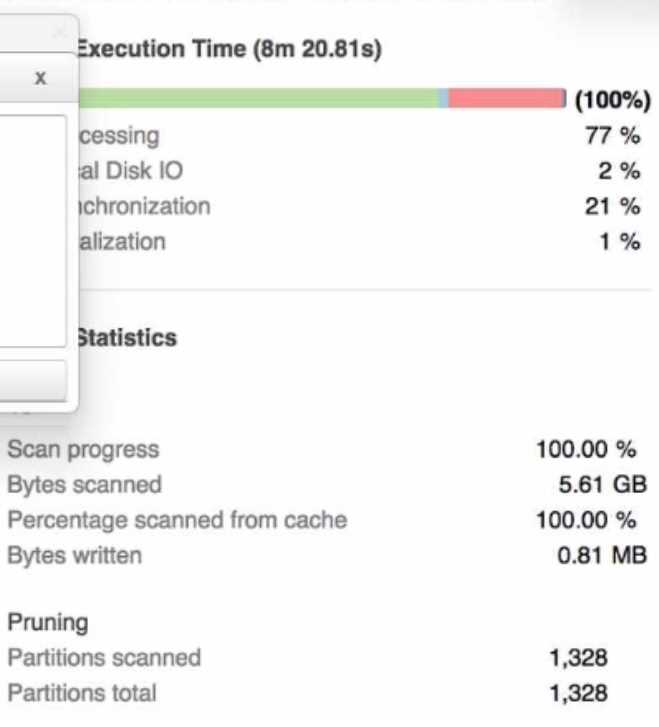
What step should the Engineer take to increase the query performance?
- A. Add additional virtual warehouses.
- B. increase the size of the virtual warehouse.
- C. Rewrite the query using Common Table Expressions (CTEs)
- D. Change the order of the joins and start with smaller tables first
Answer:
B
Explanation:
The step that the Engineer should take to increase the query performance is to increase the size of
the virtual warehouse. The Query Profile shows that most of the time was spent on local disk IO,
which indicates that the query was reading a lot of data from disk rather than from cache. This could
be due to a large amount of data being scanned or a low cache hit ratio. Increasing the size of the
virtual warehouse will increase the amount of memory and cache available for the query, which
could reduce the disk IO time and improve the query performance. The other options are not likely
to increase the query performance significantly. Option A, adding additional virtual warehouses, will
not help unless they are used in a multi-cluster warehouse configuration or for concurrent queries.
Option C, rewriting the query using Common Table Expressions (CTEs), will not affect the amount of
data scanned or cached by the query. Option D, changing the order of the joins and starting with
smaller tables first, will not reduce the disk IO time unless it also reduces the amount of data
scanned or cached by the query.
Comments
Question 4
What is a characteristic of the use of binding variables in JavaScript stored procedures in Snowflake?
- A. All types of JavaScript variables can be bound
- B. All Snowflake first-class objects can be bound
- C. Only JavaScript variables of type number, string and sf Date can be bound
- D. Users are restricted from binding JavaScript variables because they create SQL injection attack vulnerabilities
Answer:
C
Explanation:
A characteristic of the use of binding variables in JavaScript stored procedures in Snowflake is that
only JavaScript variables of type number, string and sf Date can be bound. Binding variables are a
way to pass values from JavaScript variables to SQL statements within a stored procedure. Binding
variables can improve the security and performance of the stored procedure by preventing SQL
injection attacks and reducing the parsing overhead. However, not all types of JavaScript variables
can be bound. Only the primitive types number and string, and the Snowflake-specific type sf Date,
can be bound. The other options are incorrect because they do not describe a characteristic of the
use of binding variables in JavaScript stored procedures in Snowflake. Option A is incorrect because
authenticator is not a type of JavaScript variable, but a parameter of the
snowflake.connector.connect function. Option B is incorrect because arrow_number_to_decimal is
not a type of JavaScript variable, but a parameter of the snowflake.connector.connect function.
Option D is incorrect because users are not restricted from binding JavaScript variables, but
encouraged to do so.
Comments
Question 5
Which use case would be BEST suited for the search optimization service?
- A. Analysts who need to perform aggregates over high cardinality columns
- B. Business users who need fast response times using highly selective filters
- C. Data Scientists who seek specific JOIN statements with large volumes of data
- D. Data Engineers who create clustered tables with frequent reads against clustering keys
Answer:
B
Explanation:
The use case that would be best suited for the search optimization service is business users who
need fast response times using highly selective filters. The search optimization service is a feature
that enables faster queries on tables with high cardinality columns by creating inverted indexes on
those columns. High cardinality columns are columns that have a large number of distinct values,
such as customer IDs, product SKUs, or email addresses. Queries that use highly selective filters on
high cardinality columns can benefit from the search optimization service because they can quickly
locate the relevant rows without scanning the entire table. The other options are not best suited for
the search optimization service. Option A is incorrect because analysts who need to perform
aggregates over high cardinality columns will not benefit from the search optimization service, as
they will still need to scan all the rows that match the filter criteria. Option C is incorrect because
data scientists who seek specific JOIN statements with large volumes of data will not benefit from the
search optimization service, as they will still need to perform join operations that may involve
shuffling or sorting data across nodes. Option D is incorrect because data engineers who create
clustered tables with frequent reads against clustering keys will not benefit from the search
optimization service, as they already have an efficient way to organize and access data based on
clustering keys.
Comments
Question 6
A Data Engineer is writing a Python script using the Snowflake Connector for Python. The Engineer
will use the snowflake. Connector.connect function to connect to Snowflake The requirements are:
* Raise an exception if the specified database schema or warehouse does not exist
* improve download performance
Which parameters of the connect function should be used? (Select TWO).
- A. authenticator
- B. arrow_nunber_to_decimal
- C. client_prefetch_threads
- D. client_session_keep_alivs
- E. validate_default_parameters
Answer:
C, E
Explanation:
The parameters of the connect function that should be used are client_prefetch_threads and
validate_default_parameters. The client_prefetch_threads parameter controls the number of
threads used to download query results from Snowflake. Increasing this parameter can improve
download performance by parallelizing the download process. The validate_default_parameters
parameter controls whether an exception should be raised if the specified database, schema, or
warehouse does not exist or is not authorized. Setting this parameter to True can help catch errors
early and avoid unexpected results.
Comments
Question 7
What are characteristics of Snowpark Python packages? (Select THREE).
Third-party packages can be registered as a dependency to the Snowpark session using the session,
import () method.
- A. Python packages can access any external endpoints
- B. Python packages can only be loaded in a local environment
- C. Third-party supported Python packages are locked down to prevent hitting
- D. The SQL command DESCRIBE FUNCTION will list the imported Python packages of the Python User-Defined Function (UDF).
- E. Querying information__schema .packages will provide a list of supported Python packages and versions
Answer:
ADE
Explanation:
The characteristics of Snowpark Python packages are:
Third-party packages can be registered as a dependency to the Snowpark session using the
session.import() method.
The SQL command DESCRIBE FUNCTION will list the imported Python packages of the Python User-
Defined Function (UDF).
Querying information_schema.packages will provide a list of supported Python packages and
versions.
These characteristics indicate how Snowpark Python packages can be imported, inspected, and
verified in Snowflake. The other options are not characteristics of Snowpark Python packages. Option
B is incorrect because Python packages can be loaded in both local and remote environments using
Snowpark. Option C is incorrect because third-party supported Python packages are not locked down
to prevent hitting external endpoints, but rather restricted by network policies and security settings.
Comments
Question 8
Which methods can be used to create a DataFrame object in Snowpark? (Select THREE)
- A. session.jdbc_connection()
- B. session.read.json{)
- C. session,table()
- D. DataFraas.writeO
- E. session.builder()
- F. session.sql()
Answer:
B, C, F
Explanation:
The methods that can be used to create a DataFrame object in Snowpark are session.read.json(),
session.table(), and session.sql(). These methods can create a DataFrame from different sources,
such as JSON files, Snowflake tables, or SQL queries. The other options are not methods that can
create a DataFrame object in Snowpark. Option A, session.jdbc_connection(), is a method that can
create a JDBC connection object to connect to a database. Option D, DataFrame.write(), is a method
that can write a DataFrame to a destination, such as a file or a table. Option E, session.builder(), is a
method that can create a SessionBuilder object to configure and build a Snowpark session.
Comments
Question 9
A Data Engineer is implementing a near real-time ingestion pipeline to toad data into Snowflake
using the Snowflake Kafka connector. There will be three Kafka topics created.
……snowflake objects are created automatically when the Kafka connector starts? (Select THREE)
- A. Tables
- B. Tasks
- C. Pipes
- D. internal stages
- E. External stages
- F. Materialized views
Answer:
A, C, D
Explanation:
The Snowflake objects that are created automatically when the Kafka connector starts are tables,
pipes, and internal stages. The Kafka connector will create one table, one pipe, and one internal
stage for each Kafka topic that is configured in the connector properties. The table will store the data
from the Kafka topic, the pipe will load the data from the stage to the table using COPY statements,
and the internal stage will store the files that are produced by the Kafka connector using PUT
commands. The other options are not Snowflake objects that are created automatically when the
Kafka connector starts. Option B, tasks, are objects that can execute SQL statements on a schedule
without requiring a warehouse. Option E, external stages, are objects that can reference locations
outside of Snowflake, such as cloud storage services. Option F, materialized views, are objects that
can store the precomputed results of a query and refresh them periodically.
Comments
Question 10
The following chart represents the performance of a virtual warehouse over time: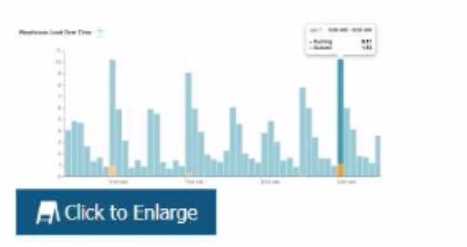
A Data Engineer notices that the warehouse is queueing queries The warehouse is size X-Small the
minimum and maximum cluster counts are set to 1 the scaling policy is set to i and auto-suspend is
set to 10 minutes.
How can the performance be improved?
- A. Change the cluster settings
- B. Increase the size of the warehouse
- C. Change the scaling policy to economy
- D. Change auto-suspend to a longer time frame
Answer:
B
Explanation:
The performance can be improved by increasing the size of the warehouse. The chart shows that the
warehouse is queueing queries, which means that there are more queries than the warehouse can
handle at its current size. Increasing the size of the warehouse will increase its processing power and
concurrency limit, which could reduce the queueing time and improve the performance. The other
options are not likely to improve the performance significantly. Option A, changing the cluster
settings, will not help unless the minimum and maximum cluster counts are increased to allow for
multi-cluster scaling. Option C, changing the scaling policy to economy, will not help because it will
reduce the responsiveness of the warehouse to scale up or down based on demand. Option D,
changing auto-suspend to a longer time frame, will not help because it will only affect how long the
warehouse stays idle before suspending itself.
Comments
Page 1 out of 6
Viewing questions 1-10 out of 65
page 2