Question 1
A Data Engineer is designing a near real-time ingestion pipeline for a retail company to ingest event
logs into Snowflake to derive insights. A Snowflake Architect is asked to define security best practices
to configure access control privileges for the data load for auto-ingest to Snowpipe.
What are the MINIMUM object privileges required for the Snowpipe user to execute Snowpipe?
- A. OWNERSHIP on the named pipe, USAGE on the named stage, target database, and schema, and INSERT and SELECT on the target table
- B. OWNERSHIP on the named pipe, USAGE and READ on the named stage, USAGE on the target database and schema, and INSERT end SELECT on the target table
- C. CREATE on the named pipe, USAGE and READ on the named stage, USAGE on the target database and schema, and INSERT end SELECT on the target table
- D. USAGE on the named pipe, named stage, target database, and schema, and INSERT and SELECT on the target table
Answer:
B
Explanation:
According to the SnowPro Advanced: Architect documents and learning resources, the minimum
object privileges required for the Snowpipe user to execute Snowpipe are:
OWNERSHIP on the named pipe.
This privilege allows the Snowpipe user to create, modify, and drop
the pipe object that defines the COPY statement for loading data from the stage to the table1
.
USAGE and READ on the named stage.
These privileges allow the Snowpipe user to access and read
the data files from the stage that are loaded by Snowpipe2
.
USAGE on the target database and schema.
These privileges allow the Snowpipe user to access the
database and schema that contain the target table3
.
INSERT and SELECT on the target table.
These privileges allow the Snowpipe user to insert data into
the table and select data from the table4
.
The other options are incorrect because they do not specify the minimum object privileges required
for the Snowpipe user to execute Snowpipe. Option A is incorrect because it does not include the
READ privilege on the named stage, which is required for the Snowpipe user to read the data files
from the stage. Option C is incorrect because it does not include the OWNERSHIP privilege on the
named pipe, which is required for the Snowpipe user to create, modify, and drop the pipe object.
Option D is incorrect because it does not include the OWNERSHIP privilege on the named pipe or the
READ privilege on the named stage, which are both required for the Snowpipe user to execute
Snowpipe. Reference:
CREATE PIPE | Snowflake Documentation
,
CREATE STAGE | Snowflake
Documentation
,
CREATE DATABASE | Snowflake Documentation
,
CREATE TABLE | Snowflake
Documentation
Comments
Question 2
The IT Security team has identified that there is an ongoing credential stuffing attack on many of
their organization’s system.
What is the BEST way to find recent and ongoing login attempts to Snowflake?
- A. Call the LOGIN_HISTORY Information Schema table function.
- B. Query the LOGIN_HISTORY view in the ACCOUNT_USAGE schema in the SNOWFLAKE database.
- C. View the History tab in the Snowflake UI and set up a filter for SQL text that contains the text "LOGIN".
- D. View the Users section in the Account tab in the Snowflake UI and review the last login column.
Answer:
B
Explanation:
This view can be used to query login attempts by Snowflake users within the last 365 days (1 year). It
provides information such as the event timestamp, the user name, the client IP, the authentication
method, the success or failure status, and the error code or message if the login attempt was
unsuccessful.
By querying this view, the IT Security team can identify any suspicious or malicious
login attempts to Snowflake and take appropriate actions to prevent credential stuffing attacks1
. The
other options are not the best ways to find recent and ongoing login attempts to Snowflake.
Option A
is incorrect because the LOGIN_HISTORY Information Schema table function only returns login events
within the last 7 days, which may not be sufficient to detect credential stuffing attacks that span a
longer period of time2
.
Option C is incorrect because the History tab in the Snowflake UI only shows
the queries executed by the current user or role, not the login events of other users or roles3
. Option
D is incorrect because the Users section in the Account tab in the Snowflake UI only shows the last
login time for each user, not the details of the login attempts or the failures.
Comments
Question 3
An Architect has a VPN_ACCESS_LOGS table in the SECURITY_LOGS schema containing timestamps of
the connection and disconnection, username of the user, and summary statistics.
What should the Architect do to enable the Snowflake search optimization service on this table?
- A. Assume role with OWNERSHIP on future tables and ADD SEARCH OPTIMIZATION on the SECURITY_LOGS schema.
- B. Assume role with ALL PRIVILEGES including ADD SEARCH OPTIMIZATION in the SECURITY LOGS schema.
- C. Assume role with OWNERSHIP on VPN_ACCESS_LOGS and ADD SEARCH OPTIMIZATION in the SECURITY_LOGS schema.
- D. Assume role with ALL PRIVILEGES on VPN_ACCESS_LOGS and ADD SEARCH OPTIMIZATION in the SECURITY_LOGS schema.
Answer:
C
Explanation:
According to the SnowPro Advanced: Architect Exam Study Guide, to enable the search optimization
service on a table, the user must have the ADD SEARCH OPTIMIZATION privilege on the table and the
schema. The privilege can be granted explicitly or inherited from a higher-level object, such as a
database or a role. The OWNERSHIP privilege on a table implies the ADD SEARCH OPTIMIZATION
privilege, so the user who owns the table can enable the search optimization service on it. Therefore,
the correct answer is to assume a role with OWNERSHIP on VPN_ACCESS_LOGS and ADD SEARCH
OPTIMIZATION in the SECURITY_LOGS schema. This will allow the user to enable the search
optimization service on the VPN_ACCESS_LOGS table and any future tables created in the
SECURITY_LOGS schema. The other options are incorrect because they either grant excessive
privileges or do not grant the required privileges on the table or the schema. Reference:
SnowPro Advanced: Architect Exam Study Guide
, page 11, section 2.3.1
Snowflake Documentation: Enabling the Search Optimization Service
Comments
Question 4
A table contains five columns and it has millions of records. The cardinality distribution of the
columns is shown below: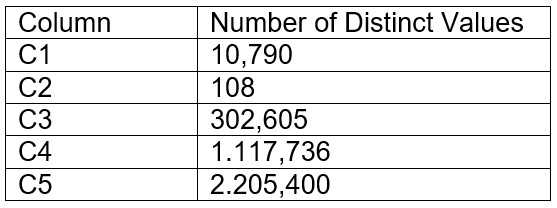
Column C4 and C5 are mostly used by SELECT queries in the GROUP BY and ORDER BY clauses.
Whereas columns C1, C2 and C3 are heavily used in filter and join conditions of SELECT queries.
The Architect must design a clustering key for this table to improve the query performance.
Based on Snowflake recommendations, how should the clustering key columns be ordered while
defining the multi-column clustering key?
- A. C5, C4, C2
- B. C3, C4, C5
- C. C1, C3, C2
- D. C2, C1, C3
Answer:
D
Explanation:
According to the Snowflake documentation, the following are some considerations for choosing
clustering for a table1
:
Clustering is optimal when either:
You require the fastest possible response times, regardless of cost.
Your improved query performance offsets the credits required to cluster and maintain the table.
Clustering is most effective when the clustering key is used in the following types of query
predicates:
Filter predicates (e.g. WHERE clauses)
Join predicates (e.g. ON clauses)
Grouping predicates (e.g. GROUP BY clauses)
Sorting predicates (e.g. ORDER BY clauses)
Clustering is less effective when the clustering key is not used in any of the above query predicates,
or when the clustering key is used in a predicate that requires a function or expression to be applied
to the key (e.g. DATE_TRUNC, TO_CHAR, etc.).
For most tables, Snowflake recommends a maximum of 3 or 4 columns (or expressions) per key.
Adding more than 3-4 columns tends to increase costs more than benefits.
Based on these considerations, the best option for the clustering key columns is C. C1, C3, C2,
because:
These columns are heavily used in filter and join conditions of SELECT queries, which are the most
effective types of predicates for clustering.
These columns have high cardinality, which means they have many distinct values and can help
reduce the clustering skew and improve the compression ratio.
These columns are likely to be correlated with each other, which means they can help co-locate
similar rows in the same micro-partitions and improve the scan efficiency.
These columns do not require any functions or expressions to be applied to them, which means they
can be directly used in the predicates without affecting the clustering.
Reference: 1
:
Considerations for Choosing Clustering for a Table | Snowflake Documentation
Comments
Question 5
Which security, governance, and data protection features require, at a MINIMUM, the Business
Critical edition of Snowflake? (Choose two.)
- A. Extended Time Travel (up to 90 days)
- B. Customer-managed encryption keys through Tri-Secret Secure
- C. Periodic rekeying of encrypted data
- D. AWS, Azure, or Google Cloud private connectivity to Snowflake
- E. Federated authentication and SSO
Answer:
B, D
Explanation:
According to the SnowPro Advanced: Architect documents and learning resources, the security,
governance, and data protection features that require, at a minimum, the Business Critical edition of
Snowflake are:
Customer-managed encryption keys through Tri-Secret Secure. This feature allows customers to
manage their own encryption keys for data at rest in Snowflake, using a combination of three secrets:
a master key, a service key, and a security password.
This provides an additional layer of security and
control over the data encryption and decryption process1
.
Periodic rekeying of encrypted data. This feature allows customers to periodically rotate the
encryption keys for data at rest in Snowflake, using either Snowflake-managed keys or customer-
managed keys.
This enhances the security and protection of the data by reducing the risk of key
compromise or exposure2
.
The other options are incorrect because they do not require the Business Critical edition of
Snowflake.
Option A is incorrect because extended Time Travel (up to 90 days) is available with the
Enterprise edition of Snowflake3
.
Option D is incorrect because AWS, Azure, or Google Cloud private
connectivity to Snowflake is available with the Standard edition of Snowflake4
.
Option E is incorrect
because federated authentication and SSO are available with the Standard edition of
Snowflake5
. Reference:
Tri-Secret Secure | Snowflake Documentation
,
Periodic Rekeying of
Encrypted Data | Snowflake Documentation
,
Snowflake Editions | Snowflake
Documentation
,
Snowflake Network Policies | Snowflake Documentation
,
Configuring Federated
Authentication and SSO | Snowflake Documentation
Comments
Question 6
A company wants to deploy its Snowflake accounts inside its corporate network with no visibility on
the internet. The company is using a VPN infrastructure and Virtual Desktop Infrastructure (VDI) for
its Snowflake users. The company also wants to re-use the login credentials set up for the VDI to
eliminate redundancy when managing logins.
What Snowflake functionality should be used to meet these requirements? (Choose two.)
- A. Set up replication to allow users to connect from outside the company VPN.
- B. Provision a unique company Tri-Secret Secure key.
- C. Use private connectivity from a cloud provider.
- D. Set up SSO for federated authentication.
- E. Use a proxy Snowflake account outside the VPN, enabling client redirect for user logins.
Answer:
C, D
Explanation:
According to the SnowPro Advanced: Architect documents and learning resources, the Snowflake
functionality that should be used to meet these requirements are:
Use private connectivity from a cloud provider. This feature allows customers to connect to
Snowflake from their own private network without exposing their data to the public Internet.
Snowflake integrates with AWS PrivateLink, Azure Private Link, and Google Cloud Private Service
Connect to offer private connectivity from customers’ VPCs or VNets to Snowflake
endpoints.
Customers can control how traffic reaches the Snowflake endpoint and avoid the need for
proxies or public IP addresses123
.
Set up SSO for federated authentication. This feature allows customers to use their existing identity
provider (IdP) to authenticate users for SSO access to Snowflake. Snowflake supports most SAML 2.0-
compliant vendors as an IdP, including Okta, Microsoft AD FS, Google G Suite, Microsoft Azure Active
Directory, OneLogin, Ping Identity, and PingOne.
By setting up SSO for federated authentication,
customers can leverage their existing user credentials and profile information, and provide stronger
security than username/password authentication4
.
The other options are incorrect because they do not meet the requirements or are not feasible.
Option A is incorrect because setting up replication does not allow users to connect from outside the
company VPN. Replication is a feature of Snowflake that enables copying databases across accounts
in different regions and cloud platforms.
Replication does not affect the connectivity or visibility of
the accounts5
. Option B is incorrect because provisioning a unique company Tri-Secret Secure key
does not affect the network or authentication requirements. Tri-Secret Secure is a feature of
Snowflake that allows customers to manage their own encryption keys for data at rest in Snowflake,
using a combination of three secrets: a master key, a service key, and a security password.
Tri-Secret
Secure provides an additional layer of security and control over the data encryption and decryption
process, but it does not enable private connectivity or SSO6
. Option E is incorrect because using a
proxy Snowflake account outside the VPN, enabling client redirect for user logins, is not a supported
or recommended way of meeting the requirements. Client redirect is a feature of Snowflake that
allows customers to connect to a different Snowflake account than the one specified in the
connection string.
This feature is useful for scenarios such as cross-region failover, data sharing, and
account migration, but it does not provide private connectivity or SSO7
. Reference:
AWS PrivateLink
& Snowflake | Snowflake Documentation
,
Azure Private Link & Snowflake | Snowflake
Documentation
,
Google Cloud Private Service Connect & Snowflake | Snowflake
Documentation
,
Overview of Federated Authentication and SSO | Snowflake
Documentation
,
Replicating Databases Across Multiple Accounts | Snowflake Documentation
,
Tri-
Secret Secure | Snowflake Documentation
,
Redirecting Client Connections | Snowflake
Documentation
Comments
Question 7
How do Snowflake databases that are created from shares differ from standard databases that are
not created from shares? (Choose three.)
- A. Shared databases are read-only.
- B. Shared databases must be refreshed in order for new data to be visible.
- C. Shared databases cannot be cloned.
- D. Shared databases are not supported by Time Travel.
- E. Shared databases will have the PUBLIC or INFORMATION_SCHEMA schemas without explicitly granting these schemas to the share.
- F. Shared databases can also be created as transient databases.
Answer:
A, C, D
Explanation:
According to the SnowPro Advanced: Architect documents and learning resources, the ways that
Snowflake databases that are created from shares differ from standard databases that are not
created from shares are:
Shared databases are read-only. This means that the data consumers who access the shared
databases cannot modify or delete the data or the objects in the databases.
The data providers who
share the databases have full control over the data and the objects, and can grant or revoke
privileges on them1
.
Shared databases cannot be cloned. This means that the data consumers who access the shared
databases cannot create a copy of the databases or the objects in the databases.
The data providers
who share the databases can clone the databases or the objects, but the clones are not automatically
shared2
.
Shared databases are not supported by Time Travel. This means that the data consumers who access
the shared databases cannot use the AS OF clause to query historical data or restore deleted
data.
The data providers who share the databases can use Time Travel on the databases or the
objects, but the historical data is not visible to the data consumers3
.
The other options are incorrect because they are not ways that Snowflake databases that are created
from shares differ from standard databases that are not created from shares. Option B is incorrect
because shared databases do not need to be refreshed in order for new data to be visible.
The data
consumers who access the shared databases can see the latest data as soon as the data providers
update the data1
. Option E is incorrect because shared databases will not have the PUBLIC or
INFORMATION_SCHEMA schemas without explicitly granting these schemas to the share.
The data
consumers who access the shared databases can only see the objects that the data providers grant to
the share, and the PUBLIC and INFORMATION_SCHEMA schemas are not granted by default4
. Option
F is incorrect because shared databases cannot be created as transient databases. Transient
databases are databases that do not support Time Travel or Fail-safe, and can be dropped without
affecting the retention period of the data.
Shared databases are always created as permanent
databases, regardless of the type of the source database5
. Reference:
Introduction to Secure Data
Sharing | Snowflake Documentation
,
Cloning Objects | Snowflake Documentation
,
Time Travel |
Snowflake Documentation
,
Working with Shares | Snowflake Documentation
,
CREATE DATABASE |
Snowflake Documentation
Comments
Question 8
What integration object should be used to place restrictions on where data may be exported?
- A. Stage integration
- B. Security integration
- C. Storage integration
- D. API integration
Answer:
C
Explanation:
In Snowflake, a storage integration is used to define and configure external cloud storage that
Snowflake will interact with. This includes specifying security policies for access control. One of the
main features of storage integrations is the ability to set restrictions on where data may be exported.
This is done by binding the storage integration to specific cloud storage locations, thereby ensuring
that Snowflake can only access those locations. It helps to maintain control over the data and
complies with data governance and security policies by preventing unauthorized data exports to
unspecified locations.
Comments
Question 9
The following DDL command was used to create a task based on a stream: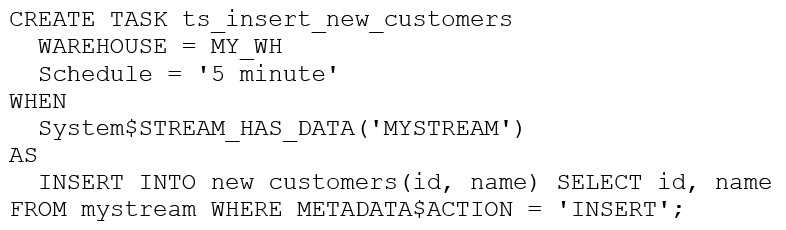
Assuming MY_WH is set to auto_suspend – 60 and used exclusively for this task, which statement is
true?
- A. The warehouse MY_WH will be made active every five minutes to check the stream.
- B. The warehouse MY_WH will only be active when there are results in the stream.
- C. The warehouse MY_WH will never suspend.
- D. The warehouse MY_WH will automatically resize to accommodate the size of the stream.
Answer:
B
Explanation:
The warehouse MY_WH will only be active when there are results in the stream. This is because the
task is created based on a stream, which means that the task will only be executed when there are
new data in the stream. Additionally, the warehouse is set to auto_suspend - 60, which means that
the warehouse will automatically suspend after 60 seconds of inactivity. Therefore, the warehouse
will only be active when there are results in the stream. Reference:
[CREATE TASK | Snowflake Documentation]
[Using Streams and Tasks | Snowflake Documentation]
[CREATE WAREHOUSE | Snowflake Documentation]
Comments
Question 10
What is a characteristic of loading data into Snowflake using the Snowflake Connector for Kafka?
- A. The Connector only works in Snowflake regions that use AWS infrastructure.
- B. The Connector works with all file formats, including text, JSON, Avro, Ore, Parquet, and XML.
- C. The Connector creates and manages its own stage, file format, and pipe objects.
- D. Loads using the Connector will have lower latency than Snowpipe and will ingest data in real time.
Answer:
C
Explanation:
According to the SnowPro Advanced: Architect documents and learning resources, a characteristic of
loading data into Snowflake using the Snowflake Connector for Kafka is that the Connector creates
and manages its own stage, file format, and pipe objects. The stage is an internal stage that is used to
store the data files from the Kafka topics. The file format is a JSON or Avro file format that is used to
parse the data files. The pipe is a Snowpipe object that is used to load the data files into the
Snowflake table.
The Connector automatically creates and configures these objects based on the
Kafka configuration properties, and handles the cleanup and maintenance of these objects1
.
The other options are incorrect because they are not characteristics of loading data into Snowflake
using the Snowflake Connector for Kafka. Option A is incorrect because the Connector works in
Snowflake regions that use any cloud infrastructure, not just AWS.
The Connector supports AWS,
Azure, and Google Cloud platforms, and can load data across different regions and cloud platforms
using data replication2
. Option B is incorrect because the Connector does not work with all file
formats, only JSON and Avro. The Connector expects the data in the Kafka topics to be in JSON or
Avro format, and parses the data accordingly.
Other file formats, such as text, ORC, Parquet, or XML,
are not supported by the Connector3
. Option D is incorrect because loads using the Connector do not
have lower latency than Snowpipe, and do not ingest data in real time. The Connector uses
Snowpipe to load data into Snowflake, and inherits the same latency and performance characteristics
of Snowpipe.
The Connector does not provide real-time ingestion, but near real-time ingestion,
depending on the frequency and size of the data files4
. Reference:
Installing and Configuring the
Kafka Connector | Snowflake Documentation
,
Sharing Data Across Regions and Cloud Platforms |
Snowflake Documentation
,
Overview of the Kafka Connector | Snowflake Documentation
,
Using
Snowflake Connector for Kafka With Snowpipe Streaming | Snowflake Documentation
Comments
Page 1 out of 16
Viewing questions 1-10 out of 162
page 2