Question 1
Which PROC MEANS statements specifies variables to group the data before calculating statistics?
- A. CLASS
- B. GROUP
- C. SUMBY
- D. VAR
Answer:
A
Explanation:
In the context of the PROC MEANS procedure in SAS, the CLASS statement is used to specify
categorical variables whose unique values group the data before calculating statistics. This allows
PROC MEANS to calculate statistics like the mean, sum, or standard deviation for each class or group
of data defined by the CLASS variables.
The CLASS statement works as follows:
class variable-list; specifies one or more variables to define groups for analysis.
When used, PROC MEANS computes the requested statistics for each level of the variables listed,
which can be very helpful for analyzing how groups compare across different statistics.
The other options are not used in the PROC MEANS procedure to specify grouping of data:
B . GROUP is not a valid statement in PROC MEANS.
C . SUMBY is not a valid statement in SAS.
D . VAR is used in PROC MEANS to specify the analysis variables for which statistics are to be
computed, not to group the data.
Comments
Question 2
Which program generates the PROC MEANS report below?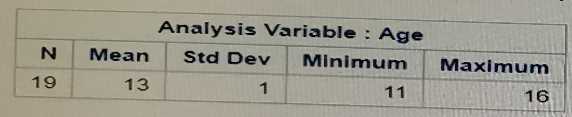
- A. proc means data=sashelp.class nodec; class Age; run;
- B. proc means data=sashelp. class; group Age; run;
- C. proc means data=sashelp. class; by Age; run;
- D. proc means data=sashelp. class maxdec=0; var Age; run;
Answer:
D
Explanation:
The PROC MEANS report shown in the image displays statistics for a single variable Age with no
decimal places. The correct SAS code to generate such a report is option D, which uses the PROC
MEANS procedure with the maxdec=0 option to control the number of decimal places displayed (in
this case, zero) and specifies Age as the analysis variable using the var statement.
The PROC MEANS procedure computes descriptive statistics for numeric variables. The maxdec=0
option is used here to remove decimal places from the report output, which matches the output
shown where the mean, standard deviation, minimum, and maximum are all integers.
The other options are incorrect for the following reasons:
A uses the class statement, which is not appropriate here because Age is not a classification variable
but an analysis variable.
B uses the group statement, which is not a valid statement in the PROC MEANS procedure.
C uses the by statement, which requires the data to be sorted by the BY variable and does not fit the
output provided since it would produce separate statistics for each value of Age.
Reference:
SAS 9.4 documentation for the PROC MEANS statement: SAS Help Center: PROC MEANS
Comments
Question 3
Given the report shown below: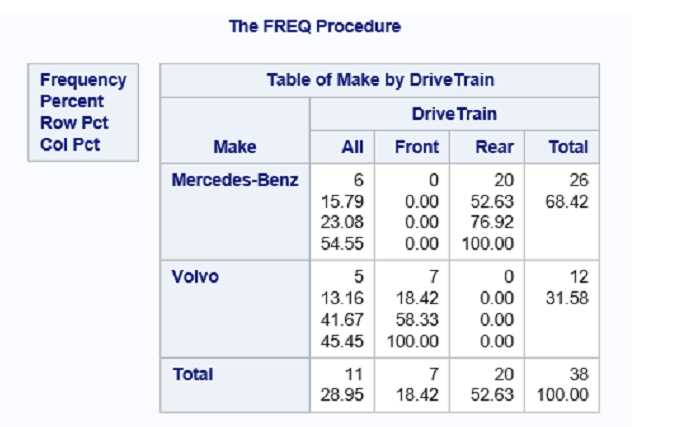
Which PROC PREQ step creates the frequency report?
- A. proc freq data= cars; tables make drivetrain; run;
- B. proc freq data= cars; tables make *drivetrain; run;
- C. proc freq data- cars; tables drivetrain make; run;
- D. proc freq data- cars; tables drivetrain* make; run;
Answer:
B
Explanation:
The report shown in the image is a two-way frequency table generated by the PROC FREQ procedure
which shows the frequency and percentage distribution of two categorical variables. The correct
answer is option B:
proc freq data=cars; tells SAS to use the PROC FREQ procedure on the dataset cars.
tables make*drivetrain; requests the frequency table for the cross of make and drivetrain. The
asterisk (*) denotes a two-way table of the two categorical variables.
run; indicates the end of the proc freq step.
The resulting table in the output has the statistics for Make broken down by Drivetrain category,
which matches the structure seen in the provided image.
Options A, C, and D do not correctly request the two-way table of make by drivetrain. Specifically, C
and D reverse the order, which would change the orientation of the table in the output, and A is
missing the asterisk (*) which is needed for the cross-tabulation of the two variables.
Reference:
SAS 9.4 documentation for the PROC FREQ statement: SAS Help Center: PROC FREQ
Comments
Question 4
Which PROC SORT option allows you to create an output data set of the sorted data?
- A. Data=
- B. SORTOUT=
- C. OUTPUT=
- D. OUT=
Answer:
D
Explanation:
In SAS, the PROC SORT procedure is used to sort data. To save the sorted data into a new dataset,
the OUT= option is used in the PROC SORT statement. This option allows you to specify the name of
the output dataset that will contain the sorted data.
Here is how it's used:
proc sort data=original out=sorted; by variable; run; will sort the dataset original by variable and
create a new dataset named sorted containing the sorted data.
Option A, Data=, is not valid for the PROC SORT procedure. Option B, SORTOUT=, is a common
misconception but is not correct; OUT= is the right option. Option C, OUTPUT=, is not used within
PROC SORT; it is used in other procedures such as PROC TABULATE and PROC SUMMARY for output
datasets.
Reference:
SAS 9.4 documentation for the PROC SORT statement: SAS Help Center: PROC SORT
Comments
Question 5
The following program is summited: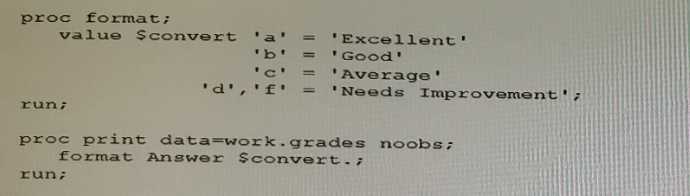
The following report is created: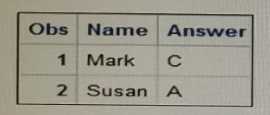
However, the desired report is shown below: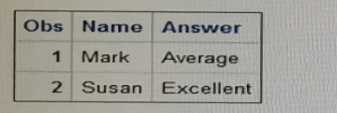
What change is needed to display the desired formatted values for the Answer varia
- A. Change the unformatted values on the VALUE statement to upper case letters
- B. Remove the comma located on the VALUE statement
- C. Add a period to the end of the format name on the VALUE statement.
- D. Remove the dollar sign located at the front of the format name
Answer:
C
Explanation:
When defining custom formats in SAS, it's important to adhere to the correct syntax, which includes
ending format names with a period. In the submitted program, the format $convert is defined
without a period at the end of the format name in the VALUE statement. This is likely causing an
error since format names in the VALUE statement should always end with a period. Option C
correctly identifies that adding a period to the end of the format name on the VALUE statement will
allow SAS to properly recognize and apply the custom format to the Answer variable when the PROC
PRINT step is executed.
The program provided in the question seems to have formatting errors, but based on the information
provided, the suggested change is to add a period to make it $convert. which would correctly apply
the format.
The other options would not resolve the issue of applying the custom format:
A . Changing the case of the unformatted values will not help if the format is not correctly specified.
B . The comma does not seem to be the issue based on the context given.
D . The dollar sign is correct and necessary for character formats; removing it would cause the format
to be invalid for character data.
Reference:
SAS 9.4 documentation for the FORMAT procedure: SAS Help Center: PROC FORMAT
Comments
Question 6
Given the input data set WORK. GR_ANS with two character variables: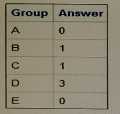
The following SAS program is submitted: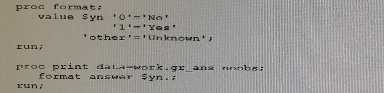
Which report is created?
A)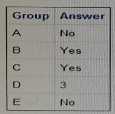
B)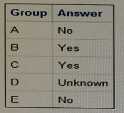
C)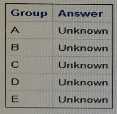
D)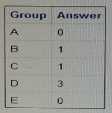
- A. Option A
- B. Option B
- C. Option C
- D. Option D
Answer:
D
Explanation:
The SAS program provided includes a PROC FORMAT step that defines a numeric format called Syn
and applies this format to the variable answer in the PROC PRINT step. The format maps the value '0'
to 'No', '1' to 'Yes', and all other values to 'Unknown'.
However, there is a syntax error in the PROC FORMAT step: it uses a dollar sign before Syn, which is
used to indicate character formats, but the format is defined for numeric values (0 and 1). Therefore,
when applying this format to the answer variable in PROC PRINT, it should not have a dollar sign, it
should be format answer Syn.; instead of format answer $yn.;.
The correct output based on the given code, assuming the error with the dollar sign is corrected,
would be as follows:
For numeric values 0 and 1, 'No' and 'Yes' would be displayed, respectively.
For any other numeric value, 'Unknown' would be displayed.
For character values, the format would not apply and the actual values would be displayed.
Given that the values in the 'answer' column are numeric, the program will format them according to
the defined Syn format. Thus, the report corresponding to Option D, which shows numeric values
unformatted, would be the one created. This indicates that the format was not applied because of
the syntax error with the dollar sign.
Reference:
SAS 9.4 documentation for the FORMAT procedure and statement: SAS Help Center: PROC FORMAT
Comments
Question 7
What is the default sort order of PROC SORT?
- A. Internal
- B. Ascending
- C. Formatted
- D. Descending
Answer:
B
Explanation:
https://documentation.sas.com/?docsetId=proc&docsetTarget=n12jw1r2n7auqqn1urrh8jwezk00.ht
m&docsetVersion=9.4&locale=en#:~:text=ASCENDING%20is%20the%20default%20sort%20order.&t
ext=In%20a%20PROC%20SORT%20KEY,is%20sorted%20in%20ascending%20order
.
The default sort order for PROC SORT in SAS is ascending. This means that if no other sort order is
specified, SAS will arrange the data in ascending order based on the values of the variable(s) listed in
the BY statement.
Here's an example:
proc sort data=mydata; by variable; run; sorts mydata by variable in ascending order by default.
The other options are incorrect in the context of the default sort order:
A . 'Internal' is not a sort order.
C . 'Formatted' refers to sorting data based on formatted values, not the default order.
D . 'Descending' is an alternative sort order that must be explicitly specified with the DESCENDING
keyword.
Reference:
SAS 9.4 documentation for the PROC SORT statement: [SAS Help Center: PROC SORT]
Comments
Question 8
Given the data set NAMES: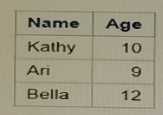
Which PROC SORT program creates the NAMES data set shown below?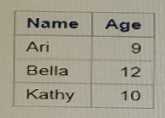
- A. proc sort data=Names; by Name; run;
- B. proc sort data=Names; orderby Name; run;
- C. proc sort data=Names; by Age; run;
- D. proc sort data=Names; orderby Age; run;
Answer:
A
Explanation:
The PROC SORT step in SAS is used to sort data sets by one or more variables. The syntax for the
proc sort step requires the by statement to specify the variable(s) by which to sort the data. The
correct answer is option A:
proc sort data=Names;
by Name;
run;
This sorts the data set by the variable 'Name' in alphabetical order, which matches the sorted NAMES
data set shown in the question. Option B uses orderby, which is not a valid SAS statement. Option C
sorts by 'Age', which would not give the same result as shown in the question. Option D also
incorrectly uses orderby.
Comments
Question 9
How many statements are In the program shown below?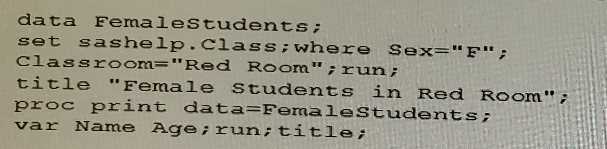
- A. 9
- B. 6
- C. 10
- D. 2
Answer:
B
Explanation:
In the provided program, there are six distinct SAS statements:
data FemaleStudents; - Data step beginning
set sashelp.Class; - Set statement
where Sex="F"; - Where statement
Classroom="Red Room"; - Assignment statement
run; - Run statement to execute the data step
title "Female Students in Red Room"; - Title statement
Note that the proc print and the second run; statement are part of another PROC step to print the
results and hence are not counted in this particular count. The final title; statement is used to clear
the title setting and does not count as part of the program statements being asked about.
Reference:
SAS 9.4 Language Reference: Concepts, "DATA Step"
SAS documentation on "TITLE Statement"
Comments
Question 10
How many statements are in the following PROC PRINT step?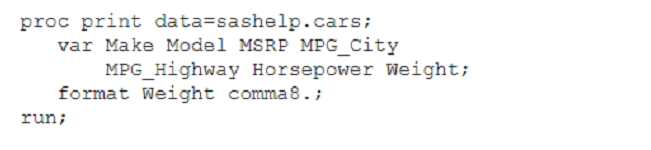
- A. 5
- B. 3
- C. 4
- D. 1
Answer:
C
Explanation:
In the provided image of the SAS code for the PROC PRINT step, the following statements are
present:
proc print data=sashelp.cars; - PROC PRINT step beginning
var Make Model MSRP MPG_City MPG_Highway Horsepower Weight; - VAR statement to specify
variables to print
format Weight comma8.; - FORMAT statement to apply a format to a variable
The final run; statement which would be necessary to execute the PROC PRINT step is not visible in
the image, but it can be inferred to be there since every PROC step must be ended with a run; or
quit; statement.
Thus, there are four statements related to the PROC PRINT step.
Reference:
SAS 9.4 Language Reference: Concepts, "PROC PRINT"
SAS documentation on "VAR Statement" and "FORMAT Statement"
Comments
Page 1 out of 7
Viewing questions 1-10 out of 78
page 2