Question 1
A Salesforce standard profile end user is looking for specific information on an Opportunity record
page. They are overwhelmed by the required scrolling to see the page.
What should the user do to simplify the page to see only what they want?
- A. Collapse detail sections.
- B. Remove activities.
- C. Change page layout assignment.
Answer:
A
Explanation:
Collapsing detail sections is a way to simplify the page to see only what the user wants, as it will hide
the fields in that section and reduce the scrolling.
Comments
Question 2
Refer to the screenshot that shows the Home page.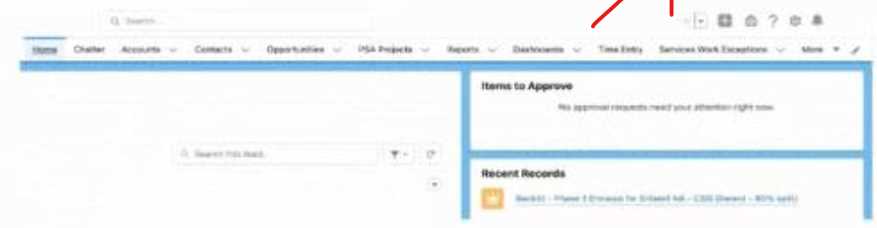
A Salesforce associate wants to reorder items in their instance so the Reports tab appears
immediately after Home.
What should the associate do to customize the items on the navigation bar?
- A. Select the personalization button (pencil icon), then click and drag the item name up or down to adjust its location.
- B. Use the downward arrow next to each item name, then select Move to move the item left or right.
- C. Click the Setup gear icon at the top right of the page, then select User Interface and then Tabs.
Answer:
A
Explanation:
Selecting the personalization button (pencil icon), then clicking and dragging the item name up or
down to adjust its location is the correct way to customize the items on the navigation bar, as shown
in the screenshot.
Comments
Question 3
A Salesforce associate has received a request to create new users for a group of new employees.
Where can the associate check the number of licenses available to be assigned to the new
employees
- A. Salesforce Help
- B. Company Information
- C. User Management Settings
Answer:
B
Explanation:
The company information page shows the number of licenses available to be assigned to the new
employees, as well as other details about the organization.
Comments
Question 4
A Salesforce associate wants a visual summary of opportunities in a list view. The associate would
like to summarize, filter, and move opportunities along the pipeline.
What should they do to meet this requirement?
- A. Create an Opportunity Summary report.
- B. Create an Opportunity List View.
- C. Create an Opportunities Kanban View.
Answer:
C
Explanation:
The opportunities Kanban view is a visual summary of opportunities in a list view, where the
associate can summarize, filter, and move opportunities along the pipeline by dragging and dropping
them.
Comments
Question 5
Get Cloudy Consulting (GCC) wants to simplify its sales teams Account Record page with the
following recommendations:
• Adding tabs
• Hiding components
• Making fields conditionally visible
Where should GCC's Salesforce associate go to draft these changes for review?
- A. Lightning App Builder
- B. Record Types
- C. Page Layouts
Answer:
A
Explanation:
The Lightning App Builder is a tool that allows the associate to draft changes to the account record
page, such as adding tabs, hiding components, and making fields conditionally visible, and preview
them before publishing.
Comments
Question 6
A Salesforce associate is using Global Search to find a record but does not remember the name of the
record they want to find.
What should the associate use to search for the record?
- A. List view for each object
- B. Object Manager
- C. Wildcards and operators
Answer:
C
Explanation:
Wildcards and operators are symbols that can be used to search for records when the name of the
record is not known. For example, the asterisk (*) can be used to match any string of characters, and
the AND operator can be used to combine multiple terms.
Comments
Question 7
A Salesforce associate recently relocated from Get Cloudy Consulting s San Francisco office to its new
London office. The associate wants to change their work hours information in the Salesforce org to
reflect their new time zone.
Which method is easiest to change these settings?
- A. Go to Settings -> Personal Information -> My Work Information
- B. Submit a case with Salesforce support
- C. Go to Setup -> Company Information -> Default Time Zone
Answer:
A
Explanation:
The easiest method to change the work hours information in the Salesforce org to reflect the new
time zone is to go to Settings -> Personal Information -> My Work Information, and select the
appropriate time zone from the drop-down menu.
Comments
Question 8
A Salesforce associate at Get Cloudy Consulting is working with a user to view multiple records and
their related records on the same screen. Currently, the user uses multiple browser tabs.
Which app should the associate recommend for the user to view multiple records and their related
records on one screen?
- A. Salesforce Lightning Page
- B. Salesforce Lightning Console
- C. Salesforce Dashboard
Answer:
B
Explanation:
The Salesforce Lightning Console is an app that allows the user to view multiple records and their
related records on one screen, using tabs and subtabs. This can improve the user’s productivity and
efficiency.
Comments
Question 9
A Salesforce associate wants to add a new related list of cases to the Account.
Where should the associate go to add the related list to Account?
- A. Account Record page
- B. Page Layout
- C. Case Record page
Answer:
B
Explanation:
The related list of cases can be added to the account page layout, which determines the fields,
buttons, and related lists that users see when they view an account record.
Comments
Question 10
How can a user see only contacts from a specific city on the 'New This Week" list view without
changing what other users see?
- A. Change the permissions so they can only see records from the specific city.
- B. Clone the list view with a new name, and filter by the specific c
- C. Build a private report for contacts that is filtered by the specific city.
Answer:
B
Explanation:
The user can clone the list view with a new name, and filter by the specific city to see only contacts
from that city on the list view. This will not affect what other users see on the original list view.
Comments
Page 1 out of 12
Viewing questions 1-10 out of 123
page 2