Question 1
What is the expected output of the following code?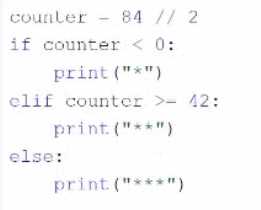
- A. The code produces no output.
- B. * * *
- C. * *
- D. *
Answer:
C
Explanation:
The code snippet that you have sent is a conditional statement that checks if a variable “counter” is
less than 0, greater than or equal to 42, or neither. The code is as follows:
if counter < 0: print(““) elif counter >= 42: print(”“) else: print(””)
The code starts with checking if the value of “counter” is less than 0. If yes, it prints a single asterisk ()
to the screen and exits the statement. If no, it checks if the value of “counter” is greater than or equal
to 42. If yes, it prints three asterisks () to the screen and exits the statement. If no, it prints two
asterisks () to the screen and exits the statement.
The expected output of the code depends on the value of “counter”. If the value of “counter” is 10, as
shown in the image, the code will print two asterisks (**) to the screen, because 10 is neither less
than 0 nor greater than or equal to 42. Therefore, the correct answer is C. * *
Reference: [Python Institute - Entry-Level Python Programmer Certification]
Comments
Question 2
DRAG DROP
Arrange the code boxes in the correct positions in order to obtain a loop which executes its body with
the level variable going through values 5, 1, and 1 (in the same order).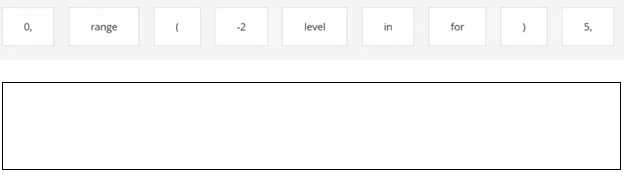
Answer:
None
Explanation:
Comments
Question 3
What happens when the user runs the following code?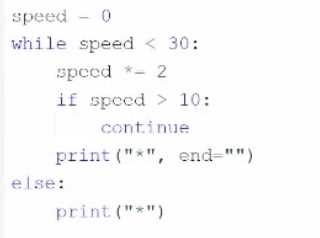
- A. The program outputs three asterisks ( *** )to the screen.
- B. The program outputs one asterisk ( * ) to the screen.
- C. The program outputs five asterisks ( ***** ) to the screen.
- D. The program enters an infinite loop.
Answer:
D
Explanation:
The code snippet that you have sent is a while loop with an if statement and a print statement inside
it. The code is as follows:
while True: if counter < 0: print(““) else: print(”**”)
The code starts with entering a while loop that repeats indefinitely, because the condition “True” is
always true. Inside the loop, the code checks if the value of “counter” is less than 0. If yes, it prints a
single asterisk () to the screen. If no, it prints three asterisks (**) to the screen. However, the code
does not change the value of “counter” inside the loop, so the same condition is checked over and
over again. The loop never ends, and the code enters an infinite loop.
The program outputs either one asterisk () or three asterisks (**) to the screen repeatedly,
depending on the initial value of “counter”. Therefore, the correct answer is D. The program enters
an infinite loop.
Reference: [Python Institute - Entry-Level Python Programmer Certification]
Comments
Question 4
What is the expected output of the following code?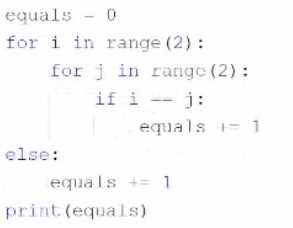
- A. The code outputs nothing.
- B. 3
- C. 1
- D. 4
Answer:
C
Explanation:
The code snippet that you have sent is checking if two numbers are equal and printing the result.
The code is as follows:
num1 = 1 num2 = 2 if num1 == num2: print(4) else: print(1)
The code starts with assigning the values 1 and 2 to the variables “num1” and “num2” respectively.
Then, it enters an if statement that compares the values of “num1” and “num2” using the equality
operator (==). If the values are equal, the code prints 4 to the screen. If the values are not equal, the
code prints 1 to the screen.
The expected output of the code is 1, because the values of “num1” and “num2” are not equal.
Therefore, the correct answer is C. 1.
Reference: [Python Institute - Entry-Level Python Programmer Certification]
Comments
Question 5
DRAG DROP
Arrange the code boxes in the correct positions to form a conditional instruction which guarantees
that a certain statement is executed when the speed variable is less than 50.0.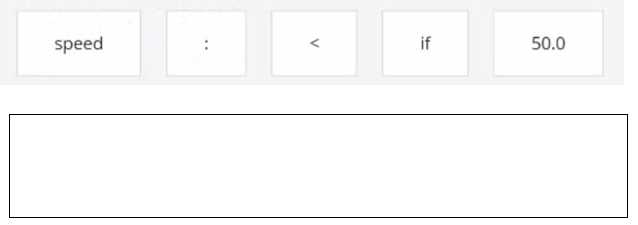
Answer:
None
Explanation: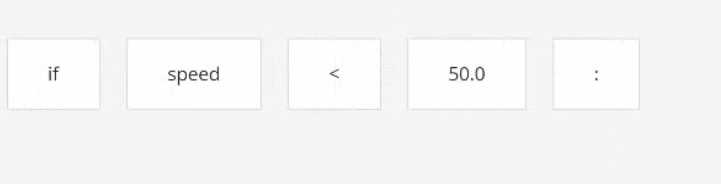
One possible way to arrange the code boxes in the correct positions to form a conditional instruction
which guarantees that a certain statement is executed when the speed variable is less than 50.0 is:
if speed < 50.0:
print("The speed is low.")
This code uses the if keyword to create a conditional statement that checks the value of the variable
speed. If the value is less than 50.0, then the code will print “The speed is low.” to the screen. The
print function is used to display the output. The code is indented to show the block of code that
belongs to the if condition.
You can find more information about the if statement and the print function in Python in the
following references:
Python If … Else
Python Print Function
Comments
Question 6
What is the expected output of the following code?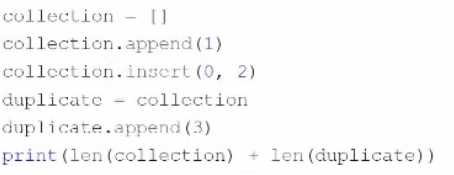
- A. 5
- B. 4
- C. 6
- D. The code raises an exception and outputs nothing.
Answer:
D
Explanation:
The code snippet that you have sent is trying to print the combined length of two lists, “collection”
and “duplicate”. The code is as follows:
collection = [] collection.append(1) collection.insert(0, 2) duplicate = collection duplicate.append(3)
print(len(collection) + len(duplicate))
The code starts with creating an empty list called “collection” and appending the number 1 to it. The
list now contains [1]. Then, the code inserts the number 2 at the beginning of the list. The list now
contains [2, 1]. Then, the code creates a new list called “duplicate” and assigns it the value of
“collection”. However, this does not create a copy of the list, but rather a reference to the same list
object. Therefore, any changes made to “duplicate” will also affect “collection”, and vice versa. Then,
the code appends the number 3 to “duplicate”. The list now contains [2, 1, 3], and so does
“collection”. Finally, the code tries to print the sum of the lengths of “collection” and “duplicate”.
However, this causes an exception, because the len function expects a single argument, not two. The
code does not handle the exception, and therefore outputs nothing.
The expected output of the code is nothing, because the code raises an exception and terminates.
Therefore, the correct answer is D. The code raises an exception and outputs nothing.
Reference: [Python Institute - Entry-Level Python Programmer Certification]
Comments
Question 7
Assuming that the following assignment has been successfully executed:
My_list – [1, 1, 2, 3]
Select the expressions which will not raise any exception.
(Select two expressions.)
- A. my_list[-10]
- B. my_list|my_Li1st | 3| I
- C. my list [6]
- D. my_List- [0:1]
Answer:
B, D
Explanation:
The code snippet that you have sent is assigning a list of four numbers to a variable called “my_list”.
The code is as follows:
my_list = [1, 1, 2, 3]
The code creates a list object that contains the elements 1, 1, 2, and 3, and assigns it to the variable
“my_list”. The list can be accessed by using the variable name or by using the index of the elements.
The index starts from 0 for the first element and goes up to the length of the list minus one for the
last element. The index can also be negative, in which case it counts from the end of the list. For
example, my_list[0] returns 1, and my_list[-1] returns 3.
The code also allows some operations on the list, such as slicing, concatenation, repetition, and
membership. Slicing is used to get a sublist of the original list by specifying the start and end index.
For example, my_list[1:3] returns [1, 2]. Concatenation is used to join two lists together by using the
+ operator. For example, my_list + [4, 5] returns [1, 1, 2, 3, 4, 5]. Repetition is used to create a new
list by repeating the original list a number of times by using the * operator. For example, my_list * 2
returns [1, 1, 2, 3, 1, 1, 2, 3]. Membership is used to check if an element is present in the list by using
the in operator. For example, 2 in my_list returns True, and 4 in my_list returns False.
The expressions that you have given are trying to access or manipulate the list in different ways.
Some of them are valid, and some of them are invalid and will raise an exception. An exception is an
error that occurs when the code cannot be executed properly. The expressions are as follows:
A) my_list[-10]: This expression is trying to access the element at the index -10 of the list. However,
the list only has four elements, so the index -10 is out of range. This will raise an IndexError exception
and output nothing.
B) my_list|my_Li1st | 3| I: This expression is trying to perform a bitwise OR operation on the list and
some other operands. The bitwise OR operation is used to compare the binary representation of two
numbers and return a new number that has a 1 in each bit position where either number has a 1. For
example, 3 | 1 returns 3, because 3 in binary is 11 and 1 in binary is 01, and 11 | 01 is 11. However,
the bitwise OR operation cannot be applied to a list, because a list is not a number. This will raise a
TypeError exception and output nothing.
C) my list [6]: This expression is trying to access the element at the index 6 of the list. However, the
list only has four elements, so the index 6 is out of range. This will raise an IndexError exception and
output nothing.
D) my_List- [0:1]: This expression is trying to perform a subtraction operation on the list and a sublist.
The subtraction operation is used to subtract one number from another and return the difference.
For example, 3 - 1 returns 2. However, the subtraction operation cannot be applied to a list, because
a list is not a number. This will raise a TypeError exception and output nothing.
Only two expressions will not raise any exception. They are:
B) my_list|my_Li1st | 3| I: This expression is not a valid Python code, but it is not an expression that
tries to access or manipulate the list. It is just a string of characters that has no meaning. Therefore, it
will not raise any exception, but it will also not output anything.
D) my_List- [0:1]: This expression is a valid Python code that uses the slicing operation to get a sublist
of the list. The slicing operation does not raise any exception, even if the start or end index is out of
range. It will just return an empty list or the closest possible sublist. For example, my_list[0:10]
returns [1, 1, 2, 3], and my_list[10:20] returns []. The expression my_List- [0:1] returns the sublist of
the list from the index 0 to the index 1, excluding the end index. Therefore, it returns [1]. This
expression will not raise any exception, and it will output [1].
Therefore, the correct answers are B. my_list|my_Li1st | 3| I and D. my_List- [0:1].
Reference: [Python Institute - Entry-Level Python Programmer Certification]
Comments
Question 8
What is true about tuples? (Select two answers.)
- A. Tuples are immutable, which means that their contents cannot be changed during their lifetime.
- B. The len { } function cannot be applied to tuples.
- C. An empty tuple is written as { } .
- D. Tuples can be indexed and sliced like lists.
Answer:
A, D
Explanation:
Tuples are one of the built-in data types in Python that are used to store collections of data. Tuples
have some characteristics that distinguish them from other data types, such as lists, sets, and
dictionaries. Some of these characteristics are:
Tuples are immutable, which means that their contents cannot be changed during their lifetime.
Once a tuple is created, it cannot be modified, added, or removed. This makes tuples more stable
and reliable than mutable data types. However, this also means that tuples are less flexible and
dynamic than mutable data types.
For example, if you want to change an element in a tuple, you
have to create a new tuple with the modified element and assign it to the same variable12
Tuples are ordered, which means that the items in a tuple have a defined order and can be accessed
by using their index. The index of a tuple starts from 0 for the first item and goes up to the length of
the tuple minus one for the last item. The index can also be negative, in which case it counts from
the end of the tuple. For example, if you have a tuple t = ("a", "b", "c"), then t[0] returns "a", and t[-
1] returns "c"
Tuples can be indexed and sliced like lists, which means that you can get a single item or a sublist of a
tuple by using square brackets and specifying the start and end index. For example, if you have a
tuple t = ("a", "b", "c", "d", "e"), then t[2] returns "c", and t[1:4] returns ("b", "c", "d"). Slicing does
not raise any exception, even if the start or end index is out of range.
It will just return an empty
tuple or the closest possible sublist12
Tuples can contain any data type, such as strings, numbers, booleans, lists, sets, dictionaries, or even
other tuples. Tuples can also have duplicate values, which means that the same item can appear
more than once in a tuple. For example, you can have a tuple t = (1, 2, 3, 1, 2)
, which contains two 1s
and two 2s12
Tuples are written with round brackets, which means that you have to enclose the items in a tuple
with parentheses. For example, you can create a tuple t = ("a", "b", "c") by using round brackets.
However, you can also create a tuple without using round brackets, by just separating the items with
commas. For example, you can create the same tuple t = "a", "b", "c" by using commas.
This is called
tuple packing, and it allows you to assign multiple values to a single variable12
The len() function can be applied to tuples, which means that you can get the number of items in a
tuple by using the len() function. For example, if you have a tuple t = ("a", "b", "c"),
then len(t)
returns 312
An empty tuple is written as (), which means that you have to use an empty pair of parentheses to
create a tuple with no items. For example, you can create an empty tuple t = () by using empty
parentheses. However, if you want to create a tuple with only one item, you have to add a comma
after the item, otherwise Python will not recognize it as a tuple. For example, you can create a tuple
with one item t = ("a",)
by using a comma12
Therefore, the correct answers are A. Tuples are immutable, which means that their contents cannot
be changed during their lifetime. and D. Tuples can be indexed and sliced like lists.
Reference:
Python Tuples - W3SchoolsTuples in Python - GeeksforGeeks
Comments
Question 9
DRAG DROP
Assuming that the phonc_dir dictionary contains namemumber pairs, arrange the code boxes to
create a valid line of code which retrieves Martin Eden's phone number, and assigns it to the number
variable.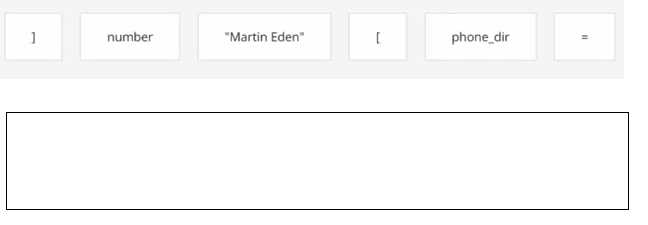
Answer:
None
Explanation:
number = phone_dir["Martin Eden"]
This code uses the square brackets notation to access the value associated with the key “Martin
Eden” in the phone_dir dictionary. The value is then assigned to the variable number. A dictionary is
a data structure that stores key-value pairs, where each key is unique and can be used to retrieve its
corresponding value. You can find more information about dictionaries in Python in the following
references:
[Python Dictionaries - W3Schools]
[Python Dictionary (With Examples) - Programiz]
[5.5. Dictionaries — How to Think Like a Computer Scientist …]
Comments
Question 10
Assuming that the following assignment has been successfully executed:
Which of the following expressions evaluate to True? (Select two expressions.)
- A. the_List.index {"1"} in the_list
- B. 1.1 in the_list |1:3 |
- C. len (the list [0:2]} <3
- D. the_list. index {'1'} -- 0
Answer:
CD
Explanation:
The code snippet that you have sent is assigning a list of four values to a variable called “the_list”.
The code is as follows:
the_list = [‘1’, 1, 1, 1]
The code creates a list object that contains the values ‘1’, 1, 1, and 1, and assigns it to the variable
“the_list”. The list can be accessed by using the variable name or by using the index of the values.
The index starts from 0 for the first value and goes up to the length of the list minus one for the last
value. The index can also be negative, in which case it counts from the end of the list. For example,
the_list[0] returns ‘1’, and the_list[-1] returns 1.
The expressions that you have given are trying to evaluate some conditions on the list and return a
boolean value, either True or False. Some of them are valid, and some of them are invalid and will
raise an exception. An exception is an error that occurs when the code cannot be executed properly.
The expressions are as follows:
A) the_List.index {“1”} in the_list: This expression is trying to check if the index of the value ‘1’ in the
list is also a value in the list. However, this expression is invalid, because it uses curly brackets instead
of parentheses to call the index method. The index method is used to return the first occurrence of a
value in a list. For example, the_list.index(‘1’) returns 0, because ‘1’ is the first value in the list.
However, the_list.index {“1”} will raise a SyntaxError exception and output nothing.
B) 1.1 in the_list |1:3 |: This expression is trying to check if the value 1.1 is present in a sublist of the
list. However, this expression is invalid, because it uses a vertical bar instead of a colon to specify the
start and end index of the sublist. The sublist is obtained by using the slicing operation, which uses
square brackets and a colon to get a part of the list. For example, the_list[1:3] returns [1, 1], which is
the sublist of the list from the index 1 to the index 3, excluding the end index. However, the_list |1:3
| will raise a SyntaxError exception and output nothing.
C) len (the list [0:2]} <3: This expression is trying to check if the length of a sublist of the list is less
than 3. This expression is valid, because it uses the len function and the slicing operation correctly.
The len function is used to return the number of values in a list or a sublist. For example, len(the_list)
returns 4, because the list has four values. The slicing operation is used to get a part of the list by
using square brackets and a colon. For example, the_list[0:2] returns [‘1’, 1], which is the sublist of
the list from the index 0 to the index 2, excluding the end index. The expression len (the list [0:2]} <3
returns True, because the length of the sublist [‘1’, 1] is 2, which is less than 3.
D) the_list. index {‘1’} – 0: This expression is trying to check if the index of the value ‘1’ in the list is
equal to 0. This expression is valid, because it uses the index method and the equality operator
correctly. The index method is used to return the first occurrence of a value in a list. For example,
the_list.index(‘1’) returns 0, because ‘1’ is the first value in the list. The equality operator is used to
compare two values and return True if they are equal, or False if they are not. For example, 0 == 0
returns True, and 0 == 1 returns False. The expression the_list. index {‘1’} – 0 returns True, because
the index of ‘1’ in the list is 0, and 0 is equal to 0.
Therefore, the correct answers are C. len (the list [0:2]} <3 and D. the_list. index {‘1’} – 0.
Reference:
Python List Methods - W3Schools5. Data Structures — Python 3.11.5 documentationList
methods in Python - GeeksforGeeks
Comments
Page 1 out of 2
Viewing questions 1-10 out of 30
page 2