Question 1
What should a protection group in a stretched pod be used for?
- A. Integrating ActiveCluster with async snapshot replication
- B. Using CloudSnap to offload to a third-site target
- C. Initiating ActiveDR failover/failback in a test scenario
- D. Configuring fan-out async snapshot replication
Answer:
A
Explanation:
A protection group in a stretched pod should be used for integrating ActiveCluster with asynchronous
snapshot replication . This combination allows for synchronous replication within the stretched pod
(using ActiveCluster) while also enabling asynchronous replication to a third site for additional
disaster recovery protection.
Why This Matters:
ActiveCluster: Provides synchronous replication between two sites within a stretched pod, ensuring
zero RPO and near-zero RTO for high availability.
Async Snapshot Replication: Extends the disaster recovery strategy by replicating snapshots
asynchronously to a third site, providing an additional layer of protection against regional failures.
Combining these features ensures both local high availability and remote disaster recovery.
Why Not the Other Options?
B . Using CloudSnap to offload to a third-site target:
CloudSnap is used to offload snapshots to cloud storage (e.g., AWS S3 or Azure Blob). While it is
useful for backup purposes, it does not integrate with ActiveCluster for synchronous replication.
C . Initiating ActiveDR failover/failback in a test scenario:
ActiveDR is designed for asynchronous replication and failover/failback scenarios but does not
integrate with ActiveCluster in a stretched pod configuration.
D . Configuring fan-out async snapshot replication:
Fan-out replication involves sending snapshots to multiple targets asynchronously. However, this
does not align with the use case of integrating ActiveCluster with async replication for a stretched
pod.
Key Points:
Stretched Pod: Enables synchronous replication across two sites using ActiveCluster.
Async Replication: Adds a third-site replication target for comprehensive disaster recovery.
Integrated Protection: Combines high availability and disaster recovery into a single solution.
Reference:
Pure Storage FlashArray Documentation: "ActiveCluster with Async Replication"
Pure Storage Whitepaper: "Disaster Recovery Strategies with FlashArray"
Pure Storage Knowledge Base: "Using Protection Groups in Stretched Pods"
Comments
Question 2
During a controller upgrade of a Pure Storage FlashArray, what aspect of array design ensures there
will be no tangible impact on performance?
- A. Active/active controller architecture
- B. Stateful controller architecture
- C. Active/passive controller front-ends ports
- D. Primary/secondary controller architecture
Answer:
A
Explanation:
During a controller upgrade of a Pure Storage FlashArray, the active/active controller architecture
ensures there will be no tangible impact on performance. This design allows both controllers to
handle I/O operations simultaneously, so even if one controller is being upgraded, the other can
continue processing workloads without interruption.
Why This Matters:
Active/Active Architecture: In an active/active design, both controllers share the workload equally. If
one controller is taken offline for maintenance or upgrades, the remaining controller seamlessly
handles all I/O operations.
This ensures continuous availability and consistent performance during upgrades, minimizing
downtime and user impact.
Why Not the Other Options?
B . Stateful controller architecture:
While stateful architectures maintain session information, they do not inherently ensure no
performance impact during upgrades. The key factor here is the active/active design.
C . Active/passive controller front-end ports:
In an active/passive design, only one controller is actively handling I/O at any given time. If the active
controller is upgraded, the passive controller must take over, which can lead to temporary
performance degradation.
D . Primary/secondary controller architecture:
Similar to active/passive, this design relies on a primary controller for all operations, making it less
resilient during upgrades compared to active/active.
Key Points:
Active/Active Design: Ensures continuous I/O processing during upgrades.
Seamless Upgrades: Minimizes performance impact and downtime for users.
High Availability: Maintains consistent performance and reliability throughout the upgrade process.
Reference:
Pure Storage FlashArray Documentation: "Controller Upgrade Process and Best Practices"
Pure Storage Whitepaper: "Active/Active Controller Architecture"
Pure Storage Knowledge Base: "Minimizing Impact During Controller Upgrades"
Comments
Question 3
A Storage Administrator has two //X50R3 FlashArrays. The two FlashArrays are located in different
data centers with a network link between them. The ethernet link between data centers has a
latency of 35 ms.
Which Purity feature will provide protection against a site failure with the lowest recovery point?
- A. ActiveCluster
- B. ActiveDR
- C. Snapshot replication
- D. Local snapshots
Answer:
B
Explanation:
Given that the two FlashArrays are located in different data centers with a network link latency of 35
ms , the best Purity feature to provide protection against a site failure with the lowest recovery point
is ActiveDR .
Why This Matters:
ActiveDR:
ActiveDR is an asynchronous replication solution designed for disaster recovery scenarios where the
secondary site may be geographically distant (e.g., >10 ms latency).
It provides low RPOs (typically seconds to minutes) and supports fast failover and failback
capabilities, ensuring minimal data loss and downtime.
With a 35 ms latency between sites, synchronous replication (e.g., ActiveCluster) is not feasible due
to the high latency impacting performance.
Why Not the Other Options?
A . ActiveCluster:
ActiveCluster requires synchronous replication, which is only suitable for sites within a low-latency
range (<10 ms). At 35 ms latency, ActiveCluster would cause significant performance degradation.
C . Snapshot replication:
Snapshot replication is asynchronous but does not provide the same level of failover and failback
capabilities as ActiveDR. It is better suited for backup purposes rather than disaster recovery with
low RPOs.
D . Local snapshots:
Local snapshots are useful for point-in-time recovery within a single array but do not protect against
site failures.
Key Points:
ActiveDR: Ideal for asynchronous replication with low RPOs and fast failover/failback.
Latency Considerations: ActiveDR supports higher latencies (e.g., 35 ms) compared to synchronous
solutions like ActiveCluster.
Disaster Recovery: Ensures protection against site failures with minimal data loss and downtime.
Reference:
Pure Storage FlashArray Documentation: "ActiveDR for Disaster Recovery"
Pure Storage Whitepaper: "Meeting RPO and RTO Requirements with FlashArray"
Pure Storage Knowledge Base: "Choosing the Right Replication Solution for High Latency"
Comments
Question 4
A customer is in the very early stages of designing a storage solution at a greenfield site.
They wish to use NVMe-TCP connectivity and require approximately:
• 100 Gbps of consistent raw network throughput between the FlashArray and the dedicated SAN
switches.
• The dedicated SAN switches support up to 25 Gbps connectivity.
What is the minimum number of Ethernet ports in total they should connect from the FlashArray to
the SAN switches while still ensuring resiliency?
- A. 8
- B. 2
- C. 4
- D. 16
Answer:
A
Explanation:
To achieve 100 Gbps of consistent raw network throughput between the FlashArray and the
dedicated SAN switches, while ensuring resiliency , the customer must connect a sufficient number
of Ethernet ports from the FlashArray to the SAN switches. Given that the dedicated SAN switches
support up to 25 Gbps connectivity per port , the calculation is as follows:
Throughput Requirement:
The customer requires 100 Gbps of raw throughput.
Each Ethernet port provides 25 Gbps of bandwidth.
Number of Ports Needed:
To meet the 100 Gbps requirement:
Resiliency Requirement:
Resiliency ensures that the solution can tolerate failures (e.g., switch or link failures). To achieve this,
the customer must double the number of ports to provide redundant paths.
Therefore, the total number of ports required is:4×2=8ports.
Why Not the Other Options?
B . 2:
Two ports would only provide 50 Gbps of raw throughput (2 × 25 Gbps), which does not meet the
100 Gbps requirement. Additionally, there would be no redundancy, violating the resiliency
requirement.
C . 4:
Four ports would meet the 100 Gbps throughput requirement but would lack redundancy, making
the solution vulnerable to failures.
D . 16:
Sixteen ports would exceed the required throughput and redundancy, resulting in unnecessary costs
and complexity.
Key Points:
Throughput Calculation: Ensure the total bandwidth meets the 100 Gbps requirement.
Resiliency: Double the number of ports to provide redundant paths for high availability.
Optimization: Use the minimum number of ports that satisfy both throughput and resiliency
requirements.
Reference:
Pure Storage FlashArray Documentation: "Network Design and Configuration Best Practices"
Pure Storage Whitepaper: "NVMe-TCP Connectivity and Performance Optimization"
Pure Storage Knowledge Base: "Calculating Required Network Ports for FlashArray"
Comments
Question 5
A potential customer has a use case where they need to use a stretched cluster for high availability
and also require a third copy of their data in a remote geographic location.
Which replication method should be recommended?
- A. CloudSnap to an offload target
- B. Fan-out asynchronous snapshot replication
- C. ActiveDR with periodic snapshot replication
- D. ActiveCluster with asychronous snapshot replication
Answer:
D
Explanation:
The customer requires a storage solution that supports a stretched cluster for high availability and
also maintains a third copy of their data in a remote geographic location . The best replication
method to recommend is ActiveCluster with asynchronous snapshot replication .
Why This Matters:
ActiveCluster:
ActiveCluster provides synchronous replication between two sites within a stretched cluster,
ensuring zero RPO and near-zero RTO for high availability.
It is ideal for scenarios where applications require continuous access to data across two locations.
Asynchronous Snapshot Replication:
Asynchronous replication extends the disaster recovery strategy by replicating snapshots to a third
site. This ensures an additional layer of protection against regional failures.
Why Not the Other Options?
A . CloudSnap to an offload target:
CloudSnap is used to offload snapshots to cloud storage (e.g., AWS S3 or Azure Blob). While it
satisfies the requirement for a third copy, it does not integrate with ActiveCluster for high availability
in a stretched cluster.
B . Fan-out asynchronous snapshot replication:
Fan-out replication involves sending snapshots to multiple targets asynchronously. However, it does
not provide the synchronous replication required for a stretched cluster.
C . ActiveDR with periodic snapshot replication:
ActiveDR is designed for asynchronous replication and failover/failback scenarios but does not
support synchronous replication for a stretched cluster.
Key Points:
ActiveCluster: Ensures high availability with synchronous replication in a stretched cluster.
Async Replication: Adds a third-site replication target for comprehensive disaster recovery.
Integrated Solution: Combines high availability and disaster recovery into a single architecture.
Reference:
Pure Storage FlashArray Documentation: "ActiveCluster with Async Replication"
Pure Storage Whitepaper: "Disaster Recovery Strategies with FlashArray"
Pure Storage Knowledge Base: "Using Protection Groups in Stretched Pods"
Comments
Question 6
A System Administrator has a FlashArray//X70R3. They need to add a backup element as part of their
data protection strategy. They have the following requirements:
• The solution should be offsite
• Cost needs to be kept as low as possible
• The backup needs to be stored in a different location from their current FlashArray
• Restore times are not a concern
Which solution should the SE recommend to the System Administrator?
- A. ActiveCluster to a FlashArray//C60
- B. ActiveDR to a FlashArray//C60
- C. CloudSnap to a public cloud provider
Answer:
C
Explanation:
The System Administrator requires an offsite backup solution that is cost-effective, stores data in a
different location from the current FlashArray, and does not prioritize restore times. The best
solution to recommend is CloudSnap to a public cloud provider .
Why This Matters:
CloudSnap:
CloudSnap is a feature that offloads snapshots to cloud storage providers like AWS S3 or Azure Blob.
It is highly cost-effective because customers only pay for the cloud storage they use, and it eliminates
the need for additional on-premises hardware.
Since restore times are not a concern, CloudSnap's slower restore process compared to on-premises
solutions is acceptable.
Why Not the Other Options?
A . ActiveCluster to a FlashArray//C60:
ActiveCluster provides synchronous replication for high availability but does not meet the
requirement for an offsite backup solution. Additionally, it is more expensive than CloudSnap.
B . ActiveDR to a FlashArray//C60:
ActiveDR provides asynchronous replication for disaster recovery but requires additional hardware
(FlashArray//C60), which increases costs. It is less cost-effective than CloudSnap for backup
purposes.
Key Points:
Cost Efficiency: CloudSnap leverages cloud storage, minimizing upfront and ongoing costs.
Offsite Storage: Ensures backups are stored in a different location from the primary FlashArray.
Restore Times: CloudSnap's slower restore process is acceptable given the customer's requirements.
Reference:
Pure Storage FlashArray Documentation: "CloudSnap for Offsite Backups"
Pure Storage Whitepaper: "Cost-Effective Backup Strategies with FlashArray"
Pure Storage Knowledge Base: "Choosing the Right Backup Solution for Your Workload"
Comments
Question 7
A customer running FlashArray//X70R3 in production just purchased a FlashArray//C60R3 Array for a
secondary site. The customer wants to have the lowest RPO (Recovery Point Objective) possible for
the data.
Which FlashArray feature will meet the requirements?
- A. ActiveCluster
- B. ActiveDR
- C. Async Replication
Answer:
B
Explanation:
The customer wants to achieve the lowest RPO (Recovery Point Objective) possible for their data
when replicating between a FlashArray//X70R3 in production and a FlashArray//C60R3 at a
secondary site. The best feature to meet this requirement is ActiveDR .
Why This Matters:
ActiveDR:
ActiveDR is an asynchronous replication solution designed for disaster recovery scenarios. It provides
low RPOs, typically in the range of seconds to minutes , depending on network conditions and
workload characteristics.
While it is asynchronous, ActiveDR achieves much lower RPOs compared to traditional async
replication methods like snapshot replication.
It also supports fast failover and failback , ensuring minimal downtime during a disaster recovery
event.
Why Not the Other Options?
A . ActiveCluster:
ActiveCluster provides synchronous replication with zero RPO and near-zero RTO. However, it
requires both sites to be within a low-latency range (typically <10 ms). Since the customer has not
specified that the secondary site is within synchronous distance, ActiveCluster is not feasible in this
scenario.
C . Async Replication:
Traditional asynchronous replication (e.g., snapshot replication) typically results in higher RPOs
compared to ActiveDR. It does not provide the same level of optimization for low RPOs as ActiveDR.
Key Points:
ActiveDR: Provides the lowest RPO possible for asynchronous replication, making it ideal for
geographically distant secondary sites.
Network Latency: ActiveDR is designed to work efficiently over longer distances and higher latencies
compared to synchronous solutions like ActiveCluster.
Disaster Recovery: Ensures protection against site failures with minimal data loss and downtime.
Reference:
Pure Storage FlashArray Documentation: "ActiveDR for Disaster Recovery"
Pure Storage Whitepaper: "Meeting RPO and RTO Requirements with FlashArray"
Pure Storage Knowledge Base: "Choosing the Right Replication Solution for High Latency"
Comments
Question 8
Refer to the exhibit.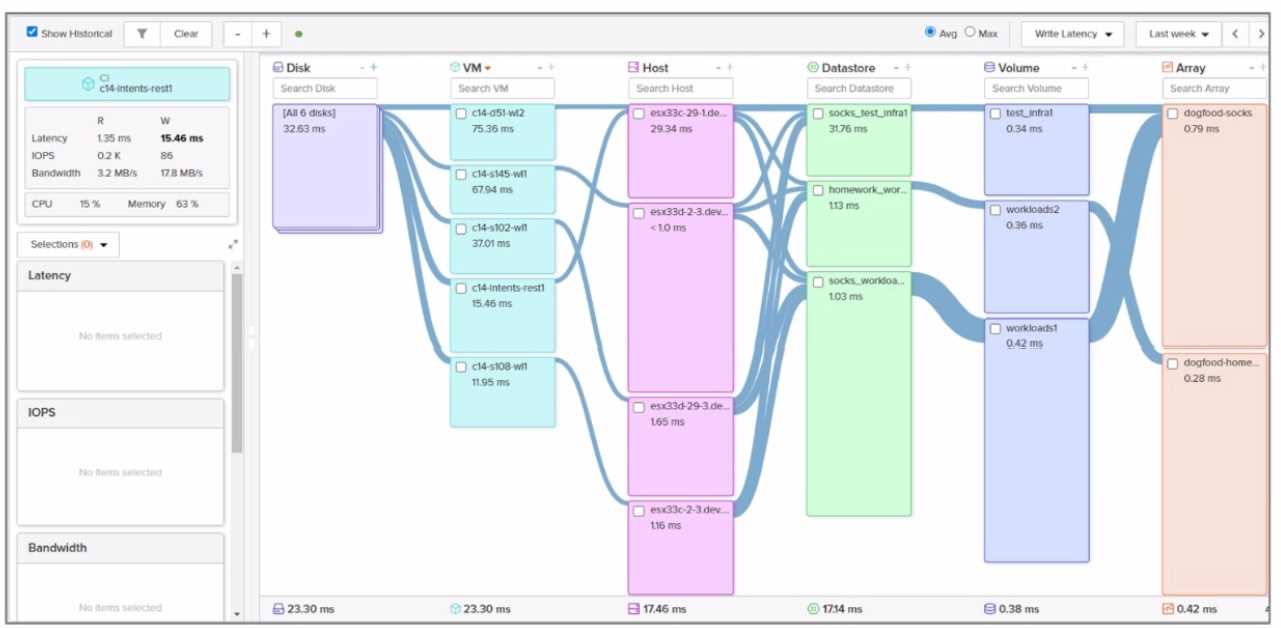
Which VM is running on the ESXi host with the lowest write latency?
- A. c14-d51-w12
- B. c14-s145-wl1
- C. C14-s108-wl1
- D. c14-s102-wl1
Answer:
A
Explanation:
Write Latency:
Write latency refers to the time it takes for a write operation to complete on the storage array. Lower
write latency indicates better performance and faster response times for write-intensive workloads.
In Pure Storage arrays, write latency is typically measured in milliseconds (ms) and can be monitored
using tools like Pure1 or Purity//FA performance metrics.
VM-to-Host Mapping:
Each VM runs on an ESXi host, and the write latency of the VM is influenced by the storage
performance characteristics of the host it resides on.
To identify the VM with the lowest write latency, we must compare the write latency values for each
VM listed in the exhibit.
Comments
Question 9
Which offering discounts controller upgrades with a purchase of qualifying storage capacity?
- A. Love Your Storage
- B. Right-Size Guarantee
- C. Capacity Consolidation
- D. Ever Agile
Answer:
A
Explanation:
The offering that discounts controller upgrades with a purchase of qualifying storage capacity is Love
Your Storage .
Why This Matters:
Love Your Storage:
This program is part of Pure Storage's Evergreen//Forever subscription model. It allows customers to
upgrade their controllers at a discounted rate when they purchase additional qualifying storage
capacity.
The goal is to ensure that customers can modernize their infrastructure without incurring excessive
costs, aligning with Pure Storage's commitment to providing flexible and future-proof solutions.
Why Not the Other Options?
B . Right-Size Guarantee:
The Right-Size Guarantee allows customers to trade in existing shelves for higher-capacity ones while
only paying for the incremental capacity increase. It does not involve discounts on controller
upgrades.
C . Capacity Consolidation:
Capacity Consolidation refers to the ability to consolidate workloads onto fewer arrays or shelves but
does not include discounts on controller upgrades.
D . Ever Agile:
Ever Agile is a subscription model that provides flexibility in scaling storage and compute resources
but does not specifically discount controller upgrades tied to storage purchases.
Key Points:
Love Your Storage: Discounts controller upgrades when purchasing qualifying storage capacity.
Evergreen Benefits: Ensures customers can modernize their infrastructure cost-effectively.
Future-Proofing: Aligns with Pure Storage's commitment to delivering long-term value.
Reference:
Pure Storage Evergreen//Forever Documentation: "Understanding Love Your Storage"
Pure Storage Whitepaper: "Maximizing Value with Evergreen Subscriptions"
Pure Storage Knowledge Base: "How Love Your Storage Works"
Comments
Question 10
What is the return window as defined by the Love Your Storage Guarantee?
- A. 15 days
- B. 30 days
- C. 60 days
- D. 90 days
Answer:
B
Explanation:
The return window as defined by the Love Your Storage Guarantee is 30 days .
Why This Matters:
Love Your Storage Guarantee:
This guarantee allows customers to return or exchange hardware components (e.g., controllers)
within a specified return window if they do not meet their needs.
The 30-day return window ensures customers have sufficient time to evaluate the hardware and
make adjustments as needed.
Why Not the Other Options?
A . 15 days:
A 15-day return window would be too short for most customers to fully evaluate their hardware and
make informed decisions.
C . 60 days:
While 60 days is longer, it exceeds the standard return window defined by Pure Storage for the Love
Your Storage Guarantee.
D . 90 days:
A 90-day return window is significantly longer than the standard 30-day period and is not aligned
with Pure Storage's policies.
Key Points:
30-Day Return Window: Provides customers with ample time to evaluate hardware components.
Customer-Centric Approach: Reflects Pure Storage's commitment to ensuring customer satisfaction.
Policy Compliance: Ensures alignment with Pure Storage's official return policies.
Reference:
Pure Storage Evergreen//Forever Documentation: "Love Your Storage Guarantee Terms and
Conditions"
Pure Storage Knowledge Base: "Understanding the Love Your Storage Return Policy"
Comments
Page 1 out of 5
Viewing questions 1-10 out of 60
page 2