Question 1
You are troubleshooting a newly installed desktop Oracle Solaris 11 system with a single network
interface. From this system, you can connect to other systems within the company intranet, but
cannot access any external services (such as websites and email), even when using IP addresses.
Examining the routing table confirms that the default route to 192.168.1.1 is missing. DHCP is not
used at this site. Which two commands will temporarily mid permanently configure the default
route?
- A. ipadm set-gateway 192.168.1.1
- B. route add default 192.168.1.1
- C. ipadm set-default 192.168.1.1
- D. dladm route-add –d 192.168.1.1
- E. echo 192.168.1.1 >/etc/gateway
- F. echo 192.168.1.1 >/etc/defaultrouter
Answer:
B,F
Explanation:
B: Setting the default route on Solaris is easy. If you are trying to just set the route temporarily you
can use the route command:
Route add default <ipaddress>
Example:
Route add default 192.168.1.1
Note: Route command manipulates the kernel routing tables. Routing is the process of forwarding a
packet from one computer to another. It is based on the IP address in the IP packet header and
netmask.
F: If you want the route to be persisted when you reboot the system, you will need to set the route in
the /etc/defaultrouter file.
/etc/defaultrouter
Example:
Echo 192.168.1.1 > /etc/defaultrouter
Comments
Question 2
You want the system to generate an email notification each time one of the services has changed its
state. Which option would send an email message to the system administrator whenever a service
changes to the maintenance state?
- A. Use the setsc command in ALOM to enable the mail alerts to be sent to a specified email address whenever the fault management facility detects a service change to the maintenance state.
- B. Make an entry in the /etc/syslog.conf file to instruct syslogd to send an email alert when it receives a message from the SMF facility that a service has changed to the maintenance state.
- C. Use the svccfg setnotify command to create a notification and send an email when a service enters the maintenance state.
- D. Use the scvadm command to enable the notification service. Set the g maintenance option on the netnotify service to send an email when a service enters the maintenance state.
Answer:
C
Explanation:
This procedure causes the system to generate an email notification each time one of the services or a
selected service has a change in state. You can choose to use either SMTP or SNMP. Normally, you
would only select SNMP if you already have SNMP configured for some other reason.
By default, SNMP traps are sent on maintenance transitions. If you use SNMP for monitoring, you can
configure additional traps for other state transitions.
1. Become an administrator or assume a role that includes the Service Management rights profile.
2. Set notification parameters.
Example:
The following command creates a notification that sends email when transactions go into the
maintenance state
# /usr/sbin/svccfg setnotify -g maintenance mailto:[email protected]
Comments
Question 3
How are operating system updates distributed in the Oracle Solaris 11 environment?
- A. Updates are only available to customers with an active support contract. The updates are distributed through the My Oracle Support web portal and installed in a central location. All software packages are then updated manually from the command line using the smpatch command.
- B. Patches are download from http: //support.oracle.com either automatically or manually. All software packages are then updated manually from the command line using the smpatch or patchadd commands.
- C. Software updates are published as packages to a repository. All software packages are then updated manually from the command line using the pkg command.
- D. Software updates, published as packages to an OS image. All software packages are then updated manually from the command line using the pkg command.
Answer:
C
Explanation:
* Updating all of the packages on your installed system To update all of the packages on your
system that have available updates, use the pkg update command, as follows:
# pkg update
Running this command updates packages that you might not otherwise consider updating, for
example, kernel components and other low-level system packages.
* Adding or updating individual packages To add individual software packages, use the pkg install
command. Any dependent packages are also updated at the same time.
* install package updates that deliver fixes A pkg update operation might include bug fixes, so the
operation is similar to applying a specific patch or patches in previous Oracle Solaris releases.
Note: The IPS interfaces first check for updates for currently installed packages before retrieving
them via the network. By default, interfaces check repository catalogs in the following locations:
* The default installation repository at pkg.oracle.com/solaris/release.
* The support repository in My Oracle Support. This repository is restricted to users with Oracle
Solaris 11 Express support contracts, and it contains packages with the latest bug fixes. For this
reason, a support contract must be purchased for production deployments.
Comments
Question 4
User jack, whose account is configured to use the korn shell, logs in and examines the value of his
PATH environment variable: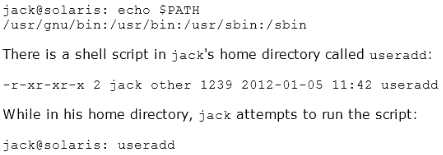
What will happen, and why?
- A. He will get a "file not found" error, because the current directory is not in his seaech path.
- B. He will get a "file not found" error, because his home directory is not in his search path.
- C. The useradd script will execute, because jack is in the same directory that the script is located in.
- D. The command /user/sbin/useradd will execute, because it is the last match in the search path.
- E. The command /user/sbin/useradd will execute, because it is the first match in the search path.
Answer:
D
Comments
Question 5
User jack on host solaris attempts to use ssh to log in to host oracle and receives this message:
jack@solaris:~$ ssh oracle
ssh: connect to host oracle port 22: connection refused
What is the problem?
- A. Host oracle does not have a valid host public key.
- B. Host oracle does not have a valid host private key.
- C. Host solaris does not have a valid host public key.
- D. Host does not have a valid host private key.
- E. Host solaris is not configured for host-based authentication.
- F. Host oracle is not configured for host-based authentication.
- G. Host oracle is not running the ssh service.
- H. Host solaris is not running the ssh service.
Answer:
G
Explanation:
The host he is trying to connect to (oracle) is not running the required service (ssh).
Comments
Question 6
When speaking to an Oracle Support Engineer, you are asked to verify the version of the Solaris 11
build currently running on your system.
Which command would display the Solaris 11 build version currently running on your system?
- A. pkg info all
- B. cat /etc/release
- C. cat /etc/update
- D. prtconf | grep –i update
- E. pkg info entire
Answer:
B
Explanation:
Which Solaris release you are running on your system can be determined using the following
command:
cat /etc/release
This will tell you which release you are running and when it was released.
The more recent your system, the more info is contained in this file.
Example:
# cat /etc/release
Oracle Solaris 10 8/11 s10s_u10wos_17b SPARC
Copyright (c) 1983, 2011, Oracle and/or its affiliates. All rights reserved.
Assembled 23 August 2011
Comments
Question 7
You need to configure an ISCSI target device on your x86 based Oracle Solaris II system. While
configuring the iSCSI device, the following error is displayed:
bash: stmfadm: command not found
Which option describes the solution to the problem?
- A. The COMSTAR feature is not supported on the x86 platform. The feature is supported only on the SPARC platform.
- B. Use the iscsitadm command on the x86 platform when configuring an iSCSI target.
- C. Install the storage-server group package on this system.
- D. Start the iSCSI target daemon on this system.
Answer:
C
Explanation:
STMF Manages transactions, such as context and resources for Small Computer System Interface
(SCSI) command execution, and tracking logical unit and port providers. STMF also handles logical
unit mappings, allocating memory, recovering failed operations, enumeration, and other necessary
functions of an I/O stack.
STMF is controlled by stmfadm, and stmfadm is the majority of the commands you will be using to
administer COMSTAR (COmmon Multiprotocl Scsi TARget).
Install the packages you need for COMSTAR with iSCSI and reboot:
# pfexec pkg install storage-server
# pfexec pkg install SUNWiscsit
# shutdown -y -i6 -g0
Note: You can set up and configure a COMSTAR Internet SCSI (iSCSI) target and make it available over
the network. The iSCSI features can work over a normal Internet connection (such as Ethernet) using
the standard iSCSI protocol. The iSCSI protocol also provides naming and discovery services,
authentication services using CHAP and RADIUS, and centralized management through iSNS.
The COMSTAR target mode framework runs as the stmf service. By default, the service is disabled.
You must enable the service to use COMSTAR functionality. You can identify the service with the svcs
command. If you have not rebooted the server since installing the group/feature/storage-server
package, the service might not be enabled correctly.
Comments
Question 8
Your SPARC server will not boot into multi user-server milestones and you need to troubleshoot to
out why. You need to start the server with minimal services running so that you can go through each
milestone manually to troubleshoot the issue.
Select the option that boots the server with the fewest services running.
- A. boot -s
- B. boot milestone none
- C. boot -m milestone=single-user
- D. boot -m milestone=none
- E. boot -m none
Answer:
D
Explanation:
The command boot -m milestone=none is useful in repairing a system that have problems booting
early.
Boot Troubleshooting:
To step through the SMF portion of the boot process, start with:
boot -m milestone=none
Then step through the milestones for the different boot levels:
svcadm milestone svc:/milestone/single-user:default
svcadm milestone svc:/milestone/multi-user:default
svcadm milestone svc:/milestone/multi-user-server:default
Comments
Question 9
User1 is attempting to assist user2 with terminating user2's process 1234.
User1 entered the following: kill -9 1234
Why does the process continue to run?
- A. You can kill a process only if you are root.
- B. You can kill only a process that you own.
- C. You can kill the process only with the pkill command.
- D. You need to kill the process with a stronger kill signal.
Answer:
B
Explanation:
Kill -9
Kill (terminates without cleanup)
Only works if issued by process owner or super user (root)
The program cannot respond to this signal; it must terminate
Note: Unix provides security mechanisms to prevent unauthorized users from killing other processes.
Essentially, for a process to send a signal to another, the owner of the signaling process must be the
same as the owner of the receiving process or be the superuser.
Comments
Question 10
Your server has one zone named dbzone (hat has been configured, but not yet installed). Which
command would you use to view all the options that were used to configure this zone?
- A. zoneadm list –icv dbzone
- B. zones tat –c summary dbzone
- C. zonecfg –z dbzone info
- D. zonecfg –icv dbzone info
Answer:
C
Explanation:
zonecfg info
Display information about the current configuration. If resource-type is specified, displays only
information about resources of the relevant type. If any property-name value pairs are specified,
displays only information about resources meeting the given criteria. In the resource scope, any
arguments are ignored, and info displays information about the resource which is currently being
added or modified.
Note:
zonecfg z
zonename. Specify the name of a zone. Zone names are case sensitive. Zone names must begin with
an alphanumeric character and can contain alphanumeric characters, the underscore (_) the hyphen
(-), and the dot (.). The name global and all names beginning with SUNW are reserved and cannot be
used.
Incorrect answer:
A: The zoneadm utility is used to administer system zones. A zone is an application container that is
maintained by the operating system runtime.
list option:
Display the name of the current zones, or the specified zone if indicated.
B: No such command.
D: no such options zonecfg icv
Comments
Page 1 out of 24
Viewing questions 1-10 out of 243
page 2