Question 1
alice is a user account used by Alice on a Solaris 11 system.
sadmin is a role account on the same system.
Your task is to add the command /usr/sbin/cryptoadm to the Network management profile, so that
Alice can execute it, while assuming the sadmin role.
Select the three activities necessary to accomplish this.
- A. To the file /etc/security/prof_attr, add the line: Network Management: solaris:cmd:RO::/usr/sbin/cryptoadm:euid=0
- B. To the file /etc/security/auth_attr, add the line: Network Management: solaris:cmd:RO::/usr/sbin/cryptoadm:euid=0
- C. To the file /etc/security/exec_attr.d/local-entriies, add the line: Network Management: solaris:cmd:RO::/usr/sbin/cryptoadm:euid=0
- D. Run the roles alice to ensure that alice may assume the role sadmin.
- E. Run the command profiles sadmin to ensure that the role sadmin includes the network Management profile.
- F. Run the command profiles alice to ensure that the Alice has permissions to access the Network management profile.
- G. Run the command profiles Network management to ensure that the Network management profile includes the sadmin role.
Answer:
C, D, G
Explanation:
C: /etc/security/exec_attr is a local database that specifies
the execution attributes associated with profiles. The
exec_attr file can be used with other sources for execution
profiles, including the exec_attr NIS map and NIS+ table.
A profile is a logical grouping of authorizations and com-
mands that is interpreted by a profile shell to form a
secure execution environment.
Incorrect answers:
A: etc/security/prof_attr is a local source for execution profile names, descriptions, and other
attributes of execution profiles. The prof_attr file can be used with other profile sources, including
the prof_attr NIS map.
B: /etc/security/auth_attr is a local source for authorization names and descriptions. The auth_attr
file can be used with other authorization sources, including the auth_attr NIS map and NIS+ table.
An authorization is a right assigned to users that is checked by certain privileged programs to
determine whether users can execute restricted functionality.
Reference: man exec_attr
Comments
Question 2
Select the two statements that correctly describe the operation of NWAM.
- A. If a location is explicitly enabled, it remains active until explicitly changed.
- B. Wireless security keys can be configured by using the nwammgr command.
- C. NWAM stores profile information in /etc/ipadm/ipadm.conf and /etc/dladm/datalink.conf.
- D. Multiple locations may be automatically activated in systems with multiple network interface cards.
- E. Interface NCU Properties "float" and are automatically attached to the highest priority Link NCU Property.
- F. If the DefaultFixed NCP is enabled, persistent configuration, stored in /etc/ipadm.conf and /etc/dladm/datalink.conf is used.
Answer:
A, D
Explanation:
A: Conditional and system locations can be manually
activated, which means that the location remains active until explicitly disabled.
D: A location comprises certain elements of a network configuration, for example a name service
and firewall settings, that are applied together, when required. You can create multiple locations
for various uses. For example, one location can be used when you are connected at the office by
using the company intranet. Another location can be used at home when you are connected to
the public Internet by using a wireless access point. Locations can be activated manually or
automatically, according to environmental conditions, such as the IP address that is obtained
by a network connection.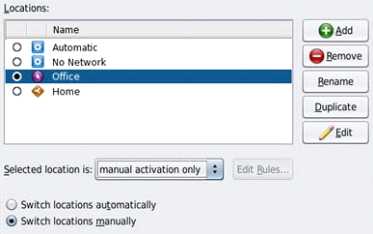
Incorrect answers:
Note: The Network Auto-Magic (NWAM) feature simplifies basic network configuration by
automatically addressing basic Ethernet and WiFi configurations, such as connecting to your wired or
wireless network at startup and displaying notifications about the status of your currently active
network connection from the desktop. NWAM is also designed to simplify some of the more complex
networking tasks, such as the creation and management of system-wide network profiles, for
example, the configuration of name services, IP Filter and IP Security (IPsec).
Reference: Oracle Solaris Administration: Network Interfaces and NetworkVirtualization, Activating
and Deactivating Profiles
Reference: Oracle Solaris Administration: Network Interfaces and NetworkVirtualization,Creating and
Managing Locations
Comments
Question 3
On server A, you enter the following command to add a static route to serverA
route -p add -host 192.168.1.101 192.168.1.101 -static
What is the purpose of this command?
- A. to temporarily bypass IP Filter rules
- B. to specify an IPMP target IP address to in.mpathd
- C. to specify routing to an adjacent network when in.rdisc is not used
- D. to specify routing to an adjacent network when in.routed is not used
- E. to ensure the IP address for serverB is not flushed from the ARP cache
- F. to optimize link aggregation using a direct connection between two systems
Answer:
B
Explanation:
Note: # route -p add -host destination-IP gateway-IP -static
wheredestination-IPandgateway-IPare IPv4 addresses of the host to be used as a target.
For example, you would type the following to specify the target system 192.168.10.137, which is on
the same subnet as the interfaces in IPMP group itops0:
$ route -p add -host 192.168.10.137 192.168.10.137 -static
This new route will be automatically configured every time the system is restarted. If you want to
define only a temporary route to a target system for probe-based failure detection, then do not use
the -p option.
Comments
Question 4
Before booting test zone a non-global zone, you want to connect to the zones console so that you
can watch the boot process.
Choose the command used to connect to testzones console.
- A. zoneadm -C testzone
- B. zoneadm -console testzone
- C. zlogin - z testzone console
- D. zlogin - z testzone - C
- E. zlogin -C testzone
- F. zoneadm - testzone - c
Answer:
E
Explanation:
The following options are supported:
-C
Connects to the zone console. Connects to the zone console.
Note:
After you install a zone, you must log in to the zone to complete its application environment. You
might log in to the zone to perform administrative tasks as well. Unless the-Coption is used to
connect to the zone console, logging in to a zone usingzloginstarts a new task. A task cannot span
two zones
Incorrect answers:
B: No option -console.
C, D: No option -z.
Reference: man zlogin
Comments
Question 5
Consider the following rule file for use with the Basic Audit Reporting Tool (BART).
CHECK all
IGNORE dirmtime
/etc/security
/etc/notices
IGNORE contents
/export/home
IGNORE mtime size contents
/var
CHECK
You are using BART to detect inappropriate changes to the file system.
Identify the two correct statements describing the attributes recorded.
- A. /var/dhcp Attribute: size uid gid mode acl
- B. /etc/hosts Attributes: size uid gid mode acl intime dest
- C. /var/spool/mqueue Attribute: size uid gid mode acl dirmtime
- D. /etc/security/exec_attr Attribute: size uid mode acl mtime devnode
- E. /export/home/kate/.profile Attributes: uid gid mode acl dirmtime
- F. /export/home/rick/.profile Attributes: size uid gid mode acl mtime contents
Answer:
D, F
Explanation:
D: According to line /etc/security
F: According to line /export/home
Not E: According to line IGNORE dirmtime
Note: In default mode, the bart compare command, as shown in the following example, checks all
the files installed on the system, with the exception of modified directory timestamps (dirmtime):
CHECK all
IGNORE dirmtime
Note 2: The Basic Audit Reporting Tool (BART) feature of Oracle Solaris enables you to
comprehensively validate systems by performing file-level checks of a system over time. By creating
BART manifests, you can easily and reliably gather information about the components of the
software stack that is installed on deployed systems.
BART is a useful tool for integrity management on one system or on a network of systems.
Reference: Oracle Solaris Administration: Security Services, BART Manifests, Rules Files, and Reports
(Reference)
Comments
Question 6
The ZFS configuration on your server is:
Pool1
6.67G
31K
/pool
Pool1/data
31K
31K
/data
Select the three commands that you would use to 1. Create, 2. List, and 3. Delete a snapshot of the
/data file system.
- A. zfs snapshot pool1/data@now
- B. zfs create snapshot pool1/data@now
- C. zfs list -t snapshot
- D. zfs list -t snapshot pool1/data
- E. zfs destroy pool1/data@now
- F. zfs destroy snapshot pool1/data@now
Answer:
A, D, E
Explanation:
A: Snapshots are created by using the zfs snapshot command, which takes as its only argument the
name of the snapshot to create.
D: You can list snapshots as follows:
# zfs list -t snapshot
E: Snapshots are destroyed by using the zfs destroy command. For example:
# zfs destroy tank/home/ahrens@now
Comments
Question 7
Which three Installation option allow for a "hands free" and "unattended'" Installation of the Solaris
11 environment?
- A. Jumpstart
- B. LiveCD
- C. A text Installation over the network
- D. An Automated Installation performed on an x86 client
- E. An Automated Installation using media from a local DVD or USB drive
- F. An Automated Installation using a networked repository
Answer:
D, E, F
Explanation:
Oracle Solaris 11 uses Automated Installer (AI) for unattended installations.
Unattended installations are possible by placing the contents of the AI Image media (or ISO image
contents from a download) on an AI server.
Incorrect answers:
A: Jumpstart used for Solaris 10.
B: LiveCD is used for hands-on installation.
Reference: Differences between Oracle Solaris 10 and 11 for System Administrators
http://www.oracle.com/technetwork/server-storage/solaris11/overview/solaris-matrix-1549264.html
Comments
Question 8
You have been tasked with creating a dedicated virtual network between two local zones within a
single system. In order to isolate the network traffic from other zones on that system.
To accomplish this, you will create__________.
- A. An ether stub
- B. A virtual router
- C. A virtual switch
- D. A virtual bridge.
- E. A virtual network interface
- F. Nothing because a virtual switch is automatically created then the virtual network interfaces are created.
Answer:
A
Explanation:
Etherstubs are pseudo ethernet NICs which are managed by the system administrator. You can create
VNICs over etherstubs instead of over physical links. VNICs over an etherstub become independent
of the physical NICs in the system. With etherstubs, you can construct a private virtual network that
is isolated both from the other virtual networks in the system and from the external network. For
example, you want to create a network environment whose access is limited only to your company
developers than to the network at large. Etherstubs can be used to create such an environment.
Note: Oracle Solaris 11 introduces a new and powerful network stack architecture which includes:
* Networking virtualization with virtual network interface cards (VNICs) and virtual switching
(etherstubs)
* Tight integration with zones
* Network resource management - efficient and easy to manage integrated quality of service (QoS)
to enforce bandwidth limit on VNICs and traffic flows
We will be examini
Reference: Oracle Solaris Administration: Network Interfaces and Network Virtualization, Configuring
Components of Network Virtualization in Oracle Solaris
Comments
Question 9
Which three options describe the purpose of the zonep2vchk command?
- A. Used on a Solaris 10 global zone to access the system for problems before migrating that system to a Solaris 10 branded zone.
- B. Used to access a Solaris 10 global zone for problems before migrating that zone to a Solaris 11 global zone
- C. Used to create zonecfg template for a Solaris 10 global zone that that will be migrated to a solaris10 branded zone.
- D. Used to migrate an Oracle Solaris 11 global zone to a non-global zone.
- E. Used to migrate a Solaris 10 global zone to a non-global zone on the same server; the non-global zone can then be migrated to a Solaris 11 server as a Solaris10 branded zone.
Answer:
C, D, E
Explanation:
zonep2vchk
- check a global zone's configuration for physical to virtual migration into non-global zone
Thezonep2vchkutility is used to evaluate a global zone's configuration before the process of
physical-to-virtual (p2v) migration into a non-global zone.
The p2v process involves archiving a global zone (source), and then installing a non-global zone
(target) using that archive
zonep2vchkserves two functions. First, it can be used to report issues on the source which might
prevent a successfulp2vmigration. Second, it can output a templatezonecfg, which can be used to
assist in configuring the non-global zone target.
zonep2vchkcan be executed on a Solaris 10 or later global zone. To execute on Solaris 10, copy
thezonep2vchkutility to the Solaris 10 source global zone.
When run on Solaris 10, a target release ofS11can be specified, which will check forp2vinto a
Solaris 10 Branded zone.
Reference: man zonep2vchk
Comments
Question 10
Your are troubleshooting network throughput on your server.
To confirm that the load balancing among aggregated links is functioning properly, you want to
examine the traffic statistics on the links comprising the aggregation.
The correct command is ___________.
- A. dlstat - aggr
- B. dlstat show-aggr
- C. dlstat show-link -r
- D. dlstat show-link -aggr
- E. dlstat show-phys -aggr
Answer:
B
Explanation:
dlstat show-aggr [-r | -t] [-i interval] [-p] [ -o field[,...]] [-u R|K|M|G|T|P] [link]
Display per-port statistics for an aggregation.
Incorrect answers:
dlstat show-link [-r [-F] | -t] [-i interval] [-a] [-p] [ -o field[,...]] [-u R|K|M|G|T|P] [link]
Display statistics for a link.
Comments
Page 1 out of 13
Viewing questions 1-10 out of 131
page 2