Question 1
Which two entities can be categorized? (Choose two.)
- A. Storage Containers
- B. Alerts
- C. Virtual Machines
- D. ISO Images
Answer:
B, C
Explanation:
In Nutanix Prism Central, categories allow administrators to group and organize entities for
management, automation, and policy enforcement.
Alerts (Option B) can be categorized to group similar system events and create filtering rules.
Virtual Machines (Option C) can be categorized to apply security policies, automation tasks, and
resource allocation rules.
Option A (Storage Containers) cannot be categorized in Prism Central. Storage policies apply at the
container level but are not managed via categories.
Option D (ISO Images) cannot be categorized because ISOs are static objects, not active entities.
References:
Nutanix Prism Central Guide → Working with Categories
Nutanix Bible → Category-Based Management and Security Policies
Nutanix KB → Using Categories for VM Management in Prism Central
Comments
Question 2
What feature allows receiving a weekly message about infrastructure performance summary?
- A. Admin Center Life Cycle Manager
- B. Prism Central Syslog
- C. Infrastructure VMs List
- D. Intelligent Operations Reports
Answer:
D
Explanation:
Nutanix Intelligent Operations Reports (Option D) provide weekly summaries of cluster health,
performance, and resource consumption.
These reports include recommendations for optimization, alerts, and forecasted resource usage
trends.
Option A (Admin Center LCM) manages firmware and software upgrades but does not generate
weekly performance reports.
Option B (Prism Central Syslog) is used for logging and event tracking, not performance summaries.
Option C (Infrastructure VMs List) provides a static list of VMs but does not generate periodic reports.
References:
Nutanix Prism Central → Intelligent Operations and Reports
Nutanix Bible → Automated Insights for Cluster Health Monitoring
Nutanix KB → Using Intelligent Operations Reports for Capacity Planning
Comments
Question 3
Which storage attributes do Storage Policies manage?
- A. Storage Containers and Volume Groups
- B. Replication Factor and Encryption
- C. Shares and Object Stores
- D. Data Protection and Security
Answer:
B
Explanation:
Storage Policies in Nutanix allow administrators to configure data protection and performance
settings at the storage container level.
Replication Factor (RF) defines the number of copies of data stored across nodes for fault tolerance.
Encryption ensures that data at rest is protected via Nutanix-native encryption methods.
Option A (Storage Containers and Volume Groups) refers to storage organization, not policies.
Option C (Shares and Object Stores) applies to file and object storage services, not VM storage
policies.
Option D (Data Protection and Security) is a broad term but does not define specific policy attributes.
References:
Nutanix Prism Element → Storage Policies and Replication Factor (RF)
Nutanix Bible → Storage Fabric and Data Resiliency
Nutanix KB → Enabling Encryption in Storage Policies
Comments
Question 4
Refer to Exhibit: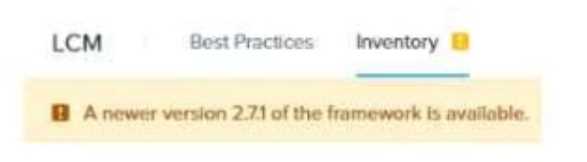
An administrator notices the message shown in the exhibit when navigating to LCM from Prism
Central.
Which action should the administrator take to update LCM to the latest version?
- A. Run an AOS upgrade.
- B. Run an AHV upgrade.
- C. Perform an Inventory Scan.
- D. Download and install the latest LCM version from a CVM.
Answer:
C
Explanation:
When Life Cycle Manager (LCM) reports that a newer framework version is available, the correct
action is to perform an inventory scan (Option C).
Performing an inventory scan updates the available firmware/software versions and allows LCM to
download required updates.
Option A (Run an AOS upgrade) is unrelated to the LCM framework update process.
Option B (Run an AHV upgrade) is a separate component update and does not affect the LCM
framework.
Option D (Download manually from a CVM) is not necessary because LCM updates are automatically
pulled after an inventory scan.
References:
Nutanix LCM User Guide → Updating LCM Framework and Performing Inventory Scans
Nutanix KB → Best Practices for LCM Updates
Nutanix Prism Central → LCM Update Workflow
Comments
Question 5
An administrator needs to ensure that a VM is powered on before the rest of the VMs when starting
a host.
Which configuration option allows this behavior?
- A. Recovery Plan
- B. Host Affinity
- C. High Availability
- D. Agent VM
Answer:
D
Explanation:
In Nutanix AHV-based clusters, when you want to ensure that a specific VM (e.g., a critical VM like a
domain controller) is powered on before other VMs during a host startup or failover scenario, you
use the Agent VM configuration setting.
Here’s the exact explanation from the Nutanix ECA course:
“Agent VMs are special VMs that are automatically powered on before other user VMs during host
startup or recovery. This ensures that critical VMs, such as those that provide essential services, are
always available first.”
In contrast:
✅
Recovery Plan (A) — This is used in the context of DR and failover, typically with Nutanix Leap.
✅
Host Affinity (B) — Host affinity rules control placement policies of VMs but not startup priority.
✅
High Availability (C) — HA ensures VMs are restarted on surviving hosts but does not control
startup order.
Therefore, setting the VM as an Agent VM guarantees that it is powered on before the other VMs
during host start-up. Let me know if you’d like steps on how to configure an Agent VM within Prism
Central or Prism Element!
Comments
Question 6
An administrator is preparing for a firmware upgrade on a host and wants to manually migrate VMs
before executing the LCM upgrade. However, one VM is unable to migrate while others migrate
successfully.
Which action would fix the issue?
- A. Enable Acropolis Dynamic Scheduling (ADS) at the cluster level.
- B. Update Link Layer Discovery Protocol (LLDP).
- C. Disable Agent VM within the VM configuration options.
- D. Configure backplane port groups that are assigned to the CVM.
Answer:
A
Comments
Question 7
A company is evaluating Nutanix Disaster Recovery (DR) to protect multiple business-critical
applications. Some applications are built using a 3-tier architecture and have interdependencies.
After failover, the VM's static IP address is retained, but DNS configuration is lost.
How should an administrator proceed to resolve this issue?
- A. Configure Self-Service Restore.
- B. Create custom in-guest scripts to preserve the statically assigned DNS IP addresses.
- C. Install Network Manager command-line tool (nncli) in the protected Windows VMs.
- D. Configure a Protection Domain.
Answer:
B
Explanation:
During failover in Nutanix Disaster Recovery, VMs retain their static IPs but may lose DNS settings if
the network configuration at the DR site is different from the primary site.
Option B (Create custom in-guest scripts) is correct:
Custom scripts allow Windows or Linux VMs to restore DNS settings automatically after failover.
These scripts can be executed using post-failover automation in Nutanix DR policies.
Option A (Self-Service Restore) is incorrect:
Self-Service Restore is used for end-user recovery of deleted files, not for network settings.
Option C (nncli tool) is incorrect:
The nncli tool is used for network troubleshooting, but it does not automatically restore DNS
settings.
Option D (Configure a Protection Domain) is incorrect:
Protection Domains define replication policies, but they do not fix DNS settings after failover.
References:
Nutanix Disaster Recovery Guide → Failover Automation and Network Configuration
Nutanix Bible → VM Recovery and IP Management in DR Scenarios
Nutanix KB → Preserving DNS Settings in Disaster Recovery
Comments
Question 8
An administrator needs to create a storage container named TestData with the following conditions:
Replication Factor (RF) = 1 (RF1)
Inline Compression enabled
Deduplication disabled
Maximum storage capacity = 100 GiB
How should the administrator complete this task?
- A. Log into Prism Element and create the storage container with an Advertised Capacity of 100 GiB.
- B. Log into Prism Element and create the storage container.
- C. Log into Prism Central and create the storage container with a Reserved Capacity of 100 GiB.
- D. Log into Prism Central and create the storage container.
Answer:
A
Explanation:
When creating a storage container in Nutanix, the administrator must configure the correct capacity
settings:
Option A (Prism Element with Advertised Capacity of 100 GiB) is correct:
Advertised Capacity defines logical limits for the container (i.e., how much space it reports as
available).
Inline Compression can be enabled directly in Prism Element.
Option B (Create in Prism Element without Advertised Capacity) is incorrect:
Without specifying Advertised Capacity, the container may consume unlimited storage.
Option C (Create in Prism Central with Reserved Capacity) is incorrect:
Reserved Capacity applies to Quality of Service (QoS) policies, not storage limits.
Option D (Create in Prism Central without capacity limits) is incorrect:
Prism Central can manage storage but does not directly enforce RF1 and compression policies.
References:
Nutanix Storage Management Guide → Creating and Managing Storage Containers
Nutanix Bible → Replication Factor (RF) and Data Optimization
Nutanix KB → Inline Compression Best Practices in Nutanix AOS
Comments
Question 9
Which predefined view in Prism Central’s Intelligent Operations should be used to determine which
VM is consuming excessive resources and causing performance issues for others?
- A. Inactive VMs List
- B. Overprovisioned VMs List
- C. Bully VMs List
- D. Constrained VMs List
Answer:
C
Explanation:
The Bully VMs List (Option C) in Prism Central’s Intelligent Operations identifies VMs consuming
excessive CPU, memory, or storage, which negatively affects other VMs.
Option A (Inactive VMs List) is used for identifying unused VMs but does not detect performance
issues.
Option B (Overprovisioned VMs List) helps identify VMs with excessive allocated resources, but it
does not focus on live performance impact.
Option D (Constrained VMs List) highlights VMs suffering from resource contention, not those
causing it.
References:
Nutanix Prism Central → Intelligent Operations and Performance Tuning
Nutanix KB → Identifying and Managing Resource-Hogging VMs
Comments
Question 10
Which feature deploys a temporary VM that allows an administrator to log in and apply OS patches
to a VM template?
- A. Create VM from Template
- B. Complete Guest OS Update
- C. Update Configuration
- D. Update Guest OS
Answer:
D
Explanation:
The Update Guest OS feature (Option D) in Nutanix allows administrators to apply patches and
updates to a VM template by creating a temporary VM instance for modification.
How It Works:
A temporary VM is deployed from the template.
Administrators apply updates to the OS.
Once complete, the changes are saved back to the template.
Option A (Create VM from Template) is incorrect:
This feature creates a new VM from an existing template but does not update the template itself.
Option B (Complete Guest OS Update) is incorrect:
There is no specific Nutanix feature named "Complete Guest OS Update."
Option C (Update Configuration) is incorrect:
Updates VM hardware and policies but not the OS.
References:
Nutanix Prism Central → Managing VM Templates and Guest OS Updates
Nutanix Bible → OS Management and Updates in Nutanix Environments
Nutanix KB → How to Patch OS in a Nutanix VM Template
Comments
Page 1 out of 12
Viewing questions 1-10 out of 121
page 2