Question 1
How should the storage containers be configured to follow Nutanix storage best practices?
- A. Use a single container. Enable Compression and Deduplication for both VMS
- B. Use separate containers. Enable Compression for non-persistent VMS. Enable Compression and Deduplication for persistent VMS
- C. Use a single container. Enable Compression and Erasure Coding for both VMS
- D. Use separate containers. Enable Compression for persistent VMS. Enable Compression and Deduplication for nan-persistent VMS
Answer:
B
Explanation:
Nutanix recommends using separate containers for persistent and non-persistent VMS. For
persistent VMS, enable compression and deduplication.
For non-persistent VMS, enable compression
only1
According to Nutanix documentation, it is recommended to use multiple containers, with each
container representing an individual performance workload. This allows for better performance
isolation and easier management. For example, one container could be used for VDI workloads,
while another container could be used for general-purpose workloads.
As for compression and deduplication, it is recommended to enable them for all VMs. Compression
reduces the amount of storage space required and increases the performance of the system, while
deduplication reduces the amount of duplicate data stored on the system. Erasure coding can also be
used as an alternative to replication for data protection.
Comments
Question 2
An administrator needs to deploy virtual desktops to a Hyper-V Nutanix cluster with writable
differencing disks, The administrator will use read only master image with clones that link back to the
image.
Which native feature will the cluster use to complete this task?
- A. Oplog
- B. Compression
- C. VM Flash Mode
- D. Shadow Clones
Answer:
D
Explanation:
The feature in Nutanix that would be used to complete the task of deploying virtual desktops to a
Hyper-V Nutanix cluster with writable differencing disks using a read-only master image with clones
that link back to the image is Shadow Clones. Shadow Clones allow for the creation of a snapshot or
a clone of a VM that uses the original VM's disks as read-only, and only writes changes to a separate
differencing disk. This is useful when deploying virtual desktops as it can reduce storage
requirements and improve performance.
Nutanix shadow clones are a feature that enables distributed caching of virtual disks (vDisks) that are
in a multi-reader scenario.
This can improve performance and reduce network traffic for scenarios
such as VDI or private clone boot storms1
Comments
Question 3
A Windows IO VM fails to power on With an NVIDIA vCPU profile in ESXi 7. The VM is configured with
NVIDIA profile by selecting Shared PCl Device, adding the NVIDIA GRID vCPU device. and selecting
the Profile under VM settings.
The following error message is displayed in the vSphere web client: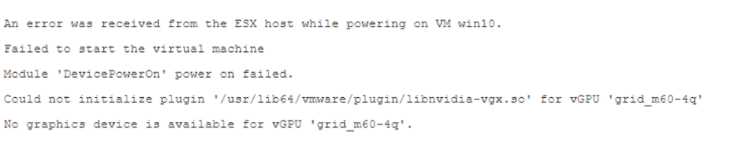
What should be done to resolve this issue?
- B. Change the Graphics mode of the host from Shared to Shared Direct
- C. Switch the GPU mode to graphics mode using gpumodeswitch command.
- D. change the Graphics mode of the host from Shared Direct to Shared.
- E. Switch the GPU mode to compute mode using gpumodeswitch command.
Answer:
C
Explanation:
gpumodeswitch is a command-line tool that is used to switch supported NVIDIA GPUs between
compute and graphics mode. Compute mode allows multiple VMs to share a GPU for CUDA
workloads.
Graphics mode allows a single VM to use a GPU for graphics workloads12
.
Comments
Question 4
An administrator supports a user group that spans across 10 Nutanix clusters for a medium-sized
medical communications firm. The 10 Nutanix clusters are managed by a single Prism Central
instance.
This group's virtual desktops are all cloned from a common gold image and all applications are
published from a Citrix Virtual Apps farm. The administrator needs to keep the gold image in sync
across all of the clusters.
What is the best way to achieve this?
- A. use the native replication facility within the Machine Catalog
- B. Setup a Protection Domain with the gold image as 3 protected entity.
- C. Upload the gold image to Prism Central Image Service.
- D. use Move to maintain all gold images across the clusters.
Answer:
C
Explanation:
Prism Central Image Service allows you to upload and manage images through Prism Central by
using the v3 API.
You can also choose where your images will be available across different clusters123
https://next.nutanix.com/ncm-intelligent-operations-formerly-prism-pro-ultimate-26/prism-central-
adding-images-to-prism-central-33759
Comments
Question 5
An administrator has been evaluating a performance issue with the current Citrix VD' solution on
Nutanix. During the evaluation, the administrator finds out there is a feature that is enabled called
Shadow Clones.
What would happen if an administrator disabled Shadow Clones within a company's VDI
environment?
- A. Deployment times would increase as the number deployed desktops increase,
- B. Deployment times would decrease when deploying additional desktops.
- C. Boot storms would be eliminated due to desktop resource contention.
- D. Boot storms would be eliminated because the number of desktops would be throttled.
Answer:
A
Explanation:
Nutanix's Shadow Clones feature is used to create linked clones or snapshots of base VMs, which can
improve VM provisioning time and storage efficiency by reducing the amount of duplicated data.
If an administrator disables Shadow Clones within a company's VDI environment, it is likely that
deployment times would increase as the number of deployed desktops increases. This is because
linked clones or snapshots would no longer be used, so each new desktop deployment would require
creating a full copy of the base VM.
Nutanix Shadow Clones allow for distributed caching of a particular disk or VM data, which are in a
‘multi-reader’ scenario.
This can help in scenarios such as VDI or private clone boot storms, where
VMs on multiple nodes read from the same set of base disks12
Comments
Question 6
In a VMware Horizon environment running on Nutanix, an administrator has noticed that create,
start, shut down, and delete operations are taking longer than expected, the environment is
currently configured with one vCenter instance and has 10,000 virtual desktops. What is the
recommended number of vCenter instances in this configuration?
- A. 1
- B. 2
- C. 5
- D. 10
Answer:
B
Explanation:
vCenter can execute approximately 640 concurrent operations before incoming requests are queued,
and can support up to 2,000 concurrent sessions1
.
VMware Horizon 8 can support up to 120,000
active sessions in a Cloud Pod Architecture pod federation23
. Therefore, if the environment has
10,000 virtual desktops, one vCenter instance might not be enough to handle all the operations and
sessions efficiently. The recommended number of vCenter instances in this configuration is B (2).
Comments
Question 7
An administrator has finished setting up a Frame environment and has to finish preparing the
Sandbox image. During the publishing andtesting phase, the administrator notices issue with the
Sysprep process.
Which tool can the administrator use to prepare the Sysprep of the sandbox with error parsing?
- A. Frame Sysprep Helper Tool
- B. Windows Sysprep Built in tool
- C. Frame Guest Agent 7
- D. Frame Guest Agent 8
Answer:
A
Explanation:
Sysprep is a Microsoft tool that prepares a Windows installation for cloning, auditing, and customer
delivery23
.
The Frame Sysprep Helper Tool is designed to simplify the Microsoft Sysprep process by
parsing errors reported by sysprep and immediately repairing them when possible1
. Therefore, the
tool that the administrator can use to prepare the Sysprep of the sandbox with error parsing is A
(Frame Sysprep Helper Tool).
Comments
Question 8
Refer to the exhibit.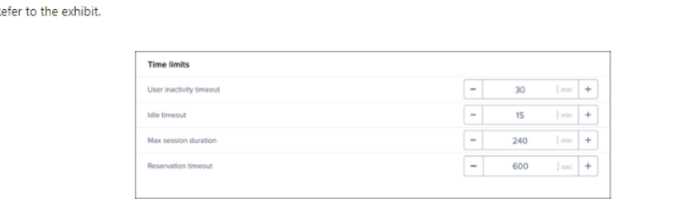
An administrator was made aware that user sessions are being randomly disconnected. and their
applications and files being terminated. When the user launches new virtual desktop session, they
are authenticated to a fresh desktop. upon investigating. the administrator discovers that most users
log in at 9:00 AM and are active through 2:00 PM.
What configuration setting must be modified in order to resolve this issue?
- A. Max session duration
- B. Idle timeout
- C. Reservation timeout
- D. user inactivity timeout
Answer:
A
Explanation:
Nutanix Frame has several session settings that can affect the user experience and resource
utilization.
One of these settings is Max session duration, which defines how long a user can stay
connected to a Frame session before it is automatically terminated1
. If this setting is too low, users
might experience random disconnections and lose their applications and files. Therefore, the
configuration setting that must be modified in order to resolve this issue is A (Max session duration).
Comments
Question 9
Refer to the exhibit.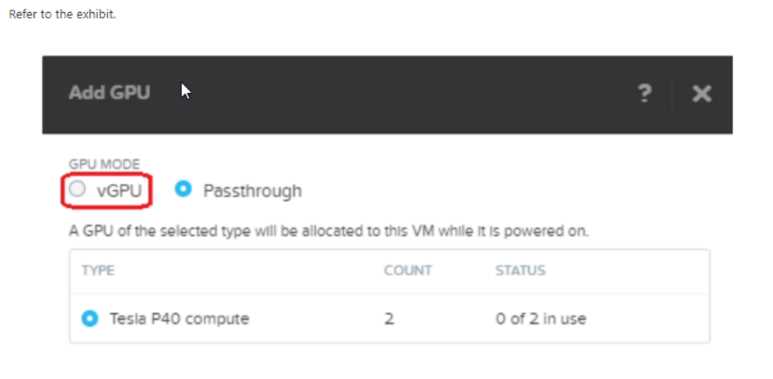
An administrator is configuring a virtual desktop gold master image with P40 NVIDIA vGPU. upon
trying to add a vCPU assignment in Prism Element, the administrator noticed that it is not selectable
and cannot proceed.
Which two actions are correct steps to resolve this issue? (Choose two.)
- A. Install the NVIDIA GPU drivers on the Gold Master.
- B. Disable ECC by running nvdia-smi -e 0.
- C. Install the NVIDIA GPU Manager Driver.
- D. Check if ECC Mode is turned on by running nvdia-smi -q | grep “ECC Mode” -A2
Answer:
BD
Explanation:
ECC (Error Correcting Code) mode is a feature of some NVIDIA GPUs that provides error detection
and correction for memory errors.
However, ECC mode can interfere with vGPU functionality and
prevent vGPU-enabled VMs from being created or started1
. Therefore, two correct steps to resolve
this issue are B (Disable ECC by running nvdia-smi -e 0) and D (Check if ECC Mode is turned on by
running nvdia-smi -q | grep “ECC Mode” -A2).
https://portal.nutanix.com/page/documents/kbs/details?targetId=kA00e000000LKjOCAW
Comments
Question 10
The operations team have been tasked with increasing overall datacenter efficiency with a target
minimum of 80% CPU, memory, and storage capacity utilization. They are requesting usage data
from all application owners be sent on a monthly basis to be ingested into their capacity
management software.
An administrator has an implementation of four Nutanix clusters under the management of a single
Prism Central Instance.
How should the administrator best provide the data needed to the operations team to ensure
adherence to the datacenter utilization directive?
- A. Export the CPU Memory end Storage Usage metrics under Virtual Infrastructure/VMs in Prism Central and FTP the file to the operations team's FTP server.
- B. Schedule a monthly email report with CPU, Memory, and Storage Usage data across all clusters under the Reporting facility in Prism Central.
- C. Create a Metric Chart in Prism Central with CPU, Memory, and Storage usage across all clusters and export the data to be sent to the operations team,
- D. Review the VM Efficiencies widget in Prism Central and export the data to a comma delimited file to be sent to the operations team.
Answer:
B
Explanation:
This option allows you to create a custom report with the required metrics for all VMs across all
clusters and send it automatically to the operations team via email4
. This way, you don’t have to
manually export or FTP the data every month.
Comments
Page 1 out of 7
Viewing questions 1-10 out of 77
page 2