Question 1
Review the exhibit.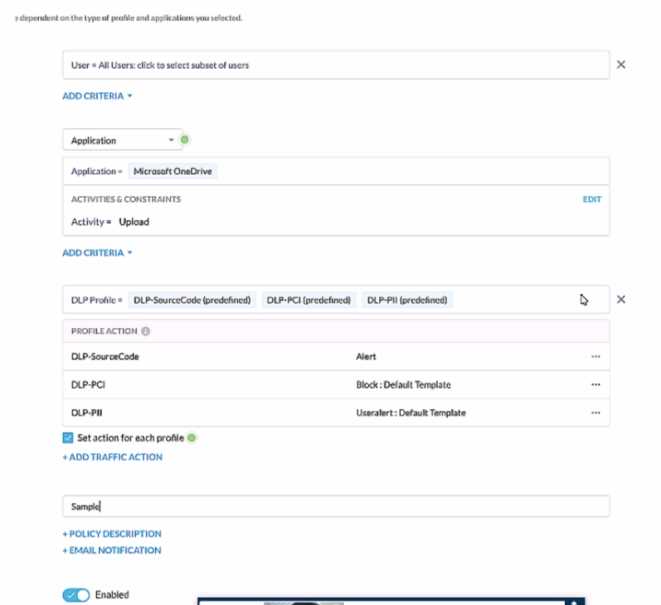
A user has attempted to upload a file to Microsoft OneDrive that contains source code with Pll and
PCI data.
Referring to the exhibit, which statement Is correct?
- A. The user will be blocked and a single Incident will be generated referencing the DLP-PCI profile.
- B. The user will be blocked and a single Incident will be generated referencing all of the matching DLP profiles
- C. The user will be blocked and a separate incident will be generated for each of the matching DLP profiles.
- D. The user will be alerted and a single incident will be generated referencing the DLP-PII profile.
Answer:
C
Explanation:
In the given scenario, a user is attempting to upload a file containing sensitive PII and PCI data to
Microsoft OneDrive. The Netskope Security Cloud provides real-time data and threat protection
when accessing cloud services, websites, and private apps from anywhere, on any device. Based on
the exhibit provided, different DLP (Data Loss Prevention) profiles are triggered - DLP-SourceCode,
DLP-PCI, and DLP-PII. Each of these profiles has specific actions associated with them; for instance, an
alert is generated for Source Code while blocking actions are initiated for PCI and PII data. Since
multiple DLP profiles are triggered due to the sensitive nature of the content in the file being
uploaded, separate incidents will be generated for each matching profile ensuring comprehensive
security coverage and incident reporting.
Reference:
Netskope Cloud Security
Netskope Resources
Netskope Documentation
Comments
Question 2
Users at your company's branch office in San Francisco report that their clients are connecting, but
websites and SaaS applications are slow When troubleshooting, you notice that the users are
connected to a Netskope data plane in New York where your company's headquarters is located.
What is a valid reason for this behavior?
- A. The Netskope Client's on-premises detection check failed.
- B. The Netskope Client's default DNS over HTTPS call is failing.
- C. The closest Netskope data plane to San Francisco is unavailable.
- D. The Netskope Client's DNS call to Secure Forwarder is failing
Answer:
C
Explanation:
The reported issue of slow website and SaaS application access for users in the San Francisco branch
office, despite being connected to a Netskope data plane in New York, can be attributed to the
geographical distance between the user location and the data plane. The Netskope Security Cloud
operates through a distributed network of data planes strategically placed in various regions. When
users connect to a data plane that is geographically distant, it can result in latency due to longer
network traversal times. In this case, the closest Netskope data plane to San Francisco might be
unavailable or experiencing high load, leading to performance issues. To address this, consider
optimizing data plane selection based on proximity to the user location or investigating any data
plane availability or performance issues.
Reference:
Netskope Cloud Security
Netskope Resources
Netskope Documentation
Comments
Question 3
You need to extract events and alerts from the Netskope Security Cloud platform and push it to a
SIEM solution. What are two supported methods to accomplish this task? (Choose two.)
- A. Use Cloud Ticket Orchestrator.
- B. Use Cloud Log Shipper.
- C. Stream directly to syslog.
- D. Use the REST API.
Answer:
B, D
Explanation:
To extract events and alerts from the Netskope Security Cloud platform and integrate them with a
SIEM (Security Information and Event Management) solution, you can utilize the following supported
methods:
Cloud Log Shipper (CLS):
The Cloud Log Shipper is designed to forward Netskope logs to external systems, including SIEMs.
It allows you to export logs in real-time or batch mode to a destination of your choice.
By configuring CLS, you can ensure that Netskope events and alerts are sent to your SIEM for further
analysis and correlation.
Reference: Netskope Documentation on Cloud Log Shipper
REST API:
The Netskope Security Cloud provides a comprehensive REST API that allows you to
programmatically retrieve data, including events and alerts.
You can use the REST API to query specific logs, incidents, or other relevant information from
Netskope.
By integrating with the REST API, you can extract data and push it to your SIEM solution.
Reference: Netskope REST API Documentation
Reference:
Netskope Cloud Security
Netskope Resources
Netskope Documentation
These methods ensure seamless data flow between Netskope and your SIEM, enabling effective
security monitoring and incident response.
Comments
Question 4
You want to enable the Netskope Client to automatically determine whether it is on-premises or off-
premises. Which two options in the Netskope Ul would you use to accomplish this task? (Choose
two.)
- A. the All Traffic option in the Steering Configuration section of the Ul
- B. the New Exception option in the Traffic Steering options of the Ul
- C. the Enable Dynamic Steering option in the Steering Configuration section of the Ul
- D. the On Premises Detection option under the Client Configuration section of the Ul
Answer:
C, D
Explanation:
To enable the Netskope Client to automatically determine whether it is on-premises or off-premises,
you can use the following options in the Netskope UI:
Enable Dynamic Steering:
This option is available in the Steering Configuration section of the UI.
By enabling dynamic steering, the Netskope Client can intelligently determine the appropriate data
plane (on-premises or cloud) based on the user’s location and network conditions.
It ensures that traffic is directed to the optimal data plane for improved performance and security.
Reference: Netskope Documentation on Dynamic Steering
On Premises Detection:
This option is available under the Client Configuration section of the UI.
By configuring on-premises detection, the Netskope Client can identify whether it is connected to
the local network (on-premises) or accessing resources from outside (off-premises).
It helps in applying relevant policies and steering traffic accordingly.
Reference: Netskope Documentation on Client Configuration
Comments
Question 5
You are already using Netskope CSPM to monitor your AWS accounts for compliance. Now you need
to allow access from your company-managed devices running the Netskope Client to only Amazon S3
buckets owned by your organization. You must ensure that any current buckets and those created in
the future will be allowed
Which configuration satisfies these requirements?
- A. Steering: Cloud Apps Only, All Traffic Policy type: Real-time Protection Constraint: Storage. Bucket Does Not Match -ALLAccounts Action: Block
- B. Steering: Cloud Apps Only Policy type: Real-time Protection Constraint: Storage. Bucket Does Not Match *@myorganization.com Action: Block
- C. Steering: Cloud Apps Only. All Traffic Policy type: Real-time Protection Constraint: Storage. Bucket Does Match -ALLAccounts Action: Allow
- D. Steering: All Web Traffic Policy type: API Data Protection Constraint: Storage, Bucket Does Match *@myorganization.com Action: Allow
Answer:
C
Explanation:
To allow access from company-managed devices running the Netskope Client to only Amazon S3
buckets owned by the organization, the following configuration satisfies the requirements:
Steering Configuration:
Policy Type: Real-time Protection
Constraint: Storage
Bucket Condition: Bucket Does Match -ALLAccounts
Action: Allow
By configuring the policy to allow traffic from company-managed devices (Netskope Clients) to
Amazon S3 buckets, the organization ensures that only buckets owned by the organization are
accessible.
The -ALLAccounts condition ensures that both existing and future buckets are allowed.
This configuration aligns with the requirement to allow access to organization-owned buckets while
blocking access to other buckets.
Reference:
Netskope Cloud Security
Netskope Solution Brief
Netskope Community
Comments
Question 6
Your organization's software deployment team did the initial install of the Netskope Client with
SCCM. As the Netskope administrator, you will be responsible for all up-to-date upgrades of the
client.
Which two actions would be required to accomplish this task9 (Choose two.)
- A. In the Client Configuration, set Upgrade Client Automatically to Latest Release.
- B. Set the installmode-IDP flag during the original Install.
- C. Set the autoupdate-on flag during the original Install.
- D. In the Client Configuration, set Upgrade Client Automatically to Specific Golden Release.
Answer:
AC
Explanation:
To ensure that the Netskope Client is always up-to-date with the latest upgrades, two actions are
required. First, in the Client Configuration, the administrator should set the option to Upgrade Client
Automatically to Latest Release. This setting ensures that the client will automatically update to the
most recent version available. Second, during the original installation of the Netskope Client,
the autoupdate-on flag should be set. This flag enables the auto-update feature, allowing the client
to receive and apply updates as they are released.
Reference: The information is based on the Netskope Client deployment options and upgrade
process as detailed in the Netskope Knowledge Portal
Comments
Question 7
You are the network architect for a company using Netskope Private Access. Multiple users are
reporting that they are unable to access an application using Netskope Private Access that was
working previously. You have verified that the Real-time Protection policy allows access to the
application, private applications are steered for the users, and the application is reachable from
internal machines. You must verify that the application is reachable through Netskope Publisher
In this scenario, which two tools in the Netskope Ul would you use to accomplish this task? (Choose
two.)
- A. Reachability Via Publisher in the App Definitions page
- B. Troubleshooter tool in the App Definitions page
- C. Applications in Skope IT
- D. Clear Private App Auth under Users in Skope IT
Answer:
AB
Explanation:
In the scenario where users are unable to access an application through Netskope Private Access,
and after verifying that the Real-time Protection policy allows access, the application is steered for
the users, and it is reachable from internal machines, the next step is to verify the application’s
reachability through the Netskope Publisher. The two tools in the Netskope UI that would be used to
accomplish this task are:
A . Reachability Via Publisher in the App Definitions page - This tool allows you to check if the
application is reachable through the configured Publishers. It is essential to ensure that the
application’s connectivity is intact and that there are no issues with the Publishers themselves.
B . Troubleshooter tool in the App Definitions page - The Troubleshooter tool can help diagnose and
resolve issues related to application reachability. It provides insights into potential problems and
offers guidance on how to fix them.
These tools are designed to assist in troubleshooting and ensuring that applications are accessible
through Netskope Private Access.
Reference: The explanation is based on the standard procedures for managing private applications
and troubleshooting within the Netskope Private Access environment as outlined in the Netskope
Knowledge Portal
Comments
Question 8
You want to integrate with a third-party DLP engine that requires ICAP. In this scenario, which
Netskope platform component must be configured?
- A. On-Premises Log Parser (OPLP)
- B. Secure Forwarder
- C. Netskope Cloud Exchange
- D. Netskope Adapter
Answer:
D
Explanation:
When integrating a third-party Data Loss Prevention (DLP) engine that requires ICAP, the Netskope
platform component that must be configured is the Netskope Adapter. The Netskope Adapter is
designed to facilitate the integration of Netskope with various third-party tools and services,
including DLP engines that use ICAP for communication. By configuring the Netskope Adapter, you
can ensure that the third-party DLP engine can communicate effectively with the Netskope platform
to provide comprehensive data protection.
Reference: This information is based on the integration capabilities of the Netskope platform, which
includes the use of Netskope Adapters for third-party integrations as detailed in the Netskope
Knowledge Portal1 and the Netskope Data Loss Prevention (DLP) documentation2
Comments
Question 9
Your Netskope Client tunnel has connected to Netskope; however, the user is not receiving any
steering or client configuration updates What would cause this issue?
- A. The client is unable to establish communication to add-on-[tenantl.goskope.com.
- B. The client is unable to establish communication to gateway-(tenant|.goskope.com.
- C. The Netskope Client service is not running.
- D. An invalid steering exception was created in the tenant
Answer:
C
Explanation:
When the Netskope Client service is not running, it cannot execute the necessary processes to
receive steering or client configuration updates. The service must be active to establish
communication with the Netskope cloud and apply the configurations and policies defined by the
administrator.
Reference: This information aligns with the Netskope Cloud Security Architect learning objectives
and documents, which emphasize the importance of running client services for proper
communication and functionality
Comments
Question 10
You built a number of DLP profiles for different sensitive data types. If a file contains any of this
sensitive data, you want to take the most restrictive policy action but also create incident details for
all matching profiles.
Which statement is correct in this scenario?
- A. Create a Real-time Protection policy for each DLP profile; each matched profile will generate a unique DLP incident.
- B. Create a Real-time Protection policy for each DLP profile; all matched profiles will show up in a single DLP incident
- C. Create a single Real-time Protection policy and include all of the DLP profiles; each matched profile will generate a unique DLP incident
- D. Create a single Real-time Protection policy and include all of the DLP profiles; all matched profiles will show up in a single DLP incident.
Answer:
D
Explanation:
When configuring a Real-time Protection policy with multiple DLP profiles, if the content matches
multiple profiles, the policy performs the most restrictive action associated with the DLP profiles that
match for that policy. The resulting incident lists all the profiles that matched along with their
corresponding forensic information.
This means that even though the most restrictive action is taken,
details for all matching profiles are created and included in a single DLP incident12
.
Reference: The explanation is based on the best practices and detailed descriptions provided in the
Netskope Knowledge Portal and Community discussions, which outline the process of handling
multiple DLP profile matches within a single Real-time Protection policy
Comments
Page 1 out of 5
Viewing questions 1-10 out of 60
page 2