Question 1
Review the exhibit.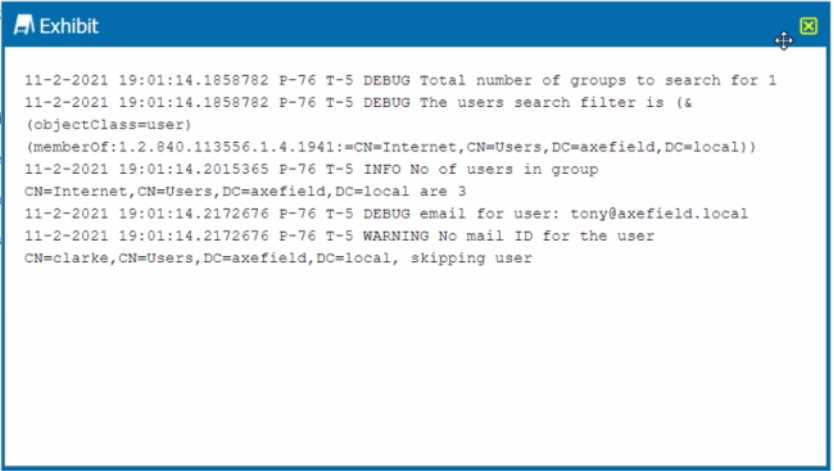
You are troubleshooting a Netskope client for user Clarke which remains in a disabled state after
being installed. After looking at various logs, you notice something which might explain the problem.
The exhibit is an excerpt from the nsADImporterLog.log.
Referring to the exhibit, what is the problem?
- A. The client was not Installed with administrative privileges.
- B. The Active Directory user is not synchronized to the Netskope tenant.
- C. This is normal; it might take up to an hour to be enabled.
- D. The client traffic is decrypted by a network security device.
Answer:
B
Explanation:
The problem is B. The Active Directory user is not synchronized to the Netskope tenant. This is
evident from the log message “WARNING No mail ID for the user: Clarke, Daxmeifield, DC=local,
skipping use”. This means that the user Clarke does not have a valid email address in the Active
Directory, which is required for the Netskope client to work. The Netskope client uses the email
address of the user to authenticate and enable the client. Therefore, option B is correct and the other
options are incorrect.
Comments
Question 2
You are having issues with fetching user and group Information periodically from the domain
controller and posting that information to your tenant instance in the Netskope cloud. To begin the
troubleshooting process, what would you Investigate first in this situation?
- A. On-Premises Log Parser
- B. Directory Importer
- C. DNS Connector
- D. AD Connector
Answer:
B
Explanation:
The Directory Importer is a component of the Netskope Adapters that connects to the domain
controller and periodically fetches user and group information to post that info to your tenant
instance in the Netskope cloud1
. If you are having issues with this process, the first thing you should
investigate is the Directory Importer itself.
You can check the status of the Directory Importer service,
the configuration file, the logs, and the connectivity to the domain controller and the Netskope
cloud2
. Therefore, option B is correct and the other options are incorrect. Reference:
Configure
Directory Importer - Netskope Knowledge Portal
,
Troubleshooting Directory Importer - Netskope
Knowledge Portal
Comments
Question 3
You are troubleshooting an issue with Microsoft where some users complain about an issue
accessing OneDrive and SharePoint Online. The configuration has the Netskope client deployed and
active for most users, but some Linux machines are routed to Netskope using GRE tunnels. You need
to disable inspection for all users to begin troubleshooting the issue.
In this scenario, how would you accomplish this task?
- A. Create a Real-time Protection policy to isolate Microsoft 365.
- B. Create a Do Not Decrypt SSL policy for the Microsoft 365 App Suite.
- C. Create a steering exception for the Microsoft 365 domains.
- D. Create a Do Not Decrypt SSL policy for OneDrive.
Answer:
B
Explanation:
To disable inspection for all users accessing Microsoft 365, you need to create a Do Not Decrypt SSL
policy for the Microsoft 365 App Suite.
This policy will prevent Netskope from decrypting and
analyzing the traffic for any Microsoft 365 app, regardless of the access method (Netskope client or
GRE tunnel)3
.
This policy will also allow SNI-based policies to apply, but no deep analysis performed
via Real-time Protection policies4
. Therefore, option B is correct and the other options are
incorrect. Reference:
Add a Policy for SSL Decryption - Netskope Knowledge Portal
,
Default Microsoft
appsuite SSL do not decrypt rule - Netskope Community
Comments
Question 4
Your company has many users that are remote and travel often. You want to provide the greatest
visibility into their activities, even while traveling. Using Netskope. which deployment method would
be used in this scenario?
- A. Use proxy chaining.
- B. Use a Netskope client.
- C. Use an IPsec tunnel.
- D. Use a GRE tunnel.
Answer:
B
Explanation:
The best deployment method for remote and traveling users is to use a Netskope client.
The
Netskope client is a lightweight software agent that runs on the user’s device and steers web and
cloud traffic to the Netskope cloud for real-time inspection and policy enforcement1
.
The Netskope
client provides an always-on end user remote access experience and avoids backhauling (or
hairpinning) remote users through the corporate network to access applications in public cloud
environments2
.
The Netskope client also supports offline mode, which allows users to work offline
and sync their policies when they reconnect to the internet
Comments
Question 5
Your company has Microsoft Azure ADFS set up as the Identity Provider (idP). You need to deploy the
Netskope client to all company users on Windows laptops without user intervention.
In this scenario, which two deployment options would you use? (Choose two.)
- A. Deploy the Netskope client with SCCM.
- B. Deploy the Netskope client with Microsoft GPO.
- C. Deploy the Netskope client using IdP.
- D. Deploy the Netskope client using an email Invitation.
Answer:
AB
Explanation:
To deploy the Netskope client to all company users on Windows laptops without user intervention,
you can use either SCCM or GPO.
These are two methods of packaging the application and pushing it
silently to the user’s device using Microsoft tools4
. These methods do not require the user to have
local admin privileges or to initiate the installation themselves. They also allow enforcing the use of
the client through company policy.
The Netskope client can authenticate the user using Azure ADFS
as the identity provider, as long as the UPN of the logged in user matches the directory5
Comments
Question 6
What is the purpose of the file hash list in Netskope?
- A. It configures blocklist and allowlist entries referenced in the custom Malware Detection profiles.
- B. It is used to allow and block URLs.
- C. It provides the file types that Netskope can inspect.
- D. It provides Client Threat Exploit Prevention (CTEP).
Answer:
A
Explanation:
The purpose of the file hash list in Netskope is to configure blocklist and allowlist entries referenced
in the custom Malware Detection profiles. A file hash list is a collection of MD5 or SHA-256 hashes
that represent files that you want to allow or block in your organization.
You can create a file hash list
when adding a file profile and use it as an allowlist or blocklist for files in your organization1
.
You can
then select the file hash list when creating a Malware Detection profile2
.
Comments
Question 7
The risk team at your company has determined that traffic from the sales team to a custom Web
application should not be inspected by Netskope. All other traffic to the Web application should
continue to be inspected. In this scenario, how would you accomplish this task?
- A. Create a Do Not Decrypt Policy using User Group and Domain in the policy page.
- B. Create a Do Not Decrypt Policy using Application in the policy page and a Steering Exception for Group
- C. Create a Do Not Decrypt Policy using Destination IP and Application in the policy page.
- D. Create a Do Not Decrypt Policy using Source IP and Application in the policy page.
Answer:
A
Explanation:
To prevent traffic from the sales team to a custom Web application from being inspected by
Netskope, you need to create a Do Not Decrypt Policy using User Group and Domain in the policy
page.
A Do Not Decrypt Policy allows you to specify the traffic you want to leave encrypted and not
further analyzed by Netskope via the Real-time Protection policies3
. You can use the User Group
criteria to match the sales team members and the Domain criteria to match the custom Web
application. This way, only the traffic from the sales team to the custom Web application will be
exempted from decryption, while all other traffic to the Web application will continue to be
inspected.
Comments
Question 8
Your organization has a homegrown cloud application. You are required to monitor the activities that
users perform on this cloud application such as logins, views, and downloaded files. Unfortunately, it
seems Netskope is unable to detect these activities by default.
How would you accomplish this goal?
- A. Enable access to the application with Netskope Private Access.
- B. Ensure that the cloud application is added as a steering exception.
- C. Ensure that the application is added to the SSL decryption policy.
- D. Create a new cloud application definition using the Chrome extension.
Answer:
D
Explanation:
To monitor the activities that users perform on a homegrown cloud application, you need to create a
new cloud application definition using the Chrome extension.
The Chrome extension is a tool that
allows you to record the traffic and activities of any web-based application and create a custom app
definition that can be imported into your Netskope tenant1
. This way, you can enable Netskope to
detect and analyze the activities of your homegrown cloud application and apply policies accordingly.
Therefore, option D is correct and the other options are incorrect. Reference:
Creating a Cloud App
Definition - Netskope Knowledge Portal
Comments
Question 9
You are implementing tenant access security and governance controls for privileged users. You want
to start with controls that are natively available within the Netskope Cloud Security Platform and do
not require external or third-party integration.
Which three access controls would you use in this scenario? (Choose three.)
- A. IP allowlisting to control access based upon source IP addresses.
- B. Login attempts to set the number of failed attempts before the admin user is locked out of the Ul.
- C. Applying predefined or custom roles to limit the admin's access to only those functions required for their job.
- D. Multi-factor authentication to verify a user's authenticity.
- E. History-based access control based on past security actions.
Answer:
ABC
Explanation:
To implement tenant access security and governance controls for privileged users, you can use the
following access controls that are natively available within the Netskope Cloud Security Platform and
do not require external or third-party integration:
IP allowlisting to control access based upon source IP addresses.
This allows you to specify the IP
addresses that are allowed to access your Netskope tenant2
. This can prevent unauthorized access
from unknown or malicious sources.
Login attempts to set the number of failed attempts before the admin user is locked out of the
UI.
This allows you to configure how many times an admin can enter an incorrect password before
being locked out for a specified period of time3
. This can prevent brute-force attacks or password
guessing attempts.
Applying predefined or custom roles to limit the admin’s access to only those functions required for
their job.
This allows you to assign different levels of permissions and access rights to different
admins based on their roles and responsibilities4
. This can enforce the principle of least privilege and
reduce the risk of misuse or abuse of admin privileges. Therefore, options A, B, and C are correct and
the other options are incorrect. Reference:
Secure Tenant Configuration and Hardening - Netskope
Knowledge Portal
,
Admin Settings - Netskope Knowledge Portal
,
Create Roles - Netskope Knowledge
Portal
Comments
Question 10
You want to prevent a document stored in Google Drive from being shared externally with a public
link. What would you configure in Netskope to satisfy this requirement?
- A. Threat Protection policy
- B. API Data Protection policy
- C. Real-time Protection policy
- D. Quarantine
Answer:
B
Explanation:
To prevent a document stored in Google Drive from being shared externally with a public link, you
need to configure an API Data Protection policy in Netskope.
An API Data Protection policy allows
you to discover, classify, and protect data that is already resident in your cloud services, such as
Google Drive1
. You can create a policy that matches the documents you want to protect based on
criteria such as users, content, activity, or DLP profiles.
Then, you can choose an action to prevent the
documents from being shared externally, such as remove external collaborators, remove public links,
or quarantine2
. Therefore, option B is correct and the other options are incorrect. Reference:
API
Data Protection - Netskope Knowledge Portal
,
Add a Policy for API Data Protection - Netskope
Knowledge Portal
Comments
Page 1 out of 9
Viewing questions 1-10 out of 93
page 2