Question 1
An administrator is asked to create a Dynamic Disk Pools (DDP) pool from eleven 12 TB disks with the
requirement that there is adequate space available for a reconstruction if a drive in the pool fails.
In this scenario, what should the administrator do to satisfy this requirement?
- A. Create the disk pool, and then edit the pool to reserve 12 TB of space
- B. Create the disk pool, and then add another 12 TB drive to the pool
- C. Create the disk pool, and then the system automatically reserves 12 TB of space
- D. Create the disk pool, and then create a hot spare on another 12 TB disk
Answer:
C
Explanation:
Create the Disk Pool:
Step: Use the SANtricity System Manager to create a DDP with the eleven 12 TB disks.
Reason: The DDP automatically reserves space for reconstruction purposes.
Automatic Space Reservation:
Functionality: The system automatically reserves adequate space for reconstruction when a disk fails.
Reference: NetApp SANtricity System Manager documentation on DDP creation and management.
Confirmation:
Verify: Check the pool's configuration to ensure the space is reserved for reconstruction.
Result: The system will show the reserved space within the DDP configuration.
Reference:
NetApp SANtricity System Manager User Guide
NetApp E-Series DDP configuration and best practices
Comments
Question 2
You are adding drives to an existing Dynamic Disk Pool (DDP).
In this scenario, which two drive characteristics should you consider when selecting the drives?
(Choose two.)
- A. if the drives are the same capacity or larger
- B. if the drives have a compatible security type
- C. if the drives are from the same manufacturer
- D. if the drives have the same firmware level
Answer:
A,B
Explanation:
Check Drive Capacity:
Step: Ensure that the new drives are of the same capacity or larger than the existing drives in the
DDP.
Reason: Consistent drive capacity ensures optimal performance and utilization.
Reference: NetApp best practices for DDP expansion.
Verify Security Type:
Step: Confirm that the new drives have a compatible security type (e.g., FDE, FIPS) with the existing
drives.
Reason: Incompatible security types can lead to configuration issues or reduced security.
Reference: NetApp hardware compatibility and security documentation.
Reference:
NetApp E-Series Hardware and Software Compatibility Guide
NetApp SANtricity System Manager User Guide
Comments
Question 3
Click the Exhibit button.
Referring to the exhibit, which three steps would you take to solve the problem shown in the event
log? (Choose three.)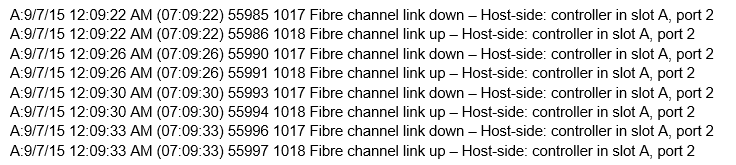
- A. Swap out the SFP in the controller port
- B. Swap out the FC cable
- C. Reinitialize the FC switch
- D. Move the connection to another controller port
- E. Swap out the HBA on the FC switch
Answer:
A,B,D
Explanation:
Step: Replace the SFP (Small Form-factor Pluggable) module in the controller port.
Reason: Faulty SFPs can cause link issues and errors.
Reference: NetApp hardware troubleshooting guide.
Swap Out the FC Cable:
Step: Replace the Fibre Channel cable connecting the controller port.
Reason: Damaged or faulty cables can lead to intermittent connectivity issues.
Reference: NetApp SANtricity documentation on cabling best practices.
Move the Connection to Another Controller Port:
Step: Connect the Fibre Channel cable to a different port on the controller.
Reason: The current port may be faulty, and using another port can help isolate the issue.
Reference: NetApp troubleshooting procedures for FC connectivity.
Reference:
NetApp SANtricity System Manager User Guide
NetApp hardware installation and troubleshooting guides
Comments
Question 4
Which file contains the configuration for a multipath driver for FC on Linux systems?
- A. /etc/kernel/mp.conf
- B. /opt/multipath/multipath.cnf
- C. /etc/multipath.conf
- D. /etc/dm-multipath.conf
Answer:
C
Explanation:
The multipath configuration file for Fibre Channel (FC) on Linux systems is typically
/etc/multipath.conf.
This file is used to define multipath settings and policies, such as path grouping, path selection, and
failover behavior.
Reference: NetApp E-Series SANtricity Multipath Drivers Guide for Linux.
Comments
Question 5
Which two local users of NetApp SANtricity Unified Manager would be used to edit the Certificate
Management section? (Choose two.)
- A. storage
- B. support
- C. security
- D. admin
Answer:
CD
Explanation:
The admin user has comprehensive privileges, including the ability to manage certificates.
The security user is specifically designed for managing security-related tasks, including certificate
management.
Reference: NetApp SANtricity Unified Manager User Guide, which details user roles and
permissions.
Reference:
Comments
Question 6
What are two base host connectivity selections that are provided by the E2800 controller? (Choose
two.)
- A. FC
- B. SAS
- C. IB
- D. iSCSI
Answer:
A,D
Explanation:
The E2800 controller supports Fibre Channel (FC) and iSCSI as base host connectivity options.
FC provides high-speed connectivity for SAN environments.
iSCSI allows for IP-based storage networking, facilitating connectivity over existing Ethernet
networks.
Reference: NetApp E2800 Series Hardware Guide, which lists supported host interfaces.
Comments
Question 7
What is represented by the Headroom graph on the SANtricity System Manager performance tab?
- A. the percentage of I/O associated with the backend disk drives
- B. the remaining performance capability of the physical objects in the storage system
- C. the percentage of CPU processing capacity that is being used by the operations on the system
- D. the resources that are being consumed by a defined workload
Answer:
B
Explanation:
The Headroom graph in SANtricity System Manager shows the remaining performance capability of
the physical objects (e.g., disks, SSDs) in the storage system.
This helps in understanding how much additional load the system can handle before reaching its
performance limits.
Reference: NetApp SANtricity System Manager User Guide, which explains the performance
monitoring features.
Reference:
Comments
Question 8
To enable one-way authentication in a new iSCSI Linux implementation, which three modifications
should you make in the /etc/iscsi/iscsid.conf file on the Linux host? (Choose three.)
- A. the target username and password
- B. the initiator username and password
- C. CHAP
- D. sendtargets discovery
- E. iSCSI
Answer:
A,C,B
Explanation:
Target username and password: These credentials are used by the initiator to authenticate to the
target.
Initiator username and password: These credentials are used by the target to authenticate the
initiator.
CHAP: Challenge-Handshake Authentication Protocol is used to set up the authentication
mechanism.
Modifications in the /etc/iscsi/iscsid.conf file include setting the appropriate values for these
parameters.
Reference: NetApp iSCSI Configuration Guide for Linux, which details the configuration of CHAP and
other authentication methods.
Reference:
Comments
Question 9
Which two errors would fail a pre-upgrade health check? (Choose two.)
- A. Hot spares are in use
- B. Volumes are reported on a non-preferred path
- C. An excess number of event log events are present
- D. I/O is being processed
Answer:
BD
Explanation:
Understand Pre-Upgrade Health Check:
Purpose: The pre-upgrade health check is designed to ensure the system is in a stable state before
proceeding with firmware or software upgrades. This helps to avoid disruptions and data loss.
Volumes on Non-Preferred Path (B):
Issue: If volumes are reported on a non-preferred path, it indicates that there might be a pathing
issue or an imbalance in the I/O load.
Impact: Non-preferred paths can lead to performance degradation and increased latency, which
might cause issues during the upgrade process.
Resolution: Ensure that all volumes are accessible through their preferred paths before initiating the
upgrade.
Reference: NetApp E-Series Upgrade and Health Check Documentation.
I/O Being Processed (D):
Issue: Active I/O during the upgrade process can lead to incomplete or failed upgrades.
Impact: Processing I/O during an upgrade can result in data corruption or loss, and may also cause
the upgrade to fail.
Resolution: Suspend or stop all I/O operations on the system before starting the upgrade.
Reference: NetApp E-Series Upgrade Procedures and Best Practices.
Reference:
NetApp E-Series Upgrade and Health Check Documentation
NetApp SANtricity System Manager User Guide
NetApp E-Series Upgrade Procedures and Best Practices
Comments
Question 10
Where would you find the version of the driver and firmware for QLogic HBAs that are supported by
NetApp E-Series systems?
- A. Interoperability Matrix Tool
- B. SANtricity Admin Guide
- C. Hardware Universe
- D. QLogic download webpage
Answer:
A
Explanation:
Access the Interoperability Matrix Tool (IMT):
Step: Open the NetApp Interoperability Matrix Tool.
Reason: The IMT provides a comprehensive list of supported configurations, including specific
versions of drivers and firmware for HBAs.
Navigate to HBA Compatibility:
Step: Search for QLogic HBA compatibility with NetApp E-Series systems.
Reason: To find the exact versions of drivers and firmware that are validated and supported.
Verify the Information:
Step: Cross-reference the information provided by the IMT with the installed hardware.
Reason: Ensuring compatibility to avoid issues related to unsupported configurations.
Reference: NetApp Interoperability Matrix Tool (IMT) documentation.
Comments
Page 1 out of 6
Viewing questions 1-10 out of 64
page 2