Question 1
You have a Power Automate flow that saves attachments from emails into OneDrive for Business.
You need to determine why the flow is not working.
What are three possible ways to achieve the goal? Each correct answer presents a complete solution.
NOTE: Each correct selection is worth one point.
- A. Navigate to the Power Automate admin center and view the projects.
- B. Navigate to the Action Items section of the Power Automate portal.
- C. Enable Repair Tips for the flow.
- D. Navigate to the flow and view the run history.
- E. Navigate to the Power Automate web portal and click view notifications.
Answer:
bcd
Reference:
https://docs.microsoft.com/en-us/power-automate/fix-flow-failures
Comments
Question 2
A company is undergoing a digital transformation by using Microsoft Power Platform.
Departments in the company have the following requirements:
You need to determine which department can use a canvas app to meet its requirement.
For which department should you develop a canvas app?
- A. Facilities
- B. Finance
- C. Customer service
- D. Marketing
Answer:
a
Comments
Question 3
HOTSPOT You create a canvas app by using the Generate from data feature. The app connects to a Microsoft SharePoint list.
For each of the following statements, select Yes if the statement is true. Otherwise, select No.
NOTE: Each correct selection is worth one point.
Hot Area: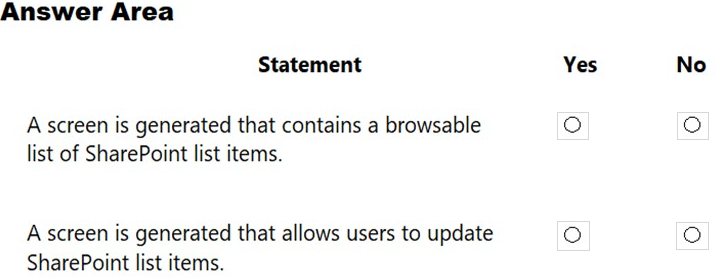
Answer:
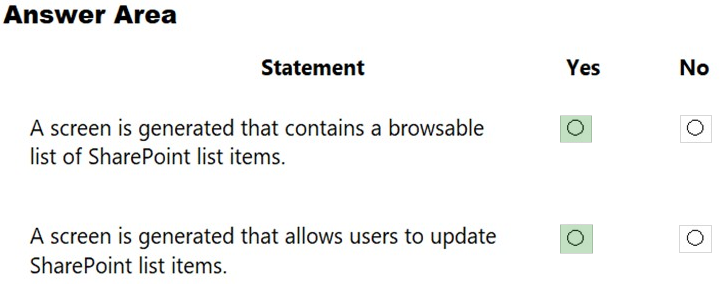
Reference:
https://docs.microsoft.com/en-us/powerapps/maker/canvas-apps/app-from-sharepoint
Comments
Question 4
HOTSPOT A company plans to implement Power Apps.
For each of the following statements, select Yes if the statement is true. Otherwise, select No.
NOTE: Each correct selection is worth one point.
Hot Area: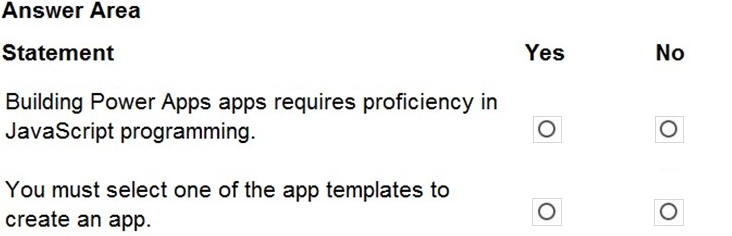
Answer:
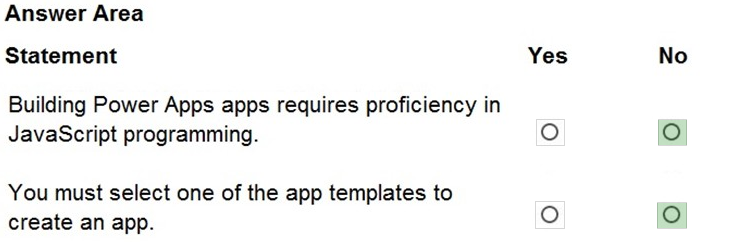
Reference:
https://docs.microsoft.com/en-us/powerapps/maker/
Comments
Question 5
HOTSPOT
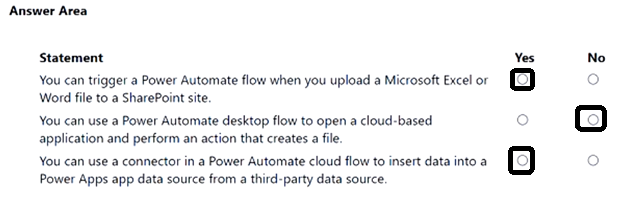
For each of the following statements, select Yes if the statement is true. Otherwise, select No.
NOTE: Each correct selection is worth one point.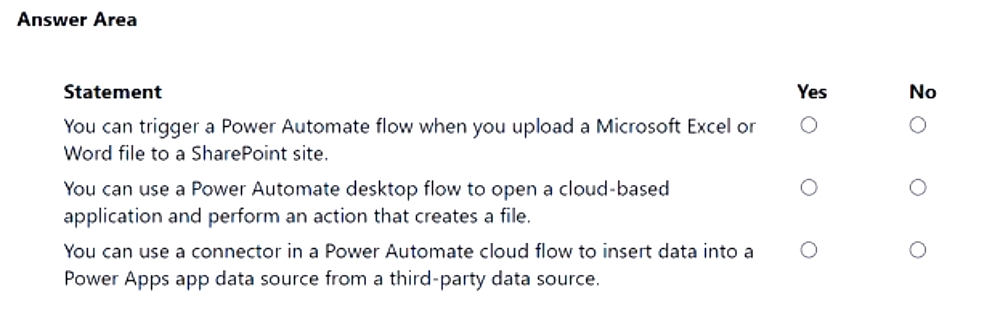
Answer:
Comments
Question 6
HOTSPOT You are creating a Power Virtual Agents chatbot to help users search for available meeting rooms within a building.
The chatbot must meet the following requirements:
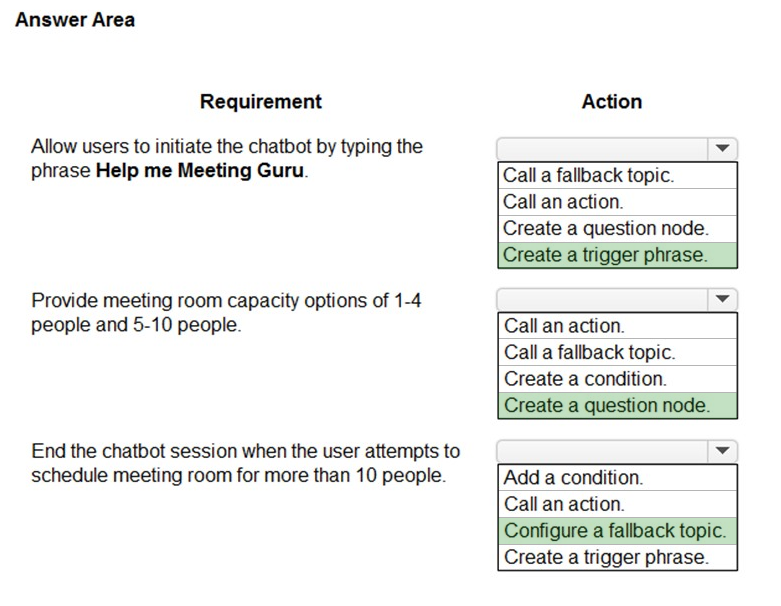
Allow users to initiate the chatbot by typing the phrase Help me Meeting Guru.
Provide meeting room capacity options of 1-4 people and 5-10 people.
End the chatbot session if the user attempts to schedule a meeting room for more than 10 people.
You need to identify the actions to use.
Which actions should you use? To answer, select the appropriate options in the answer area.
NOTE: Each correct selection is worth one point.
Hot Area: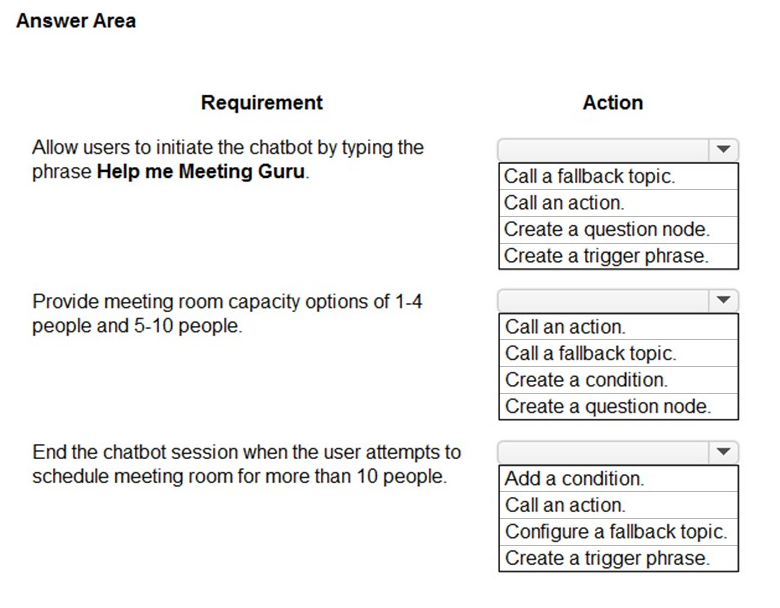
Answer:
Reference:
https://docs.microsoft.com/en-us/power-virtual-agents/authoring-create-edit-topics
Comments
Question 7
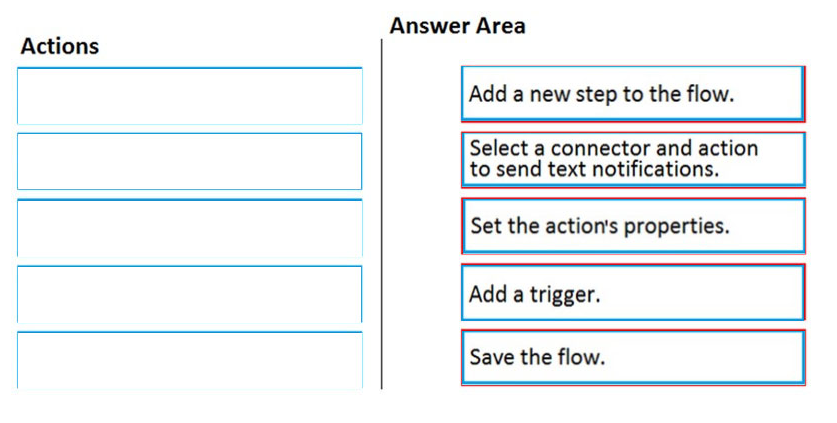
DRAG DROP A company provides on-site architectural consulting services to residential and business customers. The company wants to implement a simple alert system where a consultant can press a button on their mobile device to send the user's location to the company as a text notification.
You need to build a button flow that sends the notification.
In which order should you perform the actions? To answer, move all actions from the list of actions to the answer area and arrange them in the correct order.
Select and Place: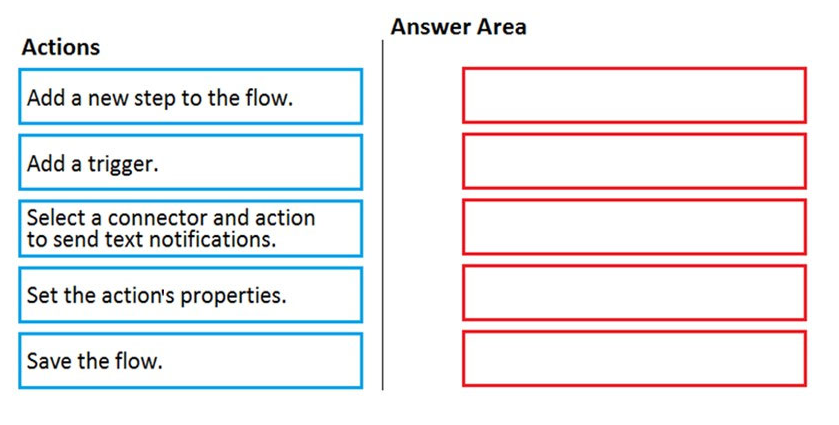
Answer:
Reference:
https://docs.microsoft.com/en-us/power-automate/button-flow-with-user-input-tokens#main
Comments
Question 8
You complete development and testing of a new canvas app. You add users to a security team and assign the security team permissions to the app.
Users are unable to view the app.
You need to ensure that users can launch and use the app.
What should you do?
- A. Add the application to the solution.
- B. Publish the application.
- C. Share the application.
- D. Add a Power Apps Component Framework (PCF) control to the application.
Answer:
b
Whenever you save changes to a canvas app, you automatically publish them only for yourself and anyone else who has permissions to edit the app. When you finish making changes, you must explicitly publish them to make them available to everyone with whom the app is shared.
Reference:
https://docs.microsoft.com/en-us/power-apps/maker/canvas-apps/save-publish-app
Comments
Question 9
You create a model-driven app for a department.
You need to make the model-driven app available to other department members.
Which two methods should you use? Each correct answer presents a complete solution.
NOTE: Each correct selection is worth one point.
- A. Send the application's Web URL to other team members by email.
- B. Use the Share feature in the Power Apps designer.
- C. Publish the app to AppSource.
- D. Deploy the application to other user's instances through PowerShell.
Answer:
bc
B: When you share a model-driven app, you can share it with all members of one or more security roles or a user or team.
C: Publish an app to make it available to users.
After you've added components, validated and saved the app, on the command bar, select Publish. In the Apps Being Edited view, in the lower right corner of the app tile you want to publish, select the More options button (...), and then select Publish.
Reference:
https://docs.microsoft.com/en-us/power-apps/maker/model-driven-apps/share-model-driven-app https://docs.microsoft.com/en-us/power-apps/maker/model-driven-apps/validate-app
Comments
Question 10
DRAG DROP A company is building a Power Apps portal.
You need to select out-of-the-box portal types to meet the company's requirements.
Which portal types should you use? To answer, drag the appropriate portal types to the correct requirements. Each portal type may be used once, more than once, or not at all. You may need to drag the split bar between panes or scroll to view content.
NOTE: Each correct selection is worth one point.
Select and Place: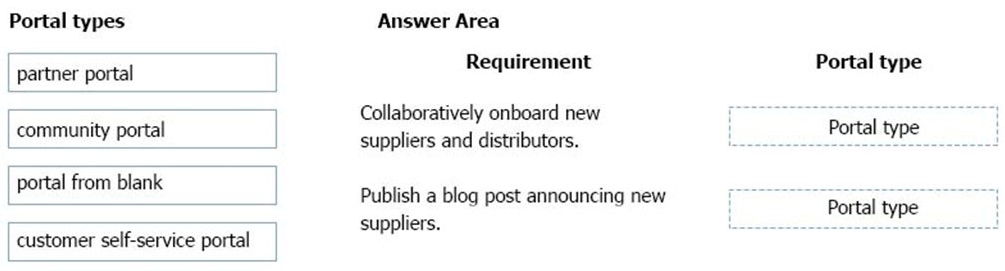
Answer:
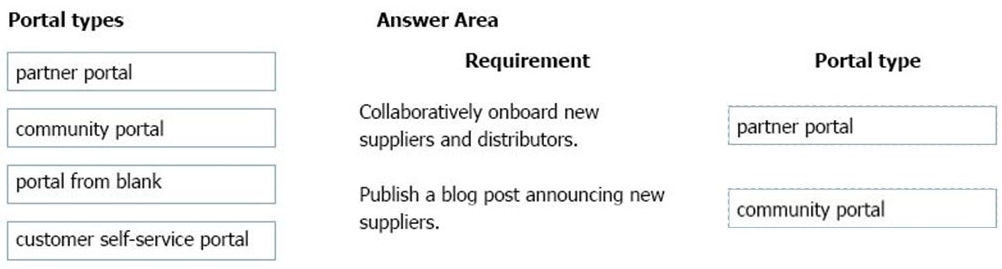
Box 1: Partner portal -
A partner portal allows every organization with resellers, distributors, suppliers, or partners to have real-time access to every stage of shared activities.
Box 2: Community portal -
A community portal leverages peer-to-peer interactions between customers and experts to organically grow the catalog of available knowledge from knowledge base articles, forums, and blogs as well as providing feedback through comments and ratings.
Incorrect Answers:
Portal from blank: Create a website to share data with external and internal users. This template comes with sample pages to get you quickly started.
Customer self-service portal: A customer self-service portal enables customers to access self-service knowledge, support resources, view the progress of their cases, and provide feedback.
Reference:
https://docs.microsoft.com/en-us/powerapps/maker/portals/portal-templates
Comments
Page 1 out of 28
Viewing questions 1-10 out of 289
page 2