Question 1 Topic 3, Case Study 3Case Study Question View Case
You need to configure the user accounts of the sales department users to meet the security requirements.
What should you do for each user?
- A. From PowerShell, run the Grant-CsTeamsUpgradePolicy -PolicyName SfBOnly cmdlet.
- B. From PowerShell, run the Grant-CsTeamsUpgradePolicy -PolicyName SfBWithTeamsCollabandMeetings cmdlet.
- C. From the Microsoft Teams admin center, set the Microsoft Teams upgrade policy to Skype for Business only coexistence mode.
- D. From PowerShell, run the Grant-CsTeamsUpgradePolicy -PolicyName Islands cmdlet.
Answer:
B
Explanation:
Reference: https://docs.microsoft.com/en-us/microsoftteams/teams-and-skypeforbusiness-coexistence-and-interoperability
Comments
Question 2 Topic 3, Case Study 3Case Study Question View Case
You need to resolve the membership issues for the two pilot users.
What should you do?
- A. Modify the department attribute of both users.
- B. Invite both users to the HR team.
- C. Add both users to the HR group.
- D. Modify the privacy level of the HR team.
Answer:
A
Comments
Question 3 Topic 3, Case Study 3Case Study Question View Case
You need to resolve the notification issues identified during the pilot project.
What should you modify?
- A. the global meeting policy
- B. the global messaging policy
- C. the org-wide Teams settings
- D. the app permission policy
Answer:
B
Explanation:
You need to disable priority notifications in the global messaging policy.
Send urgent messages using priority notifications If you turn this on, users can send messages using priority notifications.
Priority notifications notify users every 2 minutes for a period of 20 minutes or until messages that are marked as urgent are
picked up and read by the recipient, maximizing the likelihood that the message is acted upon in a timely manner.
Reference: https://docs.microsoft.com/en-us/microsoftteams/messaging-policies-in-teams
Comments
Question 4 Topic 3, Case Study 3Case Study Question View Case
You need to configure the user accounts of the sales department users to meet the security requirements.
What should you do for each user?
- A. From the Microsoft Teams admin center, set the Microsoft Teams upgrade policy to Skype for Business with Teams collaboration and meetings coexistence mode.
- B. From PowerShell, run the Grant-CsTeamsUpgradePolicy -PolicyName SfBWithTeamsCollab cmdlet.
- C. From the Microsoft Teams admin center, set the Microsoft Teams upgrade policy to Skype for Business only coexistence mode.
- D. From the Microsoft Teams admin center, set the Microsoft Teams upgrade policy to Skype for Business with Teams collaboration coexistence mode.
Answer:
A
Explanation:
Reference: https://docs.microsoft.com/en-us/microsoftteams/teams-and-skypeforbusiness-coexistence-and-interoperability
Comments
Question 5 Topic 4, Case Study 4Case Study Question View Case
HOTSPOT
You need to configure Microsoft Teams to meet the department upgrade requirements.
For each of the following statements, select Yes if that statement is true. Otherwise, select No.
NOTE: Each correct selection is worth one point.
Hot Area: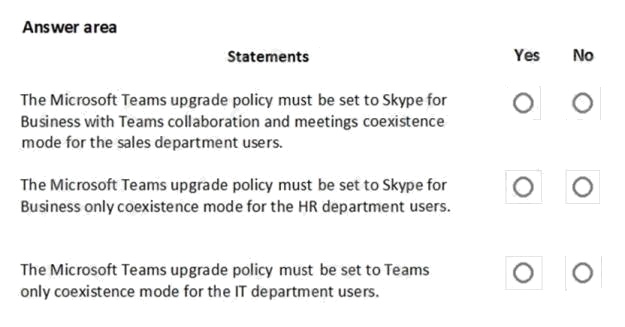
Answer:
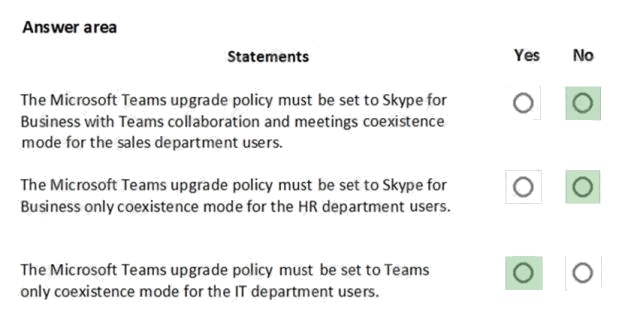
Explanation:
Reference:
https://docs.microsoft.com/en-us/microsoftteams/teams-and-skypeforbusiness-coexistence-and-interoperability
Comments
Question 6 Topic 4, Case Study 4Case Study Question View Case
You need to create a team for the sales department.
What should you do first?
- A. Create a team and modify the membership rule for the team’s Office 365 group.
- B. From PowerShell, run the Add-AzureAdGroupMember cmdlet.
- C. From PowerShell, run the New-Team cmdlet.
- D. Create a team and select Build a team from scratch.
Answer:
A
Explanation:
Reference: https://docs.microsoft.com/en-us/microsoftteams/dynamic-memberships
Comments
Question 7 Topic 5, Case Study 5Case Study Question View Case
You need to configure the environment to meet the technical requirements for guest users.
What should you modify from the Microsoft Teams admin center?
- A. the global app permission policy
- B. Guest access in Users
- C. the global meeting policy
- D. the global messaging policy
Answer:
B
Explanation:
Reference: https://docs.microsoft.com/en-us/microsoftteams/set-up-guests https://docs.microsoft.com/en-us/microsoft-
365/solutions/collaborate-as-team?view=o365-worldwide
Comments
Question 8 Topic 5, Case Study 5Case Study Question View Case
HOTSPOT
During the pilot project, you review the global policies in the Microsoft Teams admin center.
Contoso has a global meeting policy configured as shown in the following exhibit.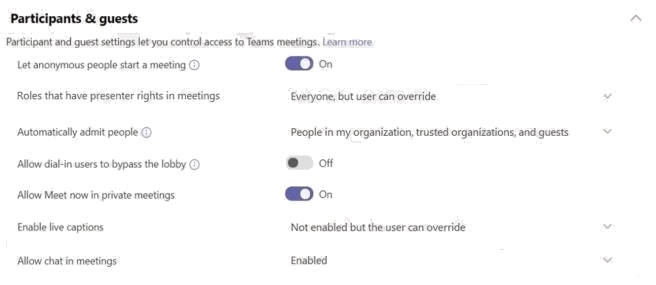
Contoso has a global live events policy configured as shown in the following exhibit.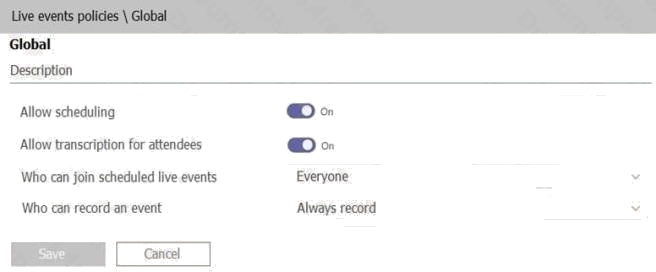
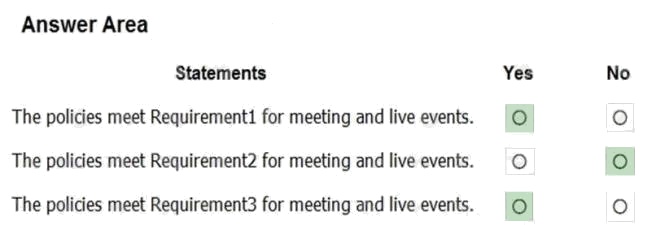
For each of the following statements, select Yes if the statement is true. Otherwise, select No.
NOTE: Each correct selection is worth one point.
Hot Area: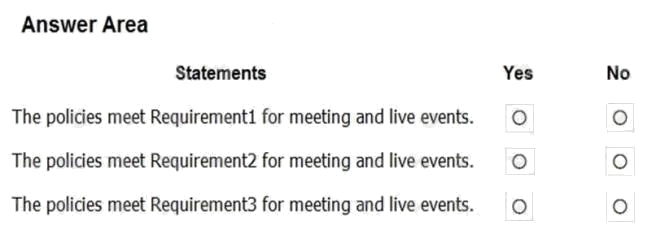
Answer:
Comments
Question 9 Topic 5, Case Study 5Case Study Question View Case
DRAG DROP
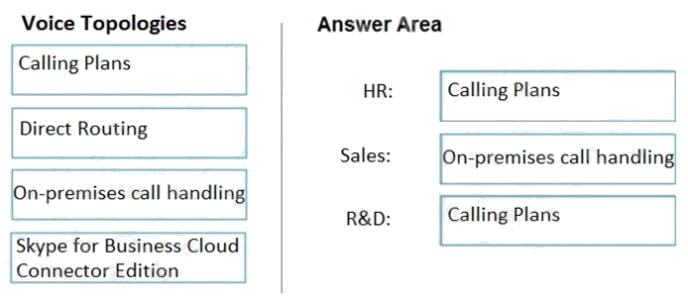
You need to recommend a voice topology for the departments. The topology must meet the calling requirements and the
security requirements.
What should you recommend for each department? To answer, select the appropriate options in the answer area.
NOTE: Each correct selection is worth one point.
Select and Place: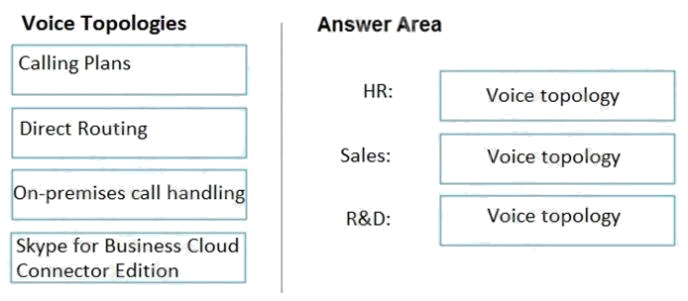
Answer:
Explanation:
Reference:
https://docs.microsoft.com/en-us/microsoftteams/direct-routing-landing-page https://docs.microsoft.com/en-
us/microsoftteams/calling-plan-landing-page https://docs.microsoft.com/en-us/skypeforbusiness/skype-for-business-hybrid-
solutions/plan-your-phone-system-cloud-pbx-solution/plan-skype-for-business-cloud-connector-edition Manage Chat,
Calling, and Meetings
Comments
Question 10 Topic 6, Mixed Questions
You work as a Systems Administrator for your company. The company has recently purchased a subscription to Microsoft
365.
All users in your company have a Microsoft 365 E3 license.
You are in the process of configuring Microsoft Teams.
You need to configure Microsoft Teams to ensure that users within your company can collaborate with users in a partner
company. You plan to create guest accounts for users in the partner company.
Users with Guest accounts must not be able to invite other guests.
Only users in the partner company must be able to collaborate with your users by using Microsoft Teams.
Which of the following should you configure?
- A. The external sharing settings in the SharePoint Admin Center.
- B. The external collaboration settings in Azure Active Directory.
- C. The Anonymous users can join a meeting setting the in the Teams Meeting Settings.
- D. The Global Meeting Policy in the Teams Admin Center.
Answer:
B
Comments
Page 1 out of 24
Viewing questions 1-10 out of 241
page 2