Question 1 Topic 2, Case Study 2Case Study Question View Case
You need to visually identify whether outliers exist in the Age column and quantify the outliers before the outliers are
removed.
Which three Azure Machine Learning Studio modules should you use? Each correct answer presents part of the solution.
NOTE: Each correct selection is worth one point.
- A. Create Scatterplot
- B. Summarize Data
- C. Clip Values
- D. Replace Discrete Values
- E. Build Counting Transform
Answer:
A B C
Explanation:
B: To have a global view, the summarize data module can be used. Add the module and connect it to the data set that needs
to be visualized. A: One way to quickly identify Outliers visually is to create scatter plots.
C: The easiest way to treat the outliers in Azure ML is to use the Clip Values module. It can identify and optionally replace
data values that are above or below a specified threshold.
You can use the Clip Values module in Azure Machine Learning Studio, to identify and optionally replace data values that
are above or below a specified threshold. This is useful when you want to remove outliers or replace them with a mean, a
constant, or other substitute value.
Reference:
https://blogs.msdn.microsoft.com/azuredev/2017/05/27/data-cleansing-tools-in-azure-machine-learning/
https://docs.microsoft.com/en-us/azure/machine-learning/studio-module-reference/clip-values
Comments
Question 2 Topic 2, Case Study 2Case Study Question View Case
HOTSPOT
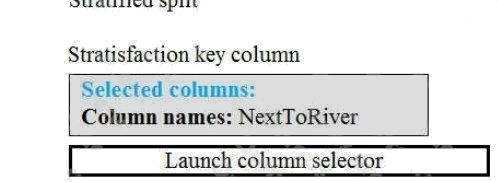
You need to identify the methods for dividing the data according to the testing requirements.
Which properties should you select? To answer, select the appropriate options in the answer area.
NOTE: Each correct selection is worth one point.
Hot Area: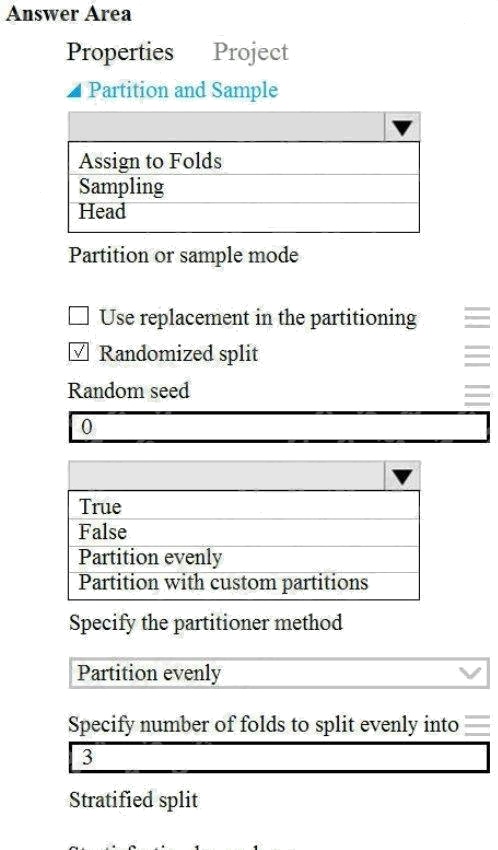
Answer:
Explanation:
Scenario: Testing
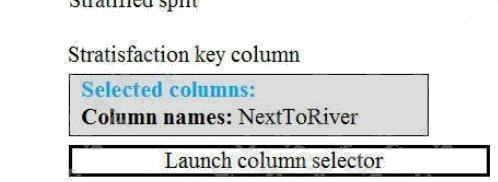
You must produce multiple partitions of a dataset based on sampling using the Partition and Sample module in Azure
Machine Learning Studio.
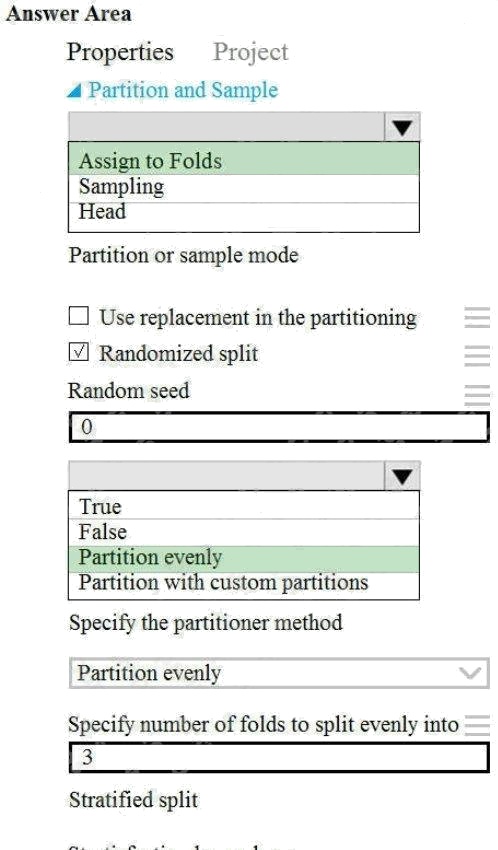
Box 1: Assign to folds
Use Assign to folds option when you want to divide the dataset into subsets of the data. This option is also useful when you
want to create a custom number of folds for cross-validation, or to split rows into several groups.
Not Head: Use Head mode to get only the first n rows. This option is useful if you want to test a pipeline on a small number
of rows, and don't need the data to be balanced or sampled in any way.
Not Sampling: The Sampling option supports simple random sampling or stratified random sampling. This is useful if you
want to create a smaller representative sample dataset for testing.
Box 2: Partition evenly
Specify the partitioner method: Indicate how you want data to be apportioned to each partition, using these options:
Partition evenly: Use this option to place an equal number of rows in each partition. To specify the number of output
partitions, type a whole number in the Specify number of folds to split evenly into text box.
Reference: https://docs.microsoft.com/en-us/azure/machine-learning/algorithm-module-reference/partition-and-sample
Comments
Question 3 Topic 2, Case Study 2Case Study Question View Case
HOTSPOT
You need to configure the Edit Metadata module so that the structure of the datasets match.
Which configuration options should you select? To answer, select the appropriate options in the answer area.
NOTE: Each correct selection is worth one point.
Hot Area: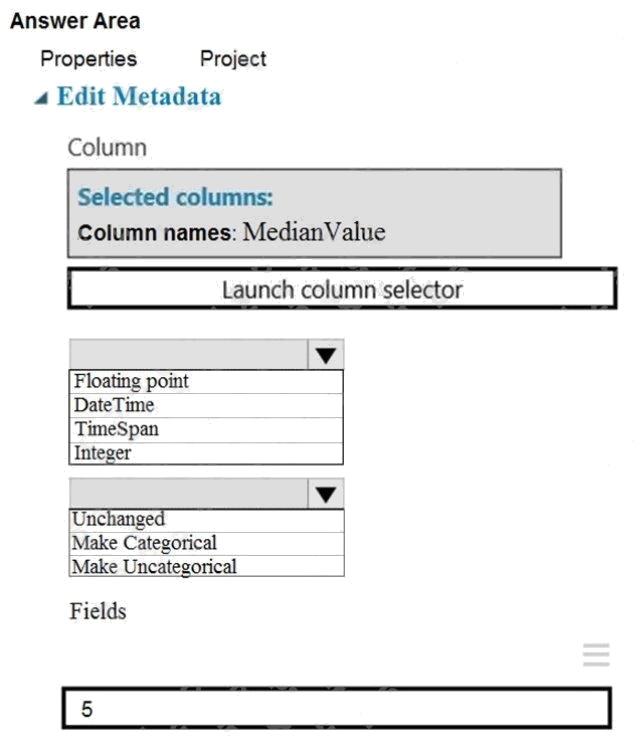
Answer:
Explanation:
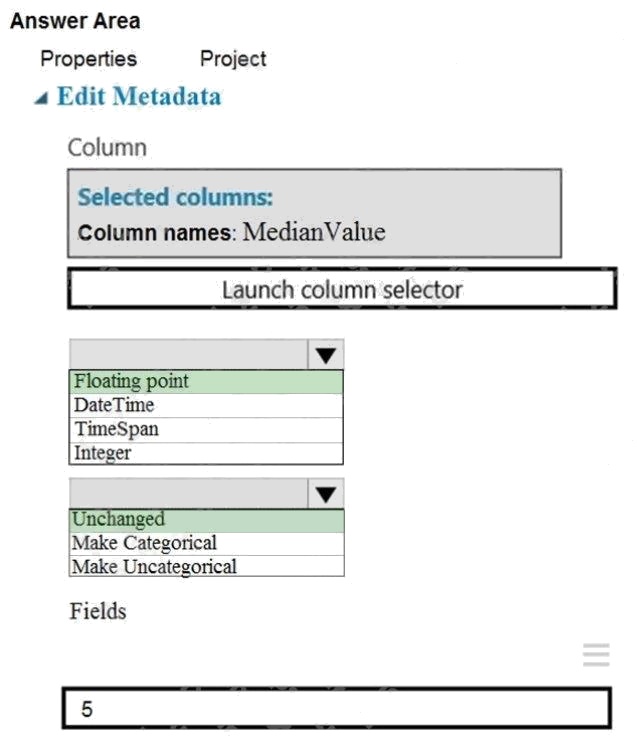
Box 1: Floating point
Need floating point for Median values.
Scenario: An initial investigation shows that the datasets are identical in structure apart from the MedianValue column. The
smaller Paris dataset contains the MedianValue in text format, whereas the larger London dataset contains the MedianValue
in numerical format.
Box 2: Unchanged
Note: Select the Categorical option to specify that the values in the selected columns should be treated as categories.
For example, you might have a column that contains the numbers 0,1 and 2, but know that the numbers actually mean
"Smoker", "Non smoker" and "Unknown". In that case, by flagging the column as categorical you can ensure that the values
are not used in numeric calculations, only to group data.
Prepare data for modeling
Comments
Question 4 Topic 2, Case Study 2Case Study Question View Case
HOTSPOT
You need to configure the Permutation Feature Importance module for the model training requirements.
What should you do? To answer, select the appropriate options in the dialog box in the answer area.
NOTE: Each correct selection is worth one point.
Hot Area: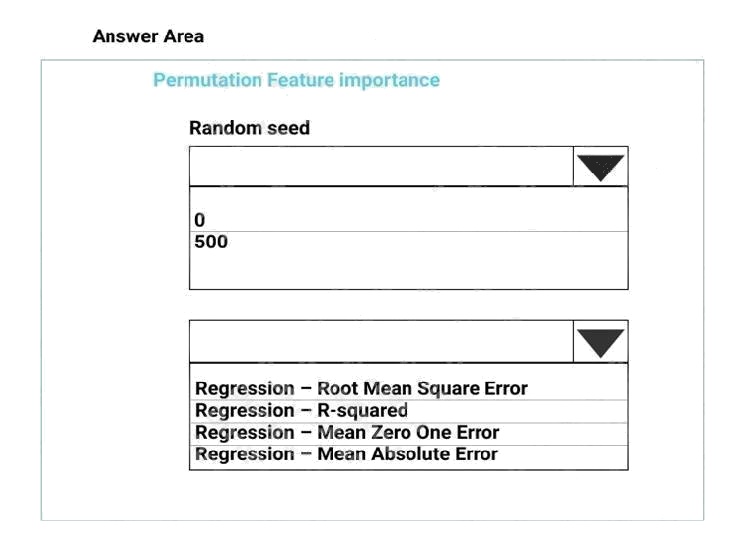
Answer:
Explanation:
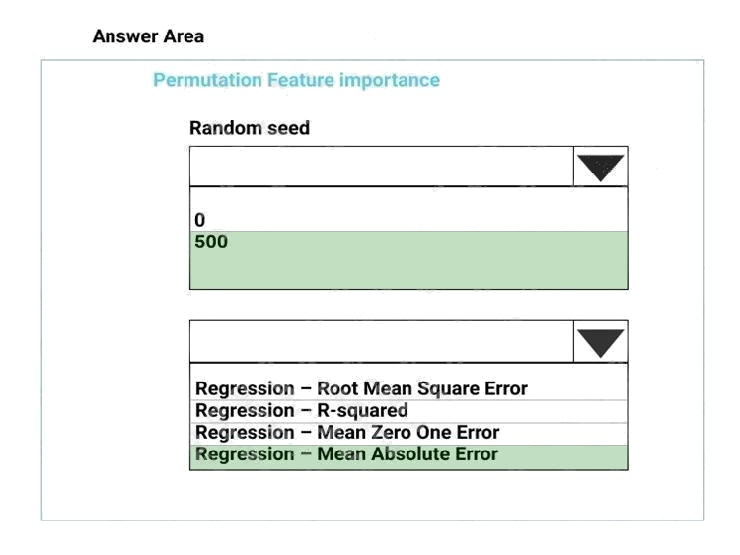
Box 1: 500
For Random seed, type a value to use as seed for randomization. If you specify 0 (the default), a number is generated based
on the system clock.
A seed value is optional, but you should provide a value if you want reproducibility across runs of the same experiment. Here
we must replicate the findings.
Box 2: Mean Absolute Error
Scenario: Given a trained model and a test dataset, you must compute the Permutation Feature Importance scores of
feature variables. You need to set up the Permutation Feature Importance module to select the correct metric to investigate
the models accuracy and replicate the findings.
Regression. Choose one of the following: Precision, Recall, Mean Absolute Error , Root Mean Squared Error, Relative
Absolute Error, Relative Squared Error, Coefficient of Determination
References: https://docs.microsoft.com/en-us/azure/machine-learning/studio-module-reference/permutation-feature-
importance
Comments
Question 5 Topic 2, Case Study 2Case Study Question View Case
You need to select a feature extraction method.
Which method should you use?
- A. Mutual information
- B. Pearson's correlation
- C. Spearman correlation
- D. Fisher Linear Discriminant Analysis
Answer:
C
Explanation:
Spearman's rank correlation coefficient assesses how well the relationship between two variables can be described using a
monotonic function.
Note: Both Spearman's and Kendall's can be formulated as special cases of a more general correlation coefficient, and they
are both appropriate in this scenario.
Scenario: The MedianValue and AvgRoomsInHouse columns both hold data in numeric format. You need to select a feature
selection algorithm to analyze the relationship between the two columns in more detail.
Incorrect Answers:
B: The Spearman correlation between two variables is equal to the Pearson correlation between the rank values of those two
variables; while Pearson's correlation assesses linear relationships, Spearman's correlation assesses monotonic
relationships (whether linear or not).
Reference: https://docs.microsoft.com/en-us/azure/machine-learning/studio-module-reference/feature-selection-modules
Comments
Question 6 Topic 2, Case Study 2Case Study Question View Case
HOTSPOT
You need to set up the Permutation Feature Importance module according to the model training requirements.
Which properties should you select? To answer, select the appropriate options in the answer area.
NOTE: Each correct selection is worth one point.
Hot Area: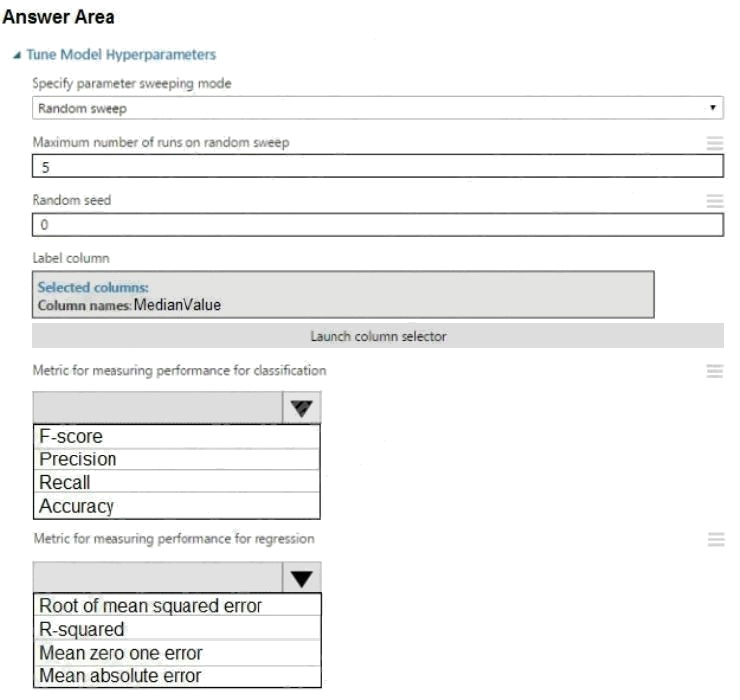
Answer:
Explanation:
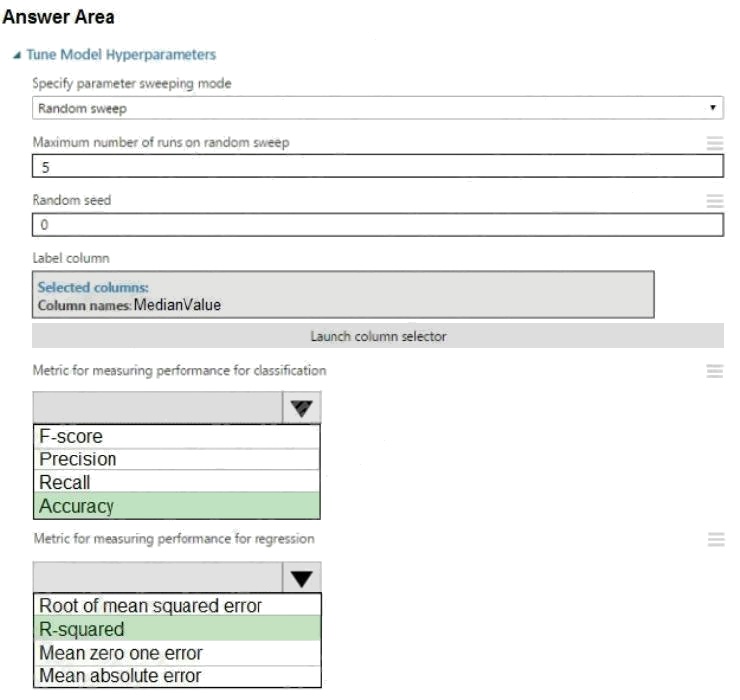
Box 1: Accuracy
Scenario: You want to configure hyperparameters in the model learning process to speed the learning phase by using
hyperparameters. In addition, this configuration should cancel the lowest performing runs at each evaluation interval, thereby
directing effort and resources towards models that are more likely to be successful. Box 2: R-Squared
Comments
Question 7 Topic 2, Case Study 2Case Study Question View Case
HOTSPOT
You need to configure the Feature Based Feature Selection module based on the experiment requirements and datasets.
How should you configure the module properties? To answer, select the appropriate options in the dialog box in the answer
area.
NOTE: Each correct selection is worth one point.
Hot Area: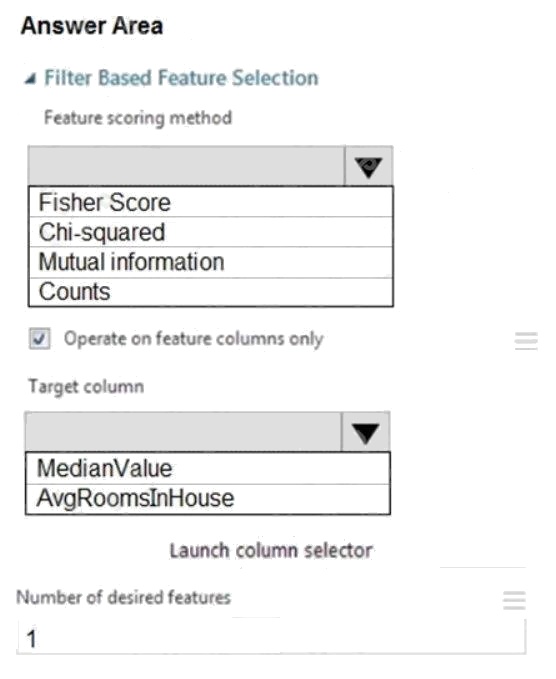
Answer:
Explanation:
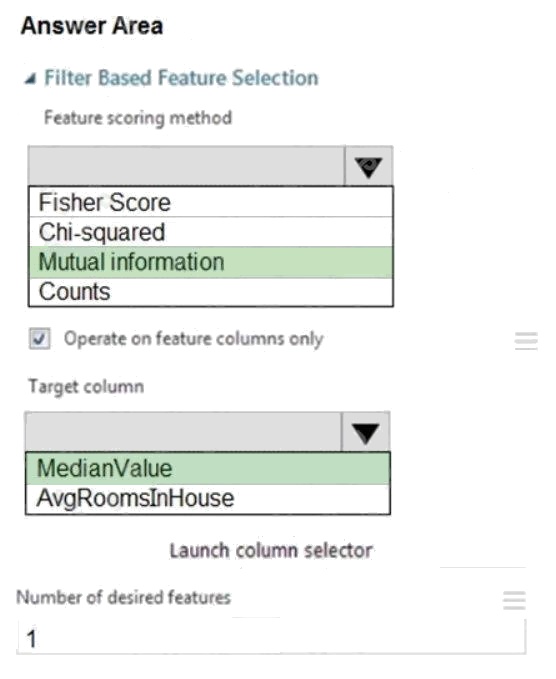
Box 1: Mutual Information.
The mutual information score is particularly useful in feature selection because it maximizes the mutual information between
the joint distribution and target variables in datasets with many dimensions.
Box 2: MedianValue
MedianValue is the feature column, , it is the predictor of the dataset.
Scenario: The MedianValue and AvgRoomsinHouse columns both hold data in numeric format. You need to select a feature
selection algorithm to analyze the relationship between the two columns in more detail.
References: https://docs.microsoft.com/en-us/azure/machine-learning/studio-module-reference/filter-based-feature-selection
Comments
Question 8 Topic 2, Case Study 2Case Study Question View Case
You need to select a feature extraction method.
Which method should you use?
- A. Mutual information
- B. Mood's median test
- C. Kendall correlation
- D. Permutation Feature Importance
Answer:
C
Explanation:
In statistics, the Kendall rank correlation coefficient, commonly referred to as Kendall's tau coefficient (after the Greek letter
), is a statistic used to measure the ordinal association between two measured quantities.
It is a supported method of the Azure Machine Learning Feature selection.
Note: Both Spearman's and Kendall's can be formulated as special cases of a more general correlation coefficient, and they
are both appropriate in this scenario.
Scenario: The MedianValue and AvgRoomsInHouse columns both hold data in numeric format. You need to select a feature
selection algorithm to analyze the relationship between the two columns in more detail.
Reference:
https://docs.microsoft.com/en-us/azure/machine-learning/studio-module-reference/feature-selection-modules
Comments
Question 9 Topic 2, Case Study 2Case Study Question View Case
DRAG DROP
You need to implement an early stopping criteria policy for model training.
Which three code segments should you use to develop the solution? To answer, move the appropriate code segments from
the list of code segments to the answer area and arrange them in the correct order.
NOTE: More than one order of answer choices is correct. You will receive credit for any of the correct orders you select.
Select and Place: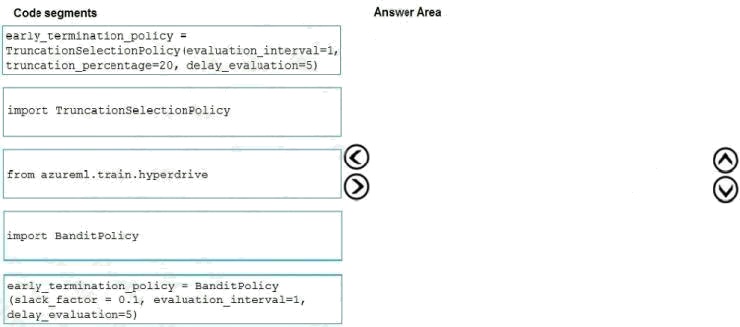
Answer:
Explanation:
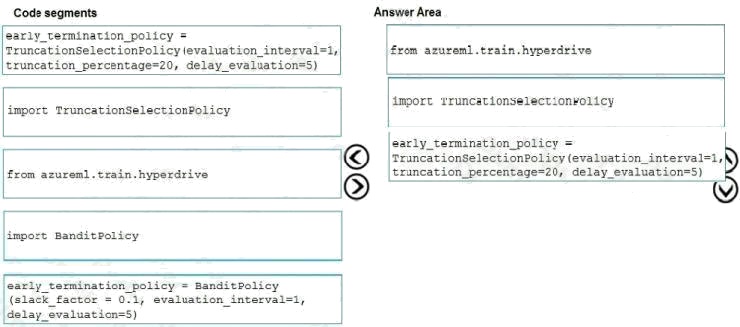
You need to implement an early stopping criterion on models that provides savings without terminating promising jobs.
Truncation selection cancels a given percentage of lowest performing runs at each evaluation interval. Runs are compared
based on their performance on the primary metric and the lowest X% are terminated.
Example:
from azureml.train.hyperdrive import TruncationSelectionPolicy early_termination_policy =
TruncationSelectionPolicy(evaluation_interval=1, truncation_percentage=20, delay_evaluation=5)
Incorrect Answers:
Bandit is a termination policy based on slack factor/slack amount and evaluation interval. The policy early terminates any
runs where the primary metric is not within the specified slack factor / slack amount with respect to the best performing
training run.
Example:
from azureml.train.hyperdrive import BanditPolicy early_termination_policy = BanditPolicy(slack_factor = 0.1,
evaluation_interval=1, delay_evaluation=5
References: https://docs.microsoft.com/en-us/azure/machine-learning/service/how-to-tune-hyperparameters
Comments
Question 10 Topic 2, Case Study 2Case Study Question View Case
DRAG DROP
You need to implement early stopping criteria as stated in the model training requirements.
Which three code segments should you use to develop the solution? To answer, move the appropriate code segments from
the list of code segments to the answer area and arrange them in the correct order.
NOTE: More than one order of answer choices is correct. You will receive the credit for any of the correct orders you select.
Select and Place: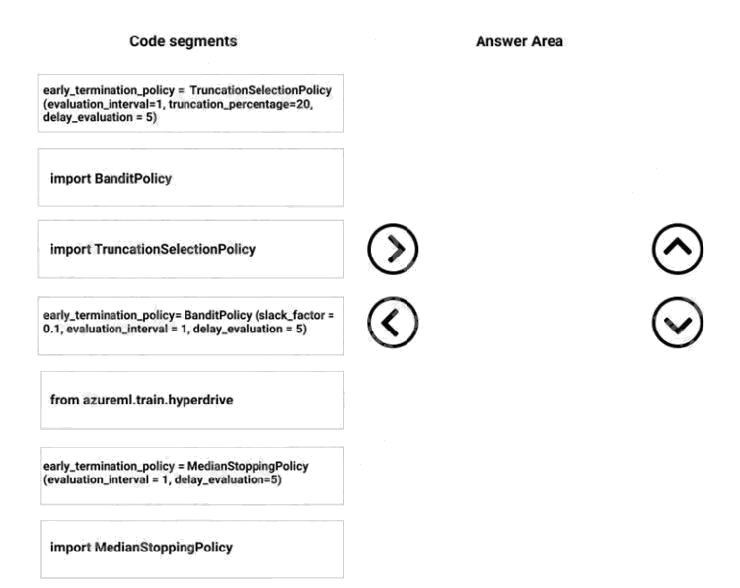
Answer:
Explanation:
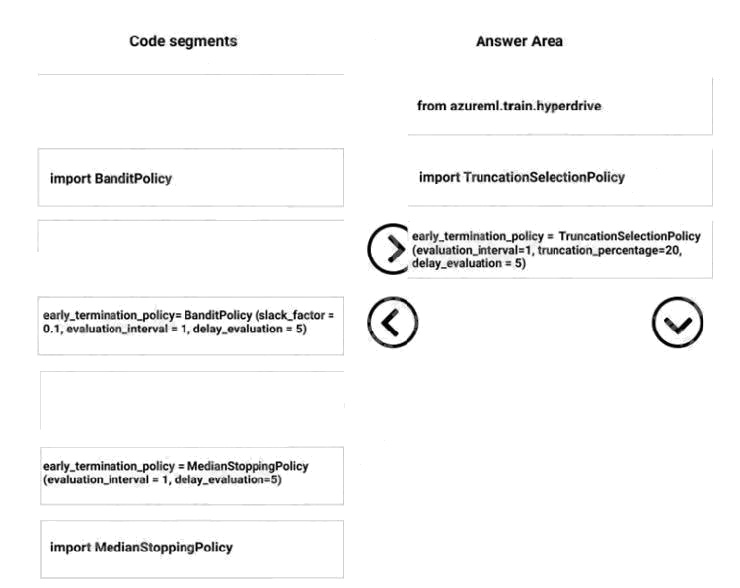
Step 1: from azureml.train.hyperdrive
Step 2: Import TruncationCelectionPolicy
Truncation selection cancels a given percentage of lowest performing runs at each evaluation interval. Runs are compared
based on their performance on the primary metric and the lowest X% are terminated.
Scenario: You must configure hyperparameters in the model learning process to speed the learning phase. In addition, this
configuration should cancel the lowest performing runs at each evaluation interval, thereby directing effort and resources
towards models that are more likely to be successful.
Step 3: early_terminiation_policy = TruncationSelectionPolicy..
Example:
from azureml.train.hyperdrive import TruncationSelectionPolicy
early_termination_policy = TruncationSelectionPolicy(evaluation_interval=1, truncation_percentage=20, delay_evaluation=5)
In this example, the early termination policy is applied at every interval starting at evaluation interval 5. A run will be
terminated at interval 5 if its performance at interval 5 is in the lowest 20% of performance of all runs at interval 5.
Incorrect Answers:
Median:
Median stopping is an early termination policy based on running averages of primary metrics reported by the runs. This
policy computes running averages across all training runs and terminates runs whose performance is worse than the median
of the running averages.
Slack:
Bandit is a termination policy based on slack factor/slack amount and evaluation interval. The policy early terminates any
runs where the primary metric is not within the specified slack factor / slack amount with respect to the best performing
training run.
References: https://docs.microsoft.com/en-us/azure/machine-learning/service/how-to-tune-hyperparameters Develop models
Comments
Page 1 out of 29
Viewing questions 1-10 out of 294
page 2