Question 1
Exhibit: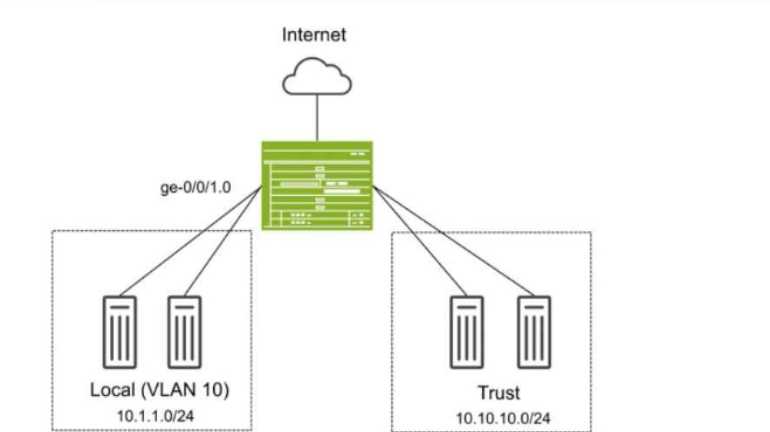
You have deployed an SRX Series device as shown in the exhibit. The devices in the Local zone have
recently been added, but their SRX interfaces have not been configured. You must configure the SRX
to meet the following requirements:
Devices in the 10.1.1.0/24 network can communicate with other devices in the same network but
not with other networks or the SRX.
You must be able to apply security policies to traffic flows between devices in the Local zone.
Which three configuration elements will be required as part of your configuration? (Choose three.)
- A. set security zones security-zone Local interfaces ge-0/0/1.0
- B. set interfaces ge-0/0/1 unit 0 family ethernet-switching vlan-members 10
- C. set protocols l2-learning global-mode switching
- D. set protocols l2-learning global-mode transparent-bridge
- E. set security zones security-zone Local interfaces irb.10
Answer:
ABD
Explanation:
In this scenario, we need to configure the SRX Series device so that devices in the Local zone (VLAN
10, 10.1.1.0/24 network) can communicate with each other but not with other networks or the SRX
itself. Additionally, you must be able to apply security policies to traffic flows between the devices in
the Local zone.
Explanation of Answer A (Assigning Interface to Security Zone):
You need to assign the interface ge-0/0/1.0 to the Local security zone. This is crucial because the SRX
only applies security policies to interfaces assigned to security zones. Without this, traffic between
devices in the Local zone won't be processed by security policies.
Configuration:
set security zones security-zone Local interfaces ge-0/0/1.0
Explanation of Answer B (Configuring Ethernet-Switching for VLAN 10):
Since we are using Layer 2 switching between devices in VLAN 10, we need to configure the interface
to operate in Ethernet switching mode and assign it to VLAN 10.
Configuration:
set interfaces ge-0/0/1 unit 0 family ethernet-switching vlan-members 10
Explanation of Answer D (Transparent Bridging Mode for Layer 2):
The global mode for Layer 2 switching on the SRX device must be set to transparent-bridge. This
ensures that the SRX operates in Layer 2 mode and can switch traffic between devices without
routing.
Configuration:
set protocols l2-learning global-mode transparent-bridge
Summary:
Interface Assignment: Interface ge-0/0/1.0 is assigned to the Local zone to allow policy enforcement.
Ethernet-Switching: The interface is configured for Layer 2 Ethernet switching in VLAN 10.
Transparent Bridging: The SRX is configured in Layer 2 transparent-bridge mode for switching
between devices.
Juniper Security Reference:
Layer 2 Bridging and Switching Overview: This mode allows the SRX to act as a Layer 2 switch for
forwarding traffic between VLAN members without routing. Reference: Juniper Transparent Bridging
Documentation.
Comments
Question 2
Exhibit: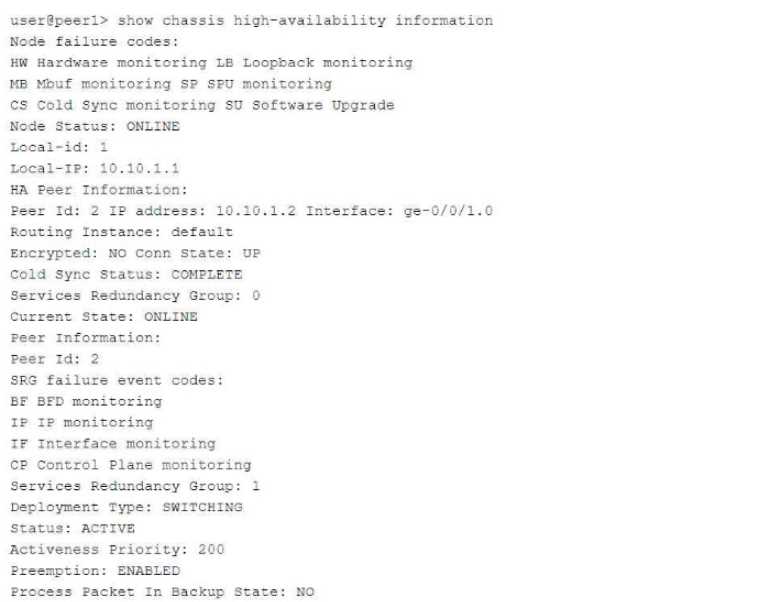
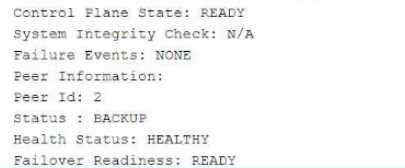
Referring to the exhibit, which statement is true?
- A. SRG1 is configured in hybrid mode.
- B. The ICL is encrypted.
- C. If SRG1 moves to peer 2, peer 1 will drop packets sent to the SRG1 interfaces.
- D. If SRG1 moves to peer 2, peer 1 will forward packets sent to the SRG1 interfaces.
Answer:
D
Explanation:
The exhibit describes a Chassis Cluster configuration with high availability (HA) settings. The key
information is related to Service Redundancy Group 1 (SRG1) and its failover behavior between the
two peers.
Explanation of Answer D (Packet Forwarding after Failover):
In a typical SRX HA setup with active/backup configuration, if the SRG1 group moves to peer 2 (the
backup), peer 1 (previously the active node) will forward packets to peer 2 instead of dropping them.
This ensures smooth failover and seamless continuation of services without packet loss.
This behavior is part of the active/backup failover process in SRX chassis clusters, where the standby
peer takes over traffic processing without disruption.
Juniper Security Reference:
Chassis Cluster Failover Behavior: When a service redundancy group fails over to the backup peer,
the previously active peer forwards traffic to the new active node. Reference: Juniper Chassis Cluster
Documentation.
Comments
Question 3
You are asked to create multiple virtual routers using a single SRX Series device. You must ensure that
each virtual router maintains a unique copy of the routing protocol daemon (RPD) process.
Which solution will accomplish this task?
- A. Secure wire
- B. Tenant system
- C. Transparent mode
- D. Logical system
Answer:
D
Explanation:
Logical systems on SRX Series devices allow the creation of separate virtual routers, each with its
unique RPD process. This segmentation ensures that routing and security policies are isolated across
different logical systems, effectively acting like independent routers within a single SRX device. For
further information, see Juniper Logical Systems Documentation.
To create multiple virtual routers on a single SRX Series device, each with its own unique copy of the
routing protocol daemon (RPD) process, you need to use logical systems. Logical systems allow for
the segmentation of an SRX device into multiple virtual routers, each with independent
configurations, including routing instances, policies, and protocol daemons.
Explanation of Answer D (Logical System):
A logical system on an SRX device enables you to create multiple virtual instances of the SRX, each
operating independently with its own control plane and routing processes. Each logical system gets a
separate copy of the RPD process, ensuring complete isolation between virtual routers.
This is the correct solution when you need separate routing instances with their own RPD processes
on the same physical device.
Configuration Example:
bash
set logical-systems <logical-system-name> interfaces ge-0/0/0 unit 0
set logical-systems <logical-system-name> routing-options static route 0.0.0.0/0 next-hop
192.168.1.1
Juniper Security Reference:
Logical Systems Overview: Logical systems allow for the creation of multiple virtual instances within a
single SRX device, each with its own configuration and control plane. Reference: Juniper Logical
Systems Documentation.
Comments
Question 4
Click the Exhibit button.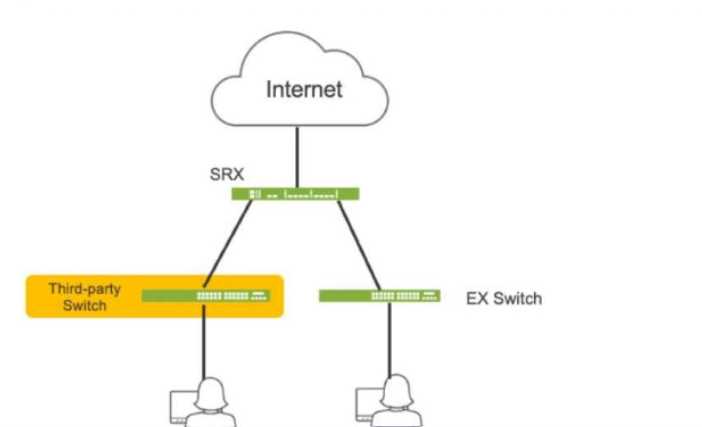
Referring to the exhibit, which three actions do you need to take to isolate the hosts at the switch
port level if they become infected with malware? (Choose three.)
- A. Enroll the SRX Series device with Juniper ATP Cloud.
- B. Use a third-party connector.
- C. Deploy Security Director with Policy Enforcer.
- D. Configure AppTrack on the SRX Series device.
- E. Deploy Juniper Secure Analytics.
Answer:
ABC
Explanation:
A. Enroll the SRX Series device with Juniper ATP Cloud. This is essential for the SRX to receive threat
intelligence from ATP Cloud, enabling it to identify infected hosts and take action.
B. Use a third-party connector. In this specific scenario, a third-party connector is required to
integrate the SRX with the third-party switch. While Juniper has native integration for its EX switches,
a connector is necessary to communicate with and manage the third-party switch.
C. Deploy Security Director with Policy Enforcer. Security Director orchestrates the automated
response, and Policy Enforcer translates the policies into device-specific commands for the SRX and
the third-party switch (via the connector).
Comments
Question 5
You want to deploy two vSRX instances in different public cloud providers to provide redundant
security services for your network. Layer 2 connectivity between the two vSRX instances is not
possible.
What would you configure on the vSRX instances to accomplish this task?
- A. Chassis cluster
- B. Secure wire
- C. Multinode HA
- D. Virtual chassis
Answer:
C
Comments
Question 6
You are asked to connect two hosts that are directly connected to an SRX Series device. The traffic
should flow unchanged as it passes through the SRX, and routing or switch lookups should not be
performed. However, the traffic should still be subjected to security policy checks.
What will provide this functionality?
- A. MACsec
- B. Mixed mode
- C. Secure wire
- D. Transparent mode
Answer:
C
Explanation:
Secure wire mode on SRX devices allows traffic to flow transparently through the firewall without
being routed or switched, while still applying security policies. This is ideal for scenarios where traffic
inspection is required without altering the traffic path or performing additional routing decisions. For
further details on Secure Wire, refer to Juniper Secure Wire Documentation.
In this scenario, you want traffic to pass through the SRX unchanged (without routing or switching
lookups) but still be subject to security policy checks. The best solution for this requirement is Secure
Wire.
Explanation of Answer C (Secure Wire):
Secure Wire allows traffic to flow through the SRX without any Layer 3 routing or Layer 2 switching
decisions. It effectively bridges two interfaces at Layer 2 while still applying security policies. This
ensures that traffic remains unchanged, while security policies (such as firewall rules) can still be
enforced.
This is an ideal solution when you need the SRX to act as a "bump in the wire" for security
enforcement without changing the traffic or performing complex network lookups.
Juniper Security Reference:
Secure Wire Functionality: Provides transparent Layer 2 forwarding with security policy enforcement,
making it perfect for scenarios where traffic needs to pass through unchanged. Reference: Juniper
Secure Wire Documentation.
Comments
Question 7
Which two statements are true when setting up an SRX Series device to operate in mixed mode?
(Choose two.)
- A. A physical interface can be configured to be both a Layer 2 and a Layer 3 interface at the same time.
- B. User logical systems support Layer 2 traffic processing.
- C. The SRX must be rebooted after configuring at least one Layer 3 and one Layer 2 interface.
- D. Packets from Layer 2 interfaces are switched within the same bridge domain.
Answer:
CD
Explanation:
In mixed mode, SRX devices can simultaneously handle Layer 2 switching and Layer 3 routing, but a
reboot is required when configuring Layer 2 and Layer 3 interfaces to ensure the configuration takes
effect. Layer 2 packets are switched within the defined bridge domain. Further guidance on SRX
mixed mode can be found at Juniper Mixed Mode Documentation.
When an SRX Series device is configured in mixed mode, both Layer 2 switching and Layer 3 routing
functionalities can be used on the same device. This enables the SRX to act as both a router and a
switch for different interfaces. However, there are certain considerations:
Explanation of Answer C (Reboot Requirement):
After configuring the SRX to operate with at least one Layer 2 interface and one Layer 3 interface, the
device needs to be rebooted. This is required to properly initialize the mixed mode configuration, as
the SRX needs to switch between Layer 2 and Layer 3 processing modes.
Explanation of Answer D (Layer 2 Traffic Handling):
In mixed mode, traffic from Layer 2 interfaces is switched within the same bridge domain. A bridge
domain defines a Layer 2 broadcast domain, and packets from Layer 2 interfaces are forwarded based
on MAC addresses within that domain.
Juniper Security Reference:
Mixed Mode Overview: Juniper SRX devices can operate in mixed mode to handle both Layer 2 and
Layer 3 traffic simultaneously. Reference: Juniper Mixed Mode Documentation.
Comments
Question 8
You have configured the backup signal route IP for your multinode HA deployment, and the ICL link
fails.
Which two statements are correct in this scenario? (Choose two.)
- A. The current active node retains the active role.
- B. The active node removes the active signal route.
- C. The backup node changes the routing preference to the other node at its medium priority.
- D. The active node keeps the active signal route.
Answer:
AC
Comments
Question 9
Exhibit: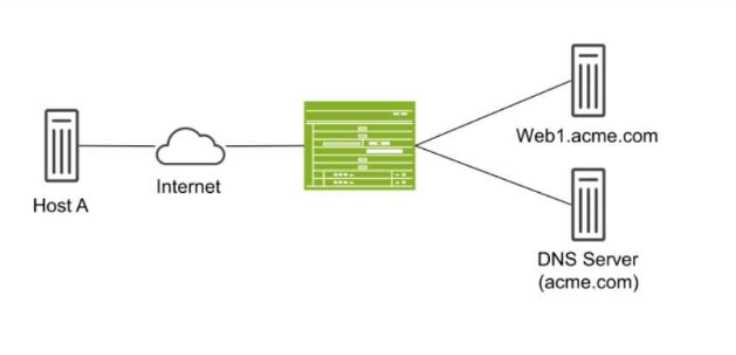
Host A shown in the exhibit is attempting to reach the Web1 webserver, but the connection is failing.
Troubleshooting reveals that when Host A attempts to resolve the domain name of the server
(web.acme.com), the request is resolved to the private address of the server rather than its public IP.
Which feature would you configure on the SRX Series device to solve this issue?
- A. Persistent NAT
- B. Double NAT
- C. DNS doctoring
- D. STUN protocol
Answer:
C
Explanation:
DNS doctoring modifies DNS responses for hosts behind NAT devices, allowing them to receive the
correct public IP address for internal resources when queried from the public network. This prevents
issues where private IPs are returned and are not reachable externally. For details, visit Juniper DNS
Doctoring Documentation.
In this scenario, Host A is trying to resolve the domain name web.acme.com, but the DNS resolution
returns the private IP address of the web server instead of its public IP. This is a common issue in
networks where private addresses are used internally, but public addresses are required for external
clients.
Explanation of Answer C (DNS Doctoring):
DNS doctoring is a feature that modifies DNS replies as they pass through the SRX device. In this
case, DNS doctoring can be used to replace the private IP address returned in the DNS response with
the correct public IP address for Host A. This allows external clients to reach internal resources
without being aware of their private IP addresses.
Configuration Example:
bash
set security nat dns-doctoring from-zone untrust to-zone trust
Juniper Security Reference:
DNS Doctoring Overview: DNS doctoring is used to modify DNS responses so that external clients can
access internal resources using public IP addresses. Reference: Juniper DNS Doctoring
Documentation.
Comments
Question 10
Exhibit: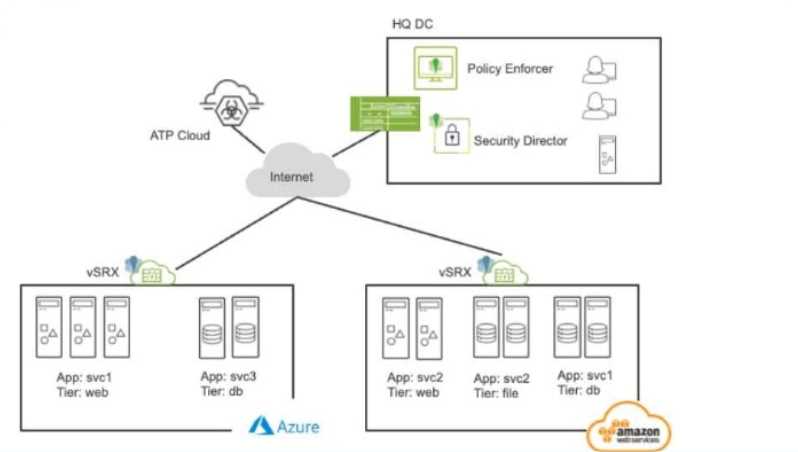
Referring to the exhibit, what do you use to dynamically secure traffic between the Azure and AWS
clouds?
- A. You can dynamically secure traffic between the clouds by using user identities in the security policies.
- B. You can dynamically secure traffic between the clouds by using advanced connection tracking in the security policies.
- C. You can dynamically secure traffic between the clouds by using security tags in the security policies.
- D. You can dynamically secure traffic between the clouds by using URL filtering in the security policies.
Answer:
C
Explanation:
Security tags facilitate dynamic traffic management between cloud environments like Azure and
AWS. Tags allow flexible policies that respond to cloud-native events or resource changes, ensuring
secure inter-cloud communication. For more information, see Juniper Cloud Security Tags.
In the scenario depicted in the exhibit, where traffic needs to be dynamically secured between Azure
and AWS clouds, the best method to achieve dynamic security is by using security tags in the security
policies.
Explanation of Answer C (Security Tags in Security Policies):
Security tags allow dynamic enforcement of security policies based on metadata rather than static IP
addresses or zones. This is crucial in cloud environments, where resources and IP addresses can
change dynamically.
Using security tags in the security policies, you can associate traffic flows with specific applications,
services, or virtual machines, regardless of their underlying IP addresses or network locations. This
ensures that security policies are automatically updated as cloud resources change.
Juniper Security Reference:
Dynamic Security with Security Tags: This feature allows you to dynamically secure cloud-based
traffic using metadata and tags, ensuring that security policies remain effective even in dynamic
environments. Reference: Juniper Security Tags Documentation.
Comments
Page 1 out of 11
Viewing questions 1-10 out of 115
page 2