Question 1
Based on the "snow ip route" output on an AruDaCX 8400. what type of route is "10.1 20 0/24, vrf
default via 10.1.12.2. [1/0]"?
- A. local
- B. static
- C. OSPF
- D. connected
Answer:
B
Explanation:
A static route is a route that is manually configured on a router or switch and does not change unless
it is modified by an administrator. Static routes are used to specify how traffic should reach specific
destinations that are not directly connected to the device or that are not reachable by dynamic
routing protocols. In Aruba CX switches, static routes can be configured using the ip route command
in global configuration mode. Based on the “show ip route” output on an Aruba CX 8400 switch, the
route “10.1 20 0/24, vrf default via 10.1.12.2, [1/0]” is a static route because it has an administrative
distance of 1 and a metric of 0, which are typical values for static routes. Reference:
https://en.wikipedia.org/wiki/Static_routing https://www.arubanetworks.com/techdocs/AOS-
CX_10_04/NOSCG/Content/cx-noscg/ip-routing/static-routes.htm
https://www.arubanetworks.com/techdocs/AOS-CX_10_04/NOSCG/Content/cx-noscg/ip-
routing/show-ip-route.htm
Comments
Question 2
Which device configuration group types can a user define in Aruba Central during group creation?
(Select two.)
- A. Security group
- B. Template group
- C. Default group
- D. Ul group
- E. ESP group
Answer:
BC
Explanation:
In Aruba Central, during the creation of a device configuration group, users can define various types
of groups to manage and apply configurations to devices centrally. Among the options, "Template
group" and "Default group" are valid types. A "Template group" allows the definition of configuration
settings in a template format, which can be applied to multiple devices or device groups, ensuring
consistency and efficiency in configurations across the network. A "Default group" is typically a
predefined group in Aruba Central that applies a basic or initial set of configurations to devices that
are not assigned to any other specific group. This helps in initial provisioning and management of
devices. The other options, such as "Security group," "UI group," and "ESP group," are not standard
group types defined in Aruba Central for device configuration purposes.
Comments
Question 3
What is the correct command to add a static route to a class-c-network 10.2.10.0 via a gateway of
172.16.1.1?
- A. ip-route 10.2.10.0/24 172.16.1.1
- B. ip route 10.2.10.0.255.255.255.0 172.16.1.1 description aruba
- C. ip route 10.2.10.0/24.172.16.11
- D. ip route-static 10.2 10.0.255.255.255.0 172.16.1.1
Answer:
A
Explanation:
The correct command to add a static route to a class-c-network 10.2.10.0 via a gateway of 172.16.1.1
is ip-route 10.2.10.0/24 172.16.1.1 . This command specifies the destination network address
(10.2.10.0) and prefix length (/24) and the next-hop address (172.16.1 .1) for reaching that network
from the switch. The other commands are either incorrect syntax or incorrect parameters for adding
a static route. Reference:
https://www.arubanetworks.com/techdocs/AOS-
CX_10_04/NOSCG/Content/cx-noscg/ip-routing/static-routes.htm
To add a static route in network devices, including Aruba switches, the correct command format
generally includes the destination network, subnet mask (or CIDR notation for the mask), and the
next-hop IP address. The command "ip route 10.2.10.0/24 172.16.1.1" correctly specifies the
destination network "10.2.10.0" with a class C subnet mask indicated by "/24", and "172.16.1.1" as
the next-hop IP address. This command is succinct and follows the standard syntax for adding a static
route in many network operating systems, including ArubaOS-CX. The other options either have
incorrect syntax or include additional unnecessary parameters that are not typically part of the
standard command to add a static route.
Comments
Question 4
You need to configure wireless access for several classes of loT devices, some of which operate only
with 802 11b. Each class must have a unique PSK and will require a different security policy applied
as a role There will be 15-20 different classes of devices and performance should be optimized
Which option fulfills these requirements''
- A. Single SSID with MPSK for each loT class using 5 GHz and 6 GHz bands
- B. Single SSID with MPSK for each loT class using 2.4GHz and 5 GHz bands
- C. Individual SSIDs with unique PSK for each loT class, using 5GHz and 6 GHz bands
- D. Individual SSIDs with unique PSK for each loT class, using 2.4GHZ and 5GHz band
Answer:
B
Explanation:
For configuring wireless access for multiple classes of IoT devices with varying security requirements,
using a single SSID with Multiple Pre-Shared Keys (MPSK) is an efficient solution. MPSK allows
different devices or groups of devices to connect to the same SSID but with unique PSKs, facilitating
unique security policies for each class. Given that some IoT devices only support 802.11b, which
operates in the 2.4GHz band, it is essential to include the 2.4GHz band in the configuration. The
5GHz band should also be included to support devices capable of operating in that band and to
optimize network performance. The 6GHz band (option A) is not suitable since 802.11b devices are
not compatible with it. Individual SSIDs for each IoT class (options C and D) would unnecessarily
complicate network management and SSID overhead.
Comments
Question 5
The noise floor measures 000000001 milliwatts, and the receiver's signal strength is -65dBm. What is
the Signal to Noise Ratio?
- A. 35 dBm
- B. 15 dBm
- C. 45 dBm
- D. 25 dBm
Answer:
D
Explanation:
The signal to noise ratio (SNR) is a measure that compares the level of a desired signal to the level of
background noise. SNR is defined as the ratio of signal power to the noise power, often expressed in
decibels (dB).
A high SNR means that the signal is clear and easy to detect or interpret, while a low
SNR means that the signal is corrupted or obscured by noise and may be difficult to distinguish or
recover3
. To calculate the SNR in dB, we can use the following formula:
SNR (dB) = Signal power (dBm) - Noise power (dBm)
In this question, we are given that the noise floor measures -90 dBm (0.000000001 milliwatts) and
the receiver’s signal strength is -65 dBm (0.000316 milliwatts). Therefore, we can plug these values
into the formula and get:
SNR (dB) = -65 dBm - (-90 dBm) SNR (dB) = -65 dBm + 90 dBm SNR (dB) = 25 dBm
Therefore, the correct answer is that the SNR is 25 dBm.
Reference:
https://en.wikipedia.org/wiki/Signal-to-noise_ratio
Comments
Question 6
DRAG DROP
Match the switching technology with the appropriate use case.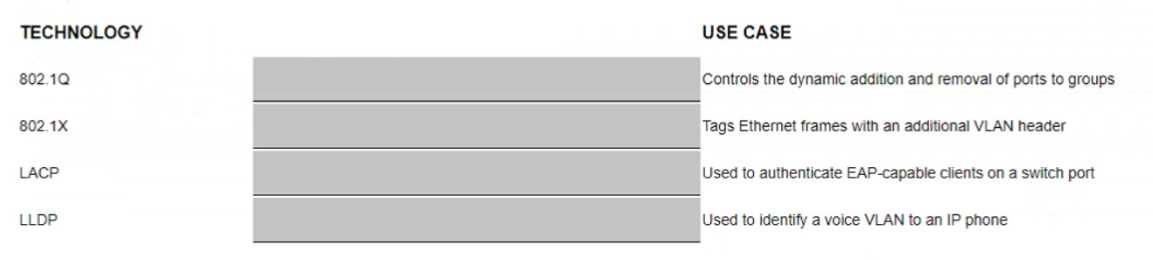
Answer:
None
Explanation:
USE CASE: a) Controls the dynamic addition and removal of ports to groups Technology: 3) LACP
USE CASE: b) Tags Ethernet frames with an additional VLAN header Technology: 1) 802.1Q
USE CASE: c) Used to authenticate EAP-Capable client on a switch port Technology: 2) 802.1X
USE CASE: d) Used to identify a voice VLAN to an IP phone Technology: 4) LLDP
The following table summarizes the switching technologies and their use cases:
Technology
Use case
802.1Q is a standard that defines how to create and manage virtual LANs (VLANs) on a network. VLANs
allow network administrators to logically segment a network into different broadcast domains, improving
security, performance, and manageability. 802.1Q tags Ethernet frames with an additional VLAN header that
1) 802.1Q
contains a VLAN identifier (VID), which indicates which VLAN the frame belongs to
.
802.1X is a standard that defines how to provide port-based network access control (PNAC) on a network.
PNAC allows network administrators to authenticate and authorize devices before granting them access to
network resources. 802.1X uses the Extensible Authentication Protocol (EAP) to exchange authentication
messages between a supplicant (a device that wants to access the network), an authenticator (a device that
controls access to the network, such as a switch), and an authentication server (a device that verifies the
2) 802.1X
credentials of the supplicant, such as a RADIUS server)
.
LACP stands for Link Aggregation Control Protocol, which is part of the IEEE 802.3ad standard that defines
how to bundle multiple physical links into a single logical link, also known as a link aggregation group (LAG)
or an EtherChannel. LAGs provide increased bandwidth, load balancing, and redundancy for network
connections. LACP controls the dynamic addition and removal of ports to groups, ensuring that only ports
3) LACP
with compatible configurations can form a LAG
.
LLDP stands for Link Layer Discovery Protocol, which is part of the IEEE 802.1AB standard that defines how to
discover and advertise information about neighboring devices on a network. LLDP operates at Layer 2 of the
OSI model and uses TLVs (type-length-value) to exchange information such as device name, port number,
VLAN ID, capabilities, and power requirements. LLDP can be used to identify a voice VLAN to an IP phone by
4) LLDP
sending a TLV that contains the voice VLAN ID and priority.
Reference:
1 https://en.wikipedia.org/wiki/IEEE_802.1Q 2 https://en.wikipedia.org/wiki/IEEE_802.1
X 3
https://en.wikipedia.org/wiki/Link_aggregation
https://en.wikipedia.org/wiki/Link_Layer_Discovery_Protocol
Comments
Question 7
Which commands are used to set a default route to 10.4.5.1 on an Aruba CX switch when ln-band
management using an SVl is being used?
- A. iP default-gateway 10.4.5.1
- B. ip route 0 0 0.070 10.4 5.1 vrf mgmt
- C. ip route 0.0 0 0/0 10.4.5.1
- D. default-gateway 10.4.5.1
Answer:
C
Explanation:
The command that is used to set a default route to 10.4.5.1 on an Aruba CX switch when in-band
management using an SVI is being used is ip route 0.0 0 0/0 10.4.5.1 . This command specifies the
destination network address (0.0 0 0) and prefix length (/0) and the next-hop address (10.4.5.1) for
reaching any network that is not directly connected to the switch. The default route applies to the
default VRF Virtual Routing and Forwarding. VRF is a technology that allows multiple instances of a
routing table to co-exist within the same router at the same time. VRFs are typically used to segment
network traffic for security, privacy, or administrative purposes. , which is used for in-band
management traffic that goes through an SVI Switch Virtual Interface. SVI is a virtual interface on a
switch that allows the switch to route packets between different VLANs on the same switch or
different switches that are connected by a trunk link.
An SVI is associated with a VLAN and has an IP
address and subnet mask assigned to it12
.
Reference:
1 https://www.arubanetworks.com/techdocs/AOS-CX/10_08/HTML/ip_route_4100i-
6000-6100-6200/Content/Chp_StatRoute/def-
rou.htm 2
https://www.arubanetworks.com/techdocs/AOS-CX/10_08/HTML/ip_route_4100i-6000-
6100-6200/Content/Chp_VRF/vrf-overview.htm
Comments
Question 8
Two independent ArubaOS-CX 6300 switches with Spanning Tree (STP) settings are interconnected
with two cables between ports 1/1/1 and 1/1/2 All four ports have "no shutdown" and "no routing"
commands
How will STP forward or discard traffic on these ports?
- A. The switch with the lower MAC address will forward on both ports, while the switch with the higher MAC address will forward on both ports
- B. The switch with the lower MAC address will forward on both ports, while the switch with the higher MAC address will discard on one port
- C. The switch with the lower MAC address will discard on one port, while the switch with the higher MAC address will forward on both ports
- D. The switch with the lower MAC address will discard on one port, while the switch with the higher MAC address will discard on one port
Answer:
D
Explanation:
The way that STP Spanning Tree Protocol. STP is a network protocol that ensures a loop-free topology
for any bridged Ethernet local area network by preventing redundant paths between switches or
bridges from creating loops that cause broadcast storms, multiple frame transmission, and MAC
table instability.
STP creates a logical tree structure that spans all of the switches in an extended
network and blocks any redundant links that are not part of the tree from forwarding data packets3
.
will forward or discard traffic on these ports is as follows:
STP will elect a root bridge among the two switches based on their bridge IDs, which are composed
of a priority value and a MAC address. The switch with the lower bridge ID will become the root
bridge and will forward traffic on all its ports.
STP will assign a role and a state to each port on both switches based on their port IDs, which are
composed of a priority value and a port number. The port with the lower port ID will become the
designated port and will forward traffic, while the port with the higher port ID will become the
alternate port and will discard traffic.
In this scenario, since both switches have two cables connected between ports 1/1/1 and 1/1/2,
there will be two possible paths between them, creating a loop. To prevent this loop, STP will block
one of these paths by discarding traffic on one of the ports on each switch.
Assuming that both switches have the same priority value (default is 32768), the switch with the
lower MAC address will have the lower bridge ID and will become the root bridge. The root bridge
will forward traffic on both ports 1/1/1 and 1/1/2.
Assuming that both ports have the same priority value (default is 128), port 1/1/1 will have a lower
port ID than port 1/1/2 on both switches because it has a lower port number. Port 1/1/1 will become
the designated port and will forward traffic, while port 1/1/2 will become the alternate port and will
discard traffic.
Therefore, the switch with the lower MAC address will discard traffic on one port (port 1/1/2), while
the switch with the higher MAC address will also discard traffic on one port (port 1/1/2).
Reference: 3
https://en.wikipedia.org/wiki/Spanning_Tree_Protocol
Comments
Question 9
What are the main characteristics of the 6 GHz band?
- A. Less RF signal is absorb by objects in a 6 GHz WLAN.
- B. In North America, the 6 GHz band offers more 80 MHz channels than there are 40 MHz channels in the 5 GHz band.
- C. The 6 GHz band is fully backward compatible with the existing bands.
- D. Low Power Devices are allowed for indoor and outdoor usage.
Answer:
B
Explanation:
The main characteristic of the 6 GHz band that is true among the given options is that in North
America, the 6 GHz band offers more 80 MHz channels than there are 40 MHz channels in the 5 GHz
band. This characteristic provides more spectrum availability, less interference, and higher
throughput for wireless devices that support Wi-Fi 6E Wi-Fi Enhanced (Wi-Fi 6E) is an extension of
Wi-Fi 6 (802.11ax) standard that operates in the newly available unlicensed frequency spectrum
around 6 GHz in addition to existing bands below it. Some facts about this characteristic are:
In North America, there are up to seven non-overlapping channels available in each of three channel
widths (20 MHz, 40 MHz, and 80 MHz) in the entire unlicensed portion of the new spectrum (5925–
7125 MHz). This means there are up to 21 non-overlapping channels available for Wi-Fi devices in
total.
In comparison, in North America, there are only nine non-overlapping channels available in each of
two channel widths (20 MHz and 40 MHz) in the entire unlicensed portion of the existing spectrum
below it (2400–2483 MHz and 5150–5825 MHz). This means there are only up to nine non-
overlapping channels available for Wi-Fi devices in total.
Therefore, in North America, there are more than twice as many non-overlapping channels available
in each channel width in the new spectrum than in the existing spectrum below it.
Specifically, there are more than twice as many non-overlapping channels available at 80 MHz width
(seven) than at 40 MHz width (three) in the existing spectrum below it.
The other options are not true because:
Less RF signal is absorbed by objects in a 6 GHz WLAN: This option is false because higher frequency
signals tend to be more absorbed by objects than lower frequency signals due to higher attenuation
Attenuation is a general term that refers to any reduction in signal strength during transmission over
distance or through an object or medium . Therefore, RF signals in a 6 GHz WLAN would be more
absorbed by objects than RF signals in a lower frequency WLAN.
The 6 GHz band is fully backward compatible with existing bands: This option is false because Wi-Fi
devices need to support Wi-Fi 6E standard to operate in the new spectrum around 6 GHz . Existing
Wi-Fi devices that do not support Wi-Fi 6E standard cannot use this spectrum and can only operate in
existing bands below it.
Low Power Devices are allowed for indoor and outdoor usage: This option is false because Low
Power Indoor Devices (LPI) are only allowed for indoor usage under certain power limits and
registration requirements . Outdoor usage of LPI devices is prohibited by regulatory authorities such
as FCC Federal Communications Commission (FCC) is an independent agency of United States
government that regulates communications by radio, television, wire, satellite, and cable across
United States . However, outdoor usage of Very Low Power Devices (VLP) may be allowed under
certain power limits and without registration requirements.
Reference: https://www.wi-fi.org/discover-wi-fi/wi-fi-certified-6e https://www.wi-fi.org/file/wi-fi-
alliance-spectrum-needs-study
https://www.cisco.com/c/en/us/products/collateral/wireless/spectrum-expert-wi-fi/prod_white_paper0900aecd807395a9.html
https://www.cisco.com/c/en/us/support/docs/wireless-mobility/wireless-lan-wlan/82068-power-
levels.html https://www.wi-fi.org/file/wi-fi-alliance-unlicensed-spectrum-in-the-us
Comments
Question 10
A hospital uses a lot of mobile equipment for the diagnosis and documentation of patient data What
Is the ideal access switch for this large hospital with distribution racks of over 400 ports in a single
VSF stack?
- A. CX 6300
- B. OCX 6400
- C. OCX 6200
- D. OCX 6100
Answer:
A
Explanation:
The ideal access switch for a large hospital with distribution racks of over 400 ports in a single VSF
stack is the CX 6300. This switch provides the following benefits:
The CX 6300 supports up to 48 ports per switch and up to 10 switches per VSF stack, allowing for a
total of 480 ports in a single stack. This meets the requirement of having over 400 ports in a single
VSF stack.
The CX 6300 supports high-performance switching with up to 960 Gbps of switching capacity and up
to 714 Mpps of forwarding rate. This meets the requirement of having high throughput and low
latency for mobile equipment and patient data.
The CX 6300 supports advanced features such as dynamic segmentation, policy-based routing, and
role-based access control. These features enhance the security and flexibility of the network by
applying different policies and roles to different types of devices and users.
The CX 6300 supports Aruba NetEdit, a network configuration and orchestration tool that simplifies
the management and automation of the network. This reduces the complexity and human errors
involved in network configuration and maintenance.
The other options are not ideal because:
OCX 6400: This switch is designed for data center applications and does not support VSF stacking. It
also does not support dynamic segmentation or policy-based routing, which are useful for network
security and flexibility.
OCX 6200: This switch is designed for small to medium-sized businesses and does not support VSF
stacking. It also has lower switching capacity and forwarding rate than the CX 6300, which may affect
the performance of the network.
OCX 6100: This switch is designed for edge applications and does not support VSF stacking. It also has
lower switching capacity and forwarding rate than the CX 6300, which may affect the performance of
the network.
Reference: https://www.arubanetworks.com/assets/ds/DS_CX6300Series.pdf
https://www.arubanetworks.com/assets/ds/DS_OC6400Series.pdf
https://www.arubanetworks.com/assets/ds/DS_OC6200Series.pdf
https://www.arubanetworks.com/assets/ds/DS_OC6100Series.pdf
Comments
Page 1 out of 10
Viewing questions 1-10 out of 102
page 2