Question 1
What is a common characteristic of a beacon between a compromised device and a command and
control server?
- A. Use of IPv6 addressing instead of IPv4 addressing
- B. Lack of encryption
- C. Use of less common protocols such as SNAP
- D. Periodic transmission of small, identically sized packets
Answer:
D
Explanation:
A beacon is a type of network traffic that is sent from a compromised device to a command and
control (C2) server, which is a remote system that controls the malicious activities of the device . A
beacon is used to establish and maintain communication between the device and the C2 server, as
well as to receive instructions or exfiltrate data .
A common characteristic of a beacon is that it is periodic, meaning that it is sent at regular intervals,
such as every few minutes or hours . This helps the C2 server to monitor the status and availability of
the device, as well as to avoid detection by network security tools .
Another common characteristic of a beacon is that it is small and identically sized, meaning that it
contains minimal or fixed amount of data, such as a simple acknowledgment or a random string . This
helps the device to conserve bandwidth and resources, as well as to avoid detection by network
security tools .
Comments
Question 2
Refer to the scenario.
A hospital has an AOS10 architecture that is managed by Aruba Central. The customer has deployed a
pair of Aruba 9000 Series gateways with Security licenses at each clinic. The gateways implement
IDS/IPS in IDS mode.
The Security Dashboard shows these several recent events with the same signature, as shown below: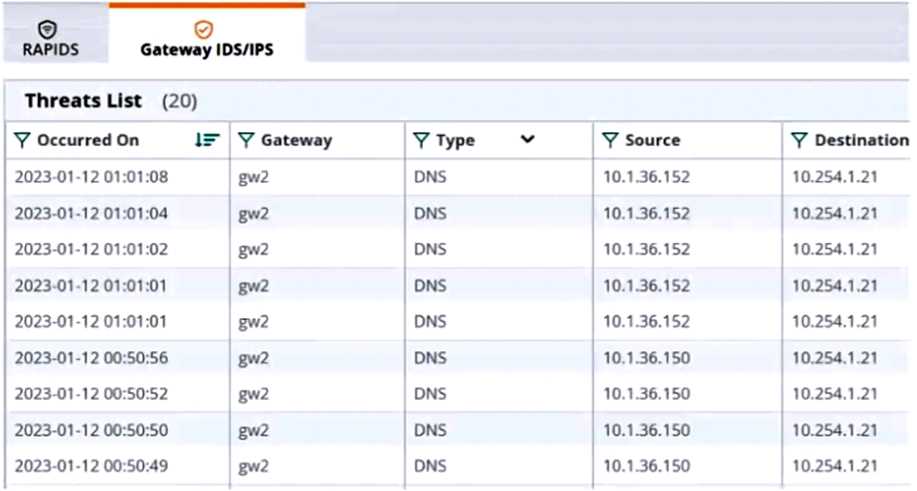
Which step could give you valuable context about the incident?
- A. View firewall sessions on the APs and record the threat sources' type and OS.
- B. View the user-table on APs and record the threat sources' 802.11 settings.
- C. View the RAPIDS Security Dashboard and see if the threat sources are listed as rogues.
- D. Find the Central client profile for the threat sources and note their category and family.
Answer:
C
Explanation:
The RAPIDS Security Dashboard is a feature of Aruba Central that provides a comprehensive view of
the network security status, including IDS/IPS events, rogue APs, and wireless intrusion detection. By
viewing the RAPIDS Security Dashboard, you can see if the threat sources are rogue APs that are
spoofing legitimate DNS servers or clients.
This can give you valuable context about the incident and
help you identify the root cause of the attack1
Reference:
Aruba Central User Guide
Comments
Question 3
Refer to the scenario.
A customer has an Aruba ClearPass cluster. The customer has AOS-CX switches that implement
802.1X authentication to ClearPass Policy Manager (CPPM).
Switches are using local port-access policies.
The customer wants to start tunneling wired clients that pass user authentication only to an Aruba
gateway cluster. The gateway cluster should assign these clients to the “eth-internet" role. The
gateway should also handle assigning clients to their VLAN, which is VLAN 20.
The plan for the enforcement policy and profiles is shown below: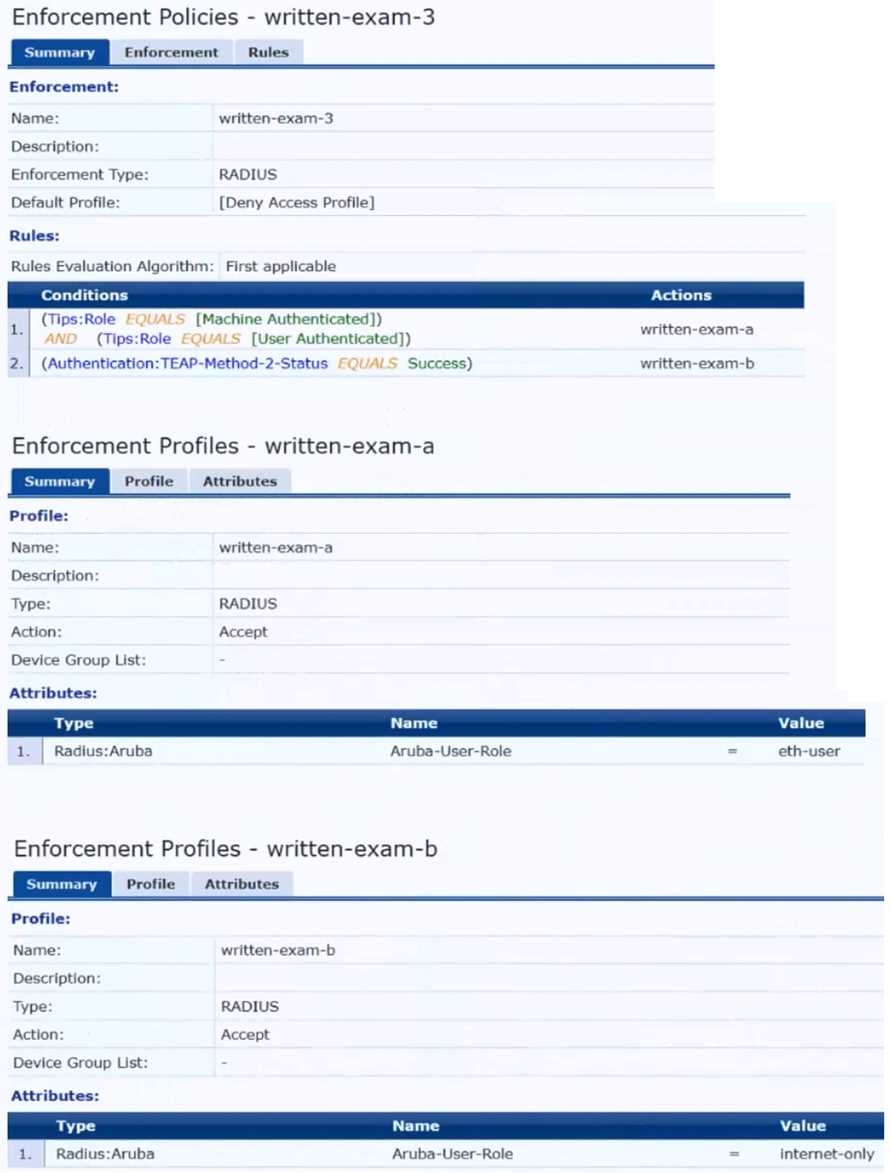
The gateway cluster has two gateways with these IP addresses:
• Gateway 1
o VLAN 4085 (system IP) = 10.20.4.21
o VLAN 20 (users) = 10.20.20.1
o VLAN 4094 (WAN) = 198.51.100.14
• Gateway 2
o VLAN 4085 (system IP) = 10.20.4.22
o VLAN 20 (users) = 10.20.20.2
o VLAN 4094 (WAN) = 198.51.100.12
• VRRP on VLAN 20 = 10.20.20.254
The customer requires high availability for the tunnels between the switches and the gateway cluster.
If one gateway falls, the other gateway should take over its tunnels. Also, the switch should be able
to discover the gateway cluster regardless of whether one of the gateways is in the cluster.
What is one change that you should make to the solution?
- A. Change the ubt-client-vlan to VLAN 13.
- B. Configure edge ports in VLAN trunk mode.
- C. Remove VLAN assignments from role configurations on the gateways.
- D. Configure the UBT solution to use VLAN extend mode.
Answer:
C
Explanation:
The UBT solution requires that the VLAN assignments for the wired clients are done by the gateway,
not by the switch. Therefore, the role configurations on the gateways should not have any VLAN
assignments, as they would override the VLAN 20 that is specified in the enforcement profile.
Instead, the role configurations should only have policies that define the access rights for the clients
in the “eth-internet” role.
This way, the gateway can assign the clients to VLAN 20 and apply the
appropriate policies based on their role1
Reference:
: Aruba Certified Network Technician (ACNT) | HPE Aruba Networking, section “Get the Edge: An
Introduction to Aruba Networking Solutions”
Comments
Question 4
Refer to the scenario.
A customer has an Aruba ClearPass cluster. The customer has AOS-CX switches that implement
802.1X authentication to ClearPass Policy Manager (CPPM).
Switches are using local port-access policies.
The customer wants to start tunneling wired clients that pass user authentication only to an Aruba
gateway cluster. The gateway cluster should assign these clients to the “eth-internet" role. The
gateway should also handle assigning clients to their VLAN, which is VLAN 20.
The plan for the enforcement policy and profiles is shown below: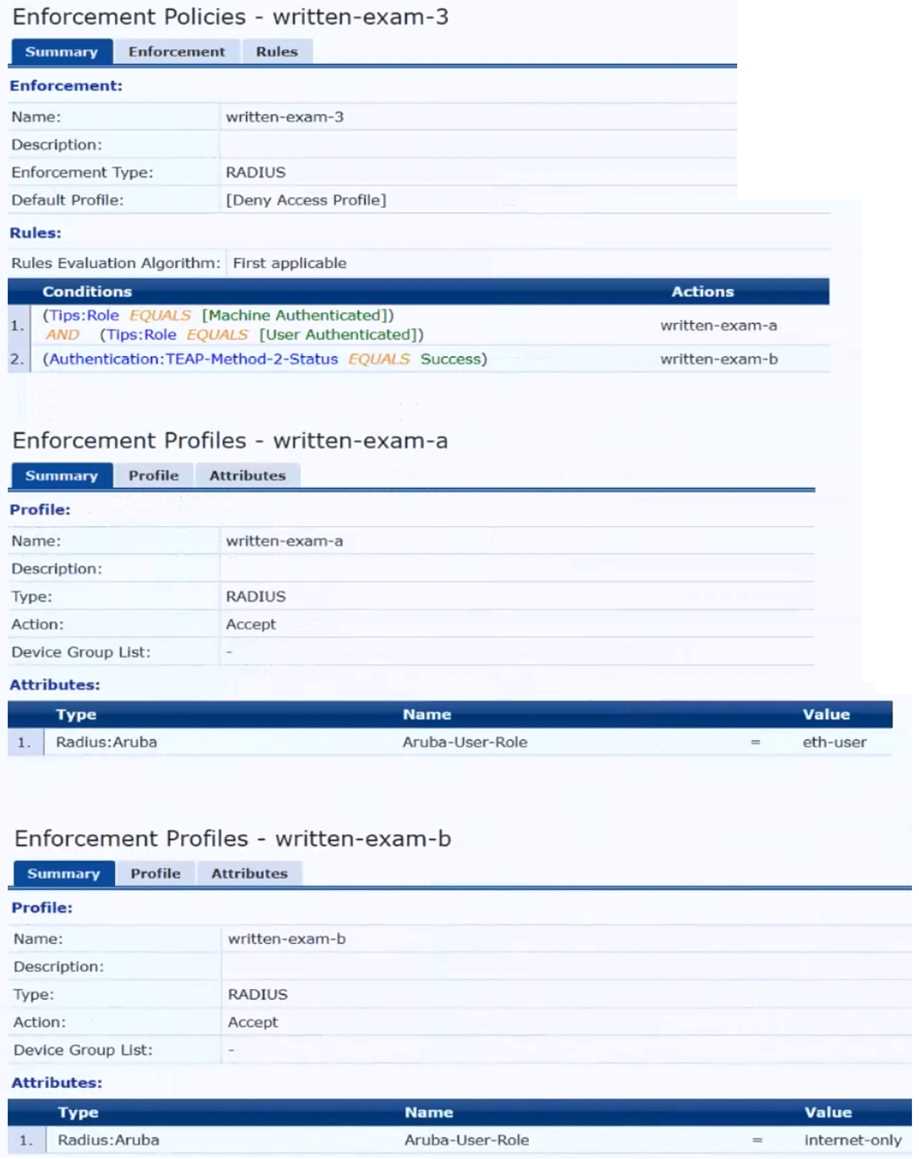
The gateway cluster has two gateways with these IP addresses:
• Gateway 1
o VLAN 4085 (system IP) = 10.20.4.21
o VLAN 20 (users) = 10.20.20.1
o VLAN 4094 (WAN) = 198.51.100.14
• Gateway 2
o VLAN 4085 (system IP) = 10.20.4.22
o VLAN 20 (users) = 10.20.20.2
o VLAN 4094 (WAN) = 198.51.100.12
• VRRP on VLAN 20 = 10.20.20.254
The customer requires high availability for the tunnels between the switches and the gateway cluster.
If one gateway falls, the other gateway should take over its tunnels. Also, the switch should be able
to discover the gateway cluster regardless of whether one of the gateways is in the cluster.
Assume that you are using the “myzone” name for the UBT zone.
Which is a valid minimal configuration for the AOS-CX port-access roles?
- A. port-access role eth-internet gateway-zone zone myzone gateway-role eth-user
- B. port-access role internet-only gateway-zone zone myzone gateway-role eth-internet
- C. port-access role eth-internet gateway-zone zone myzone gateway-role eth-internet vlan access 20
- D. port-access role internet-only gateway-zone zone myzone gateway-role eth-internet vlan access
Answer:
B
Explanation:
The UBT solution requires that the edge ports on the switches are configured in VLAN trunk mode,
not access mode. This is because the UBT solution uses a special VLAN (VLAN 4095 by default) to
encapsulate the user traffic and tunnel it to the gateway. The edge ports need to allow this VLAN as
well as any other VLANs that are used for management or control traffic.
Therefore, the edge ports
should be configured as VLAN trunk ports and allow the necessary VLANs1
Reference:
: Aruba Certified Network Technician (ACNT) | HPE Aruba Networking, section “Get the Edge: An
Introduction to Aruba Networking Solutions”
Comments
Question 5
Refer to the scenario.
A customer requires these rights for clients in the “medical-mobile” AOS firewall role on Aruba
Mobility Controllers (MCs):
Permitted to receive IP addresses with DHCP
Permitted access to DNS services from 10.8.9.7 and no other server
Permitted access to all subnets in the 10.1.0.0/16 range except denied access to 10.1.12.0/22
Denied access to other 10.0.0.0/8 subnets
Permitted access to the Internet
Denied access to the WLAN for a period of time if they send any SSH traffic
Denied access to the WLAN for a period of time if they send any Telnet traffic
Denied access to all high-risk websites
External devices should not be permitted to initiate sessions with “medical-mobile” clients, only
send return traffic.
The line below shows the effective configuration for the role.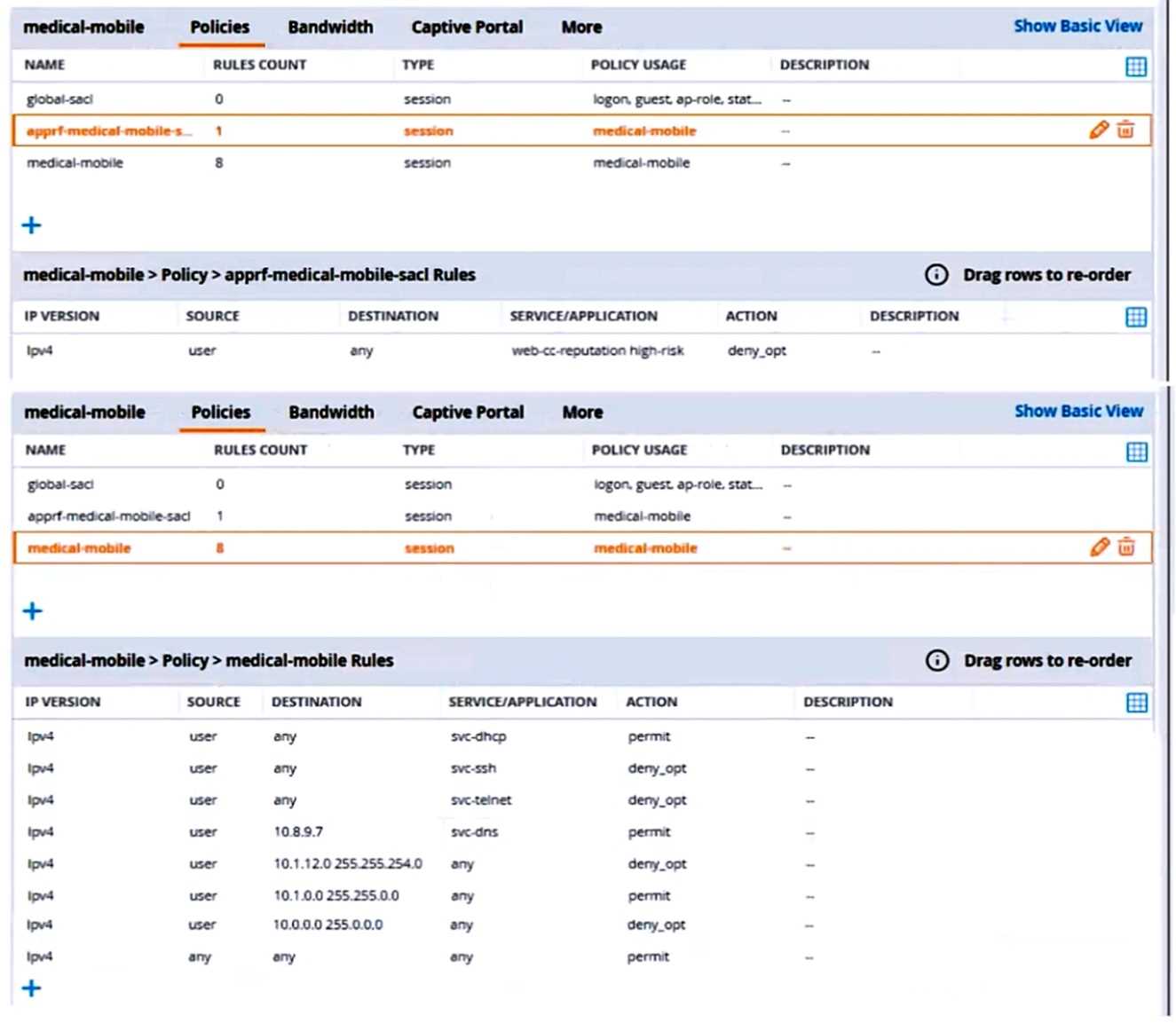
There are multiple issues with this configuration. What is one change you must make to meet the
scenario requirements? (In the options, rules in a policy are referenced from top to bottom. For
example, “medical-mobile” rule 1 is “ipv4 any any svc-dhcp permit,” and rule 6 is “ipv4 any any any
permit’.)
- A. Apply the "apprf-medical-mobile-sjcT policy explicitly to the 'medical-mobile' user-role under the 'medical-mobile" policy.
- B. In the "medical-mobile" policy, change the action for rules 2 and 3 to reject.
- C. In the "medical-mobile" policy, move rule 5 under rule 6.
- D. In the "medical-mobile* policy, change the subnet mask in rule 5 to 255.255.252.0.
Answer:
D
Explanation:
The scenario requires that the clients in the “medical-mobile” role are denied access to the
10.1.12.0/22 subnet, which is a range of IP addresses from 10.1.12.0 to 10.1.15.255. However, the
current configuration in rule 5 has a subnet mask of 255.255.240.0, which means that it matches any
IP address from 10.1.0.0 to 10.1.15.255. This is too broad and would deny access to other subnets in
the 10.1.0.0/16 range that should be permitted according to the scenario.
Therefore, the subnet
mask in rule 5 should be changed to 255.255.252.0, which would match only the IP addresses from
10.1.12.0 to 10.1.15.255 and deny access to them as required by the scenario.1
Reference:
: Configuring Firewall Policies - Aruba, section “Firewall Policies”
Comments
Question 6
A customer requires a secure solution for connecting remote users to the corporate main site. You
are designing a client-to-site virtual private network (VPN) based on Aruba VIA and Aruba Mobility
Controllers acting as VPN Concentrators (VPNCs). Remote users will first use the VIA client to contact
the VPNCs and obtain connection settings.
The users should only be allowed to receive the settings if they are the customer's
“RemoteEmployees” AD group. After receiving the settings, the VIA clients will automatically
establish VPN connections, authenticating to CPPM with certificates.
What should you do to help ensure that only authorized users obtain VIA connection settings?
- A. Set up the VPNCs' VIA web authentication profile to use CPPM as the authentication server; set up a service on CPPM that uses AD as the authentication source.
- B. Set up the VPNCs' VIA web authentication profile to use an AD domain controller as the LDAP server.
- C. Set up the VPNCs' VIA connection profile to use two authentication profiles, one RADIUS profile to CPPM and one LDAP profile to AD.
- D. Set up the VPNCs' VIA connection profile to use one authentication profile, which is set to the AD domain controller's hostname.
Answer:
A
Explanation:
The VIA web authentication profile is used to authenticate the users who want to download the VIA
connection settings from the VPNCs. The VPNCs can use either an internal database or an external
server (such as RADIUS or LDAP) as the authentication source for this profile. To ensure that only
authorized users obtain VIA connection settings, you should use CPPM as the external server and
configure a service on CPPM that uses AD as the authentication source.
This way, you can leverage
the role mapping and enforcement features of CPPM to check if the users belong to the
“RemoteEmployees” AD group and grant or deny them access accordingly1
The other options are not correct because they do not allow you to verify the users’ AD group
membership before providing them with VIA connection settings. Option B would only check the
users’ credentials against AD, but not their group membership. Option C would only apply to the VPN
connection phase, not the VIA connection settings phase.
Option D would not work because the
VPNCs do not support LDAP as an authentication source for VIA connection profiles2
Reference:
1: Configuring the VIA Controller - Aruba, section “Configuring VIA Web Authentication Profile” 2
:
Configuring VIA Connection Profile - Aruba, section “Configuring Authentication Profile”
Comments
Question 7
Refer to the scenario.
A customer is migrating from on-prem AD to Azure AD as its sole domain solution. The customer also
manages both wired and wireless devices with Microsoft Endpoint Manager (Intune).
The customer wants to improve security for the network edge. You are helping the customer design a
ClearPass deployment for this purpose. Aruba network devices will authenticate wireless and wired
clients to an Aruba ClearPass Policy Manager (CPPM) cluster (which uses version 6.10).
The customer has several requirements for authentication. The clients should only pass EAP-TLS
authentication if a query to Azure AD shows that they have accounts in Azure AD. To further refine
the clients’ privileges, ClearPass also should use information collected by Intune to make access
control decisions.
The customer wants you to configure CPPM to collect information from Intune on demand during the
authentication process.
What should you tell the Intune admins about the certificates issued to clients?
- A. They must be issued by a well-known, trusted CA.
- B. They must include the Intune ID in the subject name.
- C. They must include the client MAC address in the subject name.
- D. They must be issued by a ClearPass Onboard CA.
Answer:
B
Explanation:
To configure CPPM to collect information from Intune on demand during the authentication process,
you need to use the Intune extension for ClearPass. This extension allows ClearPass to query Intune
for device compliance and configuration information using the Intune API.
To use this extension, you
need to register an app in Azure AD and grant it the required permissions to access Intune1
The Intune extension uses the device ID as the key to query Intune for device information. The device
ID is a unique identifier that is assigned by Intune to each enrolled device. The device ID can be
obtained from the client certificate that is used for EAP-TLS authentication.
Therefore, the
certificates issued to clients must include the Intune ID in the subject name, so that ClearPass can
extract it and use it to query Intune2
The certificates issued to clients do not need to be issued by a well-known, trusted CA, as long as
ClearPass trusts the CA that issued them. The certificates do not need to include the client MAC
address in the subject name, as this is not relevant for querying Intune. The certificates do not need
to be issued by a ClearPass Onboard CA, as this is not a requirement for using the Intune extension.
Reference:
1: ClearPass Extensions - Microsoft Intune Integration - Aruba, section “Configuring Microsoft
Extension in ClearPass” 2
: ClearPass Extensions - Microsoft Intune Integration - Aruba, section
“Configuring EAP-TLS Authentication”
Comments
Question 8
Refer to the scenario.
A customer is migrating from on-prem AD to Azure AD as its sole domain solution. The customer also
manages both wired and wireless devices with Microsoft Endpoint Manager (Intune).
The customer wants to improve security for the network edge. You are helping the customer design a
ClearPass deployment for this purpose. Aruba network devices will authenticate wireless and wired
clients to an Aruba ClearPass Policy Manager (CPPM) cluster (which uses version 6.10).
The customer has several requirements for authentication. The clients should only pass EAP-TLS
authentication if a query to Azure AD shows that they have accounts in Azure AD. To further refine
the clients’ privileges, ClearPass also should use information collected by Intune to make access
control decisions.
You are planning to use Azure AD as the authentication source in 802.1X services.
What should you make sure that the customer understands is required?
- A. An app registration on Azure AD that references the CPPM's FQDN
- B. Windows 365 subscriptions
- C. CPPM's RADIUS certificate was imported as trusted in the Azure AD directory
- D. Azure AD Domain Services
Answer:
A
Explanation:
To use Azure AD as the authentication source in 802.1X services, you need to configure CPPM as a
SAML service provider and Azure AD as a SAML identity provider. This allows CPPM to use Azure AD
for user authentication and role mapping. To do this, you need to create an app registration on Azure
AD that references the CPPM’s FQDN as the reply URL and the entity ID.
You also need to grant the
app registration the required permissions to access user information from Azure AD1
Comments
Question 9
You are configuring gateway IDS/IPS settings in Aruba Central.
For which reason would you set the Fail Strategy to Bypass?
- A. To permit traffic if the IPS engine falls to inspect It
- B. To enable the gateway to honor the allowlist settings configured in IDS/IPS policies
- C. To tell gateways to stop enforcing IDS/IPS policies if they lose connectivity to the Internet
- D. To avoid wasting IPS engine resources on filtering traffic for unauthenticated clients
Answer:
A
Explanation:
The Fail Strategy is a configuration option for the IPS mode of inspection on Aruba gateways. It
defines the action to be taken when the IPS engine crashes and cannot inspect the traffic.
There are
two possible options for the Fail Strategy: Bypass and Block1
If you set the Fail Strategy to Bypass, you are telling the gateway to allow the traffic to flow without
inspection when the IPS engine fails.
This option ensures that there is no disruption in the network
connectivity, but it also exposes the network to potential threats that are not detected or prevented
by the IPS engine1
If you set the Fail Strategy to Block, you are telling the gateway to stop the traffic flow until the IPS
engine resumes inspection.
This option ensures that there is no compromise in the network security,
but it also causes a loss of network connectivity for the duration of the IPS engine failure1
Comments
Question 10
How does Aruba Central handle security for site-to-site connections between AOS 10 gateways?
- A. It uses an Aruba proprietary integrity and encryption technologies to secure site-to-site connections, making them resistant to zero day attacks.
- B. It automatically establishes IPsec tunnels for all site-to-site (all HUBs and Branches) connections using keys securely distributed by Central.
- C. It automatically steers traffic away from Internet-based connections to more secure MPLS connections to reduce encryption overhead.
- D. It automatically establishes simple-to-manage and highly secure TLSv1.3 tunnels between gateways.
Answer:
B
Explanation:
Aruba Central supports site-to-site VPNs between AOS 10 gateways, which are Aruba devices that
provide routing, firewall, and VPN functions. Aruba Central can automatically provision and manage
the site-to-site VPNs using the VPN Manager feature.
The VPN Manager allows you to create VPN
groups that consist of one or more hubs and branches, and define the VPN settings for each group1
Aruba Central uses IPsec as the protocol to secure the site-to-site connections between the AOS 10
gateways. IPsec is a standard protocol that provides encryption, authentication, and integrity for IP
packets. Aruba Central automatically establishes IPsec tunnels for all site-to-site connections using
keys that are securely distributed by Central. The keys are generated by Central and pushed to the
gateways using a secure channel.
The keys are rotated periodically to enhance security2
Comments
Page 1 out of 5
Viewing questions 1-10 out of 60
page 2