Question 1
You have an Aruba Mobility Controller (MC). for which you are already using Aruba ClearPass Policy
Manager (CPPM) to authenticate access to the Web Ul with usernames and passwords You now want
to enable managers to use certificates to log in to the Web Ul CPPM will continue to act as the
external server to check the names in managers' certificates and tell the MC the managers' correct
rote
in addition to enabling certificate authentication. what is a step that you should complete on the
MC?
- A. Verify that the MC has the correct certificates, and add RadSec to the RADIUS server configuration for CPPM
- B. install all of the managers' certificates on the MC as OCSP Responder certificates
- C. Verify that the MC trusts CPPM's HTTPS certificate by uploading a trusted CA certificate Also, configure a CPPM username and password on the MC
- D. Create a local admin account mat uses certificates in the account, specify the correct trusted CA certificate and external authentication
Answer:
C
Explanation:
To enable managers to use certificates to log into the Web UI of an Aruba Mobility Controller (MC),
where Aruba ClearPass Policy Manager (CPPM) acts as the external server for authentication, it is
essential to ensure that the MC trusts the HTTPS certificate used by CPPM. This involves uploading a
trusted CA certificate to the MC that matches the one used by CPPM. Additionally, configuring a
username and password for CPPM on the MC might be necessary to secure and facilitate
communication between the MC and CPPM. This setup ensures that certificate-based authentication
is securely validated, maintaining secure access control for the Web UI.
:
Aruba Mobility Controller configuration guides that detail the process of setting up certificate-based
authentication.
Best practices for secure authentication and certificate management in enterprise network
environments.
Comments
Question 2
A company has Aruba Mobility Controllers (MCs). Aruba campus APs. and ArubaOS-CX switches. The
company plans to use ClearPass Policy Manager (CPPM) to classify endpoints by type The ClearPass
admins tell you that they want to run Network scans as part of the solution
What should you do to configure the infrastructure to support the scans?
- A. Create a TA profile on the ArubaOS-Switches with the root CA certificate for ClearPass's HTTPS certificate
- B. Create device fingerprinting profiles on the ArubaOS-Switches that include SNMP. and apply the profiles to edge ports
- C. Create remote mirrors on the ArubaOS-Swrtches that collect traffic on edge ports, and mirror it to CPPM's IP address.
- D. Create SNMPv3 users on ArubaOS-CX switches, and make sure that the credentials match those configured on CPPM
Answer:
D
Explanation:
To configure the infrastructure to support network scans as part of the ClearPass Policy Manager
(CPPM) solution, creating SNMPv3 users on ArubaOS-CX switches is necessary. Ensuring that the
credentials for these SNMPv3 users match those configured on CPPM is crucial for enabling CPPM to
perform network scans effectively. SNMPv3 provides a secure method for network management by
offering authentication and encryption, which are essential for safely conducting scans that classify
endpoints by type. This configuration allows CPPM to communicate securely with the switches and
gather necessary data without compromising network security.
:
ArubaOS-CX configuration manuals that discuss SNMP settings.
Network management and security guidelines that emphasize the importance of secure SNMP
configurations for network scanning and monitoring.
Comments
Question 3
You have deployed a new Aruba Mobility Controller (MC) and campus APs (CAPs). One of the WLANs
enforces 802.IX authentication lo Aruba ClearPass Policy Manager {CPPM) When you test connecting
the client to the WLAN. the test falls You check Aruba ClearPass Access Tracker and cannot find a
record of the authentication attempt You ping from the MC to CPPM. and the ping is successful.
What is a good next step for troubleshooting?
- A. Renew CPPM's RADIUS/EAP certificate
- B. Reset the user credentials
- C. Check CPPM Event viewer.
- D. Check connectivity between CPPM and a backend directory server
Answer:
C
Explanation:
When dealing with a failed 802.1X authentication attempt to a WLAN enforced by Aruba ClearPass
Policy Manager (CPPM) where no record of the attempt is seen in ClearPass Access Tracker, a good
next troubleshooting step is to check the CPPM Event Viewer. Since you are able to successfully ping
from the Mobility Controller to CPPM, this indicates that there is network connectivity between
these two devices. The lack of a record in Access Tracker suggests that the issue may not be with the
RADIUS/EAP certificate or user credentials, but possibly with the ClearPass service itself or its
reception of authentication requests. The Event Viewer can provide detailed logs that might reveal
internal errors or misconfigurations within CPPM that could prevent it from processing
authentication attempts properly.
Comments
Question 4
Refer to the exhibit.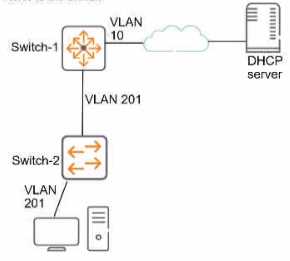
This company has ArubaOS-Switches. The exhibit shows one access layer switch, Swllcn-2. as an
example, but the campus actually has more switches. The company wants to slop any internal users
from exploiting ARP
What Is the proper way to configure the switches to meet these requirements?
- A. On Switch-1, enable ARP protection globally, and enable ARP protection on ail VLANs.
- B. On Switch-2, make ports connected to employee devices trusted ports for ARP protection
- C. On Swltch-2, enable DHCP snooping globally and on VLAN 201 before enabling ARP protection
- D. On Swltch-2, configure static PP-to-MAC bindings for all end-user devices on the network
Answer:
C
Explanation:
To prevent users from exploiting Address Resolution Protocol (ARP) on a network with ArubaOS-
Switches, the correct approach would be to enable DHCP snooping globally and on VLAN 201 before
enabling ARP protection, as stated in option C. DHCP snooping acts as a foundation by tracking and
securing the association of IP addresses to MAC addresses. This allows ARP protection to function
effectively by ensuring that only valid ARP requests and responses are processed, thus preventing
ARP spoofing attacks. Trusting ports that connect to employee devices directly could lead to
bypassing ARP protection if those devices are compromised.
The company’s goal is to prevent internal users from exploiting ARP within their ArubaOS-Switch
network. Let’s break down the options:
Option A (Incorrect): Enabling ARP protection globally on Switch-1 and all VLANs is not the best
approach. ARP protection should be selectively applied where needed, not globally. It’s also not clear
why Switch-1 is mentioned when the exhibit focuses on Switch-2.
Option B (Incorrect): Making ports connected to employee devices trusted for ARP protection is a
good practice, but it’s not sufficient by itself. Trusted ports allow ARP traffic, but we need an
additional layer of security.
Option C (Correct): This is the recommended approach. Here’s why:
DHCP Snooping: First, enable DHCP snooping globally. DHCP snooping helps validate DHCP messages
and builds an IP-MAC binding table. This table is crucial for ARP protection to function effectively.
VLAN 201: Enable DHCP snooping specifically on VLAN 201 (as shown in the exhibit). This ensures
that DHCP messages within this VLAN are validated.
ARP Protection: Once DHCP snooping is in place, enable ARP protection. ARP requests/replies from
untrusted ports with invalid IP-to-MAC bindings will be dropped. This prevents internal users from
exploiting ARP for attacks like man-in-the-middle.
Option D (Incorrect): While static ARP bindings can enhance security, they are cumbersome to
manage and don’t dynamically adapt to changes in the network.
:
ArubaOS-Switch Management and Configuration Guide for WB_16_10 - Chapter 15: IP Routing
Features
Aruba Security Guide
Comments
Question 5
Which attack is an example or social engineering?
- A. An email Is used to impersonate a Dank and trick users into entering their bank login information on a fake website page.
- B. A hacker eavesdrops on insecure communications, such as Remote Desktop Program (RDP). and discovers login credentials.
- C. A user visits a website and downloads a file that contains a worm, which sell-replicates throughout the network.
- D. An attack exploits an operating system vulnerability and locks out users until they pay the ransom.
Answer:
A
Explanation:
An example of a social engineering attack is described in option A, where an email is used to
impersonate a bank and deceive users into entering their bank login information on a counterfeit
website. Social engineering attacks exploit human psychology rather than technical hacking
techniques to gain access to systems, data, or personal information. These attacks often involve
tricking people into breaking normal security procedures. The other options describe different types
of technical attacks that do not primarily rely on manipulating individuals through deceptive personal
interactions.
Comments
Question 6
Refer to the exhibit.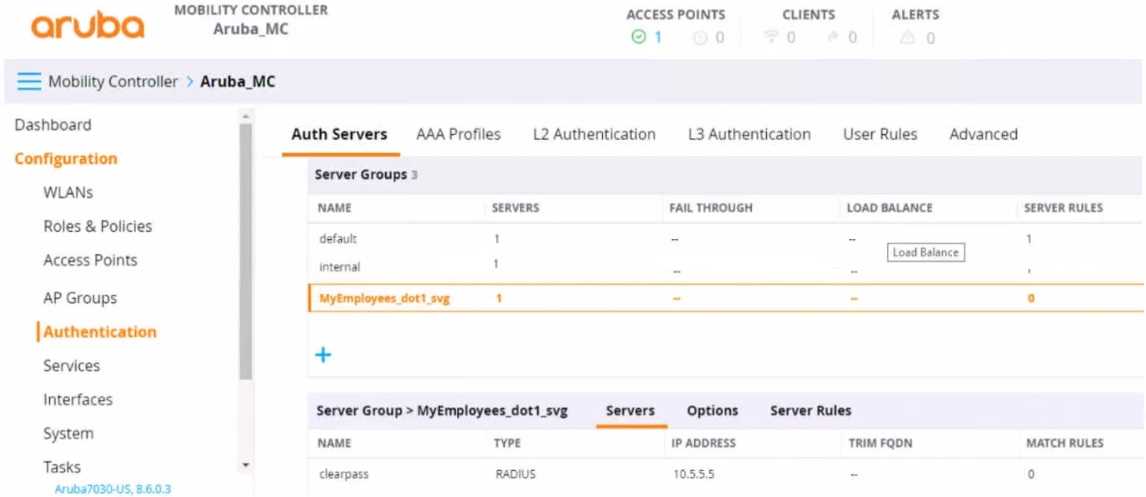
You have set up a RADIUS server on an ArubaOS Mobility Controller (MC) when you created a WLAN
named "MyEmployees .You now want to enable the MC to accept change of authorization (CoA)
messages from this server for wireless sessions on this WLAN.
What Is a part of the setup on the MC?
- A. Create a dynamic authorization, or RFC 3576, server with the 10.5.5.5 address and correct shared secret.
- B. Install the root CA associated with the 10 5.5.5 server's certificate as a Trusted CA certificate.
- C. Configure a ClearPass username and password in the MyEmployees AAA profile.
- D. Enable the dynamic authorization setting in the "clearpass" authentication server settings.
Answer:
A
Explanation:
To enable an ArubaOS Mobility Controller (MC) to accept Change of Authorization (CoA) messages
from a RADIUS server for wireless sessions on a WLAN, part of the setup on the MC involves creating
a dynamic authorization, or RFC 3576, server with the provided IP address (10.5.5.5) and the correct
shared secret. This setup allows the MC to handle CoA requests, which are used to change the
authorization attributes of a session after it has been authenticated, such as disconnecting a user or
changing a user's VLAN assignment.
Comments
Question 7
What is one way a noneypot can be used to launch a man-in-the-middle (MITM) attack to wireless
clients?
- A. it uses a combination or software and hardware to jam the RF band and prevent the client from connecting to any wireless networks
- B. it runs an NMap scan on the wireless client to And the clients MAC and IP address. The hacker then connects to another network and spoofs those addresses.
- C. it examines wireless clients' probes and broadcasts the SSlDs in the probes, so that wireless clients will connect to it automatically.
- D. it uses ARP poisoning to disconnect wireless clients from the legitimate wireless network and force clients to connect to the hacker's wireless network instead.
Answer:
C
Explanation:
A honeypot can be used to launch a Man-in-the-Middle (MITM) attack on wireless clients by
examining wireless clients' probe requests and then broadcasting the SSIDs in those probes. Clients
with those SSIDs in their preferred network list may then automatically connect to the honeypot,
believing it to be a legitimate network. Once the client is connected to the attacker's honeypot, the
attacker can intercept, monitor, or manipulate the client's traffic, effectively executing a MITM
attack.
Comments
Question 8
Which correctly describes a way to deploy certificates to end-user devices?
- A. ClearPass Onboard can help to deploy certificates to end-user devices, whether or not they are members of a Windows domain
- B. ClearPass Device Insight can automatically discover end-user devices and deploy the proper certificates to them
- C. ClearPass OnGuard can help to deploy certificates to end-user devices, whether or not they are members of a Windows domain
- D. in a Windows domain, domain group policy objects (GPOs) can automatically install computer, but not user certificates
Answer:
A
Explanation:
ClearPass Onboard is part of the Aruba ClearPass suite and it provides a mechanism to deploy
certificates to end-user devices, regardless of whether or not they are members of a Windows
domain. ClearPass Onboard facilitates the configuration and provisioning of network settings and
security, including the delivery and installation of certificates to ensure secure network access. This
capability enables a bring-your-own-device (BYOD) environment where devices can be securely
managed and provided with the necessary certificates for network authentication.
Comments
Question 9
You have been instructed to look in the ArubaOS Security Dashboard's client list Your goal is to find
clients mat belong to the company and have connected to devices that might belong to hackers
Which client fits this description?
- A. MAC address d8:50:e6:f3;6d;a4; Client Classification Authorized; AP Classification, interfering
- B. MAC address d8:50:e6 f3;6e;c5; Client Classification Interfering. AP Classification Neighbor
- C. MAC address d8:50:e6:f3;6e;60; Client Classification Interfering. AP Classification Interfering
- D. MAC address d8:50:e6:f3;TO;ab; Client Classification Interfering. AP Classification Rogue
Answer:
D
Explanation:
In the context of the ArubaOS Security Dashboard, if the goal is to find company clients that have
connected to devices potentially operated by hackers, you would look for a client that is classified as
'Interfering' (indicating a security threat) while being connected to an 'AP Classification: Rogue'. A
rogue AP is one that is not under the control of network administrators and is considered malicious
or a security threat. Therefore, the client fitting this description is:
MAC address: d8:50:e6:f3:70:ab; Client Classification: Interfering; AP Classification: Rogue
Comments
Question 10
You configure an ArubaOS-Switch to enforce 802.1X authentication with ClearPass Policy Manager
(CPPM) denned as the RADIUS server Clients cannot authenticate You check Aruba ClearPass Access
Tracker and cannot find a record of the authentication attempt.
What are two possible problems that have this symptom? (Select two)
- A. users are logging in with the wrong usernames and passwords or invalid certificates.
- B. Clients are configured to use a mismatched EAP method from the one In the CPPM service.
- C. The RADIUS shared secret does not match between the switch and CPPM.
- D. CPPM does not have a network device defined for the switch's IP address.
- E. Clients are not configured to trust the root CA certificate for CPPM's RADIUS/EAP certificate.
Answer:
CD
Explanation:
If clients cannot authenticate and there is no record of the authentication attempt in Aruba ClearPass
Access Tracker, two possible problems that could cause this symptom are:
The RADIUS shared secret does not match between the switch and CPPM. This mismatch would
prevent the switch and CPPM from successfully communicating, so authentication attempts would
fail, and no record would appear in Access Tracker.
CPPM does not have a network device profile defined for the switch's IP address. Without a network
device profile, CPPM would not recognize authentication attempts coming from the switch and
would not process them, resulting in no logs in Access Tracker.
The other options are incorrect because:
Users logging in with the wrong credentials would still generate an attempt record in Access Tracker.
Clients configured to use a mismatched EAP method would also generate an attempt record in
Access Tracker.
Clients not configured to trust the root CA certificate for CPPM's RADIUS/EAP certificate might fail
authentication, but the attempt would still be logged in Access Tracker.
Comments
Page 1 out of 16
Viewing questions 1-10 out of 168
page 2