Question 1
Your customer has the following HPE Synergy setup
- 3 HPE Synergy 12000 Frames
- 4 HPE Virtual Connect SE 100 Gb F32 Modules
- 2 HPE Synergy 50 GO Interconnect Link Modules
- 36 HPE Synergy 480 Gen10 Plus compute modules
- 2 HPE Composer 2 modules
Which statement about this setup is true?
- A. To use all compute nodes, the customer must create at least two logical enclosures
- B. To manage all frames, the customer must buy two additional HPE Composer 2 modules
- C. The customer must buy 36 HPE OneView Advanced licenses to manage compute modules
- D. The customer can add one D3940 storage Module to each of the frames
Answer:
A
Explanation:
In an HPE Synergy environment, a logical enclosure represents a management domain that groups
multiple Synergy frames and their associated compute, storage, and fabric resources. Given the
setup with 3 HPE Synergy 12000 Frames and the specified components, the customer must create at
least two logical enclosures to effectively manage all compute nodes and resources across multiple
frames. This ensures proper resource allocation, management, and redundancy.
Reference: HPE Synergy Logical Enclosure Guide
Comments
Question 2
HOTSPOT
An HPE Synergy customer needs to prevent a timeout and loss of communication during an external
switch firmware upgrade.
Click the parameter that the customer should configure within an uplink set to meet this
requirement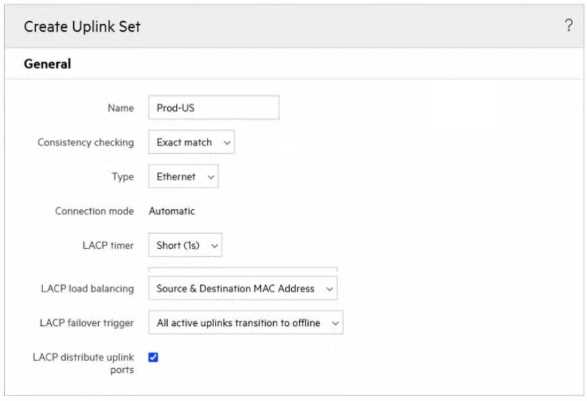
Answer:
None
Explanation:
To prevent a timeout and loss of communication during an external switch firmware upgrade, the
customer should configure the LACP failover trigger within the uplink set. By setting the LACP
failover trigger to "All active uplinks transition to offline," the configuration ensures that the traffic
will be redirected to available uplinks in the event of an uplink failure or during the upgrade process,
maintaining communication and preventing timeouts.
Reference: HPE Synergy Configuration Guide
Comments
Question 3
Which statement about HPE Superdome Flex 280 is true?
- A. It supports 2 to 8 sockets in 2-socket increments.
- B. it cannot be managed using HPE OneView.
- C. It must be equipped with at least 768 GB of memory.
- D. It can support up to two nPars with an external RMC.
Answer:
D
Explanation:
The HPE Superdome Flex 280 is a highly scalable server that supports 2 to 8 sockets in 2-socket
increments. This allows for flexible scaling of compute resources based on the needs of the
workload, providing a balance between performance and cost.
Reference: HPE Superdome Flex 280 QuickSpecs
Comments
Question 4
You are troubleshooting an HPE OneView server profile that presents a critical state. The server
profile was configured with a Link Aggregation Group
What should you check to fix the issue?
- A. if both FiexNICs are configured with the same speed
- B. If the logical enclosure is built on at least three HPE Synergy frames
- C. if both FiexNICs are connected to different networks
- D. if the logical enclosure is configured with redundant master modules
Answer:
A
Explanation:
When troubleshooting a server profile in HPE OneView that is in a critical state due to a Link
Aggregation Group (LAG), it is important to check if both FlexNICs are configured with the same
speed. Inconsistent speeds can cause issues with link aggregation, leading to network instability and
performance degradation.
Reference: HPE OneView Server Profile Troubleshooting Guide
Comments
Question 5
Your customer experienced some problems caused by outdated HPE Superdome Flex firmware.
Which update method should they use to avoid these issues in the future?
- A. HPE OneView method for I/O firmware update procedure
- B. RMC CLI to update I/O and HPE Persistent Memory firmware
- C. HPE OneView IT HPE Persistent Memory firmware must be updated.
- D. HPE SUM if HPE Persistent Memory firmware must be updated
Answer:
D
Explanation:
HPE System Update Manager (SUM) is the recommended method for updating firmware on HPE
Superdome Flex systems, especially when HPE Persistent Memory firmware needs to be updated.
HPE SUM ensures that all firmware components are updated correctly and consistently, reducing the
risk of compatibility issues.
Reference: HPE Superdome Flex Firmware Update Guide
Comments
Question 6
Your customer needs to move an application from an HPE Synergy 480 Gen10 Compute Module to an
HPE Synergy 660 Gen 10 Compute Module. The 480 has a switch that has been manually zoned
outside of HPE OneView.
What must the customer do before migrating the application?
- A. Migrate the application to a Logical JBOD and connect it to the new server
- B. Copy the server profile and assign the clone to the new hardware
- C. Edit the server profile and change server hardware type
- D. Create a new server profile template and apply to the new hardware
Answer:
B
Explanation:
When migrating an application from an HPE Synergy 480 Gen10 Compute Module to an HPE Synergy
660 Gen10 Compute Module, the recommended approach is to copy the server profile and assign
the clone to the new hardware. This ensures that all the necessary configuration settings, including
network and storage configurations, are retained and applied to the new compute module. Since the
switch zoning is manually configured outside of HPE OneView, copying the server profile helps in
maintaining consistency in the network settings during the migration.
Reference: HPE OneView Server Profile Management
Comments
Question 7
Your customer has me following HPE Synergy setup
- Three frames fully populated with HPE Synergy 480 Gen10 Plus modules and 25Gb/s downlink
speed formulating a single logical enclosure
- Two HPE Virtual Connect SE 100Gb F32 Module for Synergy
- Four HPE Synergy 50Gb interconnect Link Module
- Six HPE Synergy Virtual Connect SE 32Gb FC Modules
The customer needs to add a frame.
Which statement about the expansion of this setup is true?
- A. The additional frame must have HPE Virtual Connect FC modules installed
- B. The customer can grow the existing logical enclosure up to 5 frames
- C. The customer has to create a new logical enclosure for the additional frame
- D. The additional frame cannot have 12Gb SAS connection modules installed
Answer:
B
Explanation:
HPE Synergy allows scaling of logical enclosures up to 5 frames. Given the current setup of three
frames fully populated with HPE Synergy 480 Gen10 Plus modules and other specified components,
the customer can add another frame to the existing logical enclosure. This flexibility in scaling
ensures that the logical enclosure can be expanded without the need to create a new logical
enclosure, provided that the necessary interconnect modules are in place.
Reference: HPE Synergy Planning Guide
Comments
Question 8
HOTSPOT
Click the area within the iLO management interface that will allow you to access workload Advisor.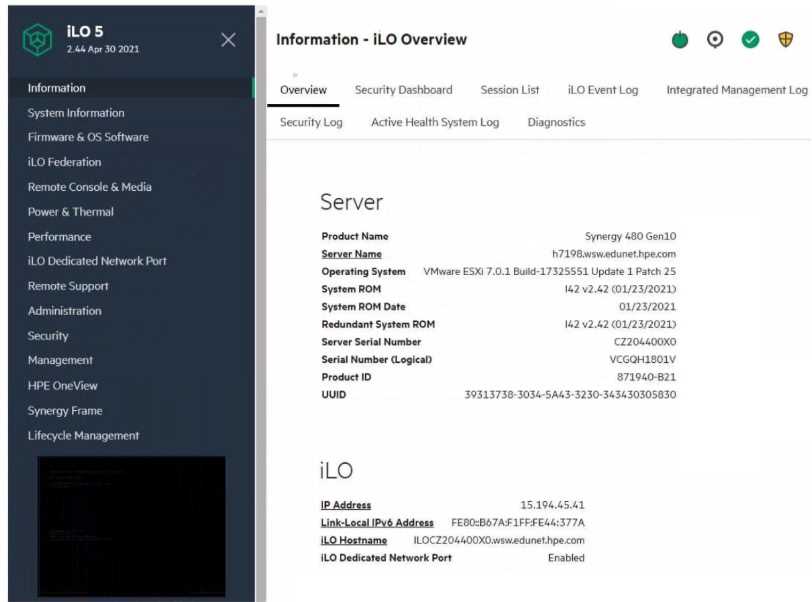
Answer:
None
Explanation:
The Performance section within the iLO management interface provides access to the Workload
Advisor. This feature offers insights and analytics regarding the server's performance, helping to
optimize workloads and manage resources efficiently.
Reference: HPE iLO 5 User Guide
Comments
Question 9
Your customer plans to deploy HPE OneView for VMware vCenter Server together with HPE Storage
Integration Pack for VMware vCenter. The customer wants to use them to manage HPE Synergy
Gen10 compute modules. HPE ProLiant Gen 10 servers and an MSA array.
Which statement about compatibility of the existing environment with the planned software
components is true?
- A. Both HPE Synergy Gen10 full-height compute module plugins will require a license
- B. HPE OneView for VMware vCenter Server does not support standalone HPE ProLiant servers
- C. To use the required plugins HPE ProLiant Gen10 systems must be managed using HPE OneView
- D. HPE Storage integration Pack for VMware vCenter does not support MSA arrays
Answer:
C
Explanation:
The HPE Storage Integration Pack for VMware vCenter is designed to provide management
capabilities for HPE storage arrays within the VMware vCenter environment. However, it does not
support MSA arrays. This means that while you can manage HPE Synergy Gen10 compute modules
and HPE ProLiant Gen10 servers, the MSA array will not be manageable through the HPE Storage
Integration Pack.
Reference: HPE Storage Integration Pack for VMware vCenter User Guide
Comments
Question 10
Refer to the exhibit.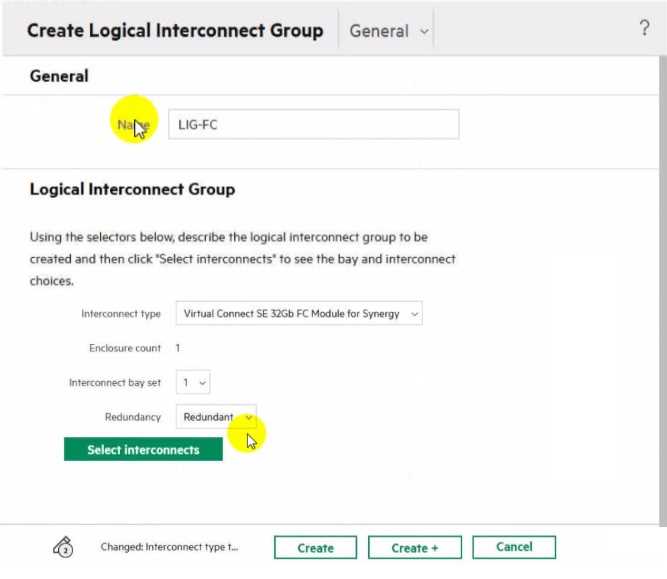
Which statement about this logical interconnect group is true?
- A. Both modules are located in different frames for redundancy
- B. For an uplink set, ports from different modules can be selected
- C. interconnect modules are installed in interconnect bays 1 and 4
- D. An additional license is required to change the enclosure count
Answer:
C
Explanation:
In the HPE Synergy setup shown in the exhibit, the interconnect type is Virtual Connect SE 32Gb FC
Module for Synergy with an enclosure count of 1 and interconnect bay set 1. Typically, in such
configurations, the interconnect modules are installed in bays 1 and 4 for redundancy. This
placement ensures high availability and failover capabilities.
Reference: HPE Synergy Interconnects Configuration Guide
Comments
Page 1 out of 10
Viewing questions 1-10 out of 104
page 2