Question 1
Exhibit.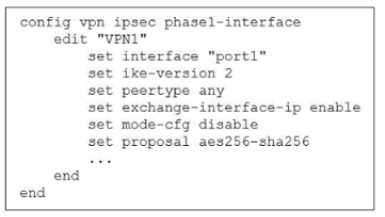
The administrator configured the IPsec tunnel VPN1 on a FortiGate device with the parameters
shown in exhibit.
Based on the configuration, which three conclusions can you draw about the characteristics and
requirements of the VPN tunnel? (Choose three.)
- A. The tunnel interface IP address on the spoke side is provided by the hub.
- B. The remote end can be a third-party IPsec device.
- C. The administrator must manually assign the tunnel interface IP address on the hub side
- D. The remote end must support IKEv2.
- E. This configuration allows user-defined overlay IP addresses.
Answer:
B, C, E
Explanation:
This configuration demonstrates a typical IPsec setup for SD-WAN overlays where the hub side
requires a manually defined tunnel IP address, and the spoke can be flexibly configured, including
interoperability with third-party IPsec devices. As described in the Fortinet SD-WAN Architect Guide:
“For some overlays, the tunnel interface IP is configured statically on the hub side, which allows
more control over overlay subnetting and facilitates the use of user-defined overlay IP addresses.
This approach is also a requirement for compatibility with non-FortiGate endpoints, such as third-
party IPsec devices that may not support dynamic address assignment via IKE or proprietary
mechanisms.” This enables hybrid SD-WAN environments and advanced designs involving external
partners or cloud services. Overlay IP flexibility is critical for route control and segmentation.
Reference:
[FCSS_SDW_AR-7.4 1-0.docx Q11]
FortiOS 7.4 SD-WAN Reference Architecture, “Overlay IP Address Management”
SD-WAN 7.4 Concept Guide, Section: "Interoperability with Third-Party Devices"
Comments
Question 2
You have a FortiGate configuration with three user-defined SD-WAN zones and two members in each
of these zones. One SD-WAN member is no longer in use in health-check and SD-WAN rules. You
want to delete it.
What happens if you delete the SD-WAN member from the FortiGate GUI?
- A. FodiGate accepts the deletion and removes routes as required.
- B. FortiGate displays an error message. You must use the CLI to delete an SD-WAN member.
- C. FortiGate displays an error message. SD-WAN zones must contain at least two members
- D. FortiGate accepts the deletion and places the member in the default SD-WAN zone.
Answer:
A
Comments
Question 3
Refer to the exhibits.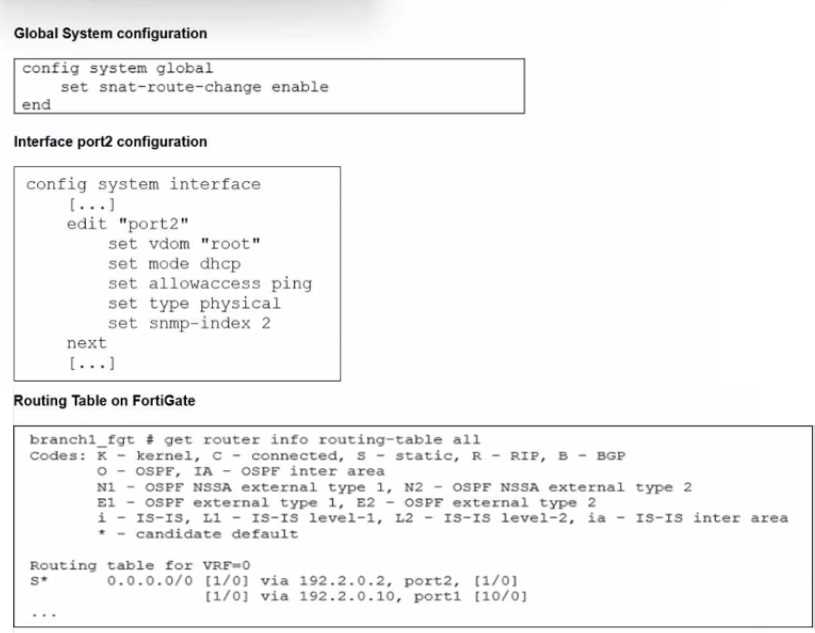
The exhibits show the source NAT (SNAT) global setting. port2 interface settings, and the routing
table on FortiGate.
The administrator increases the member priority on port2 to 20.
Upon configuration changes and the receipt of new packets, which two actions does FortiGate
perform on existing sessions established over port2? (Choose two.)
- A. FortiGate continues routing all existing sessions over port2.
- B. FortiGate routes only new sessions over port2.
- C. FortiGate flags the SNAT session as dirty only if the administrator has assigned an IP pool to the firewall policies with NAT.
- D. FortiGate flags the sessions as dirty.
- E. FortiGate updates the gateway information of the sessions with SNAT so that they use port1 instead of port2.
Answer:
D, E
Explanation:
When the member priority of a port is increased (e.g., port2 to 20), FortiGate evaluates existing
sessions and applies “dirty” flags where applicable. The SD-WAN session management mechanism is
described in detail: “Upon a change in SD-WAN member priority, all existing sessions using that
member are marked as dirty. For SNAT sessions, the gateway information is updated to ensure future
packets are routed through the newly preferred member, in this case, port1. This automatic re-
evaluation allows SD-WAN to dynamically respond to topology or priority changes, maintaining
optimal routing.” This is fundamental to seamless failover and session persistence in Fortinet SD-
WAN, ensuring active flows are redirected based on updated priorities or health status.
Reference:
[FCSS_SDW_AR-7.4 1-0.docx Q13]
FortiOS 7.4 SD-WAN Concept Guide, “Session Management During Path Change”
FortiGate CLI Reference: diagnose sys session list
Comments
Question 4
Refer to the exhibits.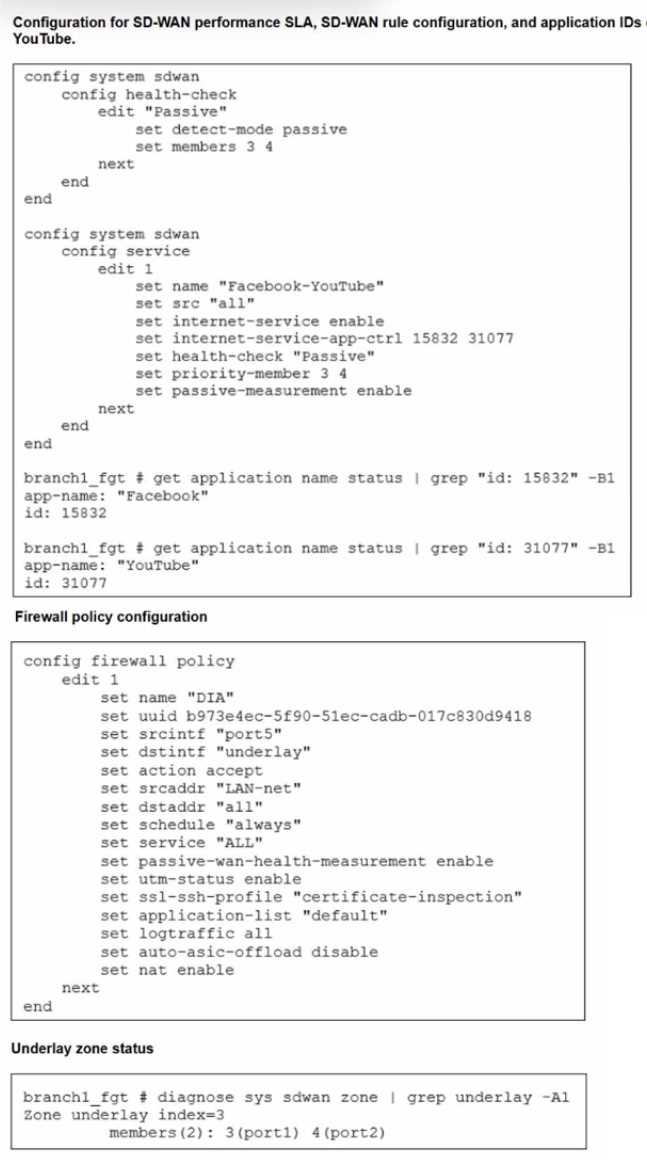
The exhibits show the configuration for SD-WAN performance. SD-WAN rule, the application IDs of
Facebook and YouTube along with the firewall policy configuration and the underlay zone status.
Which two statements are true about the health and performance of SD-WAN members 3 and 4?
(Choose two.)
- A. Only related TCP traffic is used for performance measurement.
- B. The performance is an average of the metrics measured for Facebook and YouTube traffic passing through the member.
- C. Encrypted traffic is not used for the performance measurement.
- D. FortiGate identifies the member as dead when there is no Facebook and YouTube traffic passing through the member.
Answer:
B, D
Comments
Question 5
When you use the command diagnose sys session list, how do you identify the sessions that
correspond to traffic steered according to SD-WAN rules?
- A. You identify sessions steered according to SD-WAN rules with the flag vwl.
- B. You cannot identify SD-WAN sessions. You must use the sdwar. session filter.
- C. You identify sessions steered according to SD-WAN rules with the data vwl_mbr_seq.
- D. You identify sessions steered according to SD-WAN rules with the data 3dwan_service_id.
Answer:
D
Explanation:
When using the diagnose sys session list command, SD-WAN-specific session steering is indicated by
the presence of the sdwan_service_id field in the session data. This identifier ties the session directly
to a specific SD-WAN rule or service. As noted in the Fortinet documentation: “Sessions that are
handled according to SD-WAN rules will include a service ID tag (sdwan_service_id) in their session
listing. This allows administrators to correlate live sessions with SD-WAN policy matches for
troubleshooting and visibility.” This is a crucial diagnostic tool, as it distinguishes between traffic
managed by traditional routing and that explicitly controlled by SD-WAN steering logic, aiding in
operational insight and troubleshooting.
Reference:
[FCSS_SDW_AR-7.4 1-0.docx Q15]
FortiOS 7.4 CLI Reference, “diagnose sys session list: SD-WAN Service ID Tagging”
SD-WAN 7.4 Concept Guide, Section: "Session Identification for SD-WAN Traffic"
Comments
Question 6
SD-WAN interacts with many other FortiGate features. Some of them are required to allow SD-WAN
to steer the traffic.
Which three configuration elements that you must configure before FortiGate can steer traffic
according to SD-WAN rules? (Choose three.)
- A. Firewall policies
- B. Interfaces
- C. Security profiles
- D. Traffic shaping
- E. Routing
Answer:
A, B, E
Explanation:
Before FortiGate can steer traffic according to SD-WAN rules, certain configuration elements must be
present. The guide states:
"SD-WAN is not a standalone feature and interacts with several fundamental FortiGate
configurations. Specifically, you must: (1) Define the interfaces (physical, VLAN, or IPsec) that will act
as SD-WAN members, (2) Create firewall policies to allow traffic to be steered by SD-WAN, and (3)
Set up routing so that traffic has valid routes via SD-WAN members. Without these, SD-WAN rules
will not be able to match or steer any traffic."
Security profiles and traffic shaping are not mandatory for basic SD-WAN steering but can be layered
on for enhanced security and QoS once foundational elements are present.
Reference:
[FCSS_SDW_AR-7.4 1-0.docx Q16]
FortiOS 7.4 SD-WAN Concept Guide, “Prerequisite Configuration Elements for SD-WAN Steering
Comments
Question 7
Which three characteristics apply to provisioning templates available on FortiManager? (Choose
three.)
- A. A template group can include a system template and an SD-WAN template.
- B. Each template group can contain up to three IPsec tunnel templates.
- C. CLI templates are applied in order, from top to bottom
- D. A CLI template group can contain CLI templates of both types.
- E. A CLI template can be of type CLI script or Perl script.
Answer:
A, C, D
Explanation:
The provisioning templates in FortiManager are designed for flexible, scalable configuration of large
SD-WAN deployments. The official documentation explains:
"Template groups can consist of both system and SD-WAN templates, providing a way to apply
consistent settings across multiple devices. CLI templates are evaluated and executed in order from
top to bottom within the template group, which is crucial for managing dependencies. Furthermore,
CLI template groups can contain both regular CLI templates and advanced (Perl-script-based)
templates, allowing complex or conditional configuration logic."
This modular design streamlines large deployments by separating system, SD-WAN, and CLI logic into
reusable building blocks.
Reference:
[FCSS_SDW_AR-7.4 1-0.docx Q17]
FortiManager Administration Guide 7.4, "Template Groups and CLI Template Processing"
Comments
Question 8
Refer to the exhibit.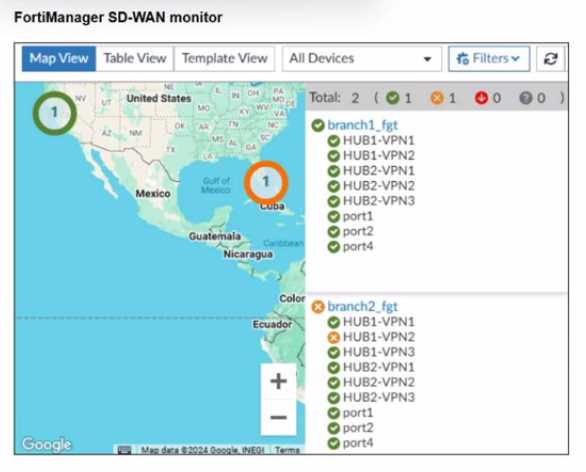
An administrator checks the status of an SD-WAN topology using the FortiManager SD-WAN monitor
menus. All members are configured with one or two SLAs.
Which two conclusions can you draw from the output shown? (Choose two.)
- A. The template view should be used to see the hub devices.
- B. One member of branch2_fgt is missing the SLAs.
- C. branch2_fgt establishes six tunnels to the hubs and they are all up.
- D. This SD-WAN topology contains only two branch devices.
Answer:
B, D
Explanation:
From the SD-WAN monitor in FortiManager:
"The SD-WAN monitor provides a summary view of the branch devices and their members. In the
scenario shown, it is clear that branch2_fgt is missing SLA configuration for one member, as
evidenced by the lack of performance metrics. The monitor also shows only two branches in the
current topology, allowing quick assessment of branch health and configuration completeness."
This kind of visibility is vital for proactive monitoring and rapid troubleshooting in SD-WAN
environments.
Reference:
[FCSS_SDW_AR-7.4 1-0.docx Q18]
FortiManager SD-WAN Monitoring Guide, “Branch Device Health and SLA Status Visualization”
Comments
Question 9
You are tasked with configuring ADVPN 2.0 on an SD-WAN topology already configured for ADVPN.
What should you do to implement ADVPN 2.0 in this scenario?
- A. Update the IPsec tunnel configurations on the hub.
- B. Update the SD-WAN configuration on the branches.
- C. Update the IPsec tunnel configuration on the branches.
- D. Delete the existing ADVPN configuration and configure ADVPN 2.0.
Answer:
A
Comments
Question 10
Refer to the exhibits.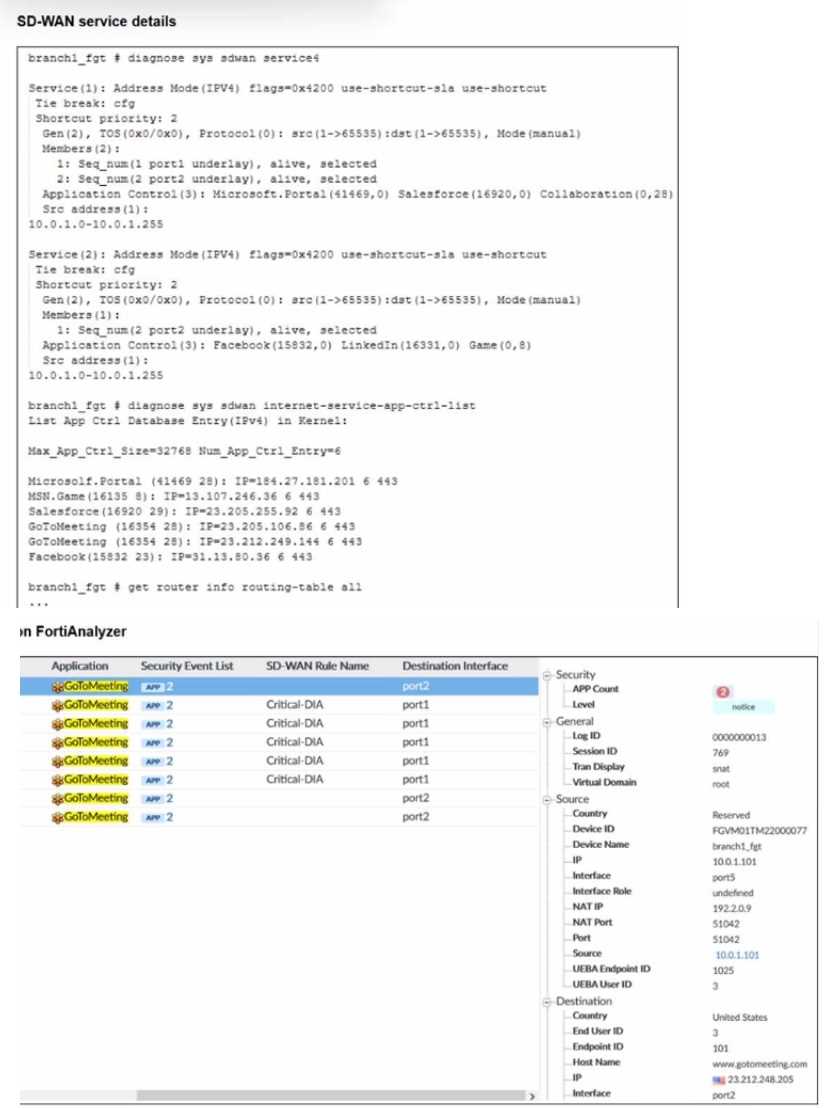
An administrator is testing application steering in SD-WAN. Before generating test traffic, the
administrator collected the information shown in the first exhibit. After generating GoToMeeting test
traffic, the administrator examined the corresponding traffic log on FortiAnalyzer, which is shown in
the second exhibit.
The administrator noticed that the traffic matched the implicit SD-WAN rule, but they expected the
traffic to match rule ID 1.
Which two reasons explain why some log messages show that the traffic matched the implicit SD-
WAN rule? (Choose two.)
- A. Full SSL inspection is not enabled on the matching firewall policy.
- B. The session 3-tuple did not match any of the existing entries in the ISDB application cache.
- C. FortiGate could not refresh the routing information on the session after the application was detected.
- D. No configured SD-WAN rule matches the traffic related to the collaboration application GoToMeeting
Answer:
B, D
Comments
Page 1 out of 6
Viewing questions 1-10 out of 68
page 2