Question 1
Refer to the exhibit.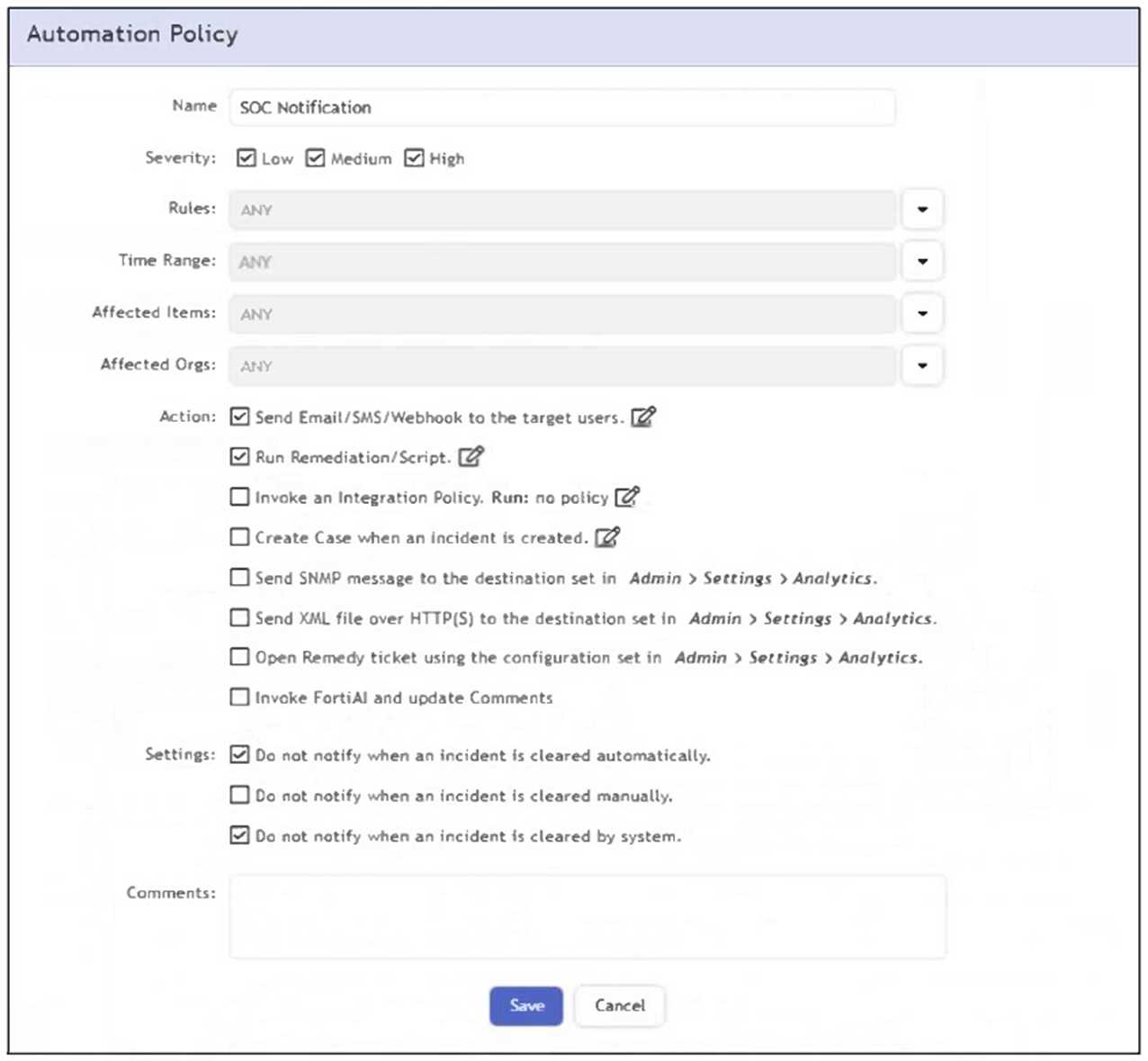
What happens when an analyst clears an incident generated by a rule containing the automation
policy shown in the exhibit?
- A. No notification is sent.
- B. An email is sent to the SOC manager.
- C. The remediation script is run.
- D. A notification is sent to the SOC manager dashboard.
Answer:
A
Explanation:
The automation policy has the option "Do not notify when an incident is cleared manually" enabled.
Therefore, when an analyst manually clears an incident, no notification or automation action is
triggered.
Comments
Question 2
Refer to the exhibit.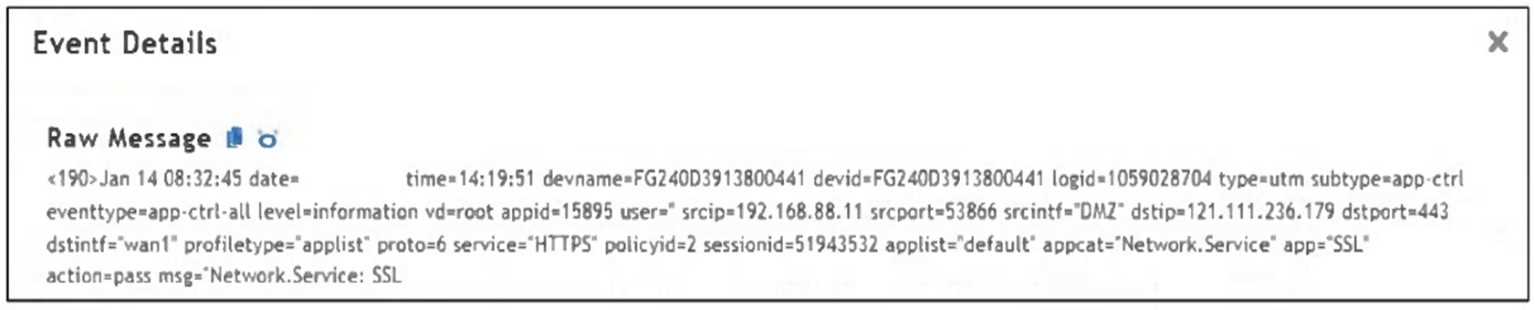
Which value would you expect the FortiSIEM parser to use to populate the Application Name field?
- A. applist
- B. Network.Service
- C. SSL
- D. wan1
Answer:
C
Explanation:
The Application Name field in FortiSIEM is typically populated using the value of the app field in the
raw log. In this event, app="SSL", so "SSL" is the expected application name parsed by FortiSIEM.
Comments
Question 3
Refer to the exhibit.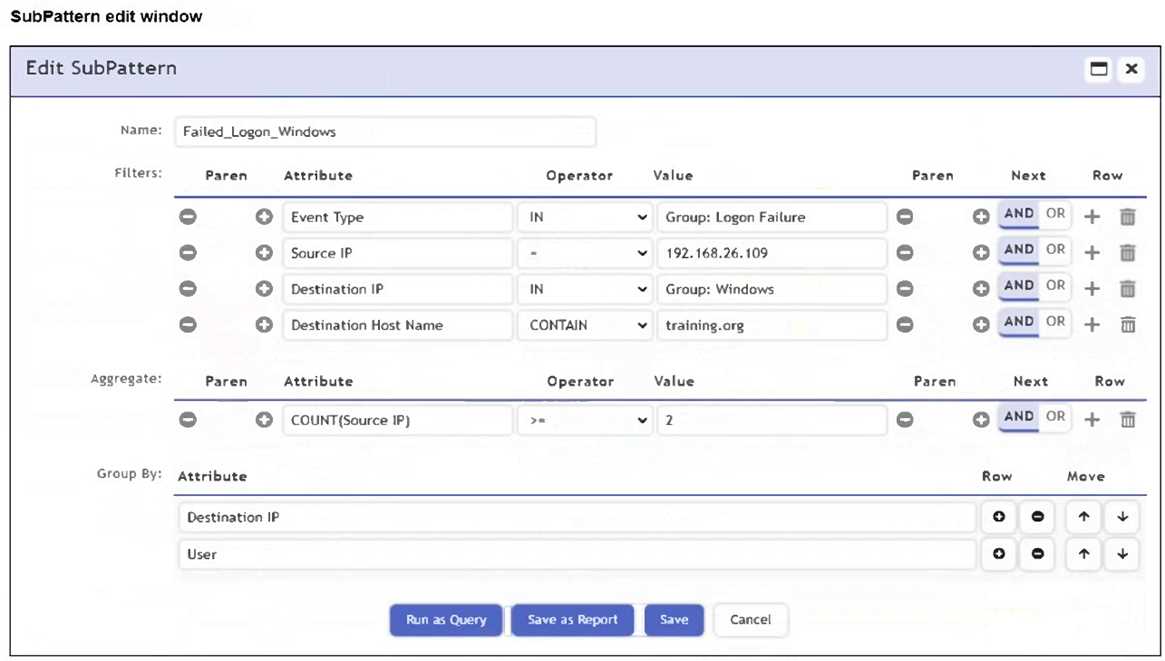
An analyst is troubleshooting the rule shown in the exhibit. It is not generating any incidents, but the
filter parameters are generating events on the Analytics tab.
What is wrong with the rule conditions?
- A. The Event Type refers to a CMDB lookup and should be an Event lookup.
- B. The Destination Host Name value is not fully qualified.
- C. The Group By attributes restricts which events are counted.
- D. The Aggregate attribute is too restrictive.
Answer:
C
Explanation:
The Group By attributes - Destination IP and User - cause the aggregation (COUNT(Source IP) >= 2)
to apply within each unique combination of those groupings. This restricts the count calculation and
can prevent the rule from triggering incidents, even if matching events exist in the Analytics tab.
Comments
Question 4
Refer to the exhibit.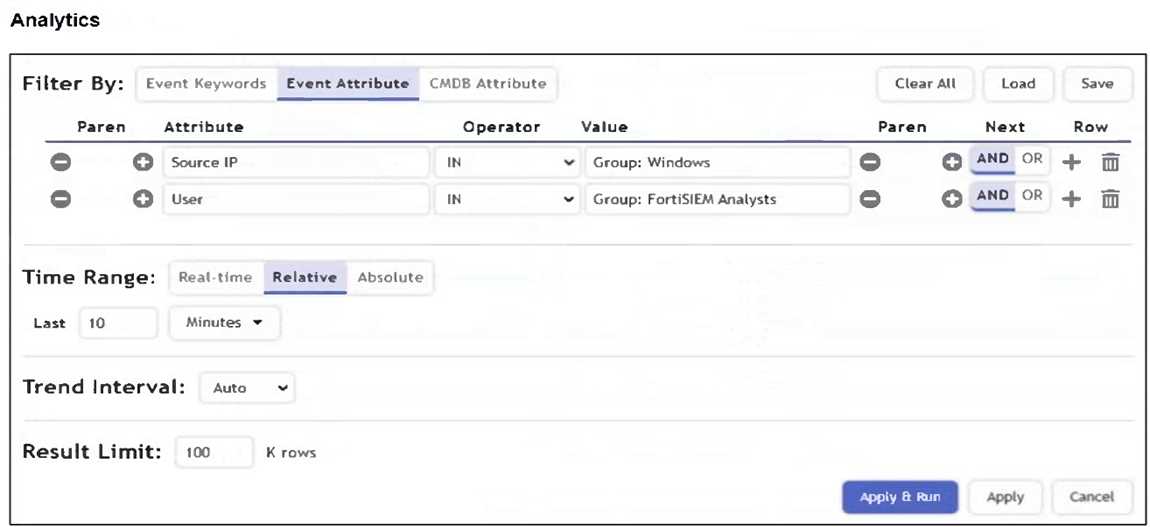
What is the Group: FortiSIEM Analysts value referring to?
- A. FortiSIEM organization group
- B. LDAP user group
- C. CMDB user group
- D. Windows Active Directory user group
Answer:
C
Explanation:
In FortiSIEM, the value Group: FortiSIEM Analysts under the User attribute refers to a CMDB user
group. These groups are defined within FortiSIEM's CMDB and used to logically organize users for
analytics, correlation rules, and reporting.
Comments
Question 5
Refer to the exhibit.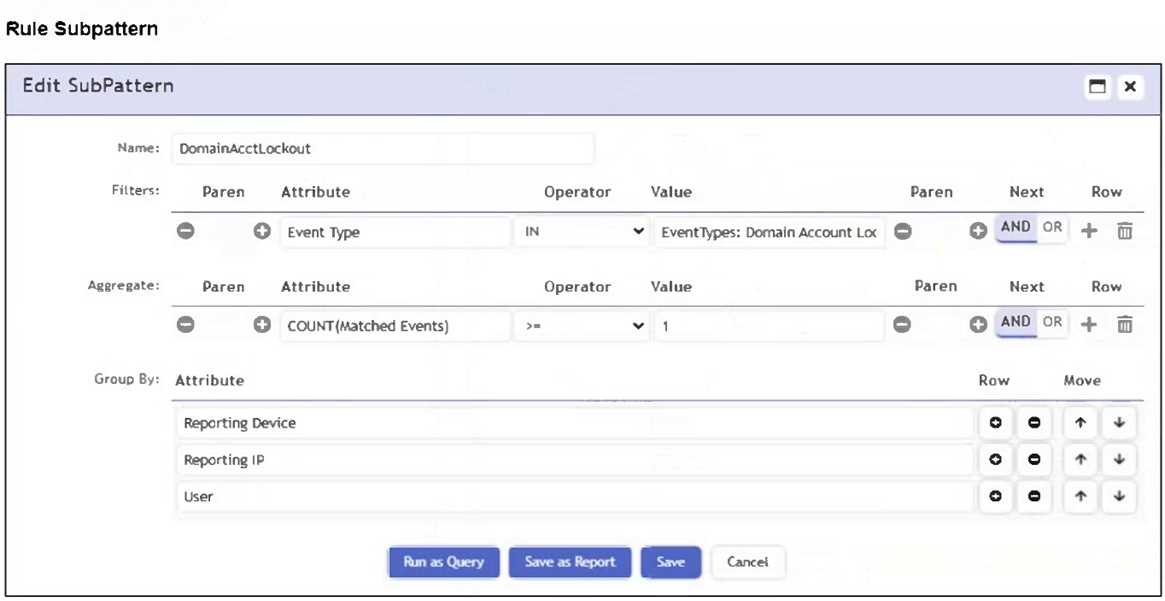
Which section contains the subpattern configuration that determines how many matching events are
needed to trigger the rule?
- A. Aggregate
- B. Group By
- C. Actions
- D. Filters
Answer:
A
Explanation:
The Aggregate section contains the condition COUNT(Matched Events) >= 1, which defines how
many events must match the filter criteria for the rule to trigger. This is the subpattern configuration
that determines the event threshold.
Comments
Question 6
What can you use to send data to FortiSIEM for user and entity behavior analytics (UEBA)?
- A. FortiSIEM agent
- B. SSH
- C. SNMP
- D. FortiSIEM worker
Answer:
A
Explanation:
The FortiSIEM agent can be used to send detailed endpoint data such as user activity and process
behavior to FortiSIEM, which is essential for performing User and Entity Behavior Analytics (UEBA).
Comments
Question 7
Refer to the exhibit.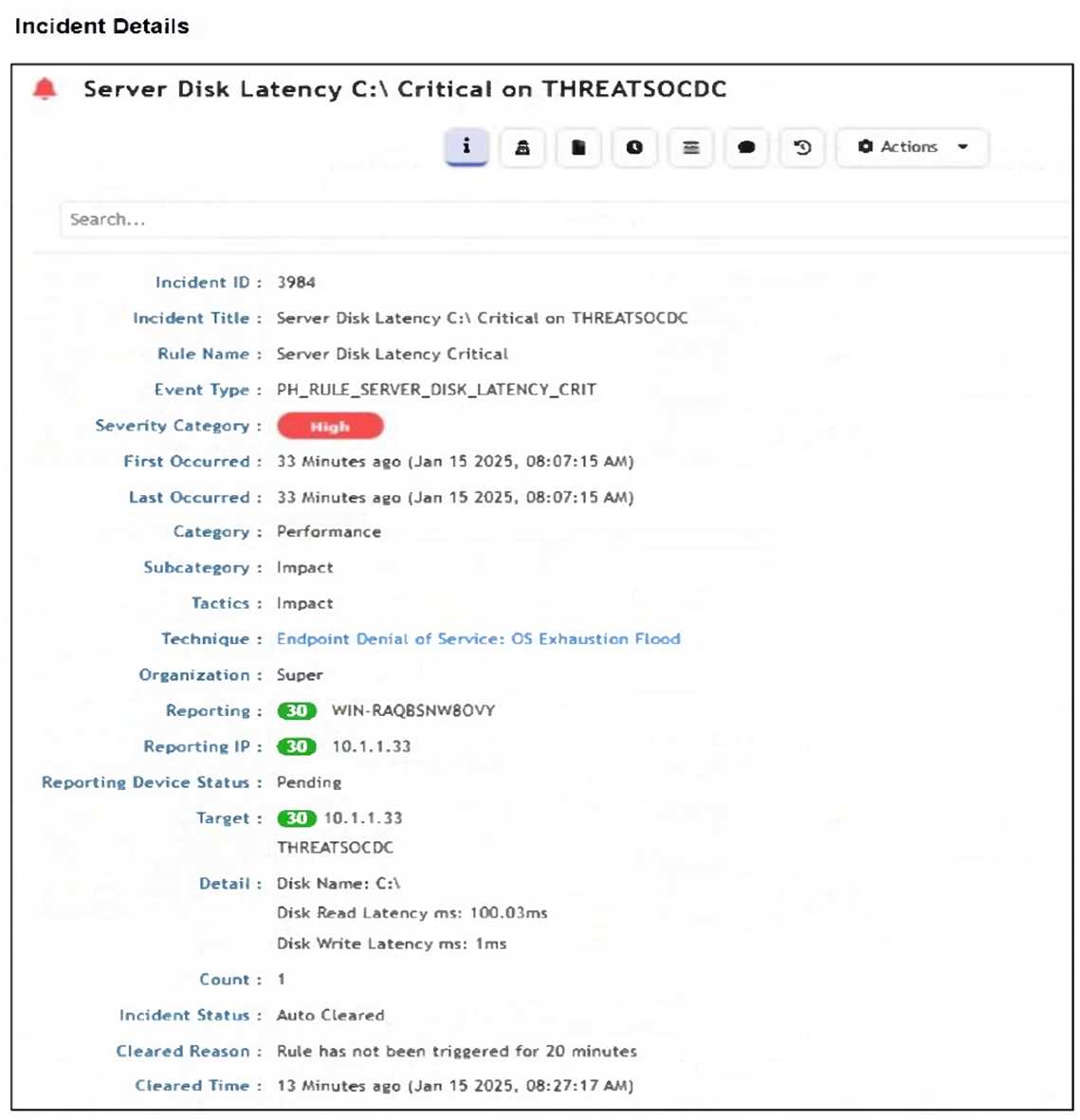
How was this incident cleared?
- A. The analyst manually cleared the incident from the incident table.
- B. FortiSIEM cleared the incident automatically after 24 hours.
- C. The incident was cleared automatically by the rule.
- D. The endpoint was rebooted and sent an all-clear signal to FortiSIEM.
Answer:
C
Explanation:
The Incident Status shows "Auto Cleared", and the Cleared Reason states: "Rule has not been
triggered for 20 minutes." This indicates that the incident was automatically cleared by the rule logic
after a defined period of inactivity.
Comments
Question 8
Refer to the exhibit.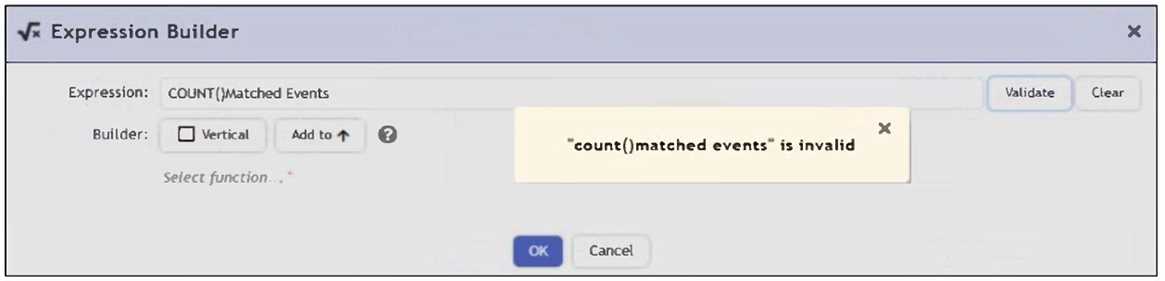
An analyst is trying to identify an issue using an expression based on the Expression Builder settings
shown in the exhibit; however, the error message shown in the exhibit indicates that the expression
is invalid.
What is the correct syntax to create an expression that generates a total count of matched events?
- A. COUNT(Matched Events)
- B. (COUNT) Matched Events
- C. Matched Events (COUNT)
- D. Matched Events COUNT()
Answer:
A
Explanation:
The correct syntax is COUNT(Matched Events) - with proper capitalization and spacing - to generate a
total count of matched events. The error in the exhibit likely stems from a formatting issue (e.g.,
lowercase count() or incorrect spacing), not the logical structure of the expression.
Comments
Question 9
Which items are used to define a subpattern?
- A. Filters, Aggregate, Group By definitions
- B. Filters, Aggregate, Time Window definitions
- C. Filters, Group By, Threshold definitions
- D. Filters, Threshold, Time Window definitions
Answer:
A
Explanation:
A subpattern in FortiSIEM is defined using Filters to match specific events, Aggregate conditions to
apply statistical thresholds (e.g., COUNT), and Group By attributes to segment data for evaluation.
These three components collectively determine how the subpattern functions.
Comments
Question 10
Refer to the exhibit.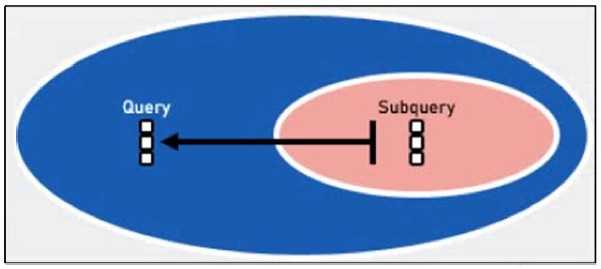
Which two lookup types can you reference as the subquery in a nested analytics query? (Choose
two.)
- A. LDAP Query
- B. CMDB Query
- C. SNMP Query
- D. Event Query
Answer:
C, D
Explanation:
In FortiSIEM nested analytics queries, you can reference both CMDB Queries and Event Queries as
subqueries. These allow correlation between CMDB data and event data for advanced detection use
cases.
Comments
Page 1 out of 3
Viewing questions 1-10 out of 32
page 2