Question 1
When manually registering each RPA initiator with the VNX, what is the required configuration?
- A. Initiator Type - RecoverPoint Appliance Failover Mode - 3 (Passive Ready)
- B. Initiator Type - RecoverPoint Appliance Failover Mode - 4 (ALUA)
- C. Initiator Type - RecoverPoint Appliance Failover Mode - 0 (LUN Based)
- D. Initiator Type - SGI Failover Mode - 4 (ALUA)
Answer:
B
Explanation:
Initiator Type - RecoverPoint Appliance: When registering each RPA initiator with the VNX, it is
essential to specify the initiator type as “RecoverPoint Appliance” to ensure proper identification and
compatibility within the storage network.
Failover Mode - 4 (ALUA): The failover mode should be set to 4, which corresponds to Asymmetric
Logical Unit Access (ALUA).
This mode allows for optimized path failover and is the recommended
setting for RecoverPoint appliances1
.
For more detailed information and guidance on the configuration process, refer to the
documentation provided by Dell, such as the RecoverPoint Deploying VNX and CLARiiON Arrays and
Splitter Technical Note, which outlines the necessary steps for proper RPA initiator registration and
configuration1
.
Comments
Question 2
What is the maximum number of arrays, per cluster, supported with a RecoverPoint/EX license?
- A. Unlimited
- B. 1
- C. 3
- D. 2
Answer:
B
Explanation:
The RecoverPoint/EX license is designed to support a single array per cluster.
This is in contrast to
the RecoverPoint/SE license, which is limited to two clusters and one array per cluster1
. When
planning the deployment or expansion of a RecoverPoint system, it is important to consider the
licensing limitations to ensure compliance and proper functionality.
For detailed information on licensing requirements and limitations, you can refer to the official Dell
EMC RecoverPoint licensing documentation or contact Dell EMC support for the most accurate and
up-to-date guidance2
.
Comments
Question 3
A RecoverPoint storage administrator needs to protect a mission-critical application. The application
is stored on three volumes provisioned from a new VNX. Once the
Consistency Group is created for the application, how many replication sets will the group contain?
- A. 1
- B. 3
- C. 2
- D. Determined by the number of copies
Answer:
B
Explanation:
Create a Consistency Group for the application: The first step is to create a Consistency Group (CG) in
the RecoverPoint system for the mission-critical application. This CG will manage the replication and
ensure consistency across the volumes.
Determine the number of replication sets: Each volume provisioned from the VNX for the application
will be represented as a separate replication set within the CG. Since there are three volumes, there
will be three replication sets.
Configure replication sets: Each replication set will include the production volume (source) and the
replica volume (target). The replication sets will be managed under the same CG to maintain
consistency across all the application data.
For more detailed information, you can refer to the Dell EMC RecoverPoint documentation, which
provides guidelines on how to configure replication sets within a CG.
It is also advisable to consult
the RecoverPoint Deployment Manager for step-by-step instructions on setting up and managing CGs
and replication sets1
.
Comments
Question 4
A service provider is implementing a VMAX splitter with four RPA RecoverPoint/EX clusters. How
should the RPA and the host FC ports be zoned, and the LUNs masked?
- A. AIl RPAs must be zoned and masked to different FA ports as the hosts
- B. Only RPA 3 and RPA 4 must be zoned and masked to the same FA ports as the hosts
- C. Only RPA 1 and RPA 2 must be zoned and masked to the same FA ports as the hosts
- D. AIl RPA FC ports must be zoned and masked to the same FA ports as the hosts
Answer:
D
Explanation:
Zoning: All RecoverPoint Appliance (RPA) Fibre Channel (FC) ports must be zoned to the same Front-
End (FA) ports as the hosts.
This is to ensure that the RPAs can see the LUNs and perform the
necessary operations1
.
LUN Masking: After zoning, LUN masking must be configured to expose the LUNs to both the hosts
and the RPAs through the same FA ports.
This involves setting up the initiator group, port group, and
storage group correctly1
.
For detailed instructions on zoning and LUN masking with VMAX splitters, it is recommended to refer
to the RecoverPoint Deploying with Symmetrix Arrays Technical Notes document, which provides
comprehensive guidelines for these configurations1
.
Comments
Question 5
A storage administrator wants to implement a new RecoverPoint with VNX(SE) cluster using virtual
RPAs in their VMware environment. The administrator wants to ensure
the highest availability for all communication within the cluster.
What is the recommended number of virtual switches required for this type of configuration?
- A. 2
- B. 1
- C. 3
- D. 4
Answer:
A
Explanation:
For ensuring the highest availability for all communication within a RecoverPoint with VNX(SE)
cluster using virtual RPAs in a VMware environment, it is recommended to use at least 2 virtual
switches. This setup allows for redundancy and load balancing, which are crucial for maintaining high
availability and preventing single points of failure.
Reference:
Dell RecoverPoint for Virtual Machines 6.0.1 vSphere HTML5 Plugin Administrator's Guide, Chapter
on network configuration and best practices for virtual RPAs.
Comments
Question 6
DRAG DROP
What is the correct sequence of steps for Snap-based replication on XtremIO?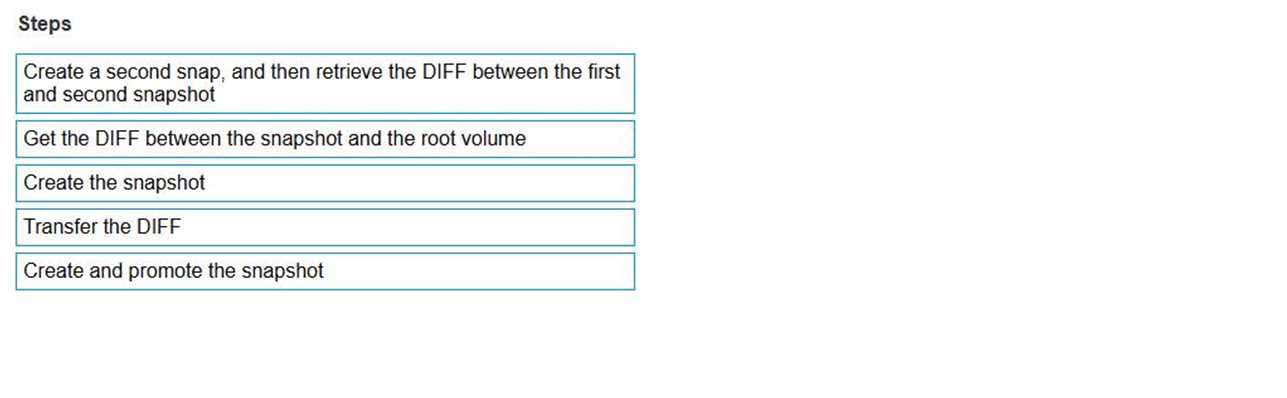
Answer:
None
Explanation:
The correct sequence of steps for Snap-based replication on XtremIO is:
Create the snapshot
Get the DIFF between the snapshot and the root volume
Create a second snap, and then retrieve the DIFF between the first and second snapshot
Transfer the DIFF
Create and promote the snapshot
Snap-based replication on XtremIO involves the following steps:
Create the snapshot: This step involves taking a snapshot of the source volume that will be used as
the baseline for replication.
Get the DIFF between the snapshot and the root volume: Here, the differences between the
snapshot and the root volume are calculated. This is necessary to understand what changes have
been made since the last snapshot.
Create a second snap, and then retrieve the DIFF between the first and second snapshot: A second
snapshot is created to capture the latest state of the volume. The differences (DIFF) between the first
snapshot and the second snapshot are then calculated.
Transfer the DIFF: The differences identified between the snapshots are transferred to the target
volume. This ensures that only the changes are replicated, optimizing the replication process.
Create and promote the snapshot: Finally, the snapshot is created and promoted to ensure the target
volume is updated with the latest changes.
This sequence ensures efficient and accurate replication by focusing on the changes between
snapshots, rather than replicating the entire volume each time.
Reference:
Dell RecoverPoint for Virtual Machines 6.0.1 vSphere HTML5 Plugin Administrator's Guide, Chapter
on Snap-based replication steps
Comments
Question 7
What is required to add a local copy to a Consistency Group that already contains one remote copy?
- A. Sufficient local copy licensed capacity on the production cluster
- B. Write splitter type at the production cluster must be the same type as the remote copy
- C. RecoverPoint license type must be RecoverPoint/CL
- D. RecoverPoint system must be RecoverPoint with VNX(SE)
Answer:
A
Explanation:
Verify local copy licensed capacity: Ensure that the production cluster has enough licensed capacity
to support an additional local copy.
Add a local copy to the Consistency Group: Use the RecoverPoint management console to add a local
copy to the existing Consistency Group. This process involves selecting the Consistency Group and
choosing the option to add a local copy.
Configure the local copy settings: Set up the local copy by defining the copy policy, RPO, and other
relevant settings as per the application’s protection requirements.
For detailed procedures and best practices, refer to the Dell EMC RecoverPoint documentation,
which provides comprehensive guidelines on adding copies to Consistency Groups and managing
licensed capacities1
.
Comments
Question 8
Prior to installation, you are meeting with the network administrator as part of your site
preparations. The administrator wants to know the minimum number of IP
addresses required for their two-node vRPA cluster.
What is the minimum number of IP addresses needed?
- A. 9
- B. 3
- C. 6
- D. 5
Answer:
A
Explanation:
For a two-node vRPA cluster, a minimum of 9 IP addresses is required. This includes IP addresses for
management, replication, and other network communication needs necessary to maintain high
availability and proper functioning of the vRPA cluster.
Reference:
Dell RecoverPoint for Virtual Machines 6.0.1 vSphere HTML5 Plugin Administrator's Guide, Chapter
on network configuration for vRPA clusters.
Comments
Question 9
Which ports are required for proper communication between Deployment Manager and the
RecoverPoint Appliances?
- A. TCP 21, 22, 25, 80, and 443
- B. TCP 21, 22, 7225, and 8082
- C. TCP 21, 22, 80, 443, and UDP 53
- D. TCP 21, 22, 25, 80, and 7225
Answer:
D
Explanation:
Proper communication between Deployment Manager and the RecoverPoint Appliances requires
the following ports: TCP 21, 22, 25, 80, and 7225. These ports facilitate the necessary management
and data transfer operations essential for the deployment and configuration of RecoverPoint
systems.
Reference:
Dell RecoverPoint for Virtual Machines 6.0.1 vSphere HTML5 Plugin Administrator's Guide, section
on network requirements and port configurations.
Comments
Question 10
What is a characteristic of a cluster that is running on RecoverPoint 5.0 or later?
- A. If the WAN and LAN are on different network adapters, they must be on different subnets
- B. If the WAN and LAN are on different network adapters, different subnets are optional
- C. If the WAN and LAN are on different network adapters, they must be on the same subnets
- D. WAN and LAN traffic cannot be on the same network adapters
Answer:
A
Explanation:
Network Adapter Configuration: For clusters running on RecoverPoint 5.0 or later, if the WAN (Wide
Area Network) and LAN (Local Area Network) are utilizing separate network adapters, it is a
requirement that these adapters are configured on different subnets1
.
Subnet Allocation: This involves assigning different subnet addresses to the WAN and LAN adapters
to segregate traffic and ensure proper routing within the network infrastructure1
.
Network Policy Compliance: Adhering to this characteristic is crucial for maintaining network policy
compliance and ensuring that the RecoverPoint system functions correctly within the designed
network topology1
.
For more detailed information on network configuration and best practices, you can refer to the Dell
EMC RecoverPoint documentation, which provides guidelines on how to set up and manage network
settings for RecoverPoint clusters1
.
Comments
Page 1 out of 6
Viewing questions 1-10 out of 61
page 2