Question 1
Refer to the exhibit.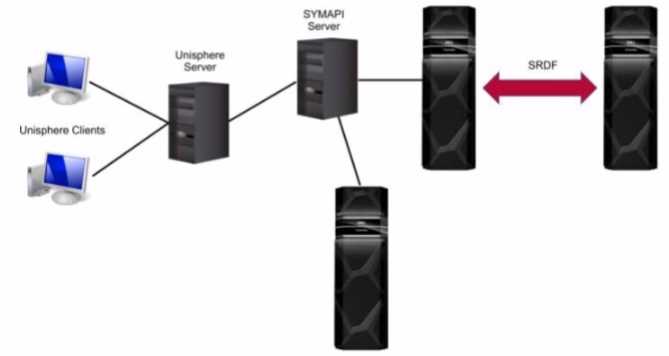
What is the Unisphere for PowerMax deployment option pictured?
- A. Embedded
- B. Either remote or local
- C. Remote
- D. Local
Answer:
C
Explanation:
Step by Step Comprehensive Detailed
Unisphere for PowerMax offers different deployment options to manage PowerMax storage arrays.
Based on the exhibit, we can identify the following:
Separate SYMAPI Server: The diagram shows a dedicated SYMAPI server. SYMAPI (Symmetrix
Application Programming Interface) is a command-line interface used to manage PowerMax and
VMAX storage arrays. This indicates that the Unisphere server is not directly connected to the
storage arrays.
Unisphere Server Connected to SYMAPI Server: The Unisphere server is shown to be connected to
the SYMAPI server. This means that the Unisphere server relies on the SYMAPI server to
communicate with the PowerMax arrays.
No Direct Connection to Arrays: The Unisphere server does not have a direct connection to the
PowerMax arrays.
Considering these points, the deployment option depicted in the exhibit is a remote deployment. In
a remote deployment, the Unisphere server is installed on a separate host and communicates with
the PowerMax arrays through a SYMAPI server. This allows for centralized management of multiple
arrays from a single Unisphere instance.
Why other options are incorrect:
A . Embedded: In an embedded deployment, the Unisphere software runs directly on the PowerMax
array itself. This eliminates the need for a separate Unisphere server.
B . Either remote or local: While the diagram could technically represent a local deployment with a
dedicated SYMAPI server, the presence of the separate SYMAPI server and the lack of direct
connection to the arrays strongly suggest a remote deployment.
D . Local: In a local deployment, the Unisphere server is typically installed on the same host as
Solutions Enabler, which has direct connectivity to the storage arrays.
Reference and documents of Dell's public documentation for PowerMax Operate v.2:
Dell Unisphere for PowerMax 10.0.0 Installation Guide: This guide provides detailed information
about the different Unisphere deployment options, including local, remote, and embedded. It also
includes diagrams and explanations of each deployment scenario. You can find this document on the
Dell Support website by searching for "Unisphere for PowerMax Installation Guide."
Dell PowerMax Family: Essentials and Best Practices Guide: This guide offers a general overview of
PowerMax systems and their management using Unisphere. It may provide context for
understanding the different deployment options.
Comments
Question 2
What is an update operation in SRDF on PowerMax arrays?
- A. process to retain the data on the target R2 side
- B. A process used to return to the original production site after a failover event
- C. A process that initiates an incremental copy from the target R2 to the source R1
- D. A process that allows separate hosts to access the same data independently
Answer:
C
Explanation:
Step by Step Comprehensive Detailed
In SRDF (Symmetrix Remote Data Facility), an "update" operation refers to a specific process where
changes made on the target (R2) side are copied back to the source (R1) side. This is typically used in
disaster recovery scenarios where:
Failover: A failover occurs, and the target (R2) becomes the active production site.
Data Modification: Data is modified or updated on the target (R2) while it's acting as the primary.
Update Operation: An "update" is initiated to synchronize the changes from the target (R2) back to
the source (R1), ensuring that the source has the latest data.
This process is crucial for maintaining data consistency and ensuring a smooth transition back to the
original production site after a failover event.
Why other options are incorrect:
A . process to retain the data on the target R2 side: This is not specific to an "update" operation. Data
retention on the target is a general aspect of SRDF.
B . A process used to return to the original production site after a failover event: While an "update" is
part of the failback process, it's not the entire process itself. Failback involves other steps like
reversing replication direction and restoring host access.
D . A process that allows separate hosts to access the same data independently: This describes a
different SRDF configuration (like Active/Active) and is not related to the "update" operation.
Reference and documents of Dell's public documentation for PowerMax Operate v.2:
Dell Solutions Enabler 10.0.0 SRDF Family CLI User Guide: This guide provides detailed information
about SRDF commands and operations, including the symrdf update command used to initiate an
update from R2 to R1. You can find this document on the Dell Support website by searching for
"Solutions Enabler SRDF Family CLI User Guide."
Dell PowerMax Family: Essentials and Best Practices Guide: This guide offers a comprehensive
overview of SRDF and its functionalities, including disaster recovery scenarios and the use of the
"update" operation.
Comments
Question 3
What function does the storsrvd daemon support?
- A. Manages Composite Groups and Device Groups
- B. Provides centralized gatekeeper device management
- C. Provides replication consistency protection
- D. Listens for SYMAPI sessions and management requests
Answer:
D
Explanation:
The storsrvd daemon is a critical component of the Solutions Enabler (SYMCLI) software suite used to
manage Dell PowerMax and VMAX storage arrays. Its primary function is to:
Listen for SYMAPI Sessions: It acts as a communication endpoint, listening for incoming SYMAPI
sessions from clients or management tools like Unisphere.
Handle Management Requests: When a client connects, storsrvd receives and processes SYMAPI
commands and requests, forwarding them to the appropriate components within Solutions Enabler
for execution.
Essentially, storsrvd acts as an intermediary between SYMCLI clients and the storage array,
facilitating communication and management operations.
Why other options are incorrect:
A . Manages Composite Groups and Device Groups: This is handled by other components within
Solutions Enabler.
B . Provides centralized gatekeeper device management: While storsrvd plays a role in device
management, it's not the sole component responsible for it.
C . Provides replication consistency protection: This is a function of SRDF (Symmetrix Remote Data
Facility) and related components.
Reference and documents of Dell's public documentation for PowerMax Operate v.2:
Dell Solutions Enabler 10.0.0 CLI User Guide: This guide provides information about the architecture
and components of Solutions Enabler, including the role of the storsrvd daemon in handling SYMAPI
communication. You can find this document on the Dell Support website by searching for "Solutions
Enabler CLI User Guide."
Comments
Question 4
An administrator is using the Workload Planner feature in Unisphere for PowerMax
How does the Planner calculate if the Storage Group workload is stable?
- A. One of the calculated values is within 10-20% of the SL-defined response time
- B. Both calculated values are within a 10-15% threshold of the SL-defined response time
- C. One of the calculated values remains within the SL-defined response time
- D. Both calculated values are within the SL-defined response time.
Answer:
D
Explanation:
Step by Step Comprehensive Detailed
The Workload Planner in Unisphere for PowerMax helps you analyze and predict the performance
impact of adding new workloads to your storage array. It uses sophisticated algorithms to calculate
how the addition of a new workload will affect the existing workloads and whether it will violate any
service level objectives (SLOs).
To determine if a Storage Group workload is stable, the Planner considers two key calculated values:
Read Response Time: The predicted read response time of the Storage Group after the new workload
is added.
Write Response Time: The predicted write response time of the Storage Group after the new
workload is added.
The Planner compares these calculated values against the service level (SL) defined for the Storage
Group. If both the calculated read and write response times fall within the defined SL response time,
the Planner considers the workload to be stable. This means that the new workload can be added
without negatively impacting the performance of the existing workloads or violating the SLOs.
Why other options are incorrect:
A . One of the calculated values is within 10-20% of the SL-defined response time: Both read and
write response times must be within the defined SL, not just one.
B . Both calculated values are within a 10-15% threshold of the SL-defined response time: The
threshold is not fixed at 10-15%. The calculated values must be within the actual SL-defined response
time.
C . One of the calculated values remains within the SL-defined response time: Again, both read and
write response times need to be within the defined SL.
Reference and documents of Dell's public documentation for PowerMax Operate v.2:
Dell Unisphere for PowerMax 10.0.0 Online Help: The online help for Unisphere provides detailed
information about the Workload Planner feature, including how it calculates and analyzes workload
stability. You can access this help within Unisphere itself or on the Dell Support website.
Dell PowerMax Family: Essentials and Best Practices Guide: This guide may offer general information
about performance management and workload planning in PowerMax, providing context for
understanding the Workload Planner's functionality.
Comments
Question 5
When using TimeFinder SnapVX technology, what is the maximum number of target volumes that
can be linked to a snapshot on a single source volume?
- A. 255
- B. 256
- C. 512
- D. 1024
Answer:
A
Explanation:
Step by Step Comprehensive Detailed
TimeFinder SnapVX is a snapshot technology in PowerMax that allows you to create point-in-time
copies of data. When using SnapVX, you can link target volumes to a snapshot to create writable
copies of the data at that specific point in time.
The maximum number of target volumes that can be linked to a single snapshot on a source volume
is 255. This limitation ensures efficient management and performance of the SnapVX snapshots and
linked targets.
Why other options are incorrect:
B . 256, C. 512, D. 1024: These numbers exceed the maximum limit of linked targets per snapshot.
Reference and documents of Dell's public documentation for PowerMax Operate v.2:
Dell Solutions Enabler 10.0.0 TimeFinder SnapVX CLI User Guide: This guide provides detailed
information about SnapVX features and limitations, including the maximum number of linked targets
per snapshot. You can find this document on the Dell Support website by searching for "Solutions
Enabler TimeFinder SnapVX CLI User Guide."
Dell PowerMax Family: Essentials and Best Practices Guide: This guide offers a comprehensive
overview of PowerMax technologies, including SnapVX. It may provide context for understanding the
limitations and best practices for using SnapVX snapshots and linked targets.
Comments
Question 6
Which tasks can a storage administrator manage from the Data Protection menu in the Unisphere for
PowerMax?
- A. Convert front-end ports to SRDF ports
- B. Configure and manage SRDF groups
- C. Configure Data Protection for z systems
- D. Review the audit log for unwanted logins
Answer:
B
Explanation:
Step by Step Comprehensive Detailed
The "Data Protection" menu in Unisphere for PowerMax provides a centralized location for managing
various data protection features and functionalities. Specifically, it allows storage administrators to:
Configure and manage SRDF groups: SRDF (Symmetrix Remote Data Facility) is a key technology for
disaster recovery and data replication in PowerMax. The Data Protection menu enables
administrators to create, modify, and monitor SRDF groups, establish replication relationships
between devices, and control replication settings.
Why other options are incorrect:
A . Convert front-end ports to SRDF ports: This is typically done through the "System > Hardware" or
"Connectivity" sections of Unisphere, where port configurations are managed.
C . Configure Data Protection for z Systems: While PowerMax supports mainframe environments, the
specific configuration for z Systems might involve specialized tools or interfaces.
D . Review the audit log for unwanted logins: Audit logs and security-related events are usually found
in the "Monitoring" or "Security" sections of Unisphere.
Reference and documents of Dell's public documentation for PowerMax Operate v.2:
Dell Unisphere for PowerMax 10.0.0 Online Help: The online help for Unisphere provides a detailed
explanation of the functionalities available in each menu, including the Data Protection menu. You
can access this help within Unisphere itself or on the Dell Support website.
Dell PowerMax Family: Essentials and Best Practices Guide: This guide offers a general overview of
data protection features in PowerMax and how they are managed through Unisphere.
Comments
Question 7
What can be managed from the Configure Storage section using the Dell VSI vSphere plug-in?
- A. Remote replication
- B. Port flags
- C. Access control
- D. Snapshots
Answer:
D
Explanation:
Step by Step Comprehensive Detailed
The Dell VSI (Virtual Storage Integrator) vSphere plug-in is a tool that integrates Dell storage
management capabilities into the VMware vSphere environment. It allows administrators to manage
storage directly from the vSphere client. Within the "Configure Storage" section of the VSI plug-in,
you can manage:
Snapshots: The plug-in allows you to create, delete, and restore snapshots of virtual machines'
storage volumes. This provides a convenient way to protect data and revert to previous states if
needed.
Why other options are incorrect:
A . Remote replication: While PowerMax supports remote replication (SRDF), this is typically
managed through Unisphere or Solutions Enabler, not the VSI plug-in.
B . Port flags: Port configurations are usually handled through Unisphere or Solutions Enabler.
C . Access control: Access control and security settings are typically managed through Unisphere or
other security tools.
Reference and documents of Dell's public documentation for PowerMax Operate v.2:
Dell PowerMax and VMware vSphere Configuration Guide: This guide provides detailed information
about the Dell VSI vSphere plug-in and its functionalities, including snapshot management. You can
find this document on the Dell Support website by searching for "PowerMax and VMware vSphere
Configuration Guide."
Dell VSI for VMware vSphere User Guide: This guide specifically focuses on the VSI plug-in and its
features, including storage configuration options.
Comments
Question 8
Four snapshots of a single source volume have been created. The snapshots were created with the
same name at 8:00 AM, 10:00 AM, 12:00 PM: and 2:00 PM.
What is the generation number of the snapshot created at 2:00 PM?
- A. 0
- B. 4
- C. 1
- D. 3
Answer:
D
Explanation:
Step by Step Comprehensive Detailed
In TimeFinder SnapVX, snapshots of a source volume are assigned generation numbers. These
numbers indicate the order in which the snapshots were created. The first snapshot taken has a
generation number of 0, the second has 1, and so on.
In this case, four snapshots were created at different times:
8:00 AM (Generation 0)
10:00 AM (Generation 1)
12:00 PM (Generation 2)
2:00 PM (Generation 3)
Therefore, the snapshot created at 2:00 PM has a generation number of 3.
Reference and documents of Dell's public documentation for PowerMax Operate v.2:
Dell Solutions Enabler 10.0.0 TimeFinder SnapVX CLI User Guide: This guide provides detailed
information about SnapVX features and functionalities, including how generation numbers are
assigned to snapshots. You can find this document on the Dell Support website by searching for
"Solutions Enabler TimeFinder SnapVX CLI User Guide."
Comments
Question 9
A systems administrator plans to use Non-Disruptive Migration (NDM) to migrate data (rom a VMAX
array running Enginuity 5876 to a PowerMax running PowerMaxOS 5978
Which NDM mode is used?
- A. Asynchronous
- B. Adaptive Copy
- C. Pass-through
- D. Metro-based
Answer:
B
Explanation:
Step by Step Comprehensive Detailed
Non-Disruptive Migration (NDM) in PowerMax offers different modes for migrating data between
storage arrays. When migrating from a VMAX array running Enginuity 5876 to a PowerMax running
PowerMaxOS 5978, the Adaptive Copy mode is used.
Adaptive Copy mode is designed for migrations between different storage array platforms or
microcode versions. It provides flexibility and efficiency by dynamically adjusting the migration
process based on the source and target array capabilities.
Why other options are incorrect:
A . Asynchronous: This mode is typically used for SRDF replication, not NDM.
C . Pass-through: This mode is not relevant to NDM.
D . Metro-based: This mode is used for specific metro distance configurations in SRDF.
Reference and documents of Dell's public documentation for PowerMax Operate v.2:
Dell PowerMax Family: Essentials and Best Practices Guide: This guide provides an overview of NDM
and its different modes, including Adaptive Copy. It also discusses the scenarios where each mode is
applicable.
Dell Solutions Enabler 10.0.0 CLI User Guide: This guide may provide further details about NDM
commands and options, including how to specify the migration mode.
Comments
Question 10
What is a feature unique to the PowerMax 8500 compared to the PowerMax 2500?
- A. Persistent Memory
- B. Mainframe Connectivity
- C. Storage Class Memory
- D. InfiniBand Switches
Answer:
D
Explanation:
Step by Step Comprehensive Detailed
Both the PowerMax 2500 and 8500 utilize NVMe over Fabrics (NVMe-oF) for high-speed data
transfer. However, they differ in their internal fabric architecture:
PowerMax 2500: Uses a direct NVMe/PCIe connection between the compute nodes and the Dynamic
Media Enclosures (DMEs).
PowerMax 8500: Employs a fully switched InfiniBand (IB) fabric for all NVMe-oF traffic. This means
that the compute nodes and DMEs are interconnected through InfiniBand switches, providing a high-
performance, low-latency, and scalable fabric for data transfer.
Therefore, the use of InfiniBand switches is a feature unique to the PowerMax 8500 compared to the
PowerMax 2500.
Why other options are incorrect:
A . Persistent Memory: Both PowerMax 2500 and 8500 utilize Storage Class Memory (SCM), which is
a type of persistent memory.
B . Mainframe Connectivity: Both models support mainframe connectivity.
C . Storage Class Memory: As mentioned above, both models use SCM.
Reference and documents of Dell's public documentation for PowerMax Operate v.2:
PowerMax 2500 and 8500 Dynamic Fabric—A High-Performance Clustered Architecture for
Enterprise Storage: This white paper provides a detailed comparison of the Dynamic Fabric
architecture in both models, highlighting the use of InfiniBand switches in the PowerMax 8500. You
can find this document on the Dell Technologies Info Hub.
Dell PowerMax Family: Essentials and Best Practices Guide: This guide offers a general overview of
the PowerMax family, including the 2500 and 8500 models. It may provide context for understanding
the differences in their architecture and features.
Comments
Page 1 out of 4
Viewing questions 1-10 out of 49
page 2