Question 1
An existing PowerScale cluster consists of four A300 and three F600 nodes.
What is the minimum number of nodes an engineer can add to expand both node pools?
- A. txA300 2xF600
- B. 2xA300 2xF600
- C. 3xF600 4xA300
- D. 2xA300 1x F600
Answer:
D
Explanation:
In a Dell PowerScale cluster that consists of four A300 nodes and three F600 nodes, expanding both
node pools requires adding nodes to each pool. The minimum number of nodes an engineer can add
to expand both node pools is determined by the following factors:
Minimum Node Addition:
PowerScale clusters allow the addition of nodes one at a time to existing node pools.
However, to maintain balanced performance and capacity, it's recommended to add nodes in pairs or
according to specific guidelines for each node type.
Node Pool Requirements:
A300 Nodes (Capacity Tier):
Designed for high-capacity storage needs.
Adding at least two A300 nodes helps maintain even data distribution and protection levels.
F600 Nodes (Performance Tier):
Designed for high-performance all-flash storage requirements.
Adding at least one F600 node can expand the performance tier, but adding two would be optimal
for balance.
Minimum Nodes to Expand Both Pools:
Option D suggests adding 2xA300 and 1xF600, totaling three nodes.
This is the minimum number among the options provided that allows expansion of both node pools.
Why Option D is Correct:
Meets Minimum Addition Recommendations:
Adding 2xA300 nodes enhances capacity while maintaining data protection schemes like FEC
(Forward Error Correction).
Adding 1xF600 node increases performance capacity with minimal investment.
Ensures Data Protection and Performance:
Adequate node addition helps in maintaining the cluster's data protection policies and performance
characteristics.
Reference:
Dell PowerScale OneFS Administration Guide – Guidelines on adding nodes to existing clusters.
Dell PowerScale Best Practices – Recommendations for node additions and cluster expansions.
Dell PowerScale Technical Specifications – Details on node types and their roles within a cluster.
Comments
Question 2
What type of upgrade on a Dell PowerScale cluster requires the least amount of time?
- A. Simultaneous
- B. Parallel
- C. Rolling
- D. Automatic
Answer:
A
Explanation:
A simultaneous upgrade on a Dell PowerScale cluster involves upgrading all nodes at the same time.
This method requires the least amount of time compared to other upgrade types because it
minimizes the total duration by handling the upgrade process concurrently across the entire cluster.
Types of Upgrades:
Simultaneous Upgrade:
Definition: All nodes are upgraded at the same time.
Advantages:
Fastest upgrade method.
Reduces total upgrade time significantly.
Disadvantages:
Requires cluster downtime; not suitable for environments that need continuous availability.
Rolling Upgrade:
Definition: Nodes are upgraded one at a time or in small groups.
Advantages:
No cluster downtime; services remain available.
Disadvantages:
Takes longer to complete as each node is upgraded sequentially.
Parallel Upgrade:
Definition: Nodes are upgraded in parallel batches.
Advantages:
Balances upgrade speed and availability.
Disadvantages:
May still require some service interruption.
Automatic Upgrade:
Definition: The upgrade process is automated but follows the rolling or parallel methodology.
Advantages:
Reduces manual intervention.
Disadvantages:
Upgrade time depends on the underlying method used (rolling or parallel).
Why Simultaneous Upgrade Requires the Least Amount of Time:
Concurrent Processing: Upgrading all nodes at once leverages parallelism, drastically reducing the
total time needed.
No Sequential Steps: Eliminates the wait time associated with upgrading nodes one after another.
Use Case Considerations: Suitable for non-production clusters or environments where downtime is
acceptable.
Important Considerations:
Cluster Downtime: Simultaneous upgrades will render the cluster unavailable during the process.
Risk Management: Any issues during the upgrade can affect the entire cluster; thorough planning
and backups are essential.
Reference:
Dell PowerScale OneFS Upgrade Planning and Process Guide – Details on upgrade methods and best
practices.
Dell PowerScale Administration Guide – Instructions and considerations for performing cluster
upgrades.
Best Practices for OneFS Upgrades – Recommendations for selecting the appropriate upgrade
method based on environment needs.
Comments
Question 3
Refer to the exhibit.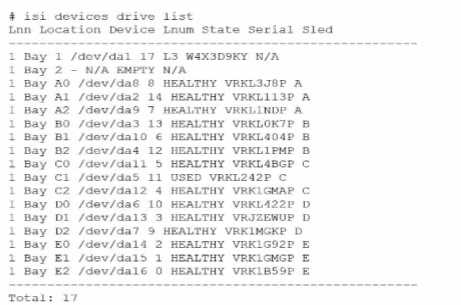
An engineer replaced the drive in C1. They run the isi devices drive list command and obtain the
output that is shown.
What action must the engineer take?
- A. Run the 1 = 1 devices drive add c1 command.
- B. Run the isi devices drive format C1 command.
- C. Contact Dell support.
- D. Update the drive firmware.
Answer:
B
Explanation:
In the output of the isi devices drive list command shown in the exhibit, the drive in location C1 is
marked as "USED," with the serial number VRKL242P. This indicates that the drive has been replaced
but has not yet been initialized or formatted for use within the PowerScale cluster.
To make the drive usable, it must be formatted. The correct procedure to follow is to use the isi
devices drive format command, specifying the drive location (C1 in this case). This will prepare the
drive for use in the cluster, ensuring that it is recognized and available for OneFS to start writing data
to it.
Steps to format the drive:
Log in to the OneFS cluster using an SSH session with an account that has the necessary privileges.
Run the following command to format the new drive:
bash
Copy code
isi devices drive format C1
This command will format the drive located at C1, making it available for use in the cluster.
After the format is complete, verify that the drive is now in a HEALTHY state by running:
isi devices drive list
This should display the new status of the drive as HEALTHY, indicating that it has been successfully
formatted and is ready for data operations.
This process is outlined in Dell’s PowerScale Administration Guide and ensures the correct
initialization of new or replaced drives.
Comments
Question 4
What is the isi diagnostics gather command used for?
- A. Diagnose the CPU.
- B. Diagnose the TPM
- C. Gather performance data.
- D. Gather cluster logs
Answer:
D
Explanation:
The isi diagnostics gather command is used in Dell PowerScale (formerly known as Isilon) clusters to
collect comprehensive diagnostic information, including system logs, configuration files, and other
pertinent data from all nodes in the cluster. This gathered information is essential for
troubleshooting and is often requested by Dell Support to diagnose and resolve issues.
Purpose of isi diagnostics gather:
The command aggregates logs and diagnostic information across the entire cluster.
It collects data such as event logs, configuration settings, and performance metrics.
Use Cases:
Troubleshooting: When experiencing issues with the cluster, this command helps in collecting
necessary data for analysis.
Support Assistance: Dell Support may request the output from this command to assist in diagnosing
cluster problems.
Process:
When executed, the command generates a single compressed file containing all the collected
information.
The file can be securely sent to Dell Support for further analysis.
Dell PowerScale Reference:
Dell EMC PowerScale OneFS CLI Administration Guide: This guide provides detailed information on
command-line utilities, including isi diagnostics gather.
Dell EMC Knowledge Base Articles: Articles related to troubleshooting often reference the use of isi
diagnostics gather to collect logs.
Comments
Question 5
Which model is a part of the Isilon Gen6 platform?
- A. F600
- B. F810
- C. F900
- D. F200
Answer:
B
Explanation:
The Isilon Gen6 platform includes several models designed to meet various performance and
capacity needs. The F810 is part of the Gen6 family and is specifically an all-flash node offering high
performance and efficiency.
Isilon Gen6 Platform Overview:
Gen6 platforms are known for their modular architecture and enhanced performance.
They offer improved scalability and efficiency over previous generations.
F810 Model Details:
All-Flash Storage: The F810 is an all-flash node, providing low latency and high throughput.
High Capacity: It offers large storage capacities suitable for demanding workloads.
Use Cases: Ideal for high-performance computing, real-time analytics, and workloads requiring rapid
data access.
Other Models:
F600 and F900: These are part of the Dell EMC PowerScale family introduced after the Isilon
rebranding and are not Gen6 Isilon models.
F200: Also part of the newer PowerScale lineup, not associated with the Isilon Gen6 platform.
Dell PowerScale Reference:
Dell EMC Isilon Gen6 Technical Overview: Documentation outlining the features and models included
in the Gen6 series.
Dell EMC Isilon F810 Data Sheet: Provides specifications and details about the F810 model.
Product Support Pages: Offer information on the various models within the Isilon and PowerScale
families.
Comments
Question 6
What is done with the components when a Gen6 single node is replaced?
- A. Transferred to the new node
- B. Returned to Dell
- C. Sent to WWFA
Answer:
B
Explanation:
When a Dell PowerScale Gen6 single node is replaced, the standard procedure is to return the entire
faulty node, including all its components, back to Dell. This ensures proper handling, compliance
with warranty agreements, and allows Dell to perform failure analysis if necessary.
Node Replacement Process:
Faulty Node Identification: A node exhibiting issues is identified for replacement.
Data Protection: Before replacement, data is protected via OneFS, which ensures data is redistributed
across the cluster to prevent data loss.
Replacement Node Shipment: Dell ships a replacement node to the customer.
Handling of Components:
No Component Swapping: Components such as drives, memory modules, and CPUs are not
transferred from the old node to the new one.
Return Procedure: The entire faulty node, with all its components intact, is returned to Dell.
Purpose of Return: Returning the node allows Dell to:
Perform Diagnostics: Analyze the faulty components for failures.
Manage Inventory: Ensure proper accounting of hardware.
Environmental Compliance: Dispose of or recycle components according to regulations.
Dell's Return Material Authorization (RMA) Policy:
RMA Process: Dell issues an RMA for the faulty node, and the customer is responsible for returning it.
Shipping Instructions: Detailed instructions are provided to safely package and ship the node back to
Dell.
Dell PowerScale Reference:
Dell EMC PowerScale Field Replacement Unit (FRU) Installation and Replacement Guide:
Outlines the procedures for replacing nodes and the requirement to return faulty units to Dell.
Dell EMC PowerScale OneFS Administration Guide:
Provides information on cluster maintenance and node management.
Warranty and Support Agreements:
Specify the obligations for returning faulty hardware under service contracts.
Comments
Question 7
What does a terracotta colored handle indicate on Dell PowerScale Gen6 hardware?
- A. The FRU must be replaced.
- B. The node can remain online when replacing a hardware component.
- C. The node must be shut down for maintenance procedures.
- D. The component must not be removed while hardware is online.
Answer:
D
Explanation:
In Dell PowerScale Gen6 hardware, terracotta-colored handles indicate that a component is not hot-
swappable. This means the component must not be removed or replaced while the node is powered
on and operational. Removing such components while the system is online could lead to data loss or
hardware damage.
Color-Coded Handles in Gen6 Hardware:
Blue Handles:
Indicate components that are hot-swappable.
Can be safely removed or replaced while the node is online.
Terracotta (Orange) Handles:
Signify components that are not hot-swappable.
Require the node to be powered down before removal or replacement.
Components with Terracotta Handles:
Examples Include:
Power supplies (in some configurations).
Certain internal components like fans or system boards.
Safety Precautions:
To prevent electrical hazards or system instability, these components should only be serviced when
the node is shut down.
Maintenance Procedures:
Shutting Down the Node:
Use the isi_for_array -s 'shutdown -p now' command to safely power down the node.
Ensure that the node is properly removed from the cluster to prevent data access issues.
Physical Removal:
Once powered down, the component with the terracotta handle can be safely removed.
Dell PowerScale Reference:
Dell EMC PowerScale Hardware Installation Guide:
Details on hardware components, color-coded handles, and their significance.
Dell EMC PowerScale OneFS Best Practices:
Provides guidelines on maintenance procedures and safety precautions.
Field Service Manuals:
Offer step-by-step instructions for replacing components and emphasize the importance of adhering
to handle color indications.
Comments
Question 8
What is the rack size of an F600 node?
- A. 3U
- B. 2U
- C. 1U
- D. 4U
Answer:
C
Explanation:
The Dell PowerScale F600 node occupies 1U of rack space. It is designed to provide high performance
and density in a compact form factor, making it suitable for data centers with limited rack space.
Dell PowerScale F600 Overview:
Form Factor: The F600 is a 1U rack-mounted node.
All-Flash Storage: Equipped with NVMe SSDs for high-speed data access.
Performance: Ideal for workloads requiring low latency and high throughput.
Rack Space Considerations:
Efficient Use of Space: The 1U size allows for more nodes to be installed within a standard 42U rack.
Scalability: Easy to scale out by adding additional 1U nodes to the cluster.
Benefits of 1U Form Factor:
Reduced Footprint: Saves physical space in the data center.
Energy Efficiency: Lower power consumption per node compared to larger form factors.
Cooling Efficiency: Easier to manage cooling requirements with smaller units.
Dell PowerScale Reference:
Dell EMC PowerScale F600 Specification Sheet:
Lists the physical dimensions, including the 1U rack height.
Dell EMC PowerScale Technical Overview:
Provides detailed information on the F600's architecture and benefits.
Hardware Installation Guides:
Offer instructions on installing the F600 node in a rack, confirming its 1U size.
Comments
Question 9
What type of NIC can be used for the external network on a Dell PowerScale F600 node?
- A. 1/10 GbE
- B. 10/100 GbE
- C. 10/25 GbE
- D. 25/40 GbE
Answer:
C
Explanation:
The Dell PowerScale F600 node supports 10/25 GbE network interface cards (NICs) for the external
network connections. These NICs provide high-speed connectivity suitable for the performance
capabilities of the F600, which is an all-flash node designed for demanding workloads.
Dell PowerScale F600 Networking Options:
The F600 comes with network interfaces that support both 10 GbE and 25 GbE speeds.
These interfaces use SFP28 transceivers, which are compatible with both 10 GbE and 25 GbE
connections.
Supported NIC Types:
10/25 GbE NICs:
Allow flexibility in network configurations.
Enable integration with existing 10 GbE networks while providing an upgrade path to 25 GbE.
Not Supporting 1 GbE or 40/100 GbE as Primary External Connections:
The F600 does not support 1 GbE as it would be a bottleneck for an all-flash node.
While the F600 may have 100 GbE capabilities for backend or other uses, the primary external
network interfaces are 10/25 GbE.
Benefits of 10/25 GbE Connectivity:
Performance:
Provides sufficient bandwidth for high-performance applications.
Scalability:
Easy to scale up network speeds as infrastructure upgrades from 10 GbE to 25 GbE.
Cost-Effectiveness:
Offers a balance between performance and cost compared to higher-speed options like 40 GbE or
100 GbE.
Dell PowerScale Reference:
Dell EMC PowerScale F600 Specification Sheet:
Details the networking capabilities and supported NICs.
Dell EMC PowerScale Network Deployment Guide:
Provides guidelines on network configurations and best practices for F600 nodes.
Hardware Installation Guides:
Outline the installation and configuration of NICs for F600 nodes.
Comments
Question 10
Which resource should be consulted before performing any Dell PowerScale platform maintenance
activities?
- A. Dell SolVe Online
- B. Dell Technical Support
- C. Dell iDRAC Service Module
- D. OneFS logs and error messages
Answer:
A
Explanation:
Before performing any maintenance activities on a Dell PowerScale platform, it is crucial to consult
Dell SolVe Online. This tool provides comprehensive, step-by-step procedures, best practices, and
necessary precautions for servicing Dell EMC equipment.
Dell SolVe Online Overview:
Service and Procedures Resource:
An online platform offering detailed service procedures for Dell EMC products.
Customized Instructions:
Generates procedure guides tailored to specific tasks and equipment models.
Safety and Compliance:
Includes safety warnings and regulatory compliance information.
Importance in Maintenance Activities:
Accurate Procedures:
Ensures that maintenance tasks are performed correctly, reducing the risk of errors.
Updated Information:
Provides the latest procedures reflecting current best practices and product updates.
Resource for Technicians:
Essential for both Dell EMC technicians and customers performing self-maintenance.
Using Dell SolVe Online:
Accessing the Tool:
Available at the Dell support website (requires login credentials).
Selecting the Product:
Choose the specific PowerScale model to get relevant procedures.
Generating Procedures:
Select the desired maintenance activity to receive a detailed guide.
Why Other Options Are Less Suitable:
B . Dell Technical Support:
While valuable, it's more reactive and may not provide step-by-step procedures without direct
engagement.
C . Dell iDRAC Service Module:
Used for system management and monitoring, not for procedural guidance.
D . OneFS Logs and Error Messages:
Useful for troubleshooting but do not provide maintenance procedures.
Dell PowerScale Reference:
Dell SolVe Online Portal:
The primary resource for service procedures.
Dell EMC PowerScale Maintenance Guides:
Referenced within SolVe Online procedures.
Support Documentation:
Accessible through Dell's support site, often linked within SolVe Online.
Comments
Page 1 out of 10
Viewing questions 1-10 out of 101
page 2