Question 1
A PowerProtect DD administrator wants to enable encryption on one of two existing cloud units.
Which statement is true regarding the encryption?
- A. Cloud tier encryption is provided only by the cloud storage
- B. Encryption can be enabled on each cloud unit individually
- C. Encryption license is not required to enable cloud tier encryption
- D. Active tier encryption is required to enable encryption on the cloud tier
- E. Once data is in the cloud, you cannot change the encryption status
Answer:
E
Explanation:
Once data is stored in the cloud tier, changing its encryption status is not possible due to data
integrity and compliance constraints. Ensuring encryption settings are configured correctly before
data migration is essential to secure storage in cloud environments. When data is moved to the cloud
tier in a PowerProtect DD environment, the encryption status is locked in for that data. This means
that once data has been stored in the cloud with encryption either enabled or disabled, this setting
cannot be altered retroactively for that data. Cloud tier encryption provides secure data storage in
the cloud, but any modification to encryption preferences would only apply to new data moved to
the cloud after the change. This constraint ensures data consistency and integrity within the cloud
storage environment.
Comments
Question 2
DRAG DROP
What is the correct order of operations for the Data Invulnerability Architecture (DIA) elements?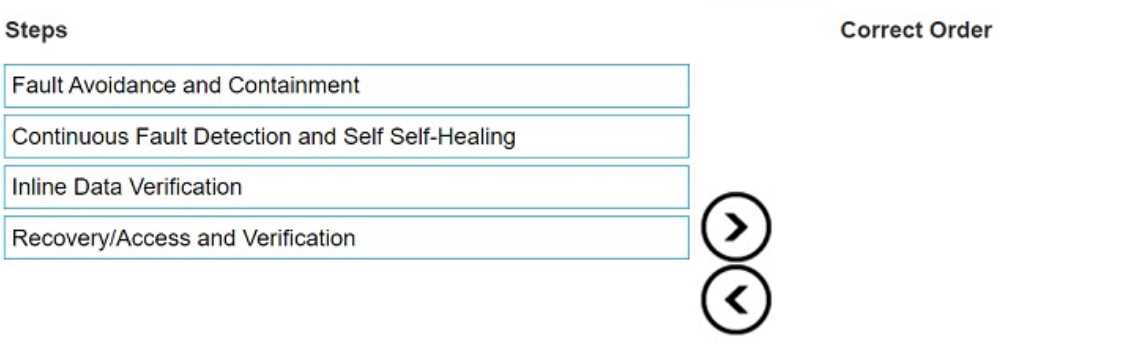
Answer:
None
Explanation:
The correct order of operations for the Data Invulnerability Architecture (DIA) elements is as follows:
Fault Avoidance and Containment
Continuous Fault Detection and Self-Healing
Inline Data Verification
Recovery/Access and Verification
The Data Invulnerability Architecture (DIA) in Dell PowerProtect DD systems is designed to ensure
data integrity and resiliency throughout the data storage process. Here’s how each element plays a
role in this ordered sequence:
Fault Avoidance and Containment: This is the first layer of protection. DIA focuses on preventing
faults before they occur and containing any potential issues, ensuring that faults do not propagate
within the system. This stage is critical as it forms the foundational protection layer.
Continuous Fault Detection and Self-Healing: After implementing containment, the system
continuously monitors for faults. It actively identifies and mitigates issues through self-healing
mechanisms, addressing any detected errors autonomously to maintain data integrity.
Inline Data Verification: As data is written to storage, the inline data verification checks data integrity
on the fly. This step ensures that any corruption or errors in data are detected immediately, enabling
early intervention before data is permanently stored.
Recovery/Access and Verification: The final step ensures that, during data recovery, the integrity of
the data is verified before it is accessed or restored. This stage completes the DIA cycle by confirming
that data retrieved from storage is accurate and intact.
This ordered approach in DIA is designed to provide robust protection against data loss or corruption,
making Dell PowerProtect DD appliances highly reliable for data protection needs.
Comments
Question 3
If ES40 SAS shelves are on the same chain as a DS60, what is the maximum number of possible
shelves on that chain?
- A. 3
- B. 5
- C. 7
- D. 4
Answer:
A
Explanation:
When configuring a chain with ES40 SAS shelves and DS60 shelves in a PowerProtect DD
environment, the maximum allowable number of shelves on that chain is three. This limitation is due
to compatibility and bandwidth requirements for maintaining optimal performance and reliability
across the SAS chain. Mixing different shelf models (ES40 and DS60) in a single chain affects the
maximum supported configuration, and following this limitation ensures that the data transfer
speeds and stability are not compromised.
Comments
Question 4
Which command is used to verify the state of the disks in an expansion shelf attached to a
PowerProtect DD system?
- A. disk show stats
- B. disk show state
- C. disk rescan
- D. disk status
Answer:
B
Explanation:
The disk show state command provides the current state of each disk in an expansion shelf, allowing
administrators to monitor disk health and operational status effectively, which is crucial for
maintaining data integrity.
Comments
Question 5
Which condition exists for a backup infrastructure based on PowerProtect DD?
- A. Compressed files must be decompressed before being sent to PowerProtect DD.
- B. Backup clients can write data directly to the PowerProtect DD appliance.
- C. VTL can be used to move physical tapes to a DR location.
Answer:
B
Explanation:
PowerProtect DD appliances allow direct data writing from backup clients, which improves efficiency
and data transfer rates, leveraging DD Boost and other protocols for optimized backup performance
without intermediate processing. In a PowerProtect DD backup infrastructure, backup clients are
designed to write data directly to the appliance. This direct write capability is supported by protocols
like DD Boost, which enhances the backup performance by offloading deduplication to the client
side, reducing network bandwidth usage and speeding up backups. PowerProtect DD systems are
optimized to handle direct data ingestion from backup clients, streamlining the data protection
process without requiring intermediate storage or decompression steps. This feature simplifies the
backup architecture and improves data protection efficiency.
Comments
Question 6
Which are two attributes of PowerProtect DD High Availability? (Select 2)
- A. PowerProtect DD nodes are configured in active/active mode.
- B. A single set of shared storage is used.
- C. PowerProtect DD nodes should have dual heads.
- D. It is supported only on DD9900 systems.
Answer:
B, D
Explanation:
PowerProtect DD High Availability configurations are supported on the DD9900 model with a single
set of shared storage, ensuring redundancy and failover capabilities, critical for enterprise-level data
protection environments.
PowerProtect DD High Availability (HA) configuration provides a continuous availability solution,
particularly suited for DD9900 systems. Here are the two key attributes of DD HA:
Single Set of Shared Storage: In the HA configuration, both nodes in the active/standby configuration
share the same set of storage. This shared storage ensures that if the active node fails, the standby
node can take over without data loss, accessing the same storage seamlessly.
Supported Only on DD9900 Systems: The HA feature is exclusive to high-end PowerProtect DD
models, specifically the DD9900. This limitation is due to the hardware requirements needed to
support the robust failover and data redundancy capabilities inherent in an HA setup.
Comments
Question 7
What is the correct practice when creating Fibre Channel zones between PowerProtect DD and the
media server?
- A. single-initiator dual-target zoning
- B. dual-initiator dual-target zoning
- C. single-initiator single-target zoning
- D. dual-initiator single-target zoning
Answer:
C
Explanation:
Best practice for Fibre Channel zoning with PowerProtect DD is to use single-initiator single-target
zoning, which enhances security and stability in data transfer by isolating connections between
devices, minimizing potential interference.
Comments
Question 8
For third-party backup applications that do not natively support DD Boost, where does the DD Boost
plug-in need to be installed?
- A. On the backup server
- B. On each media server
- C. On the PowerProtect DD
- D. On each backup client
Answer:
B
Explanation:
The DD Boost plug-in must be installed on each media server to enable optimized data deduplication
and efficient data transfer, especially for applications that do not natively support DD Boost
integration.
Comments
Question 9
An administrator recognizes poor network performance when using CIFS shares from a PowerProtect
DD system. The network link utilization is under 100%. What is the most likely cause of this issue?
- A. TCP timeout too large
- B. TCP window size too large
- C. TCP timeout too small
- D. TCP window size too small
Answer:
D
Explanation:
A small TCP window size can restrict data throughput, leading to suboptimal performance in CIFS-
based file transfers. Adjusting the TCP window size can help maximize network bandwidth utilization
and improve transfer speeds.
Comments
Question 10
What command is used to make a storage unit?
- A. storage add tier active
- B. ddboost storage-unit create <storage_unit>
- C. filesys create
- D. boostfs mount —storage unit
Answer:
B
Explanation:
The ddboost storage-unit create <storage_unit> command is used to create a storage unit
specifically for DD Boost-enabled backups, facilitating direct backup operations with PowerProtect
DD.
Comments
Page 1 out of 9
Viewing questions 1-10 out of 91
page 2