Question 1
Which of the following is the best way to distribute custom images to 800 devices that include four
device vendor classes with two types of user groups?
- A. Use xcopy to clone the hard drives from one to another
- B. Use robocopy to move the files to each device
- C. Use a local image deployment tool for each device
- D. Use a network-based remote installation tool
Answer:
D
Explanation:
Comprehensive and Detailed Explanation From Exact Extract:
In enterprise environments, network-based deployment solutions (such as Windows Deployment
Services or SCCM) allow administrators to push images across the network to hundreds of devices
efficiently. These tools support hardware-specific drivers (for different vendor classes) and can
accommodate user-group configurations using task sequences or answer files.
A and B (xcopy and robocopy) are file-level tools and not designed for full OS image deployment.
C . Using local tools per device is inefficient for large-scale rollouts (800 devices).
D . Network-based deployment is the industry standard for this scale.
Reference:
CompTIA A+ 220-1102 Objective 1.4: Given a scenario, use appropriate Microsoft operating system
installation methods.
Study Guide Section: Deployment methods (including PXE boot, image deployment)
===========================
Comments
Question 2
Which of the following types of social engineering attacks sends an unsolicited text message to a
user's mobile device?
- A. Impersonation
- B. Vishing
- C. Spear phishing
- D. Smishing
Answer:
D
Explanation:
Comprehensive and Detailed Explanation From Exact Extract:
Smishing (SMS phishing) is a type of social engineering attack where attackers send fraudulent text
messages to trick users into revealing sensitive information or downloading malware. These
messages often impersonate banks, delivery services, or official institutions to lure the victim into
clicking malicious links.
A . Impersonation is an in-person or voice-based tactic.
B . Vishing refers to voice phishing over phone calls.
C . Spear phishing is a targeted email-based phishing method.
Reference:
CompTIA A+ 220-1102 Objective 2.3: Compare and contrast social engineering techniques.
Study Guide Section: Smishing as a type of phishing via SMS or mobile messaging.
===========================
Comments
Question 3
A user reports some single sign-on errors to a help desk technician. Currently, the user is able to sign
in to the company's application portal but cannot access a specific SaaS-based tool. Which of the
following would the technician most likely suggest as a next step?
- A. Reenroll the user's mobile device to be used as an MFA token
- B. Use a private browsing window to avoid local session conflicts
- C. Bypass single sign-on by directly authenticating to the application
- D. Reset the device being used to factory defaults
Answer:
B
Explanation:
Comprehensive and Detailed Explanation From Exact Extract:
SSO issues are often related to cached session data, cookies, or browser artifacts. The fact that the
user can access the company portal but not one specific SaaS tool suggests a session or token
problem. Using a private/incognito browsing window allows a clean session to be initiated, which
often resolves SSO conflicts.
A . Reenrolling MFA is not related unless access issues stem from failed multifactor authentication.
C . Bypassing SSO may not be possible depending on the SaaS tool and company policies.
D . Factory resetting a device is a last resort and unnecessary in this case.
Reference:
CompTIA A+ 220-1102 Objective 3.3: Troubleshoot common software, application, and OS security
issues.
Study Guide Section: Troubleshooting login and authentication issues, especially with SSO services.
===========================
Comments
Question 4
A technician verifies that a malware incident occurred on some computers in a small office. Which of
the following should the technician do next?
- A. Quarantine the infected systems
- B. Educate the end users
- C. Disable System Restore
- D. Update the anti-malware and scan the computers
Answer:
A
Explanation:
Comprehensive and Detailed Explanation From Exact Extract:
Once a malware incident has been confirmed, the immediate next step is to contain the threat.
Quarantining infected systems prevents the malware from spreading to other devices and isolates
the malicious code for further analysis or remediation.
B . Educating end users is important but occurs later in the incident response process.
C . Disabling System Restore is part of cleanup, not containment.
D . Updating and scanning should occur after the system is quarantined to prevent further infection
or spread.
Reference:
CompTIA A+ 220-1102 Objective 2.5: Given a scenario, detect, remove, and prevent malware using
appropriate tools and methods.
Study Guide Section: Malware removal best practices — Step 2: Quarantine the infected system
===========================
Comments
Question 5
Which of the following is a Linux command that is used for administrative purposes?
- A. runas
- B. cmcl
- C. net user
- D. su
Answer:
D
Explanation:
Comprehensive and Detailed Explanation From Exact Extract:
The su (substitute user) command is used in Linux to switch to another user account, most commonly
to escalate privileges by switching to the root (administrator) account. It allows administrative tasks
to be performed in a terminal session.
A . runas is a Windows command for executing a program under another user's context.
B . cmcl is not a valid Linux or administrative command.
C . net user is a Windows command for managing local user accounts.
Reference:
CompTIA A+ 220-1102 Objective 1.9: Identify common features and tools of the Linux client/desktop
OS.
Study Guide Section: Linux command-line tools — su, sudo
===========================
Comments
Question 6
A user recently installed an application that accesses a database from a local server. When launching
the application, it does not populate any information. Which of the following command-line tools is
the best to troubleshoot the issue?
- A. ipconfig
- B. nslookup
- C. netstat
- D. curl
Answer:
D
Explanation:
Comprehensive and Detailed Explanation From Exact Extract:
The scenario involves an application that should retrieve data from a local database server but is
failing to do so. This likely indicates a problem in communication between the application and the
database server (such as a network issue, port misconfiguration, or service unavailability). The
correct troubleshooting approach involves testing the network/service connectivity between the
client and the database.
Let’s examine the options:
A . ipconfig:This command displays IP configuration details for Windows systems, such as IP address,
subnet mask, and default gateway. While useful for diagnosing general network issues, it does not
test service connectivity or the availability of a specific application port/service.
B . nslookup:Used to query DNS servers to resolve domain names to IP addresses. However, since the
question references a local server (likely accessed via IP or static hostname), DNS is probably not
involved. Also, it does not test application/service availability.
C . netstat:Displays active TCP connections, listening ports, and routing tables. It helps determine
whether the local system is listening for or maintaining any network connections, but it does not
initiate a connection to test availability. It’s diagnostic but not interactive for service testing.
D . curl:This is the most appropriate tool for this scenario. curl is used to test connectivity to services
over protocols like HTTP, HTTPS, FTP, and more. If the application retrieves data via a web interface
or API (common in database-driven applications), curl can be used to test if the application can
successfully reach and retrieve data from the server. It provides immediate, testable feedback on
whether the server and service are available and responsive.
Example usage:
curlhttp://localhost:8080/api/data
This command would test whether a local server's application programming interface (API) is
available and responding on port 8080.
CompTIA A+ 220-1102 Reference Points:
Objective 2.4: Given a scenario, use appropriate tools to troubleshoot and support Windows OS
issues.
Objective 3.3: Use appropriate tools to troubleshoot and resolve issues.
The CompTIA A+ Core 2 study guide references curl as a useful command-line utility for testing
connectivity and troubleshooting application access to services.
===========================
Comments
Question 7
A small office reported a phishing attack that resulted in a malware infection. A technician is
investigating the incident and has verified the following:
● All endpoints are updated and have the newest EDR signatures.
● Logs confirm that the malware was quarantined by EDR on one system.
● The potentially infected machine was reimaged.
Which of the following actions should the technician take next?
- A. Install network security tools to prevent downloading infected files from the internet
- B. Discuss the cause of the issue and educate the end user about security hygiene
- C. Flash the firmware of the router to ensure the integrity of network traffic
- D. Suggest alternate preventative controls that would include more advanced security software
Answer:
B
Explanation:
Comprehensive and Detailed Explanation From Exact Extract:
After containment and remediation, one of the final steps in incident response is user education.
Since the root cause was a phishing attack, it is essential to educate users about identifying phishing
attempts, safe browsing practices, and how to handle suspicious communications. This improves
overall security posture and helps prevent future incidents.
A . Installing additional tools may be helpful but is a long-term step.
C . Flashing router firmware is not warranted unless the network hardware is known to be
compromised.
D . Suggesting more advanced tools might be excessive given that the EDR successfully contained the
incident.
Reference:
CompTIA A+ 220-1102 Objective 2.5: Given a scenario, detect, remove, and prevent malware using
appropriate tools and methods.
Study Guide Section: Incident response and user education after a security event
Comments
Question 8
Which of the following describes a vulnerability that has been exploited before a patch or
remediation is available?
- A. Spoofing
- B. Brute-force
- C. DoS
- D. Zero-day
Answer:
D
Explanation:
Comprehensive and Detailed Explanation From Exact Extract:
A Zero-day vulnerability refers to a security flaw in software or hardware that is unknown to the
vendor or has not yet been patched. If this vulnerability is exploited before the vendor has issued a
fix or patch, it becomes a Zero-day exploit. These attacks are highly dangerous because they take
advantage of the absence of defenses due to the lack of awareness or mitigation options.
A . Spoofing is a form of impersonation, not necessarily tied to unpatched vulnerabilities.
B . Brute-force attacks rely on repeatedly guessing credentials and are not related to software flaws.
C . DoS (Denial of Service) attacks are meant to overwhelm systems and don't necessarily exploit
unknown vulnerabilities.
Reference:
CompTIA A+ 220-1102 Objective 2.3: Compare and contrast common social engineering, threats, and
vulnerabilities.
Study Guide Section: Threat types — Zero-day attacks, definitions, and implications
Comments
Question 9
SIMULATION
You have been contacted through the help desk chat application. A user is setting up a replacement
SOHO router. Assist the user with setting up the router.
INSTRUCTIONS
Select the most appropriate statement for each response. Click the send button after each response
to continue the chat.
If at any time you would like to bring back the initial state of the simulation, please click the Reset All
button.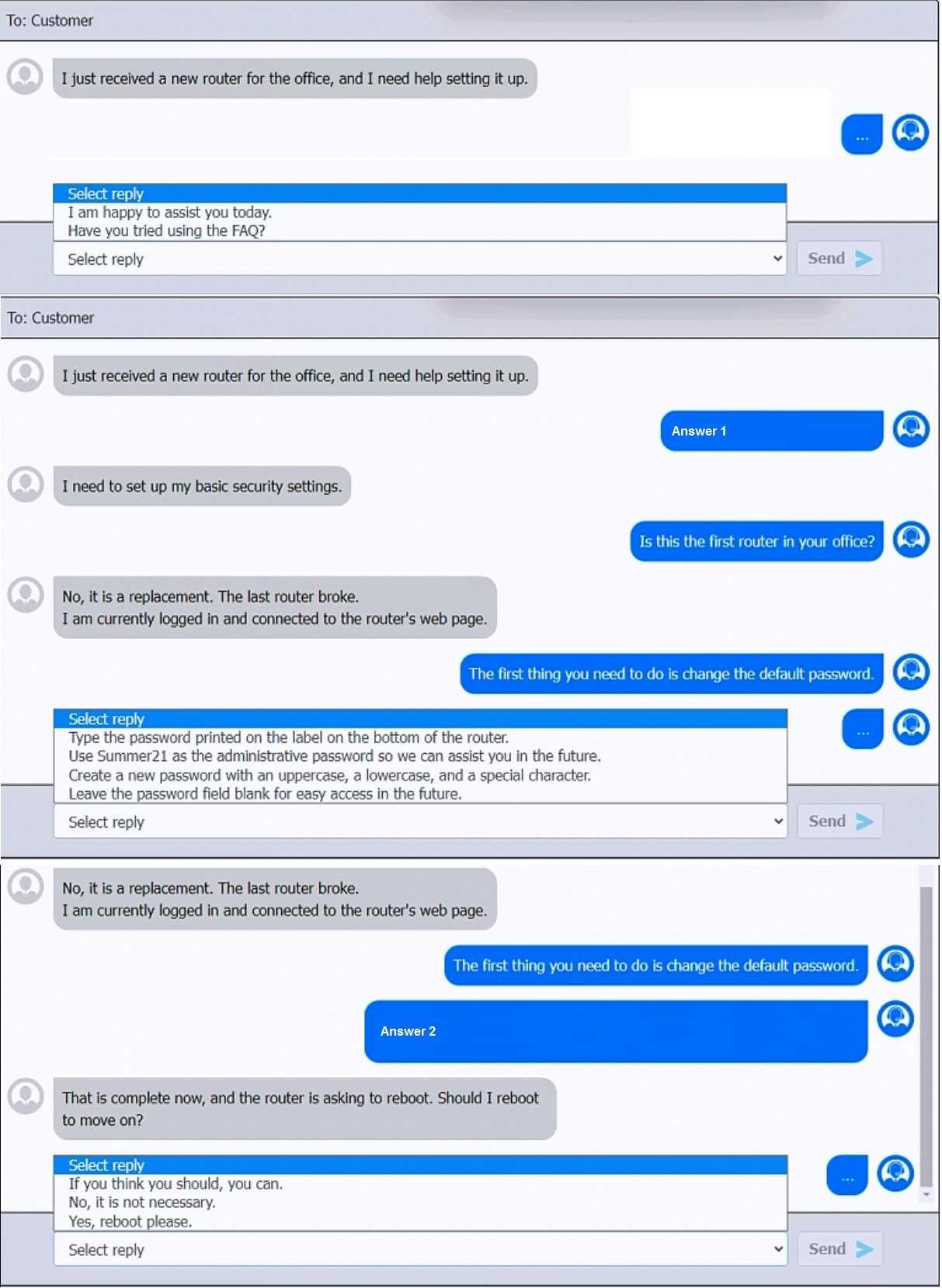
Answer:
See
explanation below.
Explanation:
First Chat Response:When the user mentions setting up a new router, the best initial response to
maintain a helpful and professional tone is:
>Select reply:"I am happy to assist you today."
Second Chat Response:When the user states that they need to set up basic security settings:
>Select reply:"Is this the first router in your office?"
Third Chat Response:After learning it's a replacement router and the user is logged into the router's
web page:
>Select reply:"The first thing you need to do is change the default password."
Fourth Chat Response:For the response about password settings:
>Select reply:"Create a new password with an uppercase, a lowercase, and a special character."
Fifth Chat Response:When the router prompts to reboot:
>Select reply:"Yes, reboot please."
Study Guide Reference: The CompTIA A+ Core 2 guide highlights the importance of changing default
credentials and using strong password policies, particularly in SOHO environments where routers are
often targeted.
Comments
Question 10
A help desk technician is setting up speech recognition on a Windows system. Which of the following
settings should the technician use?
- A. Time and Language
- B. Personalization
- C. System
- D. Ease of Access
Answer:
D
Explanation:
Comprehensive and Detailed Explanation From Exact Extract:
In Windows, accessibility tools such as speech recognition are found under the Ease of Access
settings. This section includes options for users who require assistive technologies, including screen
readers, magnifiers, and voice control interfaces like speech recognition. Setting up speech
recognition allows users to control the system and input text using voice commands.
A . Time and Language is for setting regional preferences and language packs.
B . Personalization adjusts themes, backgrounds, and colors.
C . System includes display, storage, notifications, and power settings, but not accessibility tools.
Reference:
CompTIA A+ 220-1102 Objective 1.3: Given a scenario, use appropriate Microsoft operating system
features and tools.
Study Guide Section: Accessibility tools and system configuration
===========================
Comments
Page 1 out of 15
Viewing questions 1-10 out of 157
page 2