Question 1
Which two features and functions are supported when using an MX appliance in Passthrough mode?
(Choose two.)
- A. intrusion prevention
- B. site-to-site VPN
- C. secondary uplinks
- D. DHCP
- E. high availability
Answer:
AB
Explanation:
These are the two features and functions that are supported when using an MX appliance in
Passthrough mode. According to the [MX Addressing and VLANs] article, Passthrough mode allows
the MX appliance to act as a layer 2 bridge, passing traffic between its LAN and WAN ports without
performing any routing or address translation. However, some features such as intrusion prevention
and site-to-site VPN are still available in this mode.
Reference: https://documentation.meraki.com/MX/Networks_and_Routing/
Passthrough_Mode_on_the_MX_Security_Appliance_and_Z-series_Teleworker_Gateway
Comments
Question 2
Refer to the exhibit.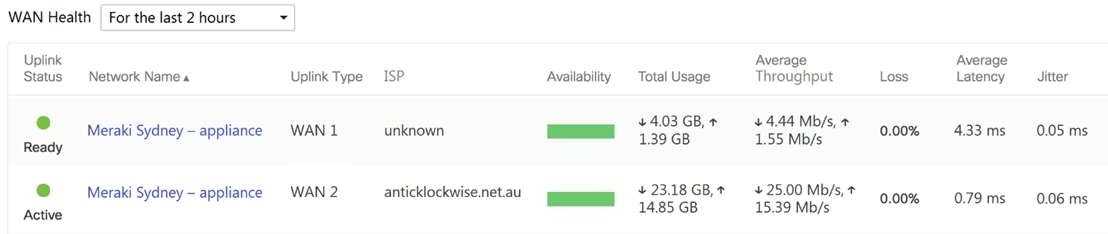
What are the Loss and Average Latency statistics based on?
- A. responses that the MX appliance receives on the connectivity-testing hostnames on the Insight > Web App Health page
- B. responses that the MX appliance receives on the connectivity-testing IP addresses on the Security & SD- WAN > Firewall page
- C. responses that the MX appliance receives on the connectivity-testing IP address that is configured on the Security & SD-WAN > SD-WAN & Traffic Shaping page
- D. responses that the MX appliance receives on the connectivity-testing IP addresses on the Help > Firewall info page
Answer:
C
Explanation:
Quote from referred documentation-Link: Loss and latency will be determined over the configured IP
address under Security and SD-WAN > SD-WAN and Traffic Shaping > Uplink Statistics. If no IP is
configured, these values will be measured against 8.8.8.8 by default. On the WAN Health page, all
the configured IP address statistics can be reviewed by changing the destination under the "Ping
Destination" column.
https://documentation.meraki.com/MI/MI_WAN_Health#:~:text=Current%20loss%20and%20latenc
y%20statistics,address%20is%20set%20to%208.8
.
Comments
Question 3
In an organization that uses the Co-Termination licensing model, which two operations enable
licenses to be applied? (Choose two.)
- A. Renew the Dashboard license.
- B. License a network.
- C. License more devices.
- D. Call Meraki support.
- E. Wait for the devices to auto-renew.
Answer:
A, C
Explanation:
There are two operations in which a license can be applied, License more devices or Renew my
dashboard license. This article will compare both operations and describe their behaviors.
https://documentation.meraki.com/General_Administration/Licensing/Meraki_Licensing_-
_License_More_Devices_vs_Renewal
These are the two operations that enable licenses to be applied in an organization that uses the Co-
Termination licensing model. According to the
Meraki Co-Termination Licensing Overview
, there are
two ways to add licenses to an organization:
Renewing the Dashboard license: This option allows you to extend the co-termination date of your
organization by purchasing new licenses for the same or longer term as your existing licenses. You
can renew your Dashboard license from the Organization > Configure > License Info page or from the
Meraki Dashboard homepage.
Licensing more devices: This option allows you to add new devices to your organization by
purchasing new licenses for them. You can license more devices from the Organization > Inventory
page or from the Meraki Dashboard homepage.
Comments
Question 4
Which two Systems Manager Live tools are available only for Apple Macs and Windows PCs and
cannot be used on iOS or Android mobile devices? (Choose two.)
- A. OS updates
- B. Send notification
- C. Selective wipe
- D. Screenshot
- E. Remote Desktop
Answer:
DE
Explanation:
https://documentation.meraki.com/SM/Monitoring_and_Reporting/MDM_Commands_in_Systems
_Manager
- Under Live Tools Selective Wiping is only for MacOS. Here we have Windows Laptop as
well
Reference: https://documentation.meraki.com/SM/Other_Topics/Systems_Manager_FAQ
Comments
Question 5
What are two ways peers interact with ports that Auto VPN uses? (Choose two.)
- A. For IPsec tunneling, peers use high UDP ports within the 32768 to 61000 range.
- B. Peers contact the VPN registry at UDP port 9350.
- C. For IPsec tunneling, peers use high TCP ports within the 32768 to 61000 range.
- D. Peers contact the VPN registry at TCP port 9350.
- E. For IPsec tunneling, peers use UDP ports 500 and 4500.
Answer:
AB
Explanation:
Ports used to contact the VPN registry:
- Source UDP port range 32768-61000
- Destination UDP port 9350 or UDP port 9351
Ports used for IPsec tunneling:
- Source UDP port range 32768-61000
- Destination UDP port range 32768-61000
https://documentation.meraki.com/MX/Site-to-site_VPN/Meraki_Auto_VPN_-
_Configuration_and_Troubleshooting
Reference: https://documentation.meraki.com/MX/Site-to-site_VPN/Meraki_Auto_VPN_-
_Configuration_and_Troubleshooting
Comments
Question 6
What occurs when a configuration change is made to an MX network that is bound to a configuration
template?
- A. The configuration change in the bound network is combined with the template configuration inside the template.
- B. The more restrictive configuration is preferred.
- C. The configuration change in the bound network overrides the template configuration.
- D. The template configuration overrides the configuration change in the bound network.
Answer:
C
Explanation:
https://documentation.meraki.com/Architectures_and_Best_Practices/Cisco_Meraki_Best_Practice_
Design/Best_Practice_Design_-_MX_Security_and_SD-
WAN/MX_Templates_Best_Practices#:~:text=policy%2C%20choose%20Save-
,Local%20Overrides,will%20override%20the%20template%20configuration
.
Comments
Question 7
One thousand concurrent users stream video to their laptops. A 30/70 split between 2.4 GHz and 5
GHz is used.
Based on client count, how many APs (rounded to the nearest whole number) are needed?
- A. 26
- B. 28
- C. 30
- D. 32
Answer:
B
Explanation:
https://documentation.meraki.com/Architectures_and_Best_Practices/Cisco_Meraki_Best_Practice_
Design/Best_Practice_Design_-_MR_Wireless/High_Density_Wi-Fi_Deployments
Comments
Question 8
Refer to the exhibit.
For an AP that displays this alert, which network access control method must be in use?
- A. preshared key
- B. WPA2-enterprise with my RADIUS server
- C. splash page with my RADIUS server
- D. MAC-based access control with RADIUS server
Answer:
B
Explanation:
This is because the alert mentions 802.1X failure, which is a network access control method that is
used with WPA2-enterprise and RADIUS servers1
.
This question is related to the topic of Wireless Access Points Quick Start in the Cisco Meraki
documentation. You can find more information about this topic in the
Wireless Access Points Quick
Start
article or the
Using the Cisco Meraki Device Local Status Page
page.
Comments
Question 9
Which Meraki Dashboard menu section is accessed to enable Sentry enrollment on an SSID?
- A. Wireless > Configure > Access Control
- B. Wireless > Configure > Splash page
- C. Wireless > Configure > Firewall & Traffic Shaping
- D. Wireless > Configure > SSIDs
Answer:
A
Explanation:
SM Sentry enrollment can be enabled on any MR network via the Splash page section of the Wireless
> Configure > Access control page.
https://documentation.meraki.com/MR/MR_Splash_Page/Systems_Manager_Sentry_Enrollment
Comments
Question 10
DRAG DROP
Drag and drop the settings from the left into the boxes on the right to indicate if the setting will be
cloned or not cloned using the Cisco Meraki MS switch cloning feature.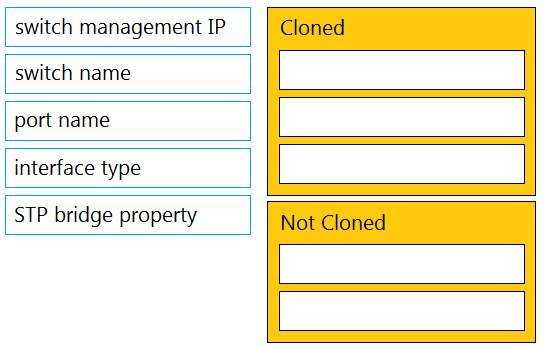
Answer:
None
Explanation:
The settings that will be cloned using the Cisco Meraki MS switch cloning feature are:
port name
interface type
STP bridge property
The settings that will not be cloned using the Cisco Meraki MS switch cloning feature are:
switch management IP
switch name
Comments
Page 1 out of 7
Viewing questions 1-10 out of 72
page 2