Question 1
What are two prerequisites for implementing undesirable URL protection in Cisco ESA? (Choose
two.)
- A. Enable outbreak filters.
- B. Enable email relay.
- C. Enable antispam scanning.
- D. Enable port bouncing.
- E. Enable antivirus scanning.
Answer:
AC
Explanation:
Undesirable URL protection is a feature that allows Cisco ESA to detect and block messages that
contain URLs that lead to malicious or unwanted websites, such as phishing, malware, or adult
content sites. To enable this feature, outbreak filters and antispam scanning must be enabled on
Cisco ESA.
Reference:
User Guide for AsyncOS 15.0 for Cisco Secure Email Gateway
, page 6-17.
Reference:
https://www.cisco.com/c/en/us/td/docs/security/esa/esa12-0/user_guide/b_ESA_Admin_Guide_12_0/b_ESA_Admin_Guide_chapter_01111.html
Comments
Question 2
DRAG DROP
Drag and drop the steps to configure Cisco ESA to use SPF/SIDF verification from the left into the
correct order on the right.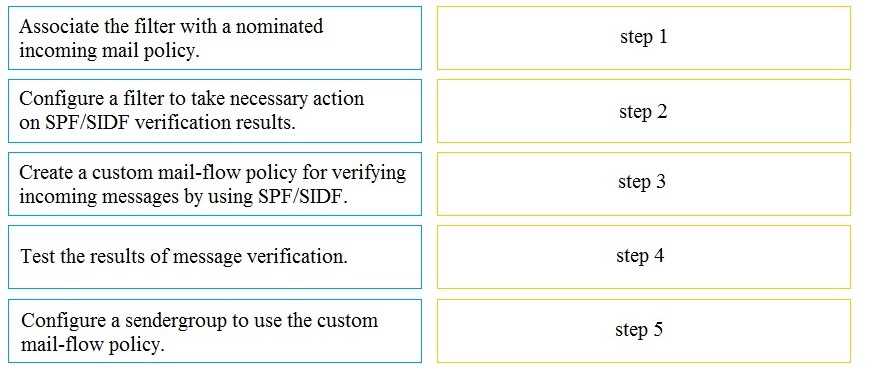
Answer:
None
Explanation: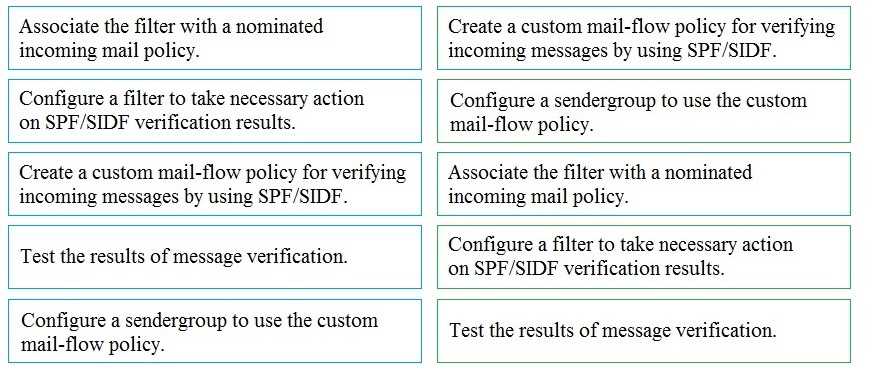
Comments
Question 3
Which suboption must be selected when LDAP is configured for Spam Quarantine End-User
Authentication?
- A. Designate as the active query
- B. Update Frequency
- C. Server Priority
- D. Entity ID
Answer:
A
Explanation:
According to the User Guide1
, the steps to configure End-User Access to the Spam Quarantine via
LDAP are as follows:
On the ESA, choose System Administration > LDAP > LDAP Server Profile page.
Click Add LDAP Server Profile.
Enter a name for the profile and click Submit.
Click Add Query.
Enter a name for the query and click Submit.
Configure the query settings, such as server address, port number, base DN, scope, filter, and
attributes.
Check the Spam Quarantine End-User Authentication Query check box. This is the suboption that
enables LDAP authentication for end users who access the spam quarantine.
Check the Designate as the active query check box. This is the suboption that specifies which query
to use for end-user authentication. Only one query can be active at a time.
Click Submit and commit changes.
On the ESA, choose Monitor > Spam Quarantine > End-User Quarantine Access.
Check the Enable End-User Quarantine Access check box.
Choose LDAP from the End-User Authentication drop-down list.
Select the LDAP profile and query that you created earlier from the drop-down lists.
Click Submit and commit changes.
Reference:
https://www.cisco.com/c/en/us/td/docs/security/security_management/sma/sma11-5/user_guide/b_SMA_Admin_Guide_11_5/b_SMA_Admin_Guide_11_5_chapter_01010.html
Comments
Question 4
Which action must be taken before a custom quarantine that is being used can be deleted?
- A. Delete the quarantine that is assigned to a filter.
- B. Delete the quarantine that is not assigned to a filter.
- C. Delete only the unused quarantine.
- D. Remove the quarantine from the message action of a filter.
Answer:
D
Explanation:
Before a custom quarantine that is being used can be deleted, it must be removed from the message
action of any filter that is using it on Cisco ESA. Otherwise, an error message will appear stating that
the quarantine cannot be deleted because it is in use.
Reference:
User Guide for AsyncOS 15.0 for Cisco Secure Email Gateway
, page 10-5.
Reference:
https://www.cisco.com/c/en/us/td/docs/security/esa/esa12-0/user_guide/b_ESA_Admin_Guide_12_0/b_ESA_Admin_Guide_12_0_chapter_011111.html
Comments
Question 5
DRAG DROP
An Encryption Profile has been set up on the Cisco ESA.
Drag and drop the steps from the left for creating an outgoing content filter to encrypt emails that
contains the subject "Secure:" into the correct order on the right.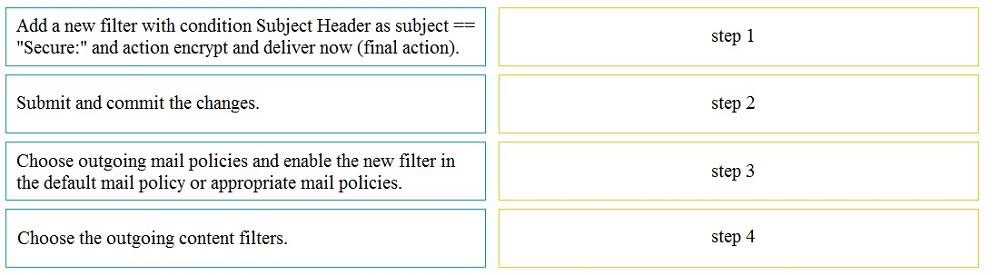
Answer:
None
Explanation: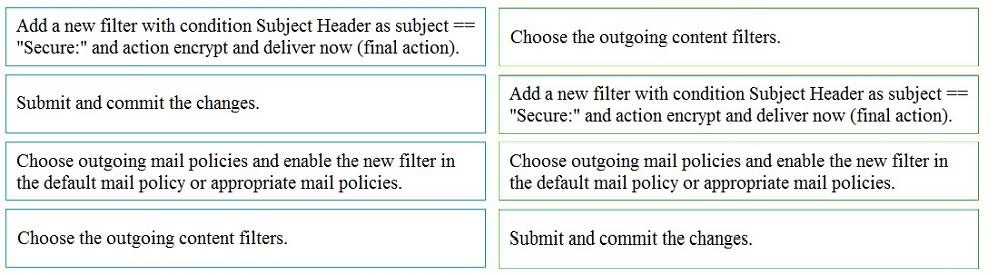
Reference:
https://community.cisco.com/t5/email-security/keyword-in-subject-line-to-encrypt-message/td-
p/2441383
Comments
Question 6
What is the maximum message size that can be configured for encryption on the Cisco ESA?
- A. 20 MB
- B. 25 MB
- C. 15 MB
- D. 30 MB
Answer:
B
Explanation:
The maximum message size that can be configured for encryption on the Cisco ESA is 25 MB. This is
the default value for the Maximum Message Size for Encryption setting in the Encryption Profile.
Messages that exceed this size will not be encrypted and will be delivered as normal.
Reference:
User Guide for AsyncOS 15.0 for Cisco Secure Email Gateway
, page 12-6.
Reference: https://www.cisco.com/c/en/us/support/docs/security/email-security-appliance/117972-technote-esa-00.html
Comments
Question 7
An analyst creates a new content dictionary to use with Forged Email Detection.
Which entry will be added into the dictionary?
- A. mycompany.com
- B. Alpha Beta
- C. ^Alpha\ Beta$
- D. [email protected]
Answer:
B
Explanation:
A content dictionary is a list of words or phrases that can be used to match against message content
in Cisco ESA. For Forged Email Detection, a content dictionary can be used to specify the display
names of internal senders that should not appear in the From header of external messages. The
display name is usually the name of the sender as it appears in the email client, such as Alpha Beta.
Therefore, the entry that will be added into the dictionary for this purpose is Alpha Beta.
Reference:
User Guide for AsyncOS 15.0 for Cisco Secure Email Gateway
, page 9-8.
Reference: https://www.cisco.com/c/en/us/products/collateral/security/email-security-appliance/whitepaper_C11-737596.html
Comments
Question 8
Which process is skipped when an email is received from safedomain.com, which is on the safelist?
- A. message filter
- B. antivirus scanning
- C. outbreak filter
- D. antispam scanning
Answer:
D
Explanation:
The safelist is a list of email addresses or domains that are considered legitimate and trustworthy by
Cisco ESA. When an email is received from a sender on the safelist, Cisco ESA skips antispam
scanning for that message and delivers it to the recipient without any spam filtering.
Reference:
User Guide for AsyncOS 15.0 for Cisco Secure Email Gateway
, page 6-13.
Comments
Question 9
Which two query types are available when an LDAP profile is configured? (Choose two.)
- A. proxy consolidation
- B. user
- C. recursive
- D. group
- E. routing
Answer:
BE
Explanation:
User and routing are two query types that are available when an LDAP profile is configured on Cisco
ESA. User queries are used to validate end-user credentials, such as for Spam Quarantine End-User
Authentication or SMTP Authentication. Routing queries are used to determine the destination mail
server for a recipient, such as for Mail Flow Policies or Delivery Methods.
Reference:
User Guide for AsyncOS 15.0 for Cisco Secure Email Gateway
, page 10-7.
Comments
Question 10
Which action is a valid fallback when a client certificate is unavailable during SMTP authentication on
Cisco ESA?
- A. LDAP Query
- B. SMTP AUTH
- C. SMTP TLS
- D. LDAP BIND
Answer:
B
Explanation:
SMTP AUTH is a valid fallback action when a client certificate is unavailable during SMTP
authentication on Cisco ESA. SMTP AUTH is a method of authenticating SMTP clients using username
and password credentials, which can be verified by an LDAP server or a local database on Cisco ESA.
Reference:
User Guide for AsyncOS 15.0 for Cisco Secure Email Gateway
, page 5-10.
Reference:
https://www.cisco.com/c/en/us/td/docs/security/esa/esa12-0/user_guide/b_ESA_Admin_Guide_12_0/b_ESA_Admin_Guide_12_0_chapter_011011.html
Comments
Page 1 out of 14
Viewing questions 1-10 out of 147
page 2