Question 1
What is the role of service providers to establish private connectivity between on-premises networks
and Google Cloud resources?
- A. facilitate direct, dedicated network connections through Google Cloud Interconnect
- B. enable intelligent routing and dynamic path selection using software-defined networking
- C. provide end-to-end encryption for data transmission using native IPsec
- D. accelerate content delivery through integration with Google Cloud CDN
Answer:
A
Explanation:
The role of service providers to establish private connectivity between on-premises networks and
Google Cloud resources is to facilitate direct, dedicated network connections through Google Cloud
Interconnect. Google Cloud Interconnect is a service that allows customers to connect their on-
premises networks to Google Cloud through a service provider partner. This provides low latency,
high bandwidth, and secure connectivity to Google Cloud services, such as Google Compute Engine,
Google Cloud Storage, and Google BigQuery. Google Cloud Interconnect also supports hybrid cloud
scenarios, such as extending on-premises networks to Google Cloud regions, or connecting multiple
Google Cloud regions together. Google Cloud Interconnect offers two types of connections:
Dedicated Interconnect and Partner Interconnect. Dedicated Interconnect provides physical
connections between the customer’s network and Google’s network at a Google Cloud Interconnect
location. Partner Interconnect provides virtual connections between the customer’s network and
Google’s network through a supported service provider partner. Both types of connections use VLAN
attachments to establish private connectivity to Google Cloud Virtual Private Cloud (VPC)
networks. Reference:
Designing and Implementing Cloud Connectivity (ENCC) v1.0
[Google Cloud Interconnect Overview]
[Google Cloud Interconnect Documentation]
Comments
Question 2
Refer to the exhibit.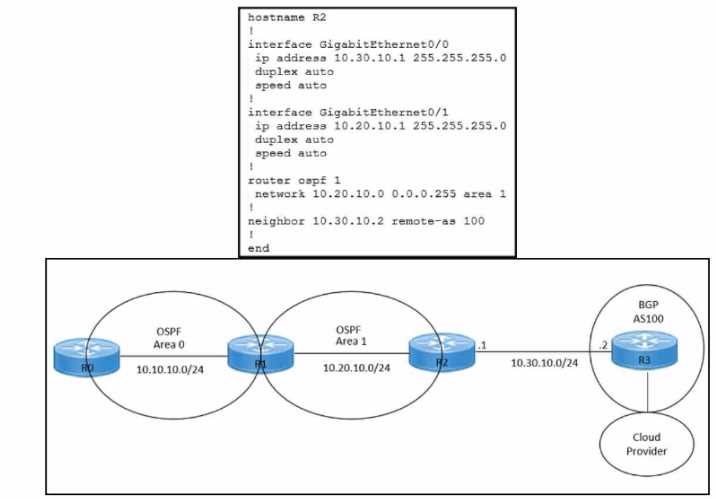
Refer to the exhibits. An engineer must redistribute IBGP routes into OSPF to connect an on-premises
network to a cloud provider. Which command must be configured on router R2?
- A. redistribute ospf 1
- B. redistribute bgp 100 ospf 1
- C. redistribute bgp 100 subnets
- D. bgp redistrlbute-lnternal
Answer:
B
Explanation:
This command redistributes the routes learned from BGP AS100 into OSPF Area 1, which allows
router R2 to advertise those routes to router R1 and connect the on-premises network to the cloud
provider.
The other options are incorrect because they either redistribute the wrong routes or use
the wrong syntax5
.
I hope this helps you understand the question and the answer. If you have any other questions or
requests, please let me know. I am always happy to help.
Reference: 1
:
Learning Plan: Designing and Implementing Cloud Connectivity v1.0 (ENCC 300-440)
Exam Prep 2
:
Designing and Implementing Cloud Connectivity (ENCC) v1.0 3
:
Cisco Multiprotocol
Label Switching 4
:
Exploring Cisco Cloud OnRamp for Colocation 5
:
ENCC: Configuring IPsec VPN from
Cisco IOS XE to AWS
: [Deploying Cisco IOS VTI-Based Point-to-Point IPsec VPNs]
Comments
Question 3
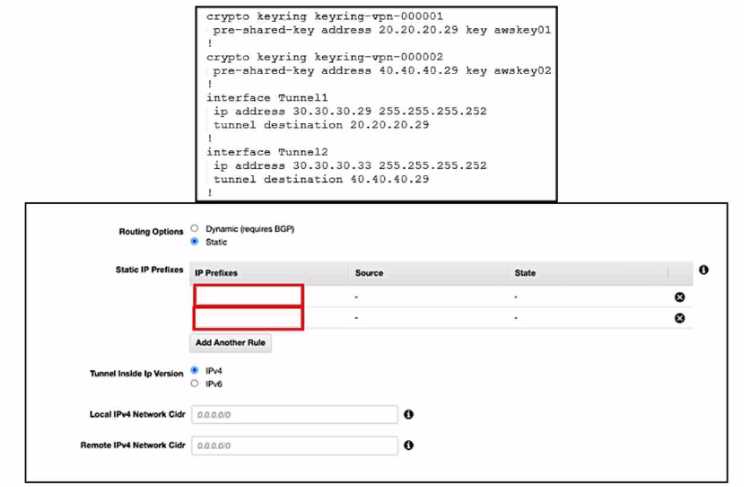
Refer to the exhibits. An engineer needs to configure a site-to-site IPsec VPN connection between an
on premises Cisco IOS XE router and Amazon Web Services (AWS). Which two IP prefixes should be
used to configure the AWS routing options? (Choose two.)
- A. 30.30.30.0/30
- B. 20.20.20.0/24
- C. 30.30.30.0/24
- D. 50.50.50.0/30
- E. 40.40.40.0/24
Answer:
A, E
Explanation:
The correct answer is A and E because they are the IP prefixes that match the tunnel interfaces on
the Cisco IOS XE router. The AWS routing options should include the local and remote IP prefixes that
are used for the IPsec tunnel endpoints. The other options are either the public IP addresses of the
routers or
the
LAN
subnets that
are
not relevant
for the
IPsec
tunnel
configuration. Reference :=
Designing and Implementing Cloud Connectivity (ENCC) v1.0
,
Configure
IOS-XE Site-to-Site VPN Connection to Amazon Web Services
,
Site-to-Site VPN with Amazon Web
Services
Comments
Question 4
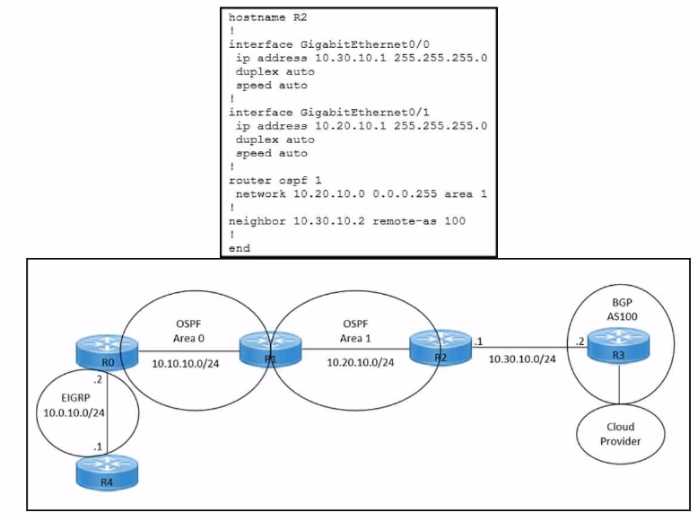
Refer to the exhibits. An engineer must redistribute OSPF internal routes into BGP to connect an on-
premises network to a cloud provider without introducing extra routes. Which two commands must
be configured on router R2? (Choose two.)
- A. router ospf 1
- B. router bgp 100
- C. redistribute ospf 1
- D. redistribute bgp 100
- E. redistribute ospf 1 match internal external
Answer:
B, E
Explanation:
To redistribute OSPF internal routes into BGP, the engineer needs to configure two commands on
router R2. The first command is router bgp 100, which enables BGP routing process and specifies the
autonomous system number of 100. The second command is redistribute ospf 1 match internal
external, which redistributes the routes from OSPF process 1 into BGP, and matches both internal
and external OSPF routes. This way, the engineer can avoid introducing extra routes that are not part
of OSPF process 1, such as the default route or the connected routes. Reference: =
Designing and
Implementing Cloud Connectivity (ENCC) v1.0
, [ENCC: Configuring IPsec VPN from Cisco IOS XE to
AWS], [Deploying Cisco IOS VTI-Based Point-to-Point IPsec VPNs]
Comments
Question 5
An engineer must configure an IPsec tunnel to the cloud VPN gateway. Which Two actions send traffic
into the tunnel? (Choose two.)
- A. Configure access lists that match the interesting user traffic.
- B. Configure a static route.
- C. Configure a local policy in Cisco vManage.
- D. Configure an IPsec profile and match the remote peer IP address.
- E. Configure policy-based routing.
Answer:
A E
Explanation:
To send traffic into an IPsec tunnel to the cloud VPN gateway, the engineer must configure two
actions:
Configure access lists that match the interesting user traffic. This is the traffic that needs to be
encrypted and sent over the IPsec tunnel. The access lists are applied to the crypto map that defines
the IPsec parameters for the tunnel.
Configure policy-based routing (PBR). This is a technique that allows the engineer to override the
routing table and forward packets based on a defined policy. PBR can be used to send specific traffic
to the IPsec tunnel interface, regardless of the destination IP address. This is useful when the cloud
VPN gateway has a dynamic IP address or when multiple cloud VPN gateways are available for load
balancing or redundancy. Reference:
Designing and Implementing Cloud Connectivity (ENCC) v1.0
, Module 3: Implementing Cloud
Connectivity, Lesson 3: Implementing IPsec VPNs to the Cloud, Topic: Configuring IPsec VPNs on
Cisco IOS XE Routers
Security for VPNs with IPsec Configuration Guide, Cisco IOS XE
, Chapter: Configuring IPsec VPNs,
Topic: Configuring Crypto Maps
[Cisco IOS XE Gibraltar 16.12.x Feature Guide], Chapter: Policy-Based Routing, Topic: Policy-Based
Routing Overview
Comments
Question 6
Refer to the exhibit.
Which Cisco lKEv2 configuration brings up the IPsec tunnel between the remote office router and the
AWS virtual private gateway?
A)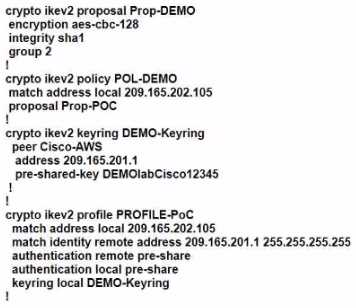
B)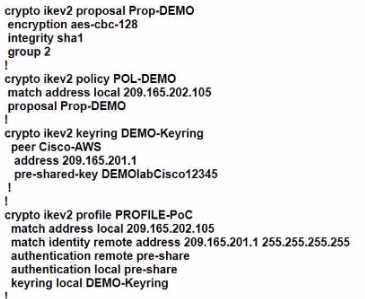
C)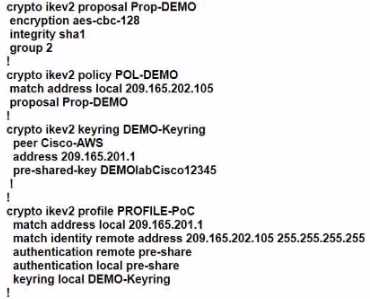
- A. Option A
- B. Option B
- C. Option C
Answer:
C
Explanation:
Option C is the correct answer because it configures the IKEv2 profile with the correct match
identity, authentication, and keyring parameters. It also configures the IPsec profile with the correct
transform set and lifetime parameters. Option A is incorrect because it does not specify the match
identity remote address in the IKEv2 profile, which is required to match the AWS virtual private
gateway IP address. Option B is incorrect because it does not specify the authentication pre-share in
the IKEv2 profile, which is required to authenticate the IKEv2 peers using a pre-shared key.
Option C
also matches the configuration example provided by AWS1 and Cisco2
for setting up an IKEv2 IPsec
site-to-site VPN between a Cisco IOS-XE router and an AWS virtual private gateway. Reference :=
: AWS VPN Configuration Guide for Cisco IOS-XE
: Configure IOS-XE Site-to-Site VPN Connection to Amazon Web Services
Comments
Question 7
DRAG DROP
An engineer must use Cisco vManage to configure an SLA class to specify the maximum packet loss,
packet latency, and jitter allowed on a connection. Drag and drop the steps from the left onto the
order on the right to complete the configuration.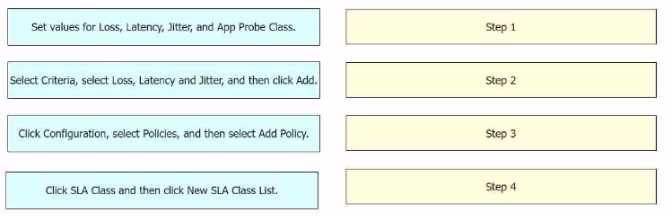
Answer:
None
Explanation: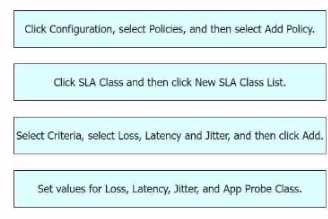
The process of configuring an SLA class to specify the maximum packet loss, packet latency, and jitter
allowed on a connection using Cisco vManage involves several steps12
.
Click Configuration, select Policies, and then select Add Policy: This is the first step where you
navigate to the Policies section in the Configuration menu of Cisco vManage1
.
Click SLA Class and then click New SLA Class List: In this step, you create a new SLA Class List1
.
Select Criteria, select Loss, Latency and Jitter, and then click Add: After setting up the SLA Class List,
you select the criteria for the SLA class.
In this case, the criteria are Loss, Latency, and Jitter1
.
Set values for Loss, Latency, Jitter, and App Probe Class: Finally, you set the values for Loss, Latency,
Jitter, and App Probe Class1
.
Reference :=
Information About Application-Aware Routing - Cisco
Policies Configuration Guide for vEdge Routers, Cisco SD-WAN Release 20
Comments
Question 8
DRAG DROP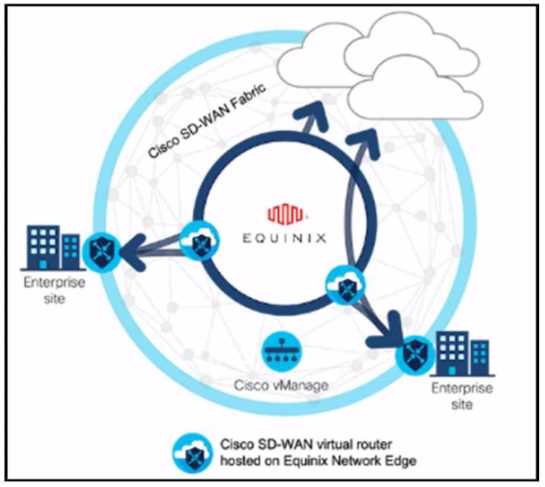
Refer to the exhibit. These configurations are complete:
• Create an account in the Equinix portal.
• Associate the Equinix account with Cisco vManage.
• Configure the global settings for Interconnect Gateways.
Drag the prerequisite steps from the left onto the order on the right to configure a Cisco SD-WAN
Cloud Interconnect with Equinix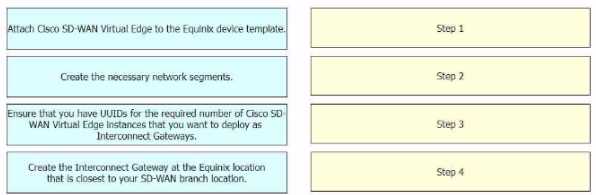
Answer:
None
Explanation: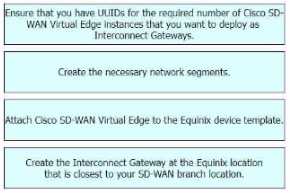
The process of configuring a Cisco SD-WAN Cloud Interconnect with Equinix involves several steps.
Ensure that you have UUIDs for the required number of Cisco SD WAN Virtual Edge instances that
you want to deploy as Interconnect Gateways: This is the first step where you ensure that you have
the necessary UUIDs for the Cisco SD-WAN Virtual Edge instances that you want to deploy.
Create the necessary network segments: After ensuring the availability of UUIDs, you create the
necessary network segments.
Attach Cisco SD-WAN Virtual Edge to the Equinix device template: After setting up the network
segments, you attach the Cisco SD-WAN Virtual Edge to the Equinix device template.
Create the Interconnect Gateway at the Equinix location that is closest to your SD-WAN branch
location: Finally, you create the Interconnect Gateway at the Equinix location that is closest to your
SD-WAN branch location.
Reference :=
[Cisco SD-WAN Cloud Interconnect with Equinix]
[Cisco SD-WAN Cloud OnRamp for CoLocation Deployment Guide]
Comments
Question 9
Which architecture model establishes internet-based connectivity between on-premises networks
and AWS cloud resources?
- A. That establishes an iPsec VPN tunnel with Internet Key Exchange (IKE) for secure key negotiation and encrypted data transmission
- B. That relies on AWS Elastic Load Balancing (ELB) for traffic distribution and uses SSL/TLS encryption for secure data transmission.
- C. That employs AWS Direct Connect for a dedicated network connection and uses private IP addresses tor secure communication.
- D. That uses Amazon CloudFront for caching and distributing content globally and uses HTTPS for secure data transfer.
Answer:
A
Explanation:
The architecture model that establishes internet-based connectivity between on-premises networks
and AWS cloud resources is the one that establishes an iPsec VPN tunnel with Internet Key Exchange
(IKE) for secure key negotiation and encrypted data transmission.
This model is also known as
the VPN CloudHub model12
.
It allows multiple remote sites to connect to the same virtual private
gateway in AWS, creating a hub-and-spoke topology1
.
The VPN CloudHub model provides the
following benefits12
:
It enables secure communication between remote sites and AWS over the public internet, using
encryption and authentication protocols such as IPsec and IKE.
It supports dynamic routing protocols such as BGP, which can automatically adjust the routing tables
based on the availability and performance of the VPN tunnels.
It allows for redundancy and load balancing across multiple VPN tunnels, increasing the reliability
and throughput of the connectivity.
It simplifies the management and configuration of the VPN connections, as each remote site only
needs to establish one VPN tunnel to the virtual private gateway in AWS, rather than multiple
tunnels to different VPCs or regions.
The other options are not correct because they do not establish internet-based connectivity between
on-premises networks and AWS cloud resources. Option B relies on AWS Elastic Load Balancing (ELB)
for traffic distribution and uses SSL/TLS encryption for secure data transmission.
However, ELB is a
service that distributes incoming traffic across multiple targets within a VPC, not across different
networks3
. Option C employs AWS Direct Connect for a dedicated network connection and uses
private IP addresses for secure communication.
However, AWS Direct Connect is a service that
establishes a private connection between on-premises networks and AWS, bypassing the public
internet4
. Option D uses Amazon CloudFront for caching and distributing content globally and uses
HTTPS for secure data transfer.
However, Amazon CloudFront is a service that delivers static and
dynamic web content to end users, not to on-premises networks5
.
Reference:
: Designing and Implementing Cloud Connectivity (ENCC, Track 1 of 5)
: Cisco ASA Site-to-Site VPN
: What Is Elastic Load Balancing?
: What is AWS Direct Connect?
Comments
Question 10
DRAG DROP
An engineer must configure cloud connectivity with Cisco Umbrella Secure Internet Gateway (SIG) in
active/backup mode. The engineer already configured the SIG Credentials and SIG Feature
Templates. Drag and drop the steps from the left onto the order on the right to complete the
configuration.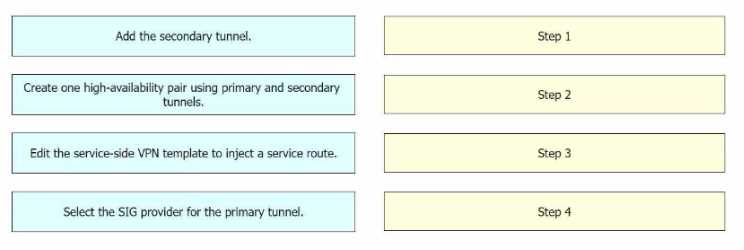
Answer:
None
Explanation:
The configuration of cloud connectivity with Cisco Umbrella Secure Internet Gateway (SIG) in
active/backup mode involves several steps. After configuring the SIG Credentials and SIG Feature
Templates, the engineer must:
Select the SIG provider for the primary tunnel: This is the first step in setting up the active/backup
mode. The primary tunnel is the main connection path for the cloud connectivity.
Add the secondary tunnel: The secondary tunnel serves as a backup in case the primary tunnel fails.
It ensures that the cloud connectivity remains uninterrupted even if there are issues with the
primary tunnel.
Create one high-availability pair using primary and secondary tunnels: This step involves pairing the
primary and secondary tunnels to create a high-availability pair. This ensures that the cloud
connectivity will switch over to the secondary tunnel seamlessly if the primary tunnel fails.
Edit the service-side VPN template to inject a service route: The final step involves modifying the
VPN template on the service side to include a service route. This ensures that the traffic is correctly
routed through the primary or secondary tunnel as needed.
Reference :=
Designing and Implementing Cloud Connectivity (ENCC) v1.01
Learning Plan: Designing and Implementing Cloud Connectivity v1.0 (ENCC 300-440) Exam Prep2
Configure Umbrella SIG Tunnels for Active/Backup or Active/Active Scenarios - Cisco3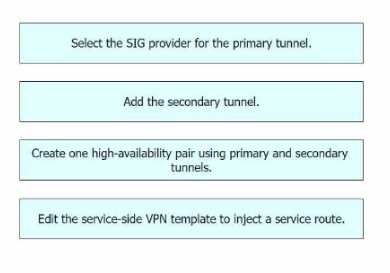
Comments
Page 1 out of 3
Viewing questions 1-10 out of 38
page 2