Question 1
HOTSPOT
A customer has the following issue:
I cannot access files from my external disk drive on my Windows 10 laptop. The disk drive is not
listed in Windows Explorer. I can access the files just fine on my other laptop that has the same
operating system and drivers installed.
You need to assist the customer in solving this problem.
For each action select Yes if it might solve the problem and No if it will not solve the problem.
Note: You will receive partial credit for each correct selection.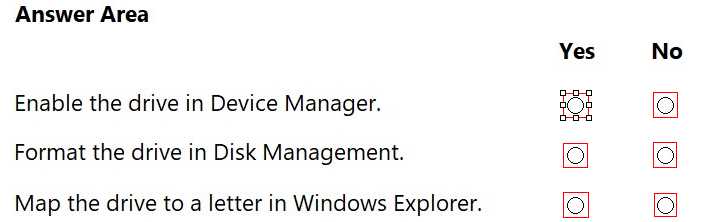
Answer:
None
Explanation: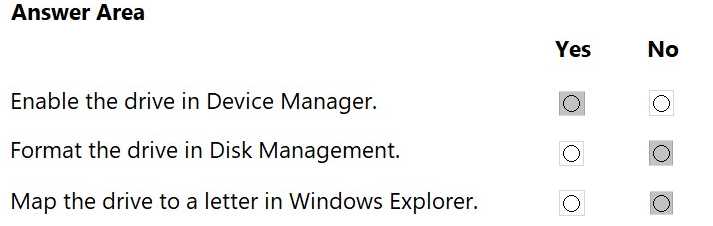
Comments
Question 2
DRAG DROP
A customer purchased a new motherboard for a desktop computer. The customer needs help
installing the correct components. The customer sends you a picture of the motherboard, which is
shown in the answer area.
You need to assist the customer in identifying the installation location of three components.
To answer, move the appropriate components from the list on the left to the correct locations on the
right. You may use each component once more than once, or not at all.
Note: You will receive partial credit for each correct response.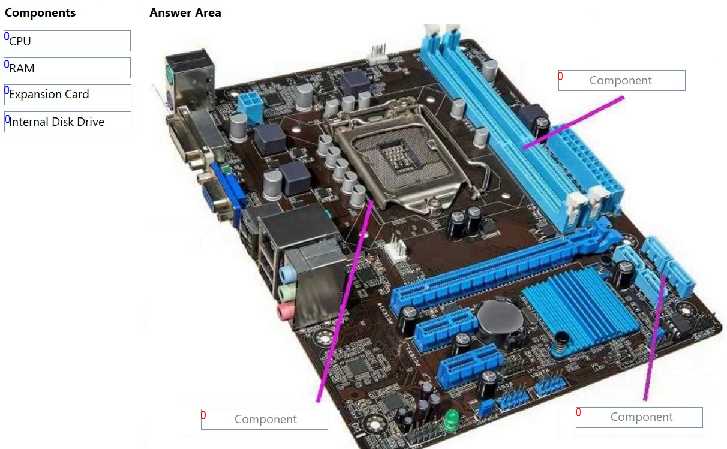
Answer:
None
Explanation: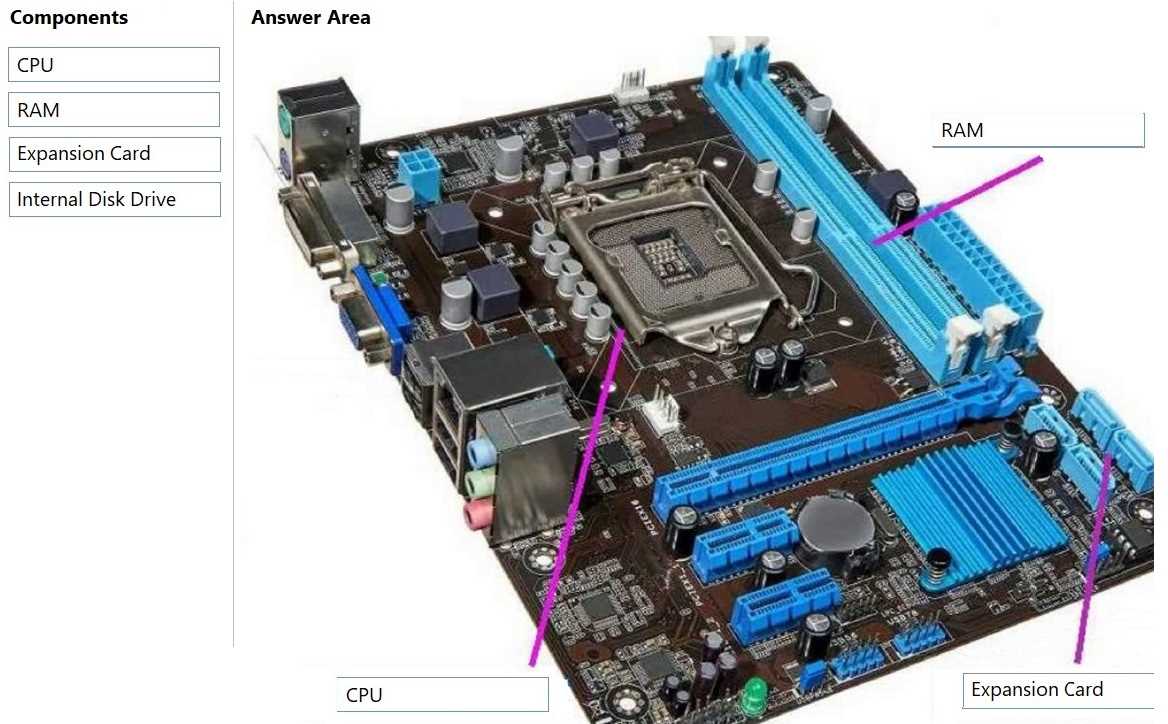
Comments
Question 3
HOTSPOT
A customer cannot scan documents and pictures to a Windows laptop. When you open Device
Manager, you see the 600dpi scanner listed under Other devices, as shown in the image.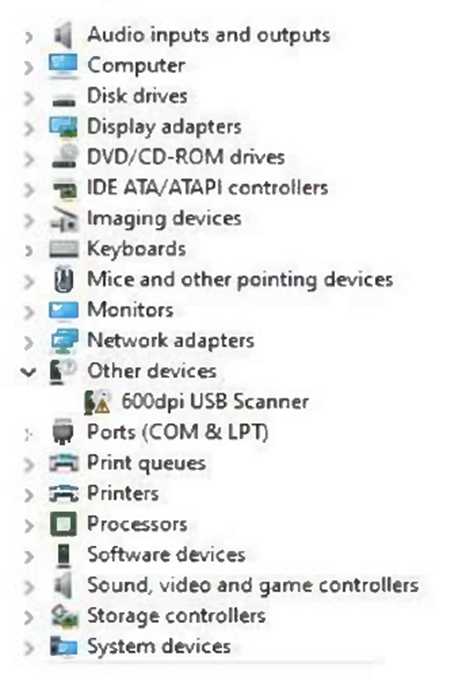
Evaluate the image and answer the questions by selecting the correct option from each drop-down
list.
Note: You will receive partial credit for each correct selection.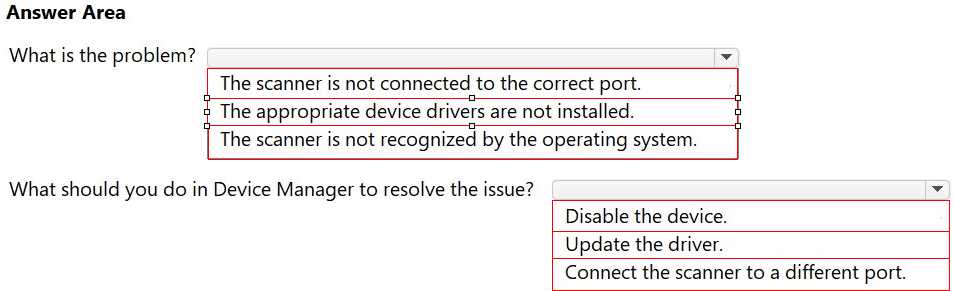
Answer:
None
Explanation: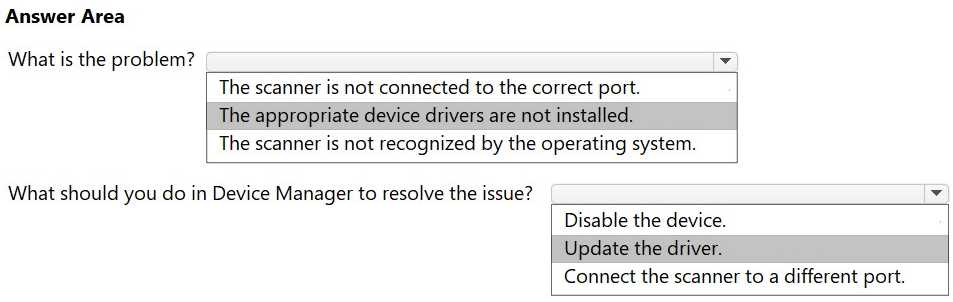
Comments
Question 4
You receive a call from a user stating that their webcam stopped working. There have been no
operating system updates since it was last working.
Which action should you tell the user to perform first?
- A. Check cables for connectivity.
- B. Check the screen resolution of webcam.
- C. Update the webcam driver software.
- D. Rollback the webcam driver software.
Answer:
A
Explanation:
The first step in hardware troubleshooting is to check physical connections. Even if no software
changes occurred, a loose or disconnected cable can cause devices like webcams to stop working.
Software-based steps like updating or rolling back drivers come afterward if the physical connection
is intact.
Comments
Question 5
HOTSPOT
You are adding a new solid state drive (SSD) to a customer's desktop computer.
You need to follow safety procedures to prevent electrical shock and electrostatic discharge.
Complete the sentences by selecting the correct option from each drop-down list.
Note: You will receive partial credit for each correct selection.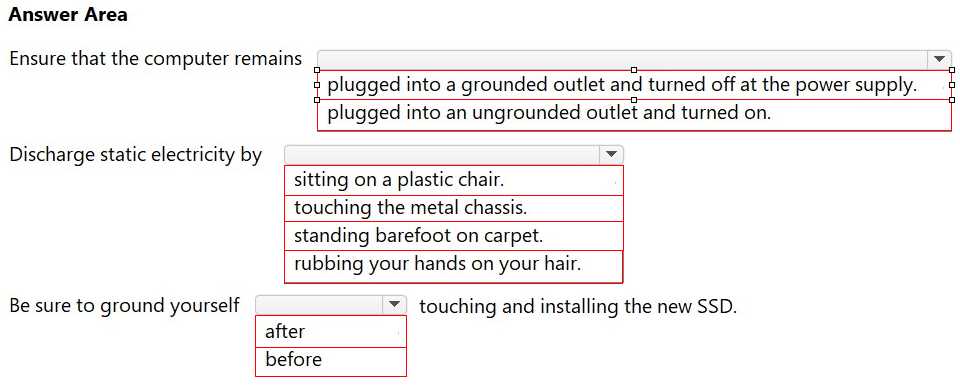
Answer:
None
Explanation: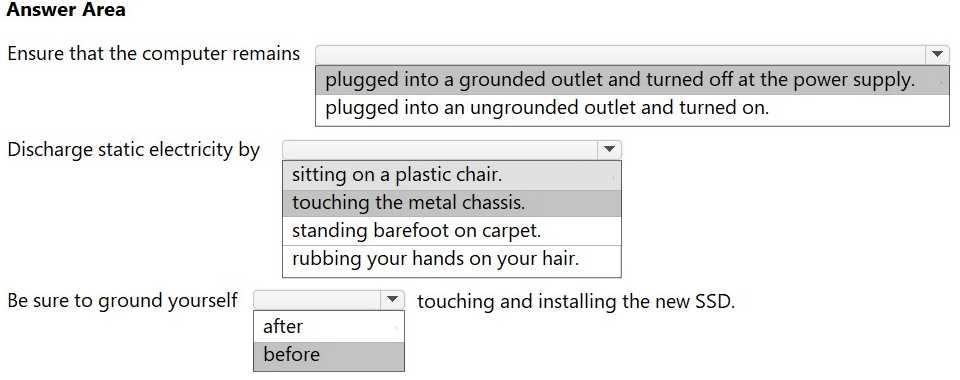
Comments
Question 6
Which action must a service desk technician take to resolve a printer driver failure on a desktop PC?)
- A. Disconnect and reconnect from the power source.
- B. Boot the computer in safe mode.
- C. Update the device driver software.
- D. Place the desktop in locked/sleep mode.
Answer:
C
Explanation:
A printer driver failure indicates the software component that enables the OS to communicate with
the printer is missing or corrupt. Updating (or reinstalling) the device driver software restores proper
communication and resolves the issue.
Comments
Question 7
A help desk technician is assisting a customer with setting up access from their Windows computer
to a shared company folder.
What should the technician do?
- A. Choose a drive letter and specify the path to the shared folder.
- B. Disable the antivirus software temporarily.
- C. Modify the user's account to have administrative privileges.
- D. Change the network profile to public.
Answer:
A
Explanation:
To access a shared folder from a Windows computer, the technician should map a network drive by
choosing a drive letter and specifying the path (e.g., \\ServerName\SharedFolder). This enables easy
and persistent access to the shared folder.
Comments
Question 8
A network technician suspects that a client's Windows computer is not correctly connecting to the
office network.
To diagnose the issue, the technician runs the ipconfig command on the client's computer.
Which two pieces of information can the technician expect to obtain by running this command?
(Choose two.)
- A. The encryption type used by the Wi-Fi network.
- B. The IP address assigned to the computer.
- C. The wireless network SSID.
- D. The firewall settings currently applied.
- E. The default gateway address configured on the computer.
Answer:
B, E
Explanation:
The ipconfig command displays the IP address assigned to each network interface. It also shows the
default gateway address, which is essential for routing traffic outside the local network.
Comments
Question 9
HOTSPOT
A user reports the following:
I cannot connect to my Office 365 web applications from my Windows 10 computer.
You need the user to gather additional information to help troubleshoot their issue.
Which part of the screen should the user focus on to access this information?
Select the correct option in the answer area.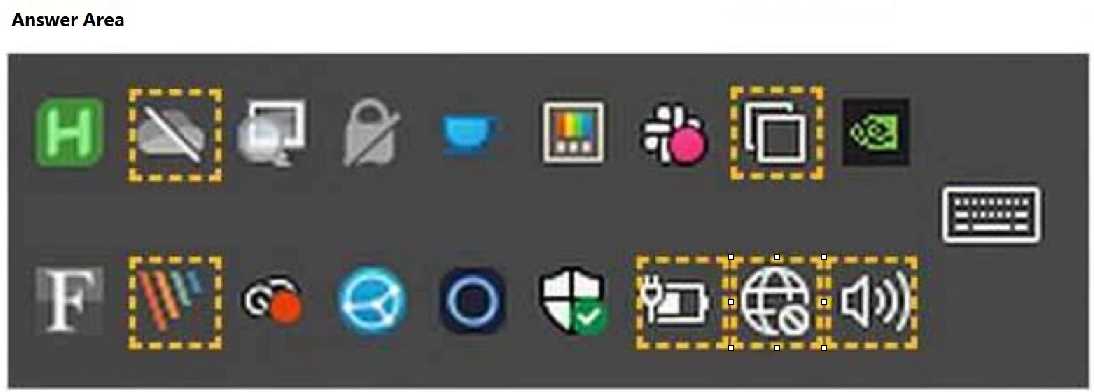
Answer:
None
Explanation: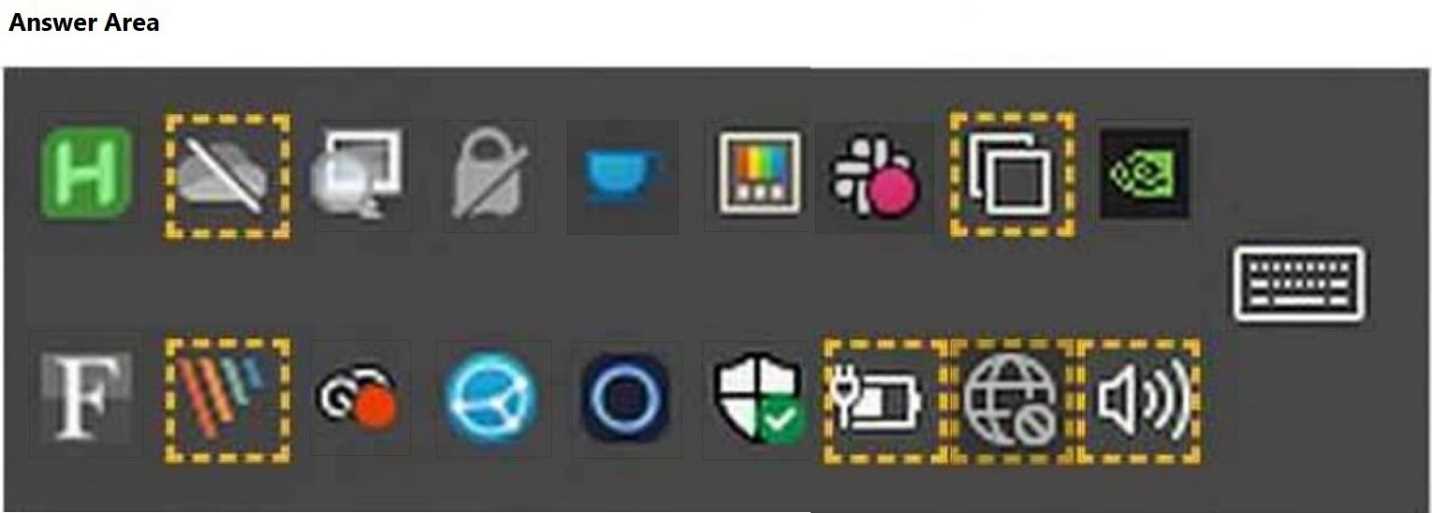
Comments
Question 10
John indicates that he cannot edit the file Test.docx, which is stored on a network shared drive. John
can access and edit other files on the shared drive. You review permissions for the file and see the
permissions shown in the following screenshot.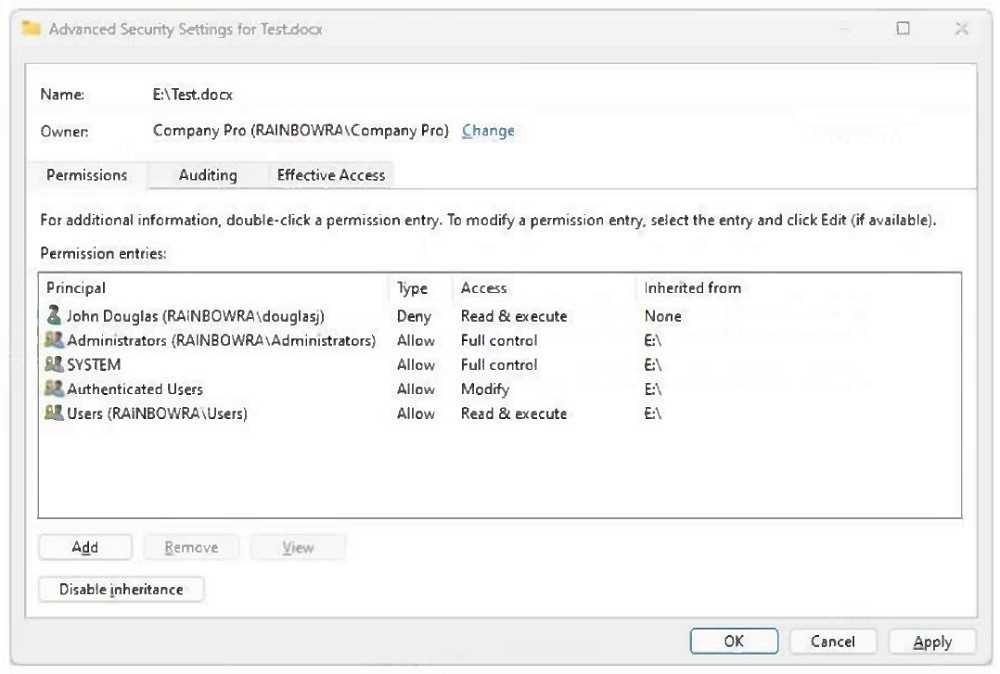
Which change will allow John to access and edit the Test.docx file, while retaining account-level
control?
- A. Move the file to a different folder on the same shared drive.
- B. Modify the NTFS permissions on the file to allow read & execute.
- C. Modify the share permissions on the file to give John full control.
- D. Tell John to modify the NTFS permissions on the file to allow read & execute.
Answer:
B
Explanation:
The screenshot shows that John Douglas is explicitly denied "Read & execute" permissions on the file
Test.docx, which overrides any inherited allow permissions. To allow John to edit the file, you must
modify the NTFS permissions on the file and remove or change the Deny rule that applies to his
account. Simply allowing "read & execute" would not be enough; you must grant "Modify" or higher
and remove the Deny.
Comments
Page 1 out of 4
Viewing questions 1-10 out of 42
page 2