Question 1
Which area of Blue Prism would you use to develop a Blue Prism Process?
- A. Application Navigator
- B. Process Studio
- C. Application Modeller
- D. Development Studio
- E. Object Studio
Answer:
B
Explanation:
Process Studio is the area of Blue Prism where processes are created and edited using stages and
links to form graphical representations of working computer programs that automate manual
repetitive tasks. Process Studio provides various tools and features to design, test and debug
processes. Reference: https://bpdocs.blueprism.com/bp-6-10/en-us/helpProcessStudio.htm
https://www.koenig-solutions.com/blue-prism-associate-developer-course
Comments
Question 2
The password field in the Centrix Data Solutions business application can be spied successfully,
however when using the Highlight feature in Application Modeller the following behaviour is
encountered
Which of the following Attributes would you use to help obtain a unique element match?
- A. Child Count
- B. Parent Class Name
- C. Parent Ordinal
- D. Ordinal
- E. Class Name
Answer:
C
Explanation:
The parent ordinal attribute is the index of the parent element among its siblings in the application
hierarchy.
It can be used to help identify an element that has a dynamic or non-unique class name or
ordinal by using its relative position to its parent element1
. In this case, the password field has a
class name of “Edit” and an ordinal of 1, which are not unique among other elements in the
application.
However, its parent element has a class name of “Window” and an ordinal of 2, which
can be used to distinguish it from other elements with the same class name and ordinal.
Reference: 1
https://bpdocs.blueprism.com/bp-6-10/en-us/helpAttributes.htm
Comments
Question 3
DRAG DROP
Drag and drop the Blue Prism stage names on the left, onto the placement boxes (A- E) so that the
dropped stage name corresponds with the image of the Blue Prism stage beside it:
Answer:
None
Explanation:
A. Page Reference B. Read Stage C. Navigate Stage D. Write Stage E. Exception Stage
The page reference stage has an icon of a blue circle with a white arrow pointing to a page, the read
stage has an icon of a blue circle with a white eye, the navigate stage has an icon of a blue circle with
a white compass, the write stage has an icon of a blue circle with a white pencil, and the exception
stage has an icon of a red circle with a white exclamation mark1.
Reference: 1
https://bpdocs.blueprism.com/bp-6-8/en-us/stage-types.htm
Comments
Question 4
Examine the following Business Object Action diagram:
The purpose of the Action is to process new orders through the order processing system. Order
details of provided to the Action by the Process and stored in the 'Order Data' Collection
According to Blue Prism best practices, what is wrong with this Action?
- A. A Single Row Collection cannot receive data from a Process
- B. A Wait stage is missing between the 'Click Submit' stage and the 'End' stage
- C. A Wait stage is missing between the 'Start' stage and the 'Write Order Details' stage
- D. An Action description has not been provided
- E. A Wait stage is missing after the 'Write Order Details' stage
Answer:
E
Explanation:
A Wait stage is needed after the ‘Write Order Details’ stage to ensure that the application has time to
process the order details before clicking the Submit button. Without a Wait stage, the automation
may fail due to timing issues. Reference: https://portal.blueprism.com/sites/default/files/2021-
05/Blue%20Prism%20Certification%20-%20Associate%20Developer%20-
%20Certification%20Overview_0.pdf (page 11)
Comments
Question 5
What is a Dynamic attribute match type in Blue Prism?
- A. A Dynamic attribute match type automatically detects changes within the business application and adapts the match criteria accordingly
- B. Dynamic attribute match is not supported in Blue Prism
- C. A Dynamic attribute match type allows the Developer to specify the match value of the attribute from the Business Object flow diagram rather than use a value defined in Application Modeller
- D. A Dynamic attribute match type accepts a Collection of multiple possible match values and checks each of the values automatically
Answer:
C
Explanation:
A Dynamic attribute match type enables the developer to use a data item or a calculation as the
match value for an attribute, instead of a fixed value defined in Application Modeller. This allows for
more flexibility and adaptability when automating applications that have dynamic elements.
Reference: https://portal.blueprism.com/sites/default/files/2021-
05/Blue%20Prism%20Certification%20-%20Associate%20Developer%20-
%20Certification%20Overview_0.pdf (page 12)
Comments
Question 6
Study the following image which has been taken from a business application which Blue Prism must
Attach to, using the Window Text Attribute as the match criteria:
The Window Text Attribute match details are provided below:
The business application receives regular updates from the software provider These updates are
easily identifiable as the version details are included in the Window (title) Text, for example (VI
2.999).
The Window Text match attribute must be updated to ensure Application Modeller continues to
recognise the business application window, following any version update
Which if the following would you use to ensure Application Modeller recognises the application
window, regardless of the version number?
A)
B)
C)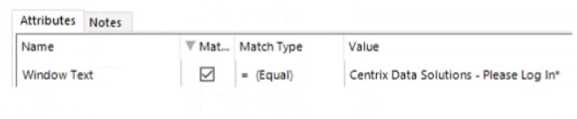
D)
- A. Option A
- B. Option B
- C. Option C
- D. Option D
Answer:
C
Explanation:
Option B uses a wildcard character (*) to match any text before and after the fixed text “Centrix Data
Solutions”. This way, the application window can be recognized regardless of the version number that
may change over time. Reference: https://portal.blueprism.com/sites/default/files/2021-
05/Blue%20Prism%20Certification%20-%20Associate%20Developer%20-
%20Certification%20Overview_0.pdf (page 12)
Comments
Question 7
When working with the orders area of the Centrix Data Solutions order system, there is a
requirement to enter an order menu option in the field located above the Go button:
The menu option field element in Application Modeller has been configured as follows: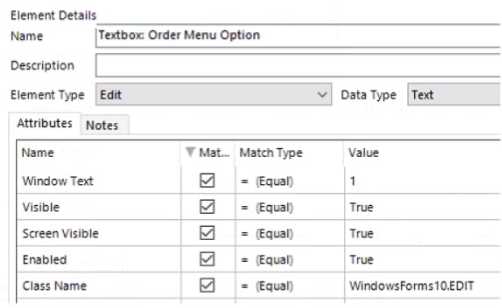
Which Attribute should be un-ticked to ensure the menu option field element can be consistently
recognised?
- A. Window Text
- B. Visible
- C. Class Name
- D. Enabled
- E. Screen Visible
Answer:
A
Explanation:
The Window Text attribute should be un-ticked because it contains the text “Orders” which may not
be unique or consistent across different windows in the application. The other attributes are more
reliable and stable for identifying the menu option field element. Reference:
https://portal.blueprism.com/sites/default/files/2021-05/Blue%20Prism%20Certification%20-
%20Associate%20Developer%20-%20Certification%20Overview_0.pdf (page 12)
Comments
Question 8
Which of the following items are valid Attribute Match Types in Blue Prism Application Modeller?
- A. = (Equal)
- B. %%(Like)
- C. Dynamic
- D. <> (Not Equal)
- E. '(Wildcard)
- F. != (Not Equal)
- G. ## (Decimal)
Answer:
A, C, E
Explanation:
These are the valid attribute match types in Blue Prism Application Modeller. The other options are
either invalid or not supported by Blue Prism. Reference:
https://portal.blueprism.com/sites/default/files/2021-05/Blue%20Prism%20Certification%20-
%20Associate%20Developer%20-%20Certification%20Overview_0.pdf (page 12)
Comments
Question 9
Which of the following statements are correct when considering an element's attributes in
Application Modeller?
(Select all items which apply)
- A. Attributes which are included in the element match criteria contain a tick in the Match column of Application Modeller
- B. The initial selection of attributes made by Blue Prism will always be the optimum attribute set to use to match the element
- C. The attributes displayed in Application Modeller are provided to Blue Prism by the target business application
- D. The attribute list will always contain the same entries regardless of the target application or element
Answer:
AC
Explanation:
These statements are correct because they describe how Blue Prism identifies and interacts with the
elements of the target application using the attributes provided by the application. The other
statements are incorrect because Blue Prism does not always select the optimum attribute set and
the attribute list may vary depending on the application or element type. Reference:
https://portal.blueprism.com/sites/default/files/2021-05/Blue%20Prism%20Certification%20-
%20Associate%20Developer%20-%20Certification%20Overview_0.pdf (page 12)
Comments
Question 10
Which of the following statements are correct about Blue Prism data items'?
(Select all items which apply)
- A. The value of a Blue Prism Data Item which has the Exposure setting configured as Session can be updated from within the System area of Blue Prism
- B. Blue Prism Data Item values can only assigned or updated from within a Process or Object diagram
- C. The value of a Blue Prism Data Item which has the Exposure setting configured as Session can be updated from Blue Prism Control Room
- D. Blue Prism Data Item values can be updated from Control Room if the Data Item visibility setting is disabled
- E. The value of a Blue Prism Data Item which has the Exposure setting configured as Environment, can be updated from Blue Prism Control Room
- F. The value of a Blue Prism Data Item which has the Exposure setting configured as Environment, can be updated from within the System area of Blue Prism
Answer:
CEF
Explanation:
These statements are correct because they describe how Blue Prism data items can be updated
depending on their exposure and visibility settings. The other statements are incorrect because Blue
Prism data items can also be updated from within a Business Object diagram, and data items with
visibility setting disabled cannot be updated from Control Room. Reference:
https://portal.blueprism.com/sites/default/files/2021-05/Blue%20Prism%20Certification%20-
%20Associate%20Developer%20-%20Certification%20Overview_0.pdf (page 13)
Comments
Page 1 out of 4
Viewing questions 1-10 out of 50
page 2