Question 1
[Monitoring, Reporting, and Automation]
A SysOps administrator noticed that a large number of Elastic IP addresses are being created on the
company's AWS account, but they are not being associated with Amazon EC2 instances, and are
incurring Elastic IP address charges in the monthly bill.
How can the administrator identify who is creating the Elastic IP addresses?
- A. Attach a cost-allocation tag to each requested Elastic IP address with the IAM user name of the developer who creates it.
- B. Query AWS CloudTrail logs by using Amazon Athena to search for Elastic IP address events.
- C. Create a CloudWatch alarm on the ElPCreated metric and send an Amazon SNS notification when the alarm triggers.
- D. Use Amazon Inspector to get a report of all Elastic IP addresses created in the last 30 days.
Answer:
B
Explanation:
To identify who is creating the Elastic IP addresses, the following steps should be taken:
Enable CloudTrail Logging:
Ensure AWS CloudTrail is enabled to log all API activities in your AWS account.
Reference: Setting Up AWS CloudTrail
Create an Athena Table for CloudTrail Logs:
Set up an Athena table that points to the S3 bucket where CloudTrail logs are stored.
Reference: Creating Tables in Athena
Query CloudTrail Logs:
Use Athena to run SQL queries to search for AllocateAddress events, which represent the creation of
Elastic IP addresses.
Example Query:
sql
Copy code
SELECT userIdentity.userName, eventTime, eventSource, eventName, requestParameters
FROM cloudtrail_logs
WHERE eventName = 'AllocateAddress';
Reference: Analyzing AWS CloudTrail Logs
Review Results:
Review the results to identify which IAM user or role is creating the Elastic IP addresses.
Reference: AWS CloudTrail Log Analysis
Comments
Question 2
[Monitoring, Reporting, and Automation]
A company has an Amazon CloudFront distribution that uses an Amazon S3 bucket as its origin.
During a review of the access logs, the company determines that some requests are going directly to
the S3 bucket by using the website hosting endpoint. A SysOps administrator must secure the S3
bucket to allow requests only from CloudFront.
What should the SysOps administrator do to meet this requirement?
- A. Create an origin access identity (OAI) in CloudFront. Associate the OAI with the distribution. Remove access to and from other principals in the S3 bucket policy. Update the S3 bucket policy to allow access only from the OAI.
- B. Create an origin access identity (OAI) in CloudFront. Associate the OAI with the distribution. Update the S3 bucket policy to allow access only from the OAI. Create a new origin, and specify the S3 bucket as the new origin. Update the distribution behavior to use the new origin. Remove the existing origin.
- C. Create an origin access identity (OAI) in CloudFront. Associate the OAI with the distribution. Update the S3 bucket policy to allow access only from the OAI. Disable website hosting. Create a new origin, and specify the S3 bucket as the new origin. Update the distribution behavior to use the new origin. Remove the existing origin.
- D. Update the S3 bucket policy to allow access only from the CloudFront distribution. Remove access to and from other principals in the S3 bucket policy. Disable website hosting. Create a new origin, and specify the S3 bucket as the new origin. Update the distribution behavior to use the new origin. Remove the existing origin.
Answer:
A
Explanation:
To secure the S3 bucket and allow access only from CloudFront, the following steps should be taken:
Create an OAI in CloudFront:
In the CloudFront console, create an origin access identity (OAI) and associate it with your
CloudFront distribution.
Reference: Restricting Access to S3 Buckets
Update S3 Bucket Policy:
Modify the S3 bucket policy to allow access only from the OAI. This involves adding a policy
statement that grants the OAI permission to get objects from the bucket and removing any other
public access permissions.
Example Policy:
json
Copy code
{
"Version": "2012-10-17",
"Statement":
[
{
"Effect": "Allow",
"Principal": {
"AWS": "arn:aws:iam::cloudfront:user/CloudFront Origin Access Identity E3EXAMPLE"
},
"Action": "s3:GetObject",
"Resource": "arn:aws:s3:::example-bucket/*"
}
]
}
Reference: Bucket Policy Examples
Test Configuration:
Ensure that the S3 bucket is not publicly accessible and that requests to the bucket through the
CloudFront distribution are successful.
Reference: Testing CloudFront OAI
Comments
Question 3
[Security and Compliance]
A SysOps administrator must create an IAM policy for a developer who needs access to specific AWS
services. Based on the requirements, the SysOps administrator creates the following policy: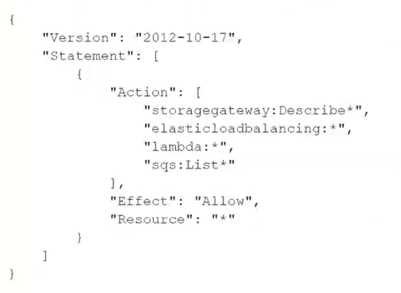
Which actions does this policy allow? (Select TWO.)
- A. Create an AWS Storage Gateway.
- B. Create an IAM role for an AWS Lambda function.
- C. Delete an Amazon Simple Queue Service (Amazon SQS) queue.
- D. Describe AWS load balancers.
- E. Invoke an AWS Lambda function.
Answer:
D,E
Explanation:
The provided IAM policy grants the following permissions:
Describe AWS Load Balancers:
The policy allows actions with the prefix elasticloadbalancing:. This includes actions like
DescribeLoadBalancers and other Describe* actions related to Elastic Load Balancing.
Reference: Elastic Load Balancing API Actions
Invoke AWS Lambda Function:
The policy allows actions with the prefix lambda:, which includes InvokeFunction and other actions
that allow listing and describing Lambda functions.
Reference: AWS Lambda API Actions
The actions related to AWS Storage Gateway (create), IAM role (create), and Amazon SQS (delete)
are not allowed by this policy. The policy only grants describe/list permissions for storagegateway,
elasticloadbalancing, lambda, and list permissions for SQS.
Comments
Question 4
[Networking and Content Delivery]
A company is trying to connect two applications. One application runs in an on-premises data center
that has a hostname of hostl .onprem.private. The other application runs on an Amazon EC2 instance
that has a hostname of hostl.awscloud.private. An AWS Site-to-Site VPN connection is in place
between the on-premises network and AWS.
The application that runs in the data center tries to connect to the application that runs on the EC2
instance, but DNS resolution fails. A SysOps administrator must implement DNS resolution between
on-premises and AWS resources.
Which solution allows the on-premises application to resolve the EC2 instance hostname?
- A. Set up an Amazon Route 53 inbound resolver endpoint with a forwarding rule for the onprem.private hosted zone. Associate the resolver with the VPC of the EC2 instance. Configure the on-premises DNS resolver to forward onprem.private DNS queries to the inbound resolver endpoint.
- B. Set up an Amazon Route 53 inbound resolver endpoint. Associate the resolver with the VPC of the EC2 instance. Configure the on-premises DNS resolver to forward awscloud.private DNS queries to the inbound resolver endpoint.
- C. Set up an Amazon Route 53 outbound resolver endpoint with a forwarding rule for the onprem.private hosted zone. Associate the resolver with the AWS Region of the EC2 instance. Configure the on-premises DNS resolver to forward onprem.private DNS queries to the outbound resolver endpoint.
- D. Set up an Amazon Route 53 outbound resolver endpoint. Associate the resolver with the AWS Region of the EC2 instance. Configure the on-premises DNS resolver to forward awscloud.private DNS queries to the outbound resolver endpoint.
Answer:
A
Explanation:
Step-by-Step
Understand the Problem:
There are two applications, one in an on-premises data center and the other on an Amazon EC2
instance.
DNS resolution fails when the on-premises application tries to connect to the EC2 instance.
The goal is to implement DNS resolution between on-premises and AWS resources.
Analyze the Requirements:
Need to resolve the hostname of the EC2 instance from the on-premises network.
Utilize the existing AWS Site-to-Site VPN connection for DNS queries.
Evaluate the Options:
Option A: Set up an Amazon Route 53 inbound resolver endpoint with a forwarding rule for the
onprem.private hosted zone.
This allows DNS queries from on-premises to be forwarded to Route 53 for resolution.
The resolver endpoint is associated with the VPC, enabling resolution of AWS resources.
Option B: Set up an Amazon Route 53 inbound resolver endpoint without specifying the forwarding
rule.
This option does not address the specific need to resolve onprem.private DNS queries.
Option C: Set up an Amazon Route 53 outbound resolver endpoint.
Outbound resolver endpoints are used for forwarding DNS queries from AWS to on-premises, not
vice versa.
Option D: Set up an Amazon Route 53 outbound resolver endpoint without specifying the forwarding
rule.
Similar to Option C, this does not meet the requirement of resolving on-premises queries in AWS.
Select the Best Solution:
Option A: Setting up an inbound resolver endpoint with a forwarding rule for onprem.private and
associating it with the VPC ensures that DNS queries from on-premises can resolve AWS resources
effectively.
Amazon Route 53 Resolver
Integrating AWS and On-Premises Networks with Route 53
Using an Amazon Route 53 inbound resolver endpoint with a forwarding rule ensures that on-
premises applications can resolve EC2 instance hostnames effectively.
Comments
Question 5
[Security and Compliance]
A large company is using AWS Organizations to manage its multi-account AWS environment.
According to company policy, all users should have read-level access to a particular Amazon S3
bucket in a central account. The S3 bucket data should not be available outside the organization. A
SysOps administrator must set up the permissions and add a bucket policy to the S3 bucket.
Which parameters should be specified to accomplish this in the MOST efficient manner?
- A. Specify "' as the principal and PrincipalOrgld as a condition.
- B. Specify all account numbers as the principal.
- C. Specify PrincipalOrgld as the principal.
- D. Specify the organization's management account as the principal.
Answer:
A
Explanation:
Step-by-Step
Understand the Problem:
Ensure all users in the organization have read-level access to a specific S3 bucket.
The data should not be accessible outside the organization.
Analyze the Requirements:
Grant read access to users within the organization.
Prevent access from outside the organization.
Evaluate the Options:
Option A: Specify "*" as the principal and PrincipalOrgId as a condition.
This grants access to all AWS principals but restricts it to those within the specified organization using
the PrincipalOrgId condition.
Option B: Specify all account numbers as the principal.
This is impractical for a large organization and requires constant updates if accounts are added or
removed.
Option C: Specify PrincipalOrgId as the principal.
The PrincipalOrgId condition must be used within a policy, not as a principal.
Option D: Specify the organization's management account as the principal.
This grants access only to the management account, not to all users within the organization.
Select the Best Solution:
Option A: Using "*" as the principal with the PrincipalOrgId condition ensures all users within the
organization have the required access while preventing external access.
Amazon S3 Bucket Policies
AWS Organizations Policy Examples
Using "*" as the principal with the PrincipalOrgId condition efficiently grants read access to the S3
bucket for all users within the organization.
Comments
Question 6
[Security and Compliance]
A SysOps administrator is attempting to download patches from the internet into an instance in a
private subnet. An internet gateway exists for the VPC, and a NAT gateway has been deployed on the
public subnet; however, the instance has no internet connectivity. The resources deployed into the
private subnet must be inaccessible directly from the public internet.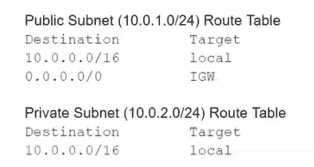
What should be added to the private subnet's route table in order to address this issue, given the
information provided?
- A. 0.0.0.0/0 IGW
- B. 0.0.0.0/0 NAT
- C. 10.0.1.0/24 IGW
- D. 10.0.1.0/24 NAT
Answer:
B
Explanation:
Understand the Problem:
An instance in a private subnet needs internet access for downloading patches.
There is an existing NAT gateway in the public subnet.
Analyze the Requirements:
Provide internet access to the private subnet instance through the NAT gateway.
Ensure resources in the private subnet remain inaccessible from the public internet.
Evaluate the Options:
Option A: 0.0.0.0/0 IGW.
This would route traffic directly to the internet gateway, exposing the instance to the public internet.
Option B: 0.0.0.0/0 NAT.
This routes traffic destined for the internet through the NAT gateway, allowing outbound connections
while keeping the instance protected from inbound internet traffic.
Option C: 10.0.1.0/24 IGW.
This does not provide the necessary route for internet access and incorrectly uses the internet
gateway for local traffic.
Option D: 10.0.1.0/24 NAT.
This also incorrectly uses the NAT gateway for local traffic, which is unnecessary.
Select the Best Solution:
Option B: Adding a route for 0.0.0.0/0 with the target set to the NAT gateway ensures that the private
subnet instance can access the internet while remaining protected from inbound internet traffic.
Amazon VPC NAT Gateways
Private Subnet Route Table
Configuring the private subnet route table to use the NAT gateway for 0.0.0.0/0 ensures secure and
efficient internet access for instances in the private subnet.
Comments
Question 7
[Deployment, Provisioning, and Automation]
A SysOps administrator applies the following policy to an AWS CloudFormation stack: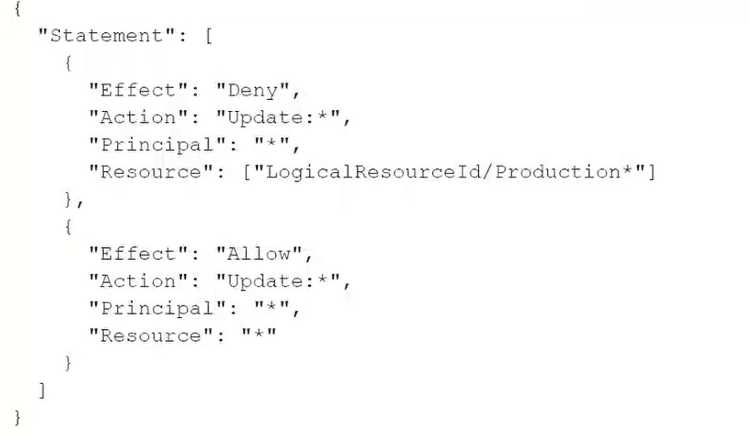
What is the result of this policy?
- A. Users that assume an IAM role with a logical ID that begins with "Production" are prevented from running the update-stack command.
- B. Users can update all resources in the stack except for resources that have a logical ID that begins with "Production".
- C. Users can update all resources in the stack except for resources that have an attribute that begins with "Production".
- D. Users in an IAM group with a logical ID that begins with "Production" are prevented from running the update-stack command.
Answer:
B
Explanation:
The policy provided includes two statements:
The first statement explicitly denies the Update:* action on resources with a LogicalResourceId that
begins with "Production".
The second statement allows the Update:* action on all resources.
In AWS IAM policy evaluation logic, explicit denies always take precedence over allows. Therefore,
the effect of this policy is that users can update all resources in the stack except for those with a
logical ID that begins with "Production".
Reference:
IAM JSON Policy Elements: Effect
Policy Evaluation Logic
Comments
Question 8
[Monitoring, Reporting, and Automation]
A company's IT department noticed an increase in the spend of their developer AWS account. There
are over 50 developers using the account, and the finance team wants to determine the service costs
incurred by each developer.
What should a SysOps administrator do to collect this information? (Select TWO.)
- A. Activate the createdBy tag in the account.
- B. Analyze the usage with Amazon CloudWatch dashboards.
- C. Analyze the usage with Cost Explorer.
- D. Configure AWS Trusted Advisor to track resource usage.
- E. Create a billing alarm in AWS Budgets.
Answer:
A,C
Explanation:
To determine the service costs incurred by each developer, follow these steps:
Activate the createdBy Tag:
Tagging resources with a createdBy tag helps identify which user created the resource. This tag
should be applied consistently across all resources created by the developers.
Reference: Tagging Your Resources
Analyze Usage with Cost Explorer:
Use Cost Explorer to filter and group cost and usage data by the createdBy tag. This provides a
breakdown of costs incurred by each developer.
Reference: Analyzing Your Costs with Cost Explorer
These two steps together will provide a detailed analysis of the costs incurred by each developer in
the AWS account.
Comments
Question 9
[High Availability, Backup, and Recovery]
A company website contains a web tier and a database tier on AWS. The web tier consists of Amazon
EC2 instances that run in an Auto Scaling group across two Availability Zones. The database tier runs
on an Amazon ROS for MySQL Multi-AZ DB instance. The database subnet network ACLs are
restricted to only the web subnets that need access to the database. The web subnets use the default
network ACL with the default rules.
The company's operations team has added a third subnet to the Auto Scaling group configuration.
After an Auto Scaling event occurs, some users report that they intermittently receive an error
message. The error message states that the server cannot connect to the database. The operations
team has confirmed that the route tables are correct and that the required ports are open on all
security groups.
Which combination of actions should a SysOps administrator take so that the web servers can
communicate with the DB instance? (Select TWO.)
- A. On the default ACL. create inbound Allow rules of type TCP with the ephemeral port range and the source as the database subnets.
- B. On the default ACL, create outbound Allow rules of type MySQL/Aurora (3306). Specify the destinations as the database subnets.
- C. On the network ACLs for the database subnets, create an inbound Allow rule of type MySQL/Aurora (3306). Specify the source as the third web subnet.
- D. On the network ACLs for the database subnets, create an outbound Allow rule of type TCP with the ephemeral port range and the destination as the third web subnet.
- E. On the network ACLs for the database subnets, create an outbound Allow rule of type MySQL/Aurora (3306). Specify the destination as the third web subnet.
Answer:
C,D
Explanation:
To ensure that the new web subnet can communicate with the database instance, follow these steps:
Create an Inbound Allow Rule for MySQL/Aurora (3306):
On the network ACL for the database subnets, add an inbound allow rule to permit traffic from the
third web subnet on port 3306 (MySQL/Aurora).
Reference: Network ACLs
Create an Outbound Allow Rule for Ephemeral Ports:
On the network ACL for the database subnets, add an outbound allow rule to permit traffic to the
third web subnet on the ephemeral port range (1024-65535).
Reference: Ephemeral Ports
These changes will ensure that the new subnet can communicate with the database, resolving the
connectivity issues.
Comments
Question 10
[Monitoring, Reporting, and Automation]
A company is running an application on a fleet of Amazon EC2 instances behind an Application Load
Balancer (ALB). The EC2 instances are launched by an Auto Scaling group and are automatically
registered in a target group. A SysOps administrator must set up a notification to alert application
owners when targets fail health checks.
What should the SysOps administrator do to meet these requirements?
- A. Create an Amazon CloudWatch alarm on the UnHealthyHostCount metric. Configure an action to send an Amazon Simple Notification Service (Amazon SNS) notification when the metric is greater than 0.
- B. Configure an Amazon EC2 Auto Scaling custom lifecycle action to send an Amazon Simple Notification Service (Amazon SNS) notification when an instance is in the Pending:Wait state.
- C. Update the Auto Scaling group. Configure an activity notification to send an Amazon Simple Notification Service (Amazon SNS) notification for the Unhealthy event type.
- D. Update the ALB health check to send an Amazon Simple Notification Service (Amazon SNS) notification when an instance is unhealthy.
Answer:
A
Explanation:
To set up a notification for failed health checks of targets in the ALB, follow these steps:
Create a CloudWatch Alarm:
Navigate to CloudWatch and create a new alarm based on the UnHealthyHostCount metric of the
target group.
Reference: Creating Alarms
Configure the Alarm Action:
Configure the alarm to send an Amazon SNS notification when the UnHealthyHostCount metric is
greater than 0.
Reference: Using Amazon SNS for CloudWatch Alarms
This setup will notify application owners whenever a target fails health checks.
Comments
Page 1 out of 55
Viewing questions 1-10 out of 557
page 2