Question 1
A portfolio manager has deleted a portfolio that is no longer relevant to the business strategy. Which
is a result of this action in Workfront?
- A. Programs and projects associated with the portfolio are deleted
- B. Programs associated with the portfolio are deleted.
- C. Projects associated with the portfolio are deleted.
Answer:
B
Explanation:
In Adobe Workfront, if a portfolio manager deletes a portfolio, the immediate effect is that all
programs associated with that portfolio are also deleted. However, the projects associated with
those programs remain intact but will no longer be associated with any portfolio or program unless
they are reassigned. This hierarchical deletion ensures that while the structural organization
(programs) under the portfolio is removed, the actual project data remains unaffected and can be
reassigned or restructured as needed.
Comments
Question 2
A project manager is using information in the Portfolio Optimizer to analyze which projects to
prioritize. Where is this information coming from?
- A. The project's Alignment Score
- B. The project's Baseline
- C. The project's Business Case
Answer:
A
Explanation:
The Portfolio Optimizer in Adobe Workfront is a tool used by project managers and portfolio
managers to analyze and prioritize projects. The information used in the Portfolio Optimizer primarily
comes from the project's Alignment Score. This score is a calculated metric that reflects how well a
project aligns with the strategic goals and priorities of the organization. The Alignment Score helps in
objectively comparing and prioritizing projects based on their strategic value.
Comments
Question 3
What are the constraints among Programs, Portfolios. Tasks, and Projects?
- A. All Projects must be associated with a Program and a Portfolio.
- B. A Project and its tasks can only belong to one Portfolio and Program at a time.
- C. Projects cannot be associated with a Program until at least one task is entered into the project plan
Answer:
B
Explanation:
In Adobe Workfront, there are specific constraints regarding the association of projects, programs,
portfolios, and tasks. A project and its tasks can only belong to one portfolio and one program at a
time. This means that a single project cannot be simultaneously associated with multiple portfolios
or programs. This constraint ensures clear and unambiguous project management and reporting
within the organizational structure.
Comments
Question 4
A project manager wants to use Portfolios and Programs to organize projects. What two
considerations would apply when using these objects? (Choose two.)
- A. Projects can be associated with a multiple Programs and Portfolios
- B. Programs are containers for Portfolios
- C. Portfolios are containers for Programs
- D. Projects must be assigned to a Program before they can be associated with a Portfolio
- E. Projects can be associated with only one Program or Portfolio
Answer:
C, E
Explanation:
When organizing projects using Portfolios and Programs in Adobe Workfront, two key considerations
apply:
Portfolios are containers for Programs: This means that programs are organized within portfolios, and
a portfolio can contain multiple programs. This hierarchical structure helps in managing and aligning
various programs under broader strategic initiatives represented by portfolios.
Projects can be associated with only one Program or Portfolio: A project can be linked to a single
program and, by extension, to the portfolio containing that program. This ensures clarity in project
alignment and reporting within the organizational structure.
Reference
These considerations are discussed in the Workfront training materials and documentation, which
explain the hierarchical relationships and constraints for using portfolios and programs to organize
projects.
Comments
Question 5
A customer has a set of users who need to review and approve proof assets associated with projects.
The approvals always need to route to the users' team for feedback before being sent to their
manager.
What needs to be set up in the system to support this consistent review and approval process?
- A. Create an automated workflow template with two stages for the team and manager to be used with uploaded assets
- B. Create a global two-stage approval process with the team and manager added in separate stages
- C. Create a proof approval associated to a task in the project template assigned to the team and manager
Answer:
A
Explanation:
Objective: Set up a consistent review and approval process where the approvals are first routed to
the users' team and then to their manager.
Workflow Setup:
Step 1: Create an automated workflow template within Workfront.
Step 2: Define two stages in the workflow template:
Stage 1: Approval by the team members.
Stage 2: Approval by the manager.
Step 3: Apply this workflow template to the uploaded proof assets.
Explanation: This ensures a structured and consistent approval process, routing the assets first to the
team for feedback and then to the manager for final approval.
Reference: Detailed information on setting up workflows can be found in the Workfront
documentation on automated workflows.
Comments
Question 6
A task includes an approval requiring a lead designers approval decision before it can be completed.
What action will trigger the approval by the lead designer?
- A. Request a document approval from the lead designer
- B. Change the task status
- C. Assign a lead designer to the task
Answer:
A
Explanation:
Objective: Trigger the approval by the lead designer for a task to be completed.
Approval Trigger:
Action: Request a document approval from the lead designer.
Explanation: This action specifically involves the lead designer in the approval process, ensuring their
decision is captured before the task is marked as complete.
Reference: This is supported by the approval workflow settings in Workfront documentation.
Comments
Question 7
Aside from predecessors, resource manager assignments, and system administrator settings, what
are three prerequisites for using the Resource Planner and Workload Balancer? (Choose three.)
- A. Job Roles assigned to Tasks
- B. Task Planned Hours greater than zero
- C. Task Durations greater than zero
- D. Schedules added to templates
- E. Time off logged in User Schedules
Answer:
B, C, A
Explanation:
Objective: Identify prerequisites for using the Resource Planner and Workload Balancer.
Prerequisites:
Prerequisite 1: Job Roles assigned to Tasks
Explanation: Assigning job roles helps in resource allocation and planning within the Resource
Planner and Workload Balancer.
Prerequisite 2: Task Planned Hours greater than zero
Explanation: Tasks need to have planned hours to be considered in the resource planning and
workload balancing.
Prerequisite 3: Task Durations greater than zero
Explanation: Tasks must have a duration set to be included in the workload calculations.
Reference: These prerequisites are detailed in the Workfront documentation on resource
management and task settings.
Comments
Question 8
A team has just created a new project template. Before making the template active, the team needs
to ensure that users have access to use the template and the projects created from the template.
Which two items must be configured to achieve this requirement? (Choose two.)
- A. Project Sharing
- B. Template Sharing
- C. Template Group
- D. Team Sharing
Answer:
A, B
Explanation:
Objective: Ensure users have access to use a new project template and the projects created from it.
Configuration Steps:
Step 1: Configure Project Sharing
Explanation: This setting ensures that users can access and use the projects created from the
template.
Step 2: Configure Template Sharing
Explanation: This setting ensures that users have access to the template itself, allowing them to
create new projects from it.
Reference: These steps are outlined in the Workfront documentation on template and project
sharing settings.
Comments
Question 9
A marketing team has identified a new workflow for a digital deliverable process.
What are the three main benefits of utilizing a project template for their new Workflow? (Choose
three.)
- A. Adherence to an accurate, repeatable process
- B. Tasks defined by Custom Forms
- C. Sharing settings completed by default
- D. Pre-created issues
- E. Efficiency in creating new projects
Answer:
A, C, E
Explanation:
Objective: Identify benefits of utilizing a project template for a new digital deliverable process
workflow.
Benefits:
Benefit 1: Adherence to an accurate, repeatable process
Explanation: Using a template ensures consistency and accuracy in the process, as the same steps are
followed each time.
Benefit 2: Sharing settings completed by default
Explanation: Templates can have predefined sharing settings, reducing the need to manually
configure these settings for each new project.
Benefit 3: Efficiency in creating new projects
Explanation: Templates streamline the project creation process, saving time and effort by providing a
pre-defined structure.
Reference: These benefits are documented in Workfront's best practices for using project templates.
Top of Form
Bottom of Form
Comments
Question 10
Refer to the exhibit.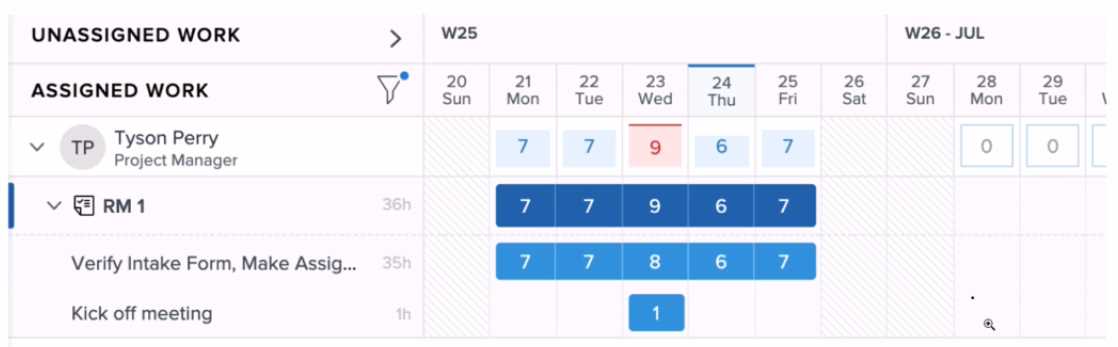
Tyson has a capacity of 7 hours per day.
What two changes can the system administrator make to this user's workload from within the
Workload Balancer to ensure that they are not overallocated? (Choose two.)
- A. Edit the allocation of the "Verify Intake Form" task to migrate hours from Wednesday to another day
- B. Change the planned completion date of the 'Kickoff Meeting" task to another day of the week
- C. Reassign the "Kickoff Meeting' task to another user who is not over-allocated
- D. Change the status of the "Kickoff Meeting" task to cancelled to remove the hours from the user's allocation
Answer:
A, C
Explanation:
To ensure Tyson is not over-allocated in the Workload Balancer, a system administrator can take the
following actions:
Edit Task Allocation: The administrator can adjust the allocation of hours for the "Verify Intake Form"
task. Specifically, they can redistribute the hours from Wednesday (where Tyson is over-allocated
with 9 hours) to other days where Tyson has available capacity.
Reassign Task: The administrator can reassign the "Kickoff Meeting" task to another user who has
available capacity. This will immediately reduce Tyson's workload and ensure the task is still
completed without overburdening Tyson.
Reference
Workfront documentation on using the Workload Balancer highlights these options for managing
user allocations and ensuring workloads are balanced across team members.
Comments
Page 1 out of 6
Viewing questions 1-10 out of 70
page 2