Question 1
A customer wants to support translations on AEM Cloud Service environment. They have an existing
third party vendor who will provide a pre-build package that must be deployed to AEM so it can be
leveraged as port of the workflow process.
How should the developer deploy this third party library onto AEM Cloud Service?
- A. Store the package as part of the customer code repository under the <url>file;$(mnven.multiModuleProjectDirectory)/install</url> folder and deploy it using Cloud Manager.
- B. Get the third party library as AEM package form the translation vendor and directly install it to Production environment using CRX Package Manager.
- C. Host the package in a remote public or private repository (password protected) and reference it as part of pon.xml so it is included as part of Cloud Manager deployment
Answer:
A
Explanation:
In Adobe Experience Manager (AEM) as a Cloud Service, deployments are handled through Cloud
Manager, and all code, including third-party libraries, must be part of the versioned code repository.
To deploy the third-party package provided by the vendor, it needs to be included as part of the AEM
project’s codebase under the install folder within the repository:
The package should be stored in the <url>file;$(maven.multiModuleProjectDirectory)/install</url>
directory.
Once stored, the deployment will be handled through Cloud Manager’s deployment pipeline.
This ensures the third-party package is included in the standard deployment process and follows
AEMaaCS's immutable infrastructure model, which ensures that changes to environments are made
only through deployments using Cloud Manager.
Option B is incorrect because installing a package directly to production via CRX Package Manager is
not allowed in AEM as a Cloud Service. Option C would work for self-hosted AEM instances but not
for AEMaaCS, where dependencies must be part of the Maven build.
For more information, refer to AEMaaCS deployment best practices and the Cloud Manager
documentation.
Comments
Question 2
A customer finds an Ul issue with component (/apps/<customer-project>/<component-name>) on
AEM page It needs to be fixed urgently to avoid miscommunication. The developer has been asked
to urgently make the change in AEM production.
How should the developer deploy the change to an AEM Cloud Service production environment?
- A. Fix the Ul issue as part of the customer code base and deploy the change to immutable repository using Cloud Manage' pipeline
- B. Due to the urgency of the request. Make the Ul fix directly to the component on AEM Production using CRXOE and then make same change to customer code bate
- C. Fix the component on local AEM and create an AEM package for that specific component that can be deployed to Production using package Manager as a one-off urgent fix
Answer:
A
Explanation:
In AEM Cloud Service, the correct approach to making changes, even urgent ones, is to update the
codebase and deploy it through the Cloud Manager pipeline. This ensures that the change is part of
the version-controlled, immutable repository and follows best practices for deployment.
Immutable infrastructure: AEMaaCS does not allow direct modifications to production environments
(e.g., via CRXDE Lite). All changes must be deployed through Cloud Manager, ensuring consistency
and traceability.
Making changes directly on production via CRXDE or deploying one-off fixes using the Package
Manager (Options B and C) violates AEMaaCS's immutable infrastructure principle and is not
supported.
Refer to Adobe Cloud Manager’s documentation for best practices on deploying urgent fixes in AEM
as a Cloud Service.
Comments
Question 3
A request form has a calculated field Allowable Days that calculates the number of days between the
request Entry Date and the custom field Required Delivery Date.
What must be set up on the corresponding Prefect custom form so the Required Delivery Dale and
the original number of Allowable Days display on the project?
- A. Add both the Allowable Days and the Required Delivery Date fields as new text fields.
- B. Add both Allowable Days and Required Denver Dale as calculated fields referencing the request object.
- C. Add Allowable Days as a calculated field and add Required Delivery Dale as a text field.
Answer:
C
Explanation:
In this scenario, the calculated field Allowable Days and the Required Delivery Date need to display
on the project. To achieve this:
Allowable Days: This is a calculated field, so it should be set up as a calculated field in the project
custom form, which references the difference between the Request Entry Date and the Required
Delivery Date.
Required Delivery Date: This is a static field and should be displayed as a text field to ensure that the
original requested delivery date is retained.
Option B is incorrect because both fields do not need to be calculated. The Required Delivery Date is
already a static value and doesn’t require calculation.
For more information, refer to the Workfront documentation on setting up calculated fields and text
fields in custom forms.
Comments
Question 4
A customer sets up a calculated field on a request form. A user manually converts the request to a
project and selects a template from the available active templates. How should the administrator
configure the Project custom form to make sure the value is passed to the project on conversion?
- A. Add a new field with the same name but make it a text field.
- B. Add the same field will a different calculation
- C. Add the-same- field but leave the calculation blank
Answer:
C
Explanation:
When converting a request to a project in Adobe Workfront, it's important to ensure that custom
fields and their values are correctly passed from the request form to the project form. To achieve
this, you need to add the same custom field on the project form, but in this case, the calculation
should be left blank because the calculated value from the request form will be passed over and does
not need to be recalculated at the project level.
Same field: The field needs to be exactly the same (same internal name) so the data can flow
between the request and the project during the conversion.
Blank calculation: By leaving the calculation blank, you ensure that the field will accept the value
from the request without overriding it or attempting to recalculate it.
For more details on setting up custom forms in Workfront and handling calculated fields during
request-to-project conversions, refer to the Adobe Workfront Form Customization Guide.
Comments
Question 5
A developer writes the following code to programmatically copy an existing asset to another folder in
the DAM:
After executing this code. The developer receives the following exception:javax.jcr.
PathNotFoundException
What caused this issue?
- A. The asset in /content /dam/projectA/asset.jpg does not exist
- B. The path /content/dam/project does not exist
- C. The user lacks READ permission lo the asset in /content/dam/projectA
Answer:
A
Explanation:
The javax.jcr.PathNotFoundException in this case indicates that the path to the asset
/content/dam/projectA/asset.jpg cannot be found. The most likely cause is that the asset does not
exist at the specified location, and thus the AssetManager is unable to copy it.
PathNotFoundException: This exception is thrown when the repository path (in this case, the asset
path) is not found in the JCR repository, meaning that the asset does not exist or the path is incorrect.
Other possibilities like permissions issues (Option C) would typically result in a
PermissionDeniedException, and Option B is incorrect because the issue specifically pertains to the
asset path, not the parent folder.
To resolve this, the developer should check if the asset exists at the specified path or if the path is
misspelled. For more information, refer to the AEM documentation on handling assets and JCR path
exceptions.
Comments
Question 6
A developer implements a custom workflow process using the following code: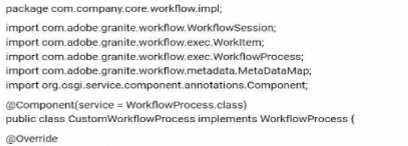
The code bundle has been deployed to AEM and displays as active in the Web Console. The
developer has created a new workflow model, added a process step, and wants to configure that
step to use the custom workflow process. However, the custom workflow process does not appear in
the dropdown menu.
What should be done to resolve this issue?
- A. Add the process. label property to the @Component annotation in the CustomizationflowProcess class
- B. Add the process. title property to the @Component annotation in the CustomizationflowProcess class
- C. Add the process. name property to the @Component annotation in the CustomizationflowProcess class
Answer:
C
Explanation:
In AEM, for a custom workflow process to be available for selection in the dropdown menu of a
process step, the process.name property must be set in the @Component annotation. This property
defines the unique name under which the custom workflow process will be registered and visible in
the workflow model editor.
Here is an example of how this should be added to the existing code:
@Component(service = WorkflowProcess.class,
property = {"process.label=Custom Workflow Process",
"process.name=customWorkflowProcess"})
process.label: This is the label that appears in the workflow model editor dropdown.
process.name: This is the internal identifier used by AEM to register the workflow process.
Options A and B would define other properties but will not resolve the issue of the custom workflow
not appearing in the dropdown. The key property needed here is process.name.
For more details, refer to the AEM documentation on creating custom workflows and annotating
components.
Comments
Question 7
A project manager wants to ensure that all documents within a certain project are shared with a
designated team in Workfront What is the correct option for carrying out this action?
- A. Link all the necessary document from Experience Manager to the designated project
- B. Find the project where these document all reside and share it with the entire team
- C. Share one of the documents the others will inherit the same access levels
Answer:
B
Explanation:
In Workfront, the best way to ensure that all documents within a project are shared with a
designated team is to share the entire project. By sharing the project, all documents and related
assets within that project are automatically made available to the designated team members
according to the project's access permissions.
Option C is incorrect because sharing one document does not automatically inherit the same access
levels for the other documents. Option A suggests linking documents from AEM, but the question
pertains to sharing documents within Workfront itself.
Refer to Workfront’s documentation on document sharing for detailed instructions on how to share
all project-related assets with teams.
Comments
Question 8
An AEM server is overloaded with too many concurrently running workflows. The developer decides
to reduce the number of concurrent workflows. What should be configured?
- A. Maximum Parallel jobs in OSGI console
- B. Launchers for each workflow
- C. The number of threads in scheduler
Answer:
A
Explanation:
In AEM, to limit the number of concurrent workflows running at the same time, you need to adjust
the Maximum Parallel Jobs setting in the OSGI console. This setting controls how many workflow jobs
can be processed simultaneously, and reducing this number will lower the load on the server by
limiting the number of workflows that can run concurrently.
This setting can be found under the Day CQ Workflow - Workflow Engine configuration in the OSGI
Web Console.
Options B and C refer to specific workflows and threads, but they do not directly address the overall
system limit on concurrent workflow executions.
Refer to the AEM documentation on workflow scaling and performance for more information on how
to adjust these settings in the OSGI configuration.
Comments
Question 9
A company uploads several images that represent products Each product is associated with a unique
SKU number. The product owner wants the ability to search for multiple products by SKU number.
Which two steps must be completed to do this? (Choose two.)
- A. Customize the Assets Admin Search rail to include a Single Property Predicate and configure the property name to the SKU number
- B. Customize the Assets Admin Search rail lo Include a Multi Value Properly Predicate and configure the property name to the SKU number
- C. Customize the mage metadata schema and add a new Single Line Text Held for the SKU number
- D. Customize the mage metadata schema and add a new Multi Value Text field for the SKU number
Answer:
B, C
Explanation:
To enable the search of products by SKU number in AEM, two main configurations are required:
Multi Value Property Predicate: By using a Multi Value Property Predicate, users can search for
multiple SKU numbers at once. This is crucial if product owners need to query for multiple products
simultaneously.
Single Line Text Field for SKU: SKU numbers are typically unique, so adding a Single Line Text field to
the image metadata schema for SKU numbers ensures that each image has its own SKU field for
accurate identification during searches.
Option D is incorrect because SKUs are usually single, unique identifiers, so a Multi Value Text field
isn’t necessary for each SKU.
Refer to AEM’s documentation on customizing metadata schemas and Assets Admin Search to
implement these features.
Comments
Question 10
An AEM Author wants to search and filter through all assets in the DAM to find assets expiring within
the next week.
What is the most efficient way of doing this?
- A. Configure the Assets Admin search rail to include the property Predicate and configure the property name to jcr:content/metadata/prism:expirationDate
- B. Configure the Assets admin Seach rall to include the Date Range Predicate and configure the property name to content to jcr:content/metadata/prism:expirationDate
- C. Configure the Assess Admin Search rail to include the Relative Date Predicate
Answer:
C
Explanation:
To search for assets that are expiring within the next week, the most efficient way is to configure the
search rail using the Relative Date Predicate. This predicate allows for dynamic filtering based on a
relative date range, such as "next week."
The Relative Date Predicate automatically adjusts to search for assets within a specific upcoming
time frame, such as the expiration date.
Option A and B are more rigid and require specific date or range configurations, which may not be as
flexible or user-friendly as the relative date search.
Refer to AEM’s Assets Admin Search Rail configuration documentation for more information on
predicates and their use in filtering search results.
Comments
Page 1 out of 5
Viewing questions 1-10 out of 55
page 2